Database Migrations in a CD World: Zero-Downtime Schema Changes
Database Migrations in a CD World
Database migrations are the hardest part of continuous deployment. Code deploys take seconds. Database schema changes can lock tables for minutes. Code can run two versions simultaneously during a rolling update. A database has one schema at a time.
The rule: the old code must work with the new schema, and the new code must work with the old schema. If a migration breaks either direction, it is not compatible with continuous deployment.
The Failure
The payments team renamed the amount column to total_amount in the charges table. They created a migration, tested it locally, and deployed. During the rolling update, old pods (expecting amount) and new pods (expecting total_amount) ran simultaneously. Every query from old pods failed with “column ‘amount’ does not exist.” The team rolled back the code, but the database migration had already run. Rolling back the code did not roll back the database. They had to write a reverse migration at 2am.
The Mechanism
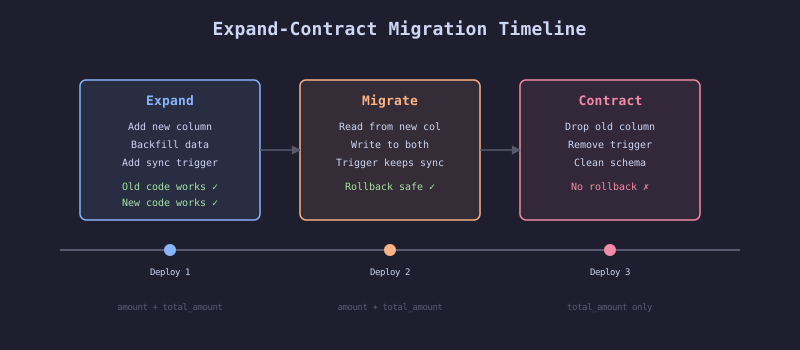
The Expand-Contract Pattern
Instead of renaming a column in one step, use three deployments:
Deployment 1 (Expand):
- Add the new column
total_amount - Backfill
total_amountfromamount - Add a trigger to keep both columns in sync
- Code reads from
amount, writes to both
Deployment 2 (Migrate):
- Code reads from
total_amount, writes to both - All new data goes to
total_amount - Old code (if rolled back) still works because
amountis still populated
Deployment 3 (Contract):
- Remove the trigger
- Drop the
amountcolumn - Code reads and writes only
total_amount
Each deployment is independently deployable and rollback-safe. At no point does old code break.
The Implementation
Migration Pipeline Stage
# HARDENED: Database migration as a separate pipeline stage
name: deploy
on:
  push:
    branches: [main]

jobs:
  migrate:
    runs-on: ubuntu-latest
    steps:
      - uses: actions/checkout@v4

      - name: Validate migrations
        run: |
          # Check that all migrations are backward-compatible
          docker run --rm \
            -v $PWD/migrations:/migrations \
            ghcr.io/acme/migration-validator:latest \
            validate --dir=/migrations --check-backward-compat

      - name: Run migration against staging
        run: |
          docker run --rm \
            -e DATABASE_URL=${{ secrets.STAGING_DATABASE_URL }} \
            ghcr.io/acme/checkout-service:${{ github.sha }} \
            ./run-migrations.sh --target=staging

      - name: Verify schema state
        run: |
          docker run --rm \
            -e DATABASE_URL=${{ secrets.STAGING_DATABASE_URL }} \
            ghcr.io/acme/checkout-service:${{ github.sha }} \
            ./verify-schema.sh

  deploy-staging:
    needs: [migrate]
    runs-on: ubuntu-latest
    steps:
      - name: Update staging image
        run: echo "Deploy code after migration succeeds"
Expand Migration Example
-- Migration: V2024.03.15.1__expand_total_amount.sql
-- Phase: EXPAND
-- Backward compatible: YES (old code reads 'amount', new column is additive)

-- Step 1: Add new column
ALTER TABLE charges ADD COLUMN total_amount DECIMAL(10,2);

-- Step 2: Backfill from existing data
UPDATE charges SET total_amount = amount WHERE total_amount IS NULL;

-- Step 3: Add sync trigger (PostgreSQL)
CREATE OR REPLACE FUNCTION sync_amount_columns()
RETURNS TRIGGER AS $$
BEGIN
  IF TG_OP = 'INSERT' OR TG_OP = 'UPDATE' THEN
    IF NEW.total_amount IS NOT NULL AND NEW.amount IS NULL THEN
      NEW.amount := NEW.total_amount;
    ELSIF NEW.amount IS NOT NULL AND NEW.total_amount IS NULL THEN
      NEW.total_amount := NEW.amount;
    END IF;
  END IF;
  RETURN NEW;
END;
$$ LANGUAGE plpgsql;

CREATE TRIGGER trg_sync_amount
  BEFORE INSERT OR UPDATE ON charges
  FOR EACH ROW
  EXECUTE FUNCTION sync_amount_columns();

-- Step 4: Add NOT NULL constraint after backfill
ALTER TABLE charges ALTER COLUMN total_amount SET NOT NULL;
Migration Validation in CI
# HARDENED: Migration backward-compatibility check
- name: Test migration backward compatibility
  run: |
    # Start a test database with the current schema
    docker compose -f docker-compose.migration-test.yml up -d postgres
    docker compose -f docker-compose.migration-test.yml exec -T postgres \
      pg_restore --dbname=testdb /schema/current-schema.dump

    # Apply the new migration
    docker run --rm --network=host \
      -e DATABASE_URL=postgresql://test:test@localhost:5432/testdb \
      ghcr.io/acme/checkout-service:${{ github.sha }} \
      ./run-migrations.sh

    # Run the OLD version's tests against the NEW schema
    docker run --rm --network=host \
      -e DATABASE_URL=postgresql://test:test@localhost:5432/testdb \
      ghcr.io/acme/checkout-service:CURRENT_PROD_SHA \
      ./run-tests.sh integration

    echo "Old code works with new schema ✓"
The Gate
Migration validation must pass before the migration runs against staging. The validation:
- Applies the migration to a test database
- Runs the current production version’s integration tests against the new schema
- If old code breaks with the new schema, the migration is not backward-compatible
The pipeline does not proceed to staging deployment until the migration succeeds and the old code is verified to work with the new schema.
The Recovery
Migration fails halfway: Most migration tools (Flyway, Liquibase, golang-migrate) wrap each migration in a transaction. If the migration fails, the transaction rolls back. The database stays at the previous version.
Migration succeeds but the new code fails: The expand-contract pattern ensures the old code still works with the new schema. Roll back the code. The database migration does not need to be reversed because both old and new code work with the expanded schema.
Need to reverse a completed migration: Write a reverse migration that undoes the expand step (drop the new column, remove the trigger). Deploy it. This is why every expand migration should have a corresponding contract-reverse migration ready before deployment.