Deployment Strategies: Blue-Green, Canary, and Feature Flags as a Release Primitive
Deployment Strategies
Three deployment strategies exist for Kubernetes workloads. Rolling updates replace pods incrementally (the default). Blue-green deployments run two complete environments and switch traffic atomically. Canary deployments send a small percentage of traffic to the new version and gradually increase it.
Rolling updates are fine for stateless services with backward-compatible changes. Blue-green is appropriate when you need instant rollback and can afford double the resources. Canary is appropriate when you need to validate with real traffic before committing.
Feature flags are not a deployment strategy. They are a release strategy. You can deploy code with a feature flag disabled, then enable the flag without deploying. This separates deployment (shipping code) from release (exposing functionality).
The Failure
The catalog team used rolling updates for every deployment. A new version introduced a bug in the search API that caused results to return in random order instead of by relevance. During the rolling update, some users hit the old version (correct results) and some hit the new version (random results). The team noticed after 15 minutes when support tickets arrived. They initiated a rollback, which took another 5 minutes of rolling update in reverse. Total exposure: 20 minutes, all users affected for 10 of those minutes.
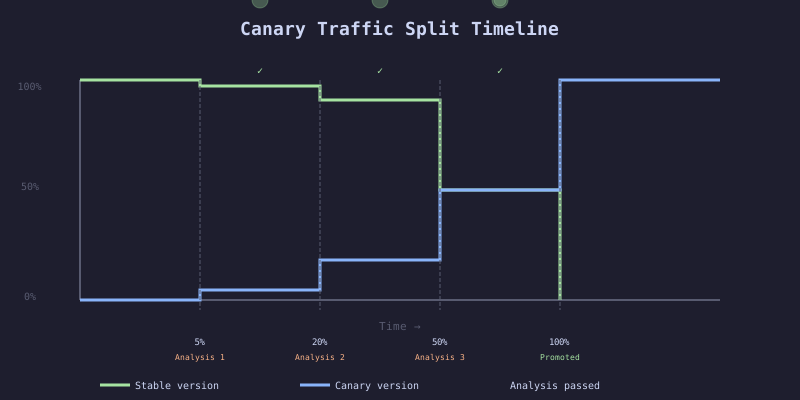
With a canary deployment, the team would have sent 5% of traffic to the new version. Automated analysis would have detected the latency increase (randomized results took longer) and rolled back automatically. Total exposure: 2 minutes, 5% of users.
The Mechanism
Strategy Comparison
| Strategy | Resource Cost | Rollback Speed | Risk Exposure | Complexity |
|---|---|---|---|---|
| Rolling update | 1x + surge | Minutes | All users during rollout | Low |
| Blue-green | 2x | Seconds | All users after switch | Medium |
| Canary | 1x + canary pods | Seconds | % of users | High |
| Feature flag | 1x | Milliseconds | Users with flag on | Medium (code complexity) |
When to Use Which
- Rolling update: Internal services, batch jobs, non-critical paths
- Blue-green: Services requiring instant rollback, database-coupled deploys (CH9)
- Canary: User-facing services, services with measurable SLOs
- Feature flag: New features, A/B tests, gradual rollouts independent of deployment
The Implementation
Blue-Green with ArgoCD Sync Waves
# HARDENED: Blue-green deployment using ArgoCD sync waves
# The green (new) deployment syncs first, then the service switches traffic
apiVersion: apps/v1
kind: Deployment
metadata:
  name: checkout-service-green
  namespace: production
  annotations:
    argocd.argoproj.io/sync-wave: "1"
  labels:
    app: checkout-service
    slot: green
spec:
  replicas: 3
  selector:
    matchLabels:
      app: checkout-service
      slot: green
  template:
    metadata:
      labels:
        app: checkout-service
        slot: green
    spec:
      containers:
        - name: checkout
          image: ghcr.io/acme/checkout-service:NEW_SHA
          ports:
            - containerPort: 8080
          resources:
            requests:
              cpu: 250m
              memory: 512Mi
            limits:
              cpu: 1000m
              memory: 1Gi
          readinessProbe:
            httpGet:
              path: /health/ready
              port: 8080
            initialDelaySeconds: 5
            periodSeconds: 5
---
# Service switches to green after green deployment is healthy (sync-wave 2)
apiVersion: v1
kind: Service
metadata:
  name: checkout-service
  namespace: production
  annotations:
    argocd.argoproj.io/sync-wave: "2"
spec:
  selector:
    app: checkout-service
    slot: green # Switch traffic to green
  ports:
    - port: 80
      targetPort: 8080
Canary with Argo Rollouts
# HARDENED: Canary rollout with automated analysis
apiVersion: argoproj.io/v1alpha1
kind: Rollout
metadata:
  name: checkout-service
  namespace: production
spec:
  replicas: 5
  strategy:
    canary:
      canaryService: checkout-service-canary
      stableService: checkout-service-stable
      trafficRouting:
        nginx:
          stableIngress: checkout-service
          additionalIngressAnnotations:
            canary-by-header: X-Canary
      steps:
        - setWeight: 5
        - pause: { duration: 2m }
        - analysis:
            templates:
              - templateName: checkout-success-rate
            args:
              - name: service-name
                value: checkout-service-canary
        - setWeight: 20
        - pause: { duration: 3m }
        - analysis:
            templates:
              - templateName: checkout-success-rate
        - setWeight: 50
        - pause: { duration: 5m }
        - analysis:
            templates:
              - templateName: checkout-success-rate
              - templateName: checkout-latency
        - setWeight: 100
      rollbackWindow:
        revisions: 2
  selector:
    matchLabels:
      app: checkout-service
  template:
    metadata:
      labels:
        app: checkout-service
    spec:
      containers:
        - name: checkout
          image: ghcr.io/acme/checkout-service:NEW_SHA
          ports:
            - containerPort: 8080
          resources:
            requests:
              cpu: 250m
              memory: 512Mi
            limits:
              cpu: 1000m
              memory: 1Gi
Analysis Template with Prometheus
apiVersion: argoproj.io/v1alpha1
kind: AnalysisTemplate
metadata:
  name: checkout-success-rate
spec:
  args:
    - name: service-name
  metrics:
    - name: success-rate
      interval: 30s
      count: 3
      successCondition: result[0] > 0.99
      failureLimit: 1
      provider:
        prometheus:
          address: http://prometheus.monitoring:9090
          query: |
            sum(rate(http_requests_total{service="{{args.service-name}}",code=~"2.."}[2m]))
            /
            sum(rate(http_requests_total{service="{{args.service-name}}"}[2m]))
The Gate
During canary rollout, analysis templates run at each step. If the success rate drops below 99% or latency exceeds the threshold, Argo Rollouts automatically aborts the rollout and scales the canary to zero. Traffic returns to the stable version in seconds.
The analysis runs three queries at 30-second intervals. If any single query fails, the analysis fails. One failure out of three attempts is allowed (failureLimit: 1). Two failures abort the rollout.
The Recovery
Canary analysis fails: Argo Rollouts reverts automatically. No manual action needed. Check the analysis run in ArgoCD dashboard to see which metric failed.
Blue-green switch causes errors: Update the service selector back to slot: blue (the previous version). Push the change to Git. ArgoCD syncs in seconds. Investigate the green deployment.
Feature flag causes issues after enabling: Disable the flag. The code is still deployed but the feature is hidden. No deployment or rollback needed. Fix the code, deploy, then re-enable the flag.