Multi-Repo Pipeline Architecture
Multi-Repo Pipeline Architecture
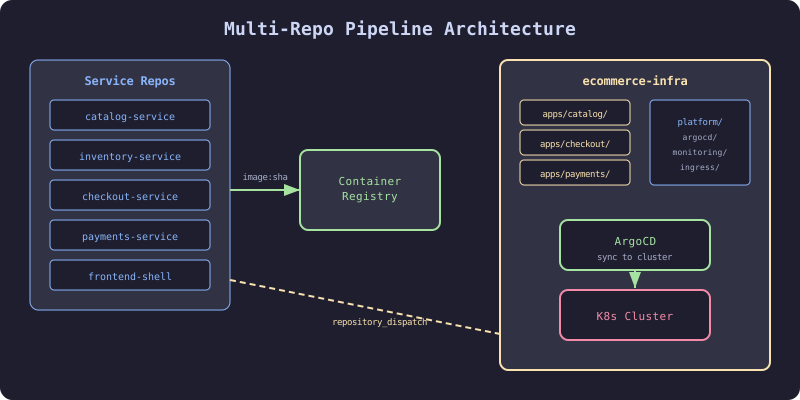
Five services, five repositories, one infrastructure repo. Each service builds and tests independently. But deployment is not independent. Checkout depends on inventory. Payments depends on checkout. When checkout deploys a breaking API change, payments breaks in production.
Multi-repo architecture requires explicit coordination. The infrastructure repo is the coordination point.
The Failure
The team had five service repos and one infra repo. Each service pipeline built, tested, and pushed a container image tagged with the git SHA. A developer would update the image tag in the infra repo manually. Sometimes they forgot. Sometimes they updated the wrong environment. Once, a developer pushed a staging image tag to the production overlay. The payments service ran staging code in production for 4 hours before anyone noticed.
Automated cross-repo triggers eliminate manual tag updates. When a service CI completes, it automatically updates the infra repo.
The Mechanism
Multi-Repo Topology
Service Repos (5):                  Infra Repo (1):
┌─────────────────┐               ┌──────────────────────────┐
│ catalog-service  │──image:sha──→│ apps/catalog/             │
│ inventory-service│──image:sha──→│ apps/inventory/           │
│ checkout-service │──image:sha──→│ apps/checkout/            │
│ payments-service │──image:sha──→│ apps/payments/            │
│ frontend-shell   │──image:sha──→│ apps/frontend/            │
└─────────────────┘               │ platform/                 │
                                  │   ├── argocd/             │
                                  │   ├── monitoring/         │
                                  │   └── ingress/            │
                                  └──────────────────────────┘
Cross-Repo Trigger Flow
- Developer pushes to
checkout-servicemain branch - CI builds, tests, pushes image
checkout-service:abc123 - CI triggers infra repo workflow via
repository_dispatch - Infra repo workflow updates image tag in overlay
- ArgoCD detects change, syncs to cluster
The Implementation
Service CI: Push Image and Trigger Infra
# checkout-service/.github/workflows/ci.yml
# HARDENED: Build, push, and trigger infra update
name: CI
on:
  push:
    branches: [main]

jobs:
  build:
    runs-on: ubuntu-latest
    outputs:
      image-tag: ${{ steps.meta.outputs.tags }}
    steps:
      - uses: actions/checkout@v4

      - name: Build and push
        id: meta
        uses: docker/build-push-action@v5
        with:
          push: true
          tags: ghcr.io/acme/checkout-service:${{ github.sha }}

  trigger-deploy:
    needs: build
    runs-on: ubuntu-latest
    steps:
      - name: Trigger infra repo
        uses: peter-evans/repository-dispatch@v3
        with:
          token: ${{ secrets.INFRA_REPO_TOKEN }}
          repository: acme/ecommerce-infra
          event-type: deploy-service
          client-payload: |
            {
              "service": "checkout-service",
              "image": "ghcr.io/acme/checkout-service",
              "tag": "${{ github.sha }}",
              "environment": "staging"
            }
Infra Repo: Receive Trigger and Update
# ecommerce-infra/.github/workflows/deploy.yml
# HARDENED: Update image tag from service CI trigger
name: Deploy Service
on:
  repository_dispatch:
    types: [deploy-service]

jobs:
  update-tag:
    runs-on: ubuntu-latest
    steps:
      - uses: actions/checkout@v4

      - name: Update image tag
        run: |
          SERVICE=${{ github.event.client_payload.service }}
          TAG=${{ github.event.client_payload.tag }}
          IMAGE=${{ github.event.client_payload.image }}
          ENV=${{ github.event.client_payload.environment }}

          cd apps/${SERVICE}/overlays/${ENV}
          kustomize edit set image ${IMAGE}:${TAG}

      - name: Commit and push
        run: |
          git config user.name "deploy-bot"
          git config user.email "[email protected]"
          git add .
          git commit -m "deploy: ${{ github.event.client_payload.service }} ${{ github.event.client_payload.tag }} to ${{ github.event.client_payload.environment }}"
          git push
Production Promotion
# ecommerce-infra/.github/workflows/promote.yml
# HARDENED: Promote staging tag to production
name: Promote to Production
on:
  workflow_dispatch:
    inputs:
      service:
        description: "Service to promote"
        required: true
        type: choice
        options:
          - catalog-service
          - inventory-service
          - checkout-service
          - payments-service
          - frontend-shell

jobs:
  promote:
    runs-on: ubuntu-latest
    steps:
      - uses: actions/checkout@v4

      - name: Get staging tag
        id: staging
        run: |
          cd apps/${{ inputs.service }}/overlays/staging
          TAG=$(kustomize build . | grep "image:" | head -1 | awk -F: '{print $NF}')
          echo "tag=${TAG}" >> $GITHUB_OUTPUT

      - name: Update production
        run: |
          cd apps/${{ inputs.service }}/overlays/production
          kustomize edit set image ghcr.io/acme/${{ inputs.service }}:${{ steps.staging.outputs.tag }}

      - name: Commit
        run: |
          git config user.name "deploy-bot"
          git config user.email "[email protected]"
          git add .
          git commit -m "promote: ${{ inputs.service }} to production (${{ steps.staging.outputs.tag }})"
          git push
The Gate
The infra repo is the gate. No service reaches any environment without a committed, reviewed, auditable change in the infra repo. For staging, this is automated. For production, this requires a workflow_dispatch (manual trigger) or a PR with approval.
The Recovery
Two services push to infra repo simultaneously: Git push conflicts. Use git pull --rebase before pushing. Or use a queue (GitHub environments with concurrency: 1).
Deploy-bot token expires: All deploys stop. Use a GitHub App with auto-renewing installation tokens instead of a PAT.
Wrong environment in payload: Validate the environment field in the infra workflow. Reject unknown environments.