Reproducible Builds: Dependency Pinning, Lock Files, and the Supply Chain Problem
Reproducible Builds
A build is reproducible when the same source code produces the same artifact regardless of when or where the build runs. This is a harder property to achieve than it sounds. Most builds depend on external state: the current version of a transitive dependency, the latest patch of a base image, the availability of a download URL. Every external dependency is a variable that can change the output.
The supply chain attack surface is every external input to the build. A compromised npm package, a hijacked base image tag, a DNS redirect on a download URL. The 2020 SolarWinds attack compromised a build system. The 2021 ua-parser-js attack compromised an npm package. The 2024 xz-utils backdoor compromised a compression library used in SSH. Each exploited a build that trusted external inputs without verification.
This chapter covers how to pin every dependency, verify every input, generate a software bill of materials (SBOM), and detect known vulnerabilities before they reach production.
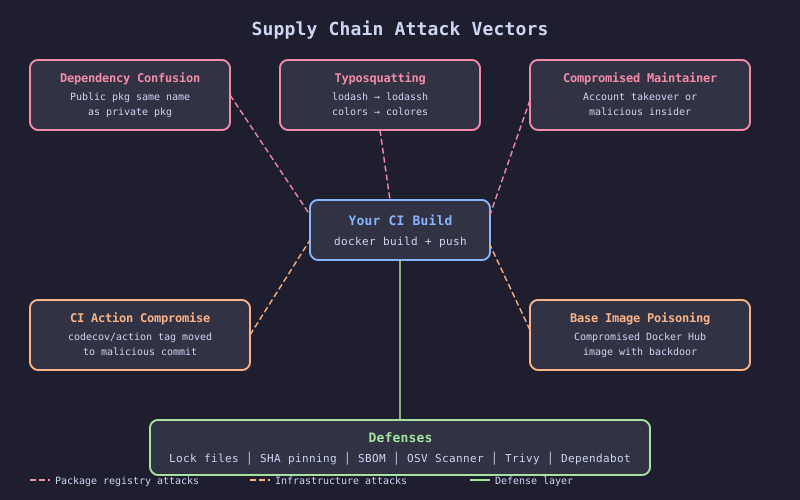
The diagram maps the attack surface of a CI pipeline. External inputs flow into the build from six sources: package registries (npm, PyPI, Maven Central), base image registries (Docker Hub, ghcr.io), GitHub Actions marketplace, download URLs for tools and binaries, Git submodules, and build-time environment variables. Each input has a labeled attack vector: dependency confusion for package registries, tag mutation for image registries, repository compromise for actions. The defense for each input is shown on the opposite side: lock files, digest pinning, SHA pinning, checksum verification, submodule pinning, and secret masking.
The Failure
The checkout service uses a transitive dependency, [email protected], pulled in by a direct dependency. A week after the last successful production deploy, the maintainer’s npm account is compromised. The attacker publishes [email protected] with a postinstall script that exfiltrates environment variables to an external server.
The checkout service’s package.json specifies "checkout-framework": "^3.0.0", which depends on "left-pad-utils": "^2.0.0". On the next CI build, npm install resolves to [email protected]. The postinstall script runs during npm install in the CI environment. GITHUB_TOKEN, registry credentials, and Vault tokens are sent to the attacker.
The team does not notice because the tests pass. The compromised code does not affect application behavior. The exfiltration happens during the build, not at runtime. The attacker now has credentials to push to the container registry and modify the infra repo.
The Mechanism
Lock File Enforcement
A lock file records the exact version and integrity hash of every dependency (direct and transitive) at the time of resolution. package-lock.json for npm, go.sum for Go, requirements.txt with hashes for Python, Cargo.lock for Rust.
npm ci (as opposed to npm install) does two things differently: it installs exactly the versions in package-lock.json without resolving newer versions, and it verifies the integrity hash of each package against the lock file. If a package has been modified since the lock file was created, the hash does not match and the install fails.
Digest-Pinned Base Images
Docker image tags are mutable. node:20-slim points to a different image after every security patch. Pinning to a digest locks the exact image:
FROM node:20-slim@sha256:4f57b0edb3f43a741f9b5e8a42e2c66b6d19c3b4...The digest is a SHA-256 hash of the image manifest. The registry cannot serve a different image for the same digest without breaking the hash.
SBOM Generation
A Software Bill of Materials (SBOM) lists every component in the artifact: OS packages, language dependencies, and their versions. SBOM generation captures what went into the build. Vulnerability scanners consume the SBOM to check for known CVEs without re-scanning the image.
The Implementation
# FRAGILE: No lock file enforcement, unpinned base image, no SBOM
name: ci
on: [push]
jobs:
  build:
    runs-on: ubuntu-latest
    steps:
      - uses: actions/checkout@v4
      - run: npm install # Resolves latest versions, ignores lock file
      - run: docker build -t app:latest . # Uses mutable base image tag
      - run: docker push app:latest
# HARDENED: Lock file verification, digest-pinned image, SBOM generation
name: ci
on:
push:
branches: [main]
pull_request:
env:
IMAGE: ghcr.io/acme/checkout-service
jobs:
build:
runs-on: ubuntu-latest
permissions:
contents: read
packages: write
outputs:
image-tag: ${{ github.sha }}
image-digest: ${{ steps.build.outputs.digest }}
steps:
- uses: actions/checkout@v4
- name: Verify lock file integrity
run: |
npm ci --ignore-scripts
# Fail if lock file is out of sync
git diff --exit-code package-lock.json
- uses: docker/login-action@v3
with:
registry: ghcr.io
username: ${{ github.actor }}
password: ${{ secrets.GITHUB_TOKEN }}
- name: Build and push
id: build
uses: docker/build-push-action@v6
with:
context: .
push: true
tags: ${{ env.IMAGE }}:${{ github.sha }}
cache-from: type=gha
cache-to: type=gha,mode=max
- name: Generate SBOM
uses: anchore/sbom-action@v0
with:
image: ${{ env.IMAGE }}@${{ steps.build.outputs.digest }}
format: spdx-json
output-file: sbom.spdx.json
- name: Upload SBOM
uses: actions/upload-artifact@v4
with:
name: sbom
path: sbom.spdx.json
retention-days: 90
dependency-scan:
runs-on: ubuntu-latest
needs: [build]
steps:
- name: Download SBOM
uses: actions/download-artifact@v4
with:
name: sbom
- name: Scan SBOM for vulnerabilities
uses: anchore/scan-action@v4
with:
sbom: sbom.spdx.json
fail-build: true
severity-cutoff: high
vulnerability-scan:
runs-on: ubuntu-latest
needs: [build]
steps:
- name: Trivy scan
uses: aquasecurity/trivy-action@master
with:
image-ref: ${{ env.IMAGE }}@${{ needs.build.outputs.image-digest }}
exit-code: 1
severity: CRITICAL,HIGH
format: tableThe Dockerfile for the checkout service:
# HARDENED: Digest-pinned, multi-stage, no dev dependencies in production
FROM node:20-slim@sha256:4f57b0edb3f43a741f9b5e8a42e2c66b6d19c3b4... AS build
WORKDIR /app
COPY package.json package-lock.json ./
RUN npm ci --ignore-scripts
COPY . .
RUN npm run build

FROM node:20-slim@sha256:4f57b0edb3f43a741f9b5e8a42e2c66b6d19c3b4... AS production
WORKDIR /app
COPY --from=build /app/dist ./dist
COPY --from=build /app/node_modules ./node_modules
COPY package.json ./
USER node
CMD ["node", "dist/server.js"]
The Gate
Two gates protect the build:
-
Lock file verification.
npm cifails ifpackage-lock.jsondoes not matchpackage.json. Thegit diff --exit-codecheck catches cases where a developer rannpm installlocally and forgot to commit the updated lock file. -
Vulnerability scan. Both the SBOM-based scan (Anchore) and the image scan (Trivy) run as separate jobs with
exit-code: 1. Any CRITICAL or HIGH vulnerability blocks the pipeline.
These gates catch two different problems. The lock file gate prevents unexpected dependency changes. The vulnerability scan catches known CVEs in dependencies that were intentionally included.
The Recovery
When a dependency scan blocks the build:
Known CVE in a direct dependency: Update the dependency to a patched version, regenerate the lock file, and push.
Known CVE in a transitive dependency: Check if the direct dependency has released a version that upgrades the transitive dependency. If yes, update. If no, evaluate the CVE’s applicability. If the vulnerable code path is not reachable in your application, add the CVE to an ignore list with an expiration date and a link to the upstream issue.
Compromised dependency (supply chain attack): Remove the dependency, rotate all secrets that were exposed to the CI environment, audit recent builds for signs of exfiltration, and report the compromise to the registry (npm, PyPI) and to GitHub Security Advisories.
# .trivyignore in the service repo
# CVE-2024-12345: OpenSSL vulnerability in base image, not reachable in our code path
# Upstream fix expected in node:20.15.0, review by 2026-07-01
CVE-2024-12345
The ignore file is committed to the repo. It is reviewable, auditable, and has a documented justification and expiration. This is the only acceptable way to suppress a vulnerability finding.