Progressive Delivery: Argo Rollouts, Traffic Splitting, and Automated Rollback
Progressive Delivery with Argo Rollouts
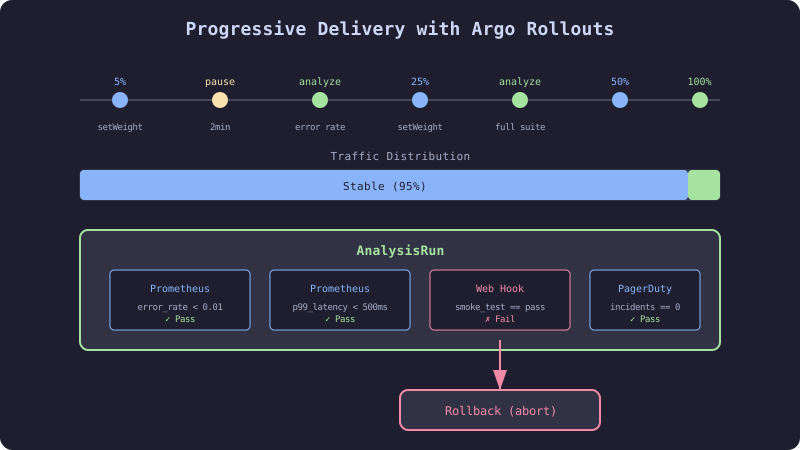
Progressive delivery is canary deployments with automated decision-making. Instead of a human watching dashboards and deciding when to promote, analysis templates query metrics and make the decision programmatically. If metrics are good, promote. If metrics are bad, rollback. No human in the loop.
Argo Rollouts is a Kubernetes controller that replaces the built-in Deployment controller with a Rollout controller that supports canary, blue-green, and experiment strategies with integrated analysis.
The Failure
The team implemented canary deployments with manual observation. The process:
- Deploy canary (5% traffic)
- Engineer watches Grafana for 10 minutes
- Engineer increases to 25% traffic
- Engineer watches Grafana for 10 minutes
- Engineer promotes to 100%
The process took 30 minutes of an engineer’s focused attention. On Friday afternoons, the engineer watched for 5 minutes instead of 10. On one Friday, the canary had a gradual memory leak that only became visible after 15 minutes. The engineer promoted at 5 minutes. Production OOM-killed after 2 hours.
Automated analysis does not get tired on Fridays. It runs the same checks every time, for the same duration, with the same thresholds.
The Mechanism
Argo Rollouts CRDs
| CRD | Purpose |
|---|---|
| Rollout | Replaces Deployment, defines canary/blue-green strategy |
| AnalysisTemplate | Reusable metric query definition |
| AnalysisRun | Instance of an AnalysisTemplate for a specific rollout |
| Experiment | Runs multiple ReplicaSets temporarily for A/B comparison |
Rollout Lifecycle
- New image pushed → Rollout creates canary ReplicaSet
- Traffic routing updated (5% to canary)
- AnalysisRun created from AnalysisTemplate
- Analysis queries Prometheus at defined intervals
- If all metrics pass → increase traffic weight
- Repeat steps 3-5 at each stage
- At 100% → scale down old ReplicaSet
- If any analysis fails → abort, scale down canary, restore stable
The Implementation
Complete Rollout Specification
# HARDENED: Full Argo Rollout with progressive delivery
apiVersion: argoproj.io/v1alpha1
kind: Rollout
metadata:
  name: checkout-service
  namespace: production
  labels:
    app.kubernetes.io/name: checkout-service
    app.kubernetes.io/part-of: ecommerce
spec:
  replicas: 5
  revisionHistoryLimit: 3
  selector:
    matchLabels:
      app: checkout-service
  strategy:
    canary:
      canaryService: checkout-canary
      stableService: checkout-stable
      trafficRouting:
        nginx:
          stableIngress: checkout-ingress
          annotationPrefix: nginx.ingress.kubernetes.io
      analysis:
        successfulRunHistoryLimit: 5
        unsuccessfulRunHistoryLimit: 5
      steps:
        # Stage 1: Smoke test (5% traffic, 2 min)
        - setWeight: 5
        - pause: { duration: 2m }
        - analysis:
            templates:
              - templateName: error-rate
              - templateName: latency-p99

        # Stage 2: Initial validation (20% traffic, 5 min)
        - setWeight: 20
        - pause: { duration: 5m }
        - analysis:
            templates:
              - templateName: error-rate
              - templateName: latency-p99
              - templateName: memory-usage

        # Stage 3: Load validation (50% traffic, 10 min)
        - setWeight: 50
        - pause: { duration: 10m }
        - analysis:
            templates:
              - templateName: error-rate
              - templateName: latency-p99
              - templateName: memory-usage
              - templateName: throughput-comparison

        # Stage 4: Full promotion
        - setWeight: 100
      rollbackWindow:
        revisions: 3
      abortScaleDownDelaySeconds: 30
      dynamicStableScale: true
  template:
    metadata:
      labels:
        app: checkout-service
    spec:
      containers:
        - name: checkout
          image: ghcr.io/acme/checkout-service:PLACEHOLDER
          ports:
            - containerPort: 8080
          resources:
            requests:
              cpu: 250m
              memory: 512Mi
            limits:
              cpu: 1000m
              memory: 1Gi
Analysis Templates
# Error rate must stay below 1%
apiVersion: argoproj.io/v1alpha1
kind: AnalysisTemplate
metadata:
  name: error-rate
spec:
  metrics:
    - name: error-rate
      interval: 30s
      count: 5
      successCondition: result[0] < 0.01
      failureLimit: 2
      provider:
        prometheus:
          address: http://prometheus.monitoring:9090
          query: |
            sum(rate(http_requests_total{
              app="checkout-service",
              revision="{{args.revision}}",
              code=~"5.."}[2m]))
            /
            sum(rate(http_requests_total{
              app="checkout-service",
              revision="{{args.revision}}"}[2m]))
---
# p99 latency must stay below 500ms
apiVersion: argoproj.io/v1alpha1
kind: AnalysisTemplate
metadata:
  name: latency-p99
spec:
  metrics:
    - name: latency
      interval: 30s
      count: 5
      successCondition: result[0] < 500
      failureLimit: 2
      provider:
        prometheus:
          address: http://prometheus.monitoring:9090
          query: |
            histogram_quantile(0.99,
              sum(rate(http_request_duration_seconds_bucket{
                app="checkout-service",
                revision="{{args.revision}}"}[2m])) by (le)) * 1000
---
# Memory must stay below 80% of limit
apiVersion: argoproj.io/v1alpha1
kind: AnalysisTemplate
metadata:
  name: memory-usage
spec:
  metrics:
    - name: memory
      interval: 60s
      count: 5
      successCondition: result[0] < 0.8
      failureLimit: 1
      provider:
        prometheus:
          address: http://prometheus.monitoring:9090
          query: |
            avg(container_memory_working_set_bytes{
              pod=~"checkout-service-.*",
              container="checkout",
              namespace="production"})
            /
            avg(kube_pod_container_resource_limits{
              pod=~"checkout-service-.*",
              container="checkout",
              namespace="production",
              resource="memory"})
---
# Canary throughput must be within 10% of stable
apiVersion: argoproj.io/v1alpha1
kind: AnalysisTemplate
metadata:
  name: throughput-comparison
spec:
  metrics:
    - name: throughput-ratio
      interval: 60s
      count: 3
      successCondition: result[0] > 0.9
      failureLimit: 1
      provider:
        prometheus:
          address: http://prometheus.monitoring:9090
          query: |
            sum(rate(http_requests_total{
              app="checkout-service",
              revision="canary"}[5m]))
            /
            sum(rate(http_requests_total{
              app="checkout-service",
              revision="stable"}[5m]))
Services for Traffic Splitting
apiVersion: v1
kind: Service
metadata:
  name: checkout-stable
  namespace: production
spec:
  selector:
    app: checkout-service
  ports:
    - port: 80
      targetPort: 8080
---
apiVersion: v1
kind: Service
metadata:
  name: checkout-canary
  namespace: production
spec:
  selector:
    app: checkout-service
  ports:
    - port: 80
      targetPort: 8080
The Gate
Each analysis step is a gate. The rollout only proceeds to the next traffic weight if all analysis templates pass. The analysis runs count queries at interval intervals. If more than failureLimit queries fail, the analysis fails and the rollout aborts.
The three-stage approach tests different concerns at different scales:
- Stage 1 (5%): Basic health — is the service responding without errors?
- Stage 2 (20%): Resource behavior — is the service using memory and CPU within bounds?
- Stage 3 (50%): Throughput parity — is the canary handling traffic at the same rate as stable?
The Recovery
Rollout aborted: Argo Rollouts automatically scales down canary pods and routes all traffic to stable. Check the AnalysisRun to see which metric failed: kubectl get analysisrun -n production.
Rollout stuck in Paused state: A previous analysis completed but the next step is a manual pause. Promote manually: kubectl argo rollouts promote checkout-service -n production.
Need to rollback after full promotion: kubectl argo rollouts undo checkout-service -n production. Argo Rollouts reverts to the previous revision’s ReplicaSet.
Analysis templates return no data: Prometheus query returns empty results (no traffic to the canary). The analysis defaults to “Inconclusive.” Configure inconclusiveLimit to handle this: inconclusiveLimit: 3 allows 3 empty results before failing.