Secrets Management in Pipelines: Vault, SOPS, and What Never to Do
Secrets Management in Pipelines
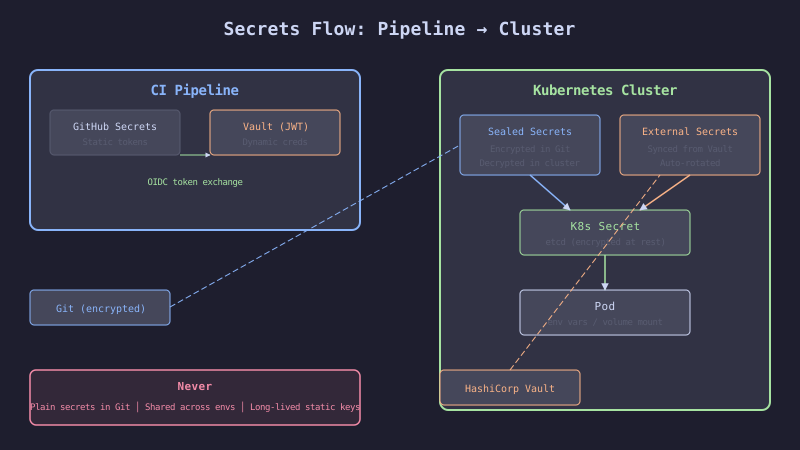
Two categories of secrets exist in a CI/CD pipeline. Pipeline secrets are used during the build and deploy process: registry credentials, API tokens for scanning tools, deployment keys. Runtime secrets are used by the running application: database passwords, API keys for external services, TLS certificates.
Pipeline secrets live in the CI system (GitHub Actions secrets). Runtime secrets live in Kubernetes (Secrets resources). The two categories have different security requirements, different rotation strategies, and different blast radii.
The Failure
A developer committed a .env file containing the production database password to the repository. They immediately deleted the file in the next commit. The password was still in the Git history. Six months later, an automated scanner found the credential in a public fork of the repository. The database was exposed for 14 hours before the credential was rotated.
Three rules that prevent this:
- Never store secrets in Git, even encrypted, unless using a purpose-built tool (SOPS, Sealed Secrets)
- Never use long-lived credentials when short-lived alternatives exist (Vault dynamic credentials)
- Never share secrets between environments (dev database password ≠ production database password)
The Mechanism
Secret Categories and Tools
| Category | Scope | Tool | Rotation | Example |
|---|---|---|---|---|
| Pipeline secret | CI job | GitHub Actions secrets | Manual or Vault | Registry password, deploy key |
| Pipeline dynamic | CI job | Vault AppRole/JWT | Automatic per-run | Cloud credentials, database access |
| Runtime static | K8s pod | Sealed Secrets | Manual + GitOps | API keys, TLS certs |
| Runtime dynamic | K8s pod | External Secrets Operator + Vault | Automatic | Database passwords, cloud tokens |
The Rule of Least Privilege
Each pipeline job should have access only to the secrets it needs. The build job needs registry credentials. The deploy job needs the infra repo token. The test job needs test database credentials. No job should have all secrets.
The Implementation
GitHub Actions Secrets with Scoping
# FRAGILE: All secrets available to all jobs
jobs:
  build:
    env:
      REGISTRY_PASSWORD: ${{ secrets.REGISTRY_PASSWORD }}
      DEPLOY_KEY: ${{ secrets.DEPLOY_KEY }}
      DATABASE_URL: ${{ secrets.DATABASE_URL }}
      PACT_TOKEN: ${{ secrets.PACT_TOKEN }}
# HARDENED: Secrets scoped to the jobs that need them
jobs:
build:
runs-on: ubuntu-latest
permissions:
packages: write # Only what build needs
steps:
- uses: docker/login-action@v3
with:
registry: ghcr.io
username: ${{ github.actor }}
password: ${{ secrets.GITHUB_TOKEN }} # Built-in, scoped token
test:
runs-on: ubuntu-latest
steps:
- name: Run tests
env:
PACT_BROKER_TOKEN: ${{ secrets.PACT_TOKEN }}
run: npm run test:contract
deploy:
runs-on: ubuntu-latest
environment: production # Environment-scoped secrets
steps:
- uses: actions/checkout@v4
with:
repository: acme/ecommerce-infra
token: ${{ secrets.INFRA_REPO_TOKEN }} # Only available in production envVault Integration for Dynamic Credentials
# HARDENED: Vault dynamic credentials for database access in CI
- name: Get Vault token
  id: vault
  uses: hashicorp/vault-action@v3
  with:
    url: https://vault.acme.com
    method: jwt
    role: ci-checkout-service
    jwtGithubAudience: https://github.com/acme
    secrets: |
      database/creds/checkout-readonly username | DB_USER ;
      database/creds/checkout-readonly password | DB_PASS

- name: Run integration tests
  env:
    DATABASE_URL: "postgresql://${{ steps.vault.outputs.DB_USER }}:${{ steps.vault.outputs.DB_PASS }}@db.staging.acme.com:5432/checkout"
  run: npm run test:integration
  # Vault credential expires after 1 hour — no credential to leak
SOPS for Encrypted Values in Git
# HARDENED: SOPS-encrypted secrets file
# Encrypted with: sops --encrypt --age <public-key> secrets.yaml
apiVersion: v1
kind: Secret
metadata:
  name: checkout-secrets
  namespace: production
type: Opaque
stringData:
  PAYMENT_API_KEY: ENC[AES256_GCM,data:abc123...,type:str]
  STRIPE_WEBHOOK_SECRET: ENC[AES256_GCM,data:def456...,type:str]
sops:
  kms: []
  age:
    - recipient: age1xxxxxxxxxxxxxxxxxxxxxxxxxxxxxxxxxxxxxxxxxxxxxxxxx
      enc: |
        -----BEGIN AGE ENCRYPTED FILE-----
        ...
        -----END AGE ENCRYPTED FILE-----
  version: 3.8.1
Pre-commit Hook to Prevent Secret Commits
# .pre-commit-config.yaml
repos:
  - repo: https://github.com/Yelp/detect-secrets
    rev: v1.4.0
    hooks:
      - id: detect-secrets
        args: ["--baseline", ".secrets.baseline"]
# CI step to catch secrets that bypass pre-commit
- name: Scan for secrets
uses: trufflesecurity/trufflehog@main
with:
path: ./
base: ${{ github.event.pull_request.base.sha }}
head: ${{ github.event.pull_request.head.sha }}The Gate
Every PR is scanned for secrets using TruffleHog. The scan compares the PR diff against known secret patterns (API keys, passwords, tokens, private keys). Any match blocks the PR.
The pre-commit hook catches secrets locally before they are committed. The CI scan is the backup for developers who skip the pre-commit hook.
If a secret is detected in the Git history, the pipeline fails with an error message that says: “Rotate the credential immediately. Removing the file is not sufficient — the secret is in Git history.”
The Recovery
Secret committed to Git: Rotate the credential immediately. Do not wait. Do not try to rewrite Git history first. Rotate, verify the old credential no longer works, then clean up Git history if needed.
Vault is unavailable during CI: The pipeline fails. Do not fall back to static credentials stored in GitHub Actions secrets. Fix Vault or wait. If Vault outages are frequent, the Vault infrastructure needs attention, not the pipeline.
SOPS-encrypted secret needs updating: Decrypt with SOPS, update the value, re-encrypt, commit. The Git diff shows encrypted values changed but not the plaintext. Only team members with the SOPS key can decrypt.