Serverless on Kubernetes: Knative as a Deployment Target
Serverless on Kubernetes: Knative as a Deployment Target
Not every service in the e-commerce platform runs at the same load level. The checkout service handles traffic continuously. The report generation service runs once a day. The product import service runs when a vendor uploads a catalog. Running 3 replicas of the import service 24/7 wastes resources.
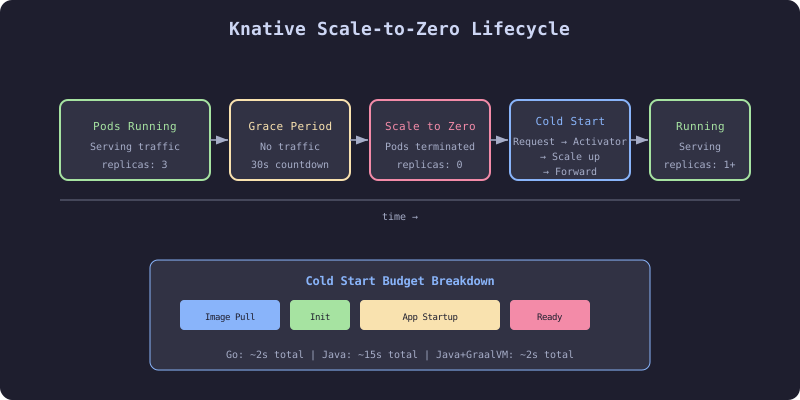
Knative Serving provides scale-to-zero for Kubernetes workloads. When no traffic arrives, the pods are terminated. When traffic arrives, pods are created. The trade-off is cold start latency: the time between the first request and the first response.
The Failure
The team deployed the product import service as a standard Deployment with 2 replicas. The service was used by vendors to upload product catalogs, typically during business hours. From 6pm to 8am and on weekends, the service received zero traffic. Two pods ran continuously, consuming 512Mi memory and 250m CPU each. Across all idle services, the cluster wasted 15% of its capacity on pods handling zero requests.
Knative would scale these pods to zero during idle periods and create them on demand when a vendor started an upload.
The Mechanism
Knative Serving Components
| Component | Purpose |
|---|---|
| Activator | Receives requests when pods are scaled to zero, triggers scaling |
| Autoscaler | Manages pod count based on concurrency or RPS |
| Queue Proxy | Sidecar in each pod, reports metrics to autoscaler |
| Controller | Manages Knative Service, Configuration, Revision, Route |
Scale-to-Zero Flow
- No traffic for
scale-to-zero-grace-period(default 30s) → Autoscaler scales to 0 - Request arrives → Activator buffers the request
- Activator signals autoscaler → Autoscaler creates pod
- Pod starts, passes readiness check → Queue Proxy reports ready
- Activator forwards buffered request to the pod
- Subsequent requests go directly to pods (bypass activator)
Cold Start Budget
The cold start time = container pull time + application startup time + readiness probe delay. For a Java service with a 15-second startup, the first user waits 20+ seconds. For a Go service with a 200ms startup, the first user waits 2-3 seconds.
| Language | Typical Cold Start | Acceptable For |
|---|---|---|
| Go | 1-3s | APIs, webhooks, import services |
| Node.js | 2-5s | APIs, background processors |
| Java (Spring Boot) | 10-30s | Batch jobs, scheduled tasks |
| Java (Quarkus native) | 1-3s | APIs, event handlers |
The Implementation
Knative Service for Product Import
# HARDENED: Knative Service with scale-to-zero
apiVersion: serving.knative.dev/v1
kind: Service
metadata:
  name: product-import
  namespace: production
  labels:
    app.kubernetes.io/part-of: ecommerce
spec:
  template:
    metadata:
      annotations:
        # Scale to zero after 5 minutes of no traffic
        autoscaling.knative.dev/scale-to-zero-pod-retention-period: "5m"
        # Maximum 10 concurrent requests per pod
        autoscaling.knative.dev/target: "10"
        # Maximum 5 pods
        autoscaling.knative.dev/max-scale: "5"
        # Minimum 0 pods (enable scale-to-zero)
        autoscaling.knative.dev/min-scale: "0"
    spec:
      containerConcurrency: 10
      timeoutSeconds: 300
      containers:
        - image: ghcr.io/acme/product-import:abc123
          ports:
            - containerPort: 8080
          resources:
            requests:
              cpu: 250m
              memory: 512Mi
            limits:
              cpu: 1000m
              memory: 1Gi
          readinessProbe:
            httpGet:
              path: /health/ready
              port: 8080
            initialDelaySeconds: 2
            periodSeconds: 5
          env:
            - name: CATALOG_SERVICE_URL
              value: http://catalog-service.production.svc.cluster.local
Knative Service That Never Scales to Zero
For the checkout service, use Knative’s autoscaling without scale-to-zero:
# HARDENED: Knative Service with min-scale > 0 (no scale-to-zero)
apiVersion: serving.knative.dev/v1
kind: Service
metadata:
  name: checkout-service
  namespace: production
spec:
  template:
    metadata:
      annotations:
        autoscaling.knative.dev/min-scale: "3"
        autoscaling.knative.dev/max-scale: "20"
        autoscaling.knative.dev/target: "50"
        autoscaling.knative.dev/metric: "rps"
    spec:
      containers:
        - image: ghcr.io/acme/checkout-service:abc123
          ports:
            - containerPort: 8080
          resources:
            requests:
              cpu: 250m
              memory: 512Mi
            limits:
              cpu: 1000m
              memory: 1Gi
ArgoCD Integration
# HARDENED: ArgoCD Application for Knative Service
apiVersion: argoproj.io/v1alpha1
kind: Application
metadata:
  name: product-import
  namespace: argocd
spec:
  project: ecommerce
  source:
    repoURL: https://github.com/acme/ecommerce-infra.git
    targetRevision: main
    path: apps/product-import/overlays/production
  destination:
    server: https://kubernetes.default.svc
    namespace: production
  syncPolicy:
    automated:
      prune: true
      selfHeal: true
ArgoCD needs a custom health check for Knative Services:
# ArgoCD ConfigMap
data:
  resource.customizations.health.serving.knative.dev_Service: |
    hs = {}
    if obj.status ~= nil then
      if obj.status.conditions ~= nil then
        for _, condition in ipairs(obj.status.conditions) do
          if condition.type == "Ready" then
            if condition.status == "True" then
              hs.status = "Healthy"
            elseif condition.status == "False" then
              hs.status = "Degraded"
              hs.message = condition.message
            else
              hs.status = "Progressing"
            end
            return hs
          end
        end
      end
    end
    hs.status = "Progressing"
    return hs
The Gate
Knative’s built-in readiness probes are the gate. A Knative Revision is only marked as Ready when the container passes its readiness probe. Traffic is not routed to a Revision until it is Ready.
For scale-to-zero services, the gate includes cold start tolerance: if the cold start exceeds timeoutSeconds, the request is rejected and the revision is marked as failed.
The Recovery
Cold start is too slow: Increase min-scale to 1 (keep one warm pod). Or optimize the application startup: use ahead-of-time compilation (GraalVM native image, Go), lazy-load dependencies, defer non-critical initialization.
Pods scale too aggressively: Increase target (requests per pod before scaling). The default is 100, which may be too low for lightweight handlers.
ArgoCD shows Knative Service as Progressing indefinitely: The custom health check is missing or the Knative Service conditions are not being evaluated. Add the health check Lua script to the ArgoCD ConfigMap.