Caching Strategy
Caching Strategy
The Cache That Eliminates Requests
The fastest network request is the one that never happens. A cached resource loads in under 5ms from disk cache and under 1ms from memory cache, compared to 200-800ms for a network fetch. For returning visitors (60% of the e-commerce platform’s traffic), aggressive caching eliminates most network requests on subsequent page loads.
The challenge is not enabling caching. The challenge is making aggressive caching safe. If you cache a JavaScript bundle for one year and then deploy a bug fix, 60% of users continue running the buggy version until the cache expires. The deployment pipeline must guarantee that new deployments invalidate stale cached resources.
The solution is immutable assets with content hashes and short-lived HTML documents that reference the current hashes.
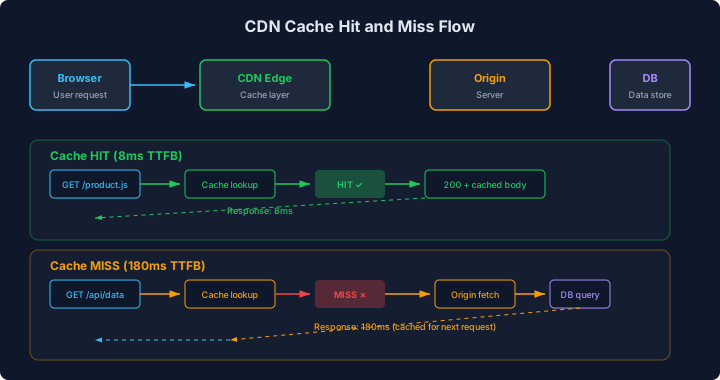
The diagram shows two request paths: a cache hit and a cache miss. On a cache hit, the CDN edge server returns the resource directly without contacting the origin, saving the full round-trip to the origin server and the origin’s processing time. On a cache miss, the CDN fetches from the origin, stores the response, and serves it. Subsequent requests for the same resource from any user in the same edge region are served from cache. The ratio of hits to total requests determines the cache’s effectiveness.
Immutable Assets with Content Hashes
Vite, Webpack, and most modern bundlers generate output files with content hashes in the filename:
dist/assets/
  index-a1b2c3d4.js      ← Hash changes when content changes
  vendor-e5f6g7h8.js
  main-i9j0k1l2.css
  product-hero-m3n4.avif
These files are immutable. The filename index-a1b2c3d4.js refers to exactly one version of the file. If the code changes, the new build produces index-x9y8z7w6.js with a different hash. The old file is never overwritten, and the old URL is never reused.
This property makes aggressive caching safe:
# Hashed assets: cache forever
location ~* \.[a-f0-9]{8}\.(js|css|woff2|avif|webp|jpg|png|svg)$ {
    expires 365d;
    add_header Cache-Control "public, max-age=31536000, immutable";
    add_header Vary "Accept-Encoding";
}

# HTML documents: never cache
location ~* \.html$ {
    add_header Cache-Control "no-cache, no-store, must-revalidate";
    add_header Pragma "no-cache";
    expires 0;
}

# Service worker: short cache
location = /sw.js {
    add_header Cache-Control "no-cache";
}
The immutable directive tells the browser: do not even send a conditional request (If-None-Match) to check if this resource changed. It will never change. The browser serves it from cache without any network activity.
The HTML document is not cached because it contains <script> and <link> tags that reference the current hashed filenames. When a new deployment produces new hashes, the HTML document must be re-fetched to discover the new filenames. The HTML document is small (9-18KB gzipped), so the cost of re-fetching it on every visit is negligible.
CDN Configuration
A CDN caches resources at edge servers close to users. For the e-commerce platform with users in North America, Europe, and South Asia, the CDN eliminates the geographic latency penalty that Chapter 1 identified (1,200ms TTFB from Mumbai to a Virginia origin).
CDN caching follows the same principles as browser caching, but with additional considerations:
# Origin server headers that control CDN caching
location ~* \.[a-f0-9]{8}\.(js|css|woff2|avif|webp|jpg|png|svg)$ {
    # Browser cache: 1 year
    add_header Cache-Control "public, max-age=31536000, immutable";
    # CDN cache: 1 year (same as browser)
    add_header CDN-Cache-Control "public, max-age=31536000";
}

location ~* \.html$ {
    # Browser cache: don't cache
    add_header Cache-Control "no-cache, no-store, must-revalidate";
    # CDN cache: 60 seconds with stale-while-revalidate
    add_header CDN-Cache-Control "public, max-age=60, stale-while-revalidate=300";
}
The CDN-Cache-Control header (supported by Cloudflare, Fastly, and others) overrides Cache-Control for the CDN while the browser respects the original Cache-Control. This allows the CDN to cache HTML for 60 seconds (reducing origin load) while the browser always fetches fresh HTML.
The stale-while-revalidate=300 directive allows the CDN to serve a stale HTML response for up to 300 seconds while it fetches a fresh copy from the origin in the background. The user gets an instant response (cached HTML), and the CDN updates its cache asynchronously. The worst case: a user sees content that is up to 360 seconds old. For the e-commerce platform, this is acceptable for listing and editorial pages. For the checkout page (where cart state matters), HTML caching is disabled entirely.
Cache Invalidation on Deployment
The deployment pipeline must ensure that:
- New hashed assets are uploaded to the CDN/server before the HTML is updated.
- The HTML update happens atomically (the old HTML references old assets, the new HTML references new assets, there is no moment where the HTML references assets that do not yet exist).
// scripts/deploy.ts
import * as fs from "fs";

interface DeployConfig {
  distDir: string;
  cdnBucket: string;
  cdnDistribution: string;
}

async function deploy(config: DeployConfig): Promise<void> {
  // Step 1: Upload all hashed assets (these are new files, no conflict with existing)
  console.log("Uploading hashed assets...");
  const assets = findHashedAssets(config.distDir);
  for (const asset of assets) {
    await uploadToCDN(asset, config.cdnBucket, {
      cacheControl: "public, max-age=31536000, immutable",
    });
  }

  // Step 2: Upload HTML files (these overwrite existing files)
  console.log("Uploading HTML documents...");
  const htmlFiles = findHTMLFiles(config.distDir);
  for (const html of htmlFiles) {
    await uploadToCDN(html, config.cdnBucket, {
      cacheControl: "no-cache, no-store, must-revalidate",
    });
  }

  // Step 3: Invalidate CDN cache for HTML paths only
  // Hashed assets do not need invalidation (different URLs)
  console.log("Invalidating CDN cache for HTML paths...");
  const htmlPaths = htmlFiles.map(
    (f) => "/" + f.replace(config.distDir + "/", ""),
  );
  await invalidateCDNPaths(config.cdnDistribution, htmlPaths);

  // Step 4: Verify deployment
  console.log("Verifying deployment...");
  const testUrl = `https://store.example.com/`;
  const response = await fetch(testUrl);
  const html = await response.text();

  // Check that the HTML references the new hashed assets
  for (const asset of assets.slice(0, 3)) {
    const hash = extractHash(asset);
    if (!html.includes(hash)) {
      throw new Error(
        `Deployment verification failed: HTML does not reference asset hash ${hash}`,
      );
    }
  }

  console.log("Deployment complete and verified.");
}

function findHashedAssets(dir: string): string[] {
  // Find files matching the content hash pattern
  const allFiles = fs.readdirSync(dir, { recursive: true }) as string[];
  return allFiles.filter((f) =>
    /\.[a-f0-9]{8}\.(js|css|woff2|avif|webp|jpg|png|svg)$/.test(f),
  );
}

function findHTMLFiles(dir: string): string[] {
  const allFiles = fs.readdirSync(dir, { recursive: true }) as string[];
  return allFiles.filter((f) => f.endsWith(".html"));
}

function extractHash(filename: string): string {
  const match = filename.match(/\.([a-f0-9]{8})\./);
  return match?.[1] ?? "";
}

// CDN-specific implementations (S3 + CloudFront shown)
async function uploadToCDN(
  filePath: string,
  bucket: string,
  options: { cacheControl: string },
): Promise<void> {
  // Implementation using AWS SDK or CDN API
}

async function invalidateCDNPaths(
  distributionId: string,
  paths: string[],
): Promise<void> {
  // Implementation using CloudFront invalidation API
}
The key ordering: assets are uploaded first, HTML second. If the reverse happened, there would be a window where the new HTML references assets that do not yet exist on the CDN, causing 404 errors for users during the deployment.
Measuring Cache Effectiveness
Cache hit rate is the primary metric. A high cache hit rate means most requests are served from cache (fast). A low cache hit rate means most requests hit the origin (slow).
// Cache hit rate from CDN analytics or server logs
interface CacheMetrics {
  totalRequests: number;
  cacheHits: number;
  cacheMisses: number;
  hitRate: number;
  bytesSavedByCache: number;
}

function analyzeCacheLogs(
  logs: Array<{ status: number; cacheStatus: string; bytes: number }>,
): CacheMetrics {
  let hits = 0;
  let misses = 0;
  let bytesSaved = 0;

  for (const log of logs) {
    if (log.cacheStatus === "HIT") {
      hits++;
      bytesSaved += log.bytes;
    } else {
      misses++;
    }
  }

  return {
    totalRequests: hits + misses,
    cacheHits: hits,
    cacheMisses: misses,
    hitRate: hits / (hits + misses),
    bytesSavedByCache: bytesSaved,
  };
}
The e-commerce platform’s cache metrics after implementing the immutable asset strategy:
| Resource Type | Cache Hit Rate | Requests/Day | Origin Load Saved |
|---|---|---|---|
| JS bundles | 94% | 120,000 | 112,800 |
| CSS | 96% | 80,000 | 76,800 |
| Images | 88% | 350,000 | 308,000 |
| Fonts | 98% | 60,000 | 58,800 |
| HTML | 72% | 95,000 | 68,400 |
The 94% JavaScript cache hit rate means 94% of JavaScript requests are served from CDN edge or browser cache. The 6% misses are first-time visitors and post-deployment cache invalidations.
The HTML hit rate of 72% reflects the stale-while-revalidate strategy: most HTML requests are served from CDN cache within the 60-second window, but 28% of requests arrive after the cache expires and require an origin fetch.
Impact on repeat visitor LCP:
| Metric | First Visit | Repeat Visit | Delta |
|---|---|---|---|
| LCP (p75) | 3.2s | 1.4s | -1,800ms |
| Total transfer | 200 kB | 9.8 kB (HTML only) | -190 kB |
| Network requests | 28 | 1 (HTML) | -27 |
Repeat visitors experience 1.4s LCP because all assets are served from browser cache. Only the HTML document is fetched from the network.
The CI Lighthouse gate from Chapter 2 runs against first-visit (uncached) conditions, ensuring that new code changes do not degrade the first-visit experience. The caching strategy ensures that returning visitors experience an even faster page.