WebAssembly
WebAssembly
The Honest Assessment
WebAssembly is not a universal performance upgrade for frontend code. It is a targeted tool for compute-intensive operations where JavaScript’s overhead becomes the bottleneck. Most frontend performance problems are caused by network latency, unnecessary DOM operations, excessive bundle size, and unoptimized images. WASM addresses none of these.
WASM is appropriate when:
- A single computation takes more than 50ms on the main thread on a mid-tier device.
- The computation is CPU-bound, not I/O-bound or DOM-bound.
- The computation can be expressed as a function that takes typed data in and produces typed data out, with no DOM access needed.
- The performance gain justifies the complexity of a polyglot build pipeline.
The threshold below which WASM is not worth the cost: if the TypeScript implementation takes less than 50ms on a 4x CPU-throttled Chrome profile, WASM will not produce a meaningful user-facing improvement. The overhead of loading the WASM module, instantiating it, and marshaling data between JavaScript and WASM memory consumes 10-30ms. For operations under 50ms, the overhead eats most of the gain.
On the e-commerce platform, the candidate operation is product image format conversion. The platform allows users to upload product photos in any format, and the client-side preview generates WebP thumbnails before upload. The TypeScript implementation using Canvas API takes 280ms per image on a Moto G Power profile. This is the benchmark target.
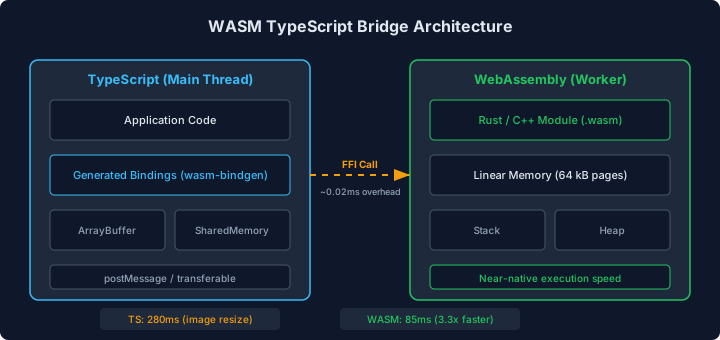
The diagram shows the data flow between the TypeScript application and the WASM module. The TypeScript layer handles DOM interaction, user input, and UI updates. Data crosses the boundary through the WebAssembly linear memory, where the TypeScript layer writes input bytes and reads output bytes. The WASM module performs the compute-intensive operation in isolation. The bridge cost (serialization, memory copy, function call overhead) is paid on every invocation and determines whether WASM is worth the architectural complexity.
The TypeScript Implementation (Baseline)
The image conversion using Canvas API:
// SLOW: Canvas-based image conversion on the main thread
interface ConversionResult {
  blob: Blob;
  width: number;
  height: number;
  processingTimeMs: number;
}

async function convertToWebP(
  file: File,
  maxWidth: number,
  quality: number,
): Promise<ConversionResult> {
  const start = performance.now();

  const bitmap = await createImageBitmap(file);
  const scale = Math.min(1, maxWidth / bitmap.width);
  const width = Math.round(bitmap.width * scale);
  const height = Math.round(bitmap.height * scale);

  const canvas = new OffscreenCanvas(width, height);
  const ctx = canvas.getContext("2d");
  if (!ctx) throw new Error("Cannot get 2d context");

  ctx.drawImage(bitmap, 0, 0, width, height);
  bitmap.close();

  const blob = await canvas.convertToBlob({
    type: "image/webp",
    quality,
  });

  return {
    blob,
    width,
    height,
    processingTimeMs: performance.now() - start,
  };
}
Performance on Moto G Power profile (4x CPU throttle):
- 1200x800 JPEG input: 280ms
- 2400x1600 JPEG input: 620ms
- 4000x3000 JPEG input: 1,340ms
The 280ms for a single product photo is above the 50ms WASM threshold. For the bulk upload flow where sellers upload 5-15 photos, the total processing time is 1.4-4.2 seconds of main thread blocking (or equivalent time in a Web Worker without main thread blocking but with noticeable processing delay).
The WASM Implementation
The WASM module is compiled from Rust using wasm-bindgen, but this chapter focuses on the TypeScript bindings, not the Rust source. The engineering concern for a frontend team is the interface, not the implementation language.
The WASM module exports a function that accepts image bytes and returns WebP bytes:
// wasm-image-converter.ts - TypeScript bindings for the WASM module
interface WasmImageModule {
  memory: WebAssembly.Memory;
  convert_to_webp: (
    inputPtr: number,
    inputLen: number,
    maxWidth: number,
    quality: number,
    outputPtr: number,
  ) => number; // returns output length
  allocate: (size: number) => number; // returns pointer
  deallocate: (ptr: number, size: number) => void;
}

let wasmModule: WasmImageModule | null = null;

async function loadWasmModule(): Promise<WasmImageModule> {
  if (wasmModule) return wasmModule;

  const response = await fetch("/wasm/image-converter.wasm");
  const bytes = await response.arrayBuffer();
  const { instance } = await WebAssembly.instantiate(bytes, {
    env: {
      abort: () => {
        throw new Error("WASM abort");
      },
    },
  });

  wasmModule = instance.exports as unknown as WasmImageModule;
  return wasmModule;
}

async function convertToWebPWasm(
  file: File,
  maxWidth: number,
  quality: number,
): Promise<ConversionResult> {
  const start = performance.now();
  const module = await loadWasmModule();

  // Read file into ArrayBuffer
  const inputBuffer = await file.arrayBuffer();
  const inputBytes = new Uint8Array(inputBuffer);

  // Allocate WASM memory for input
  const inputPtr = module.allocate(inputBytes.length);
  const wasmMemory = new Uint8Array(module.memory.buffer);
  wasmMemory.set(inputBytes, inputPtr);

  // Allocate output buffer (estimate: input size is upper bound for WebP)
  const outputPtr = module.allocate(inputBytes.length);

  // Call WASM conversion
  const outputLen = module.convert_to_webp(
    inputPtr,
    inputBytes.length,
    maxWidth,
    quality,
    outputPtr,
  );

  // Copy output from WASM memory
  const outputBytes = new Uint8Array(
    module.memory.buffer,
    outputPtr,
    outputLen,
  ).slice(); // .slice() copies the data out of WASM memory

  // Free WASM memory
  module.deallocate(inputPtr, inputBytes.length);
  module.deallocate(outputPtr, inputBytes.length);

  const blob = new Blob([outputBytes], { type: "image/webp" });

  // Get dimensions from the WASM output metadata
  // (simplified - actual implementation reads WebP header)
  const bitmap = await createImageBitmap(blob);
  const width = bitmap.width;
  const height = bitmap.height;
  bitmap.close();

  return {
    blob,
    width,
    height,
    processingTimeMs: performance.now() - start,
  };
}
The critical performance details in the bindings:
-
Memory copying: Input bytes are copied from JavaScript’s heap into WASM’s linear memory. Output bytes are copied back. For a 2MB JPEG, this is 4MB of memory copies, taking ~3ms.
-
Module loading:
WebAssembly.instantiatecompiles and instantiates the module. First load takes 50-100ms depending on module size. Subsequent calls reuse the cached module and take 0ms. -
.slice()on output: Without.slice(), theUint8Arrayis a view into WASM memory. If the WASM module grows its memory or deallocates the region, the view becomes invalid..slice()copies the data into a JavaScript-owned buffer, adding ~1ms for a 200KB output.
The WASM Module in a Web Worker
For the bulk upload flow, running WASM in a Web Worker prevents any main thread blocking:
// image-worker.ts
interface WorkerMessage {
  type: "convert";
  id: string;
  fileBuffer: ArrayBuffer;
  maxWidth: number;
  quality: number;
}

interface WorkerResponse {
  type: "result";
  id: string;
  blob: Blob;
  width: number;
  height: number;
  processingTimeMs: number;
}

// Load WASM module once per worker
let modulePromise: Promise<WasmImageModule> | null = null;

self.onmessage = async (event: MessageEvent<WorkerMessage>) => {
  if (!modulePromise) {
    modulePromise = loadWasmModule();
  }
  const module = await modulePromise;

  const { id, fileBuffer, maxWidth, quality } = event.data;
  const start = performance.now();

  const inputBytes = new Uint8Array(fileBuffer);
  const inputPtr = module.allocate(inputBytes.length);
  const wasmMemory = new Uint8Array(module.memory.buffer);
  wasmMemory.set(inputBytes, inputPtr);

  const outputPtr = module.allocate(inputBytes.length);
  const outputLen = module.convert_to_webp(
    inputPtr,
    inputBytes.length,
    maxWidth,
    quality,
    outputPtr,
  );

  const outputBytes = new Uint8Array(
    module.memory.buffer,
    outputPtr,
    outputLen,
  ).slice();

  module.deallocate(inputPtr, inputBytes.length);
  module.deallocate(outputPtr, inputBytes.length);

  const blob = new Blob([outputBytes], { type: "image/webp" });

  const response: WorkerResponse = {
    type: "result",
    id,
    blob,
    width: 0, // Set by main thread after createImageBitmap
    height: 0,
    processingTimeMs: performance.now() - start,
  };

  self.postMessage(response);
};
Using Transferable objects to avoid copying the input buffer:
// Main thread: sending file to worker
async function convertInWorker(
  file: File,
  maxWidth: number,
  quality: number,
): Promise<ConversionResult> {
  const buffer = await file.arrayBuffer();

  return new Promise((resolve) => {
    worker.onmessage = (event: MessageEvent<WorkerResponse>) => {
      resolve({
        blob: event.data.blob,
        width: event.data.width,
        height: event.data.height,
        processingTimeMs: event.data.processingTimeMs,
      });
    };

    // Transfer the ArrayBuffer to the worker (zero-copy)
    worker.postMessage(
      {
        type: "convert",
        id: crypto.randomUUID(),
        fileBuffer: buffer,
        maxWidth,
        quality,
      },
      [buffer], // Transferable: buffer is moved, not copied
    );
  });
}
The [buffer] transfer list moves the ArrayBuffer to the worker without copying. The main thread loses access to buffer after the transfer. This eliminates the ~3ms copy overhead for large files.
Benchmark Results
All measurements on Moto G Power (4x CPU throttle), JPEG input:
| Image Size | TypeScript (Canvas) | WASM (main thread) | WASM (Worker) | WASM Speedup |
|---|---|---|---|---|
| 1200x800 (1.2MB) | 280ms | 85ms | 85ms* | 3.3x |
| 2400x1600 (3.1MB) | 620ms | 170ms | 170ms* | 3.6x |
| 4000x3000 (6.8MB) | 1,340ms | 340ms | 340ms* | 3.9x |
*Worker adds ~5ms for message passing, offset by zero main thread impact.
WASM module size: 142KB (gzipped: 68KB). First-load instantiation: 75ms. Subsequent instantiation: 0ms (cached).
INP measurement during bulk upload of 10 images:
- TypeScript: INP 1,200ms (main thread blocked by sequential conversions)
- WASM + Worker: INP 12ms (main thread free during processing)
The INP improvement from 1,200ms to 12ms is the primary user-facing metric. The raw computation speedup (3.3-3.9x) is secondary. The architectural win is moving the work off the main thread entirely.
The Complexity Cost
WASM introduces costs that do not show up in benchmarks:
-
Build pipeline: The WASM module must be compiled from its source language (Rust, C++, Go, AssemblyScript). This adds a compilation step to the build. On the e-commerce platform’s CI, the Rust-to-WASM compilation step takes 45 seconds. The team must maintain a Rust toolchain alongside the TypeScript toolchain.
-
Debugging: WASM stack traces are opaque. When the image conversion fails on a corrupted JPEG, the error is
RuntimeError: unreachablewith a WASM memory address. Mapping this to the Rust source requires DWARF debug info and a compatible debugger. In practice, developers add extensive input validation in the TypeScript layer to catch bad inputs before they reach WASM. -
Binary size: The 68KB (gzipped) WASM module is loaded in addition to the JavaScript bundle. For users who never use the image upload feature, this is 68KB of wasted bandwidth if the module is eagerly loaded. Lazy loading the WASM module only when the upload flow is activated eliminates this cost for most users.
-
Memory management: WASM’s linear memory must be manually managed. The
allocate/deallocatepattern above is a simplified view. Memory leaks in WASM are not caught by JavaScript’s garbage collector. A leak in the image conversion module would grow WASM memory indefinitely across conversions, eventually causing the browser tab to crash. -
Maintenance: The TypeScript bindings are a contract between two codebases. Changing the WASM function signature requires updating both the Rust source and the TypeScript bindings. There is no shared type system across this boundary.
wasm-bindgengenerates bindings automatically, but the generated code must be reviewed for correctness.
The decision rule: if the TypeScript implementation takes more than 100ms on a 4x throttled CPU profile and the operation is invoked by user interaction (affecting INP), WASM in a Web Worker is justified. Between 50ms and 100ms, WASM provides marginal improvement that may not justify the complexity. Below 50ms, WASM overhead consumes the gain.
For the e-commerce platform’s image conversion at 280ms TypeScript vs 85ms WASM, the 3.3x speedup combined with the Worker architecture (INP from 1,200ms to 12ms) justified the complexity. The team allocated one engineer for the initial Rust implementation (3 days) and maintains the module with approximately 2 hours per quarter for dependency updates.
The CI bundle size gate from Chapter 2 tracks the WASM module as a separate asset with its own budget of 80KB gzipped, preventing the module from growing unchecked.