The Rendering Pipeline
The Rendering Pipeline
How a Frame Gets to the Screen
The browser renders a frame in a sequence of stages. Understanding this sequence is the difference between knowing that something is slow and knowing why it is slow and where to intervene.
-
Parse HTML: The HTML parser reads the document and builds the DOM tree. Inline
<script>tags withoutasyncordeferpause parsing until the script downloads, parses, and executes. -
Parse CSS / Build CSSOM: Stylesheets are parsed into the CSS Object Model. This is render-blocking: the browser will not paint until all render-blocking CSS is processed.
-
JavaScript Execution: Scripts run on the main thread. Long-running scripts block the next stages.
-
Style Calculation: The browser matches CSS selectors to DOM nodes and computes final styles. The cost scales with the number of elements and the complexity of selectors.
-
Layout: The browser computes the geometry (position and size) of every visible element. Layout is expensive when many elements change position simultaneously, such as after a DOM insertion or a font swap.
-
Paint: The browser fills in pixels for each element: text, colors, borders, shadows, images. Paint operations are recorded as display lists.
-
Composite: Layers are combined and sent to the GPU for display. Composited animations (transforms, opacity) skip steps 4-6 and run on the compositor thread, which is why they are smooth even during main thread contention.
A single frame at 60fps has a 16.7ms budget. If steps 3-6 consume more than 16.7ms, the browser drops frames and the user sees jank. On a 4x throttled CPU, that budget effectively becomes 4.2ms of real computation.
The INP metric captures this: when a user interaction triggers steps 3-7 and the total time exceeds 200ms, the interaction is rated “needs improvement.” Above 500ms, it is “poor.”
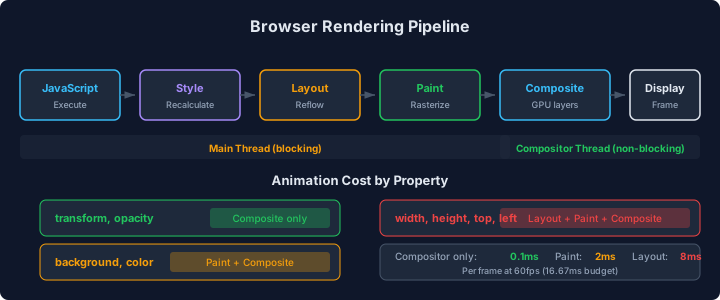
The diagram shows the seven pipeline stages as a sequence of boxes on the main thread, with the compositor thread running in parallel for transform and opacity animations. The critical insight is that stages 3 through 6 are all blocking: each must complete before the next begins. A long task in JavaScript (stage 3) pushes Layout, Paint, and Composite later, delaying the visual update. The CI gate from Chapter 2 catches Total Blocking Time regressions that indicate main thread contention during page load.
Long Tasks and Their Consequences
A long task is any main thread task that takes more than 50ms. The 50ms threshold exists because human perception research shows that delays under 50ms feel instantaneous. A 50ms task leaves 16ms of headroom for the rendering stages within a single frame. Above 50ms, the rendering stages are deferred, and the user perceives lag.
On the e-commerce product detail page, the Performance panel shows three long tasks during page load:
-
JavaScript evaluation (380ms): Parsing and executing the product detail bundle. This includes React’s module initialization, component definitions, and top-level imports of all product-related utilities.
-
Hydration (220ms): React re-attaching event handlers to server-rendered DOM. Every component’s render function runs to verify the server output matches the client output.
-
Image gallery initialization (95ms): The carousel component reads DOM dimensions, computes slide positions, and attaches touch event listeners synchronously.
Total main thread blocking during load: 695ms. During this window, the page is visible but unresponsive. If a user taps “Add to Cart” during hydration, the tap is queued until hydration completes. The perceived delay is the remainder of the hydration task plus the tap handler’s own execution time.
Breaking Up Long Tasks
The scheduler.yield() API (and its polyfill pattern using setTimeout(0)) allows a long task to voluntarily return control to the browser between chunks of work. The browser can process pending user interactions, run rendering stages, and then resume the yielded task.
// SLOW: Synchronous processing blocks the main thread for 380ms
function processProductData(products: ProductData[]): ProcessedProduct[] {
  const results: ProcessedProduct[] = [];
  for (const product of products) {
    results.push(computeDisplayData(product)); // ~8ms per product
  }
  return results;
}

// FAST: Yield to the browser every 5 items
async function processProductData(
  products: ProductData[],
): Promise<ProcessedProduct[]> {
  const results: ProcessedProduct[] = [];
  const CHUNK_SIZE = 5;

  for (let i = 0; i < products.length; i += CHUNK_SIZE) {
    const chunk = products.slice(i, i + CHUNK_SIZE);
    for (const product of chunk) {
      results.push(computeDisplayData(product));
    }

    // Yield to the browser between chunks
    if (i + CHUNK_SIZE < products.length) {
      await yieldToMain();
    }
  }
  return results;
}

function yieldToMain(): Promise<void> {
  if ("scheduler" in globalThis && "yield" in (globalThis as any).scheduler) {
    return (globalThis as any).scheduler.yield();
  }
  return new Promise((resolve) => {
    setTimeout(resolve, 0);
  });
}
The chunk size of 5 processes ~40ms of work before yielding (5 products * 8ms each), staying under the 50ms long task threshold. The total processing time increases slightly because of the yield overhead (~1-2ms per yield), but the user impact is dramatically different.
Before yielding: one 380ms long task. The page is unresponsive for 380ms. After yielding: ten ~40ms tasks with yields between them. The browser processes any pending interactions in the gaps.
Web Workers for Heavy Computation
For computation that does not need DOM access, Web Workers run JavaScript on a separate thread. The main thread remains responsive. The cost is the serialization overhead of postMessage for sending data between threads.
The e-commerce platform’s search-as-you-type feature filters and sorts 2,400 products client-side when the API is slow to respond. On the main thread, this takes 120ms per keystroke on a throttled CPU, causing visible typing lag.
// SLOW: Search filtering on the main thread
function handleSearchInput(query: string): void {
  const filtered = products.filter((p) => matchesQuery(p, query));
  const sorted = filtered.sort(
    (a, b) => relevanceScore(b, query) - relevanceScore(a, query),
  );
  setState({ results: sorted.slice(0, 50) });
}

// FAST: Search filtering in a Web Worker
// search.worker.ts
interface SearchMessage {
  type: "search";
  query: string;
  products: ProductData[];
}

interface SearchResult {
  type: "results";
  results: ProductData[];
}

self.onmessage = (event: MessageEvent<SearchMessage>) => {
  const { query, products } = event.data;

  const filtered = products.filter((p) => matchesQuery(p, query));
  const sorted = filtered.sort(
    (a, b) => relevanceScore(b, query) - relevanceScore(a, query),
  );

  const response: SearchResult = {
    type: "results",
    results: sorted.slice(0, 50),
  };
  self.postMessage(response);
};
// Main thread: search-worker-client.ts
const worker = new Worker(new URL("./search.worker.ts", import.meta.url), {
type: "module",
});
let productCache: ProductData[] | null = null;
function initializeSearch(products: ProductData[]): void {
productCache = products;
}
function handleSearchInput(
query: string,
onResults: (results: ProductData[]) => void,
): void {
if (!productCache) return;
worker.onmessage = (event: MessageEvent<SearchResult>) => {
onResults(event.data.results);
};
worker.postMessage({
type: "search",
query,
products: productCache,
});
}The Vite configuration recognizes new URL('./search.worker.ts', import.meta.url) and bundles the worker as a separate file automatically. No additional configuration needed.
The main thread cost of the worker approach: ~2ms for serializing the message and ~1ms for deserializing the result. The 120ms computation happens entirely off the main thread. INP for search keystrokes improved from 180ms to 12ms.
The limitation: postMessage uses the structured clone algorithm, which serializes data. For the 2,400-product array, serialization takes ~5ms. If the product data were larger (tens of thousands of items), the serialization cost itself would become a performance concern. The solution is to transfer the data once during initialization using Transferable objects or a SharedArrayBuffer, avoiding re-serialization on every keystroke.
For the e-commerce platform, the 5ms serialization cost is acceptable because it is paid per keystroke and the user types at most 10 characters per second (10 * 5ms = 50ms per second of serialization overhead, well within budget).
The CI bundle size gate from Chapter 2 tracks the worker bundle separately from the main bundle, preventing worker code from inflating the main thread JavaScript budget.