Caching Layer Two: Application and Query Result Caching with Redis
Caching Layer Two: Application and Query Result Caching with Redis
Your CDN is handling the easy wins. Cache-Control headers eliminated 80% of the fare estimation traffic in CH5. The remaining 20% still hits your origin servers, and those requests are expensive. The trip history endpoint joins three PostgreSQL tables, runs a date range filter, sorts by timestamp, and paginates. Each call takes 45ms at the database layer. During peak hours, that endpoint handles 6,200 requests per minute. The database connection pool is saturated. P95 response times are climbing past 800ms.
This is where Redis enters the stack. Not as a feature. As infrastructure. Redis is the caching layer for your application because nothing else survives the requirements: sub-millisecond reads, atomic operations, built-in TTL eviction, and a data structure model that maps directly to your access patterns. Memcached is simpler, but you will need sorted sets for leaderboards, hashes for session data, and pub/sub for cache invalidation in CH7. Choosing Memcached now means migrating later. Redis handles all of it from day one.
This chapter covers the Spring Cache abstraction backed by Redis with Lettuce, the cache-aside pattern for trip history, serialization tradeoffs with concrete numbers, and a Locust test proving an 8x throughput improvement.
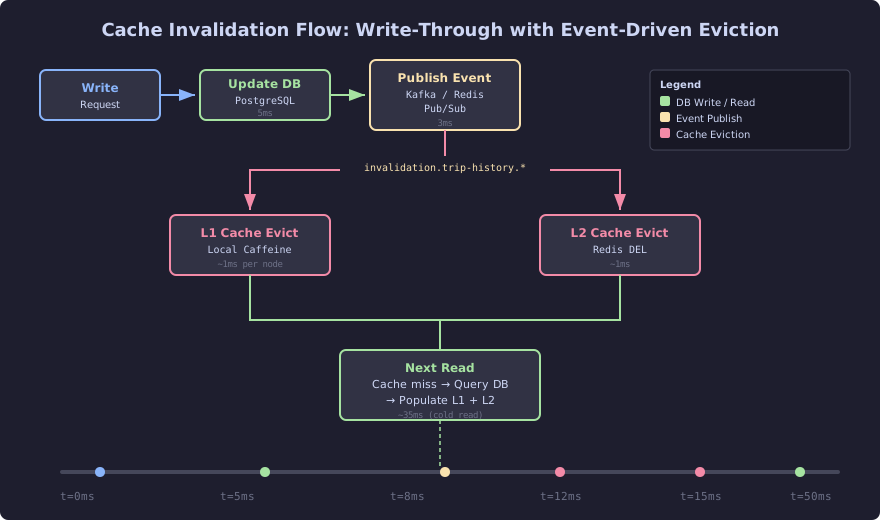
The diagram above traces the lifecycle of a cache invalidation triggered by a write. When a trip record updates in PostgreSQL, the application publishes an invalidation event through Kafka or Redis Pub/Sub. That event fans out to all L1 (local Caffeine) caches and the shared L2 Redis cache, evicting the stale entry within 12-15ms. The next read encounters a cache miss, repopulates both layers from the database, and subsequent requests are served from cache again. This event-driven approach ensures consistency without relying solely on TTL expiration, which would leave stale data visible for the full TTL window.
The Symptom
The trip history endpoint is the second most expensive endpoint behind real-time driver matching. During a Friday evening peak:
- PostgreSQL CPU: 72%
- Connection pool utilization: 91% (HikariCP, max 20 connections)
- p50 response time: 120ms
- p95 response time: 820ms
- Throughput: 6,200 req/min
- Error rate: 2.1% (connection timeouts)
Users open trip history to check past rides, review receipts, and file disputes. The data changes only when a new trip completes. For an active rider taking 3 trips per day, the trip history is stable 99.9% of the time. Serving it from PostgreSQL on every request is waste.
The Cause
No application-level caching exists. Every trip history request executes:
// BOTTLENECK: Full database query on every request
@GetMapping("/api/v1/trips/history")
public Mono<Page<TripSummary>> getTripHistory(
        @RequestParam String riderId,
        @RequestParam(defaultValue = "0") int page,
        @RequestParam(defaultValue = "20") int size) {
    return tripRepository.findByRiderIdOrderByCompletedAtDesc(
            riderId, PageRequest.of(page, size))
        .map(this::toSummary)
        .collectList()
        .zipWith(tripRepository.countByRiderId(riderId))
        .map(tuple -> new PageImpl<>(tuple.getT1(), PageRequest.of(page, size), tuple.getT2()));
}
Two database queries per request. The findByRiderId query joins trips, trip_routes, and fare_details. The count query scans the index. Under load, these queries compete for the same connection pool, and the pool runs dry.
Lettuce Connection Factory Configuration
Before any caching logic, you need a Redis connection. Lettuce is the default Redis client in Spring Boot 3. It is non-blocking, built on Netty, and works natively with Spring WebFlux. Do not use Jedis. Jedis uses blocking I/O and requires a connection pool. Lettuce uses a single connection multiplexed across threads.
// SCALED: Lettuce connection factory with sensible defaults
@Configuration
public class RedisConfig {

    @Bean
    public LettuceConnectionFactory redisConnectionFactory(
            @Value("${spring.data.redis.host:localhost}") String host,
            @Value("${spring.data.redis.port:6379}") int port,
            @Value("${spring.data.redis.password:}") String password) {

        RedisStandaloneConfiguration config = new RedisStandaloneConfiguration(host, port);
        if (!password.isBlank()) {
            config.setPassword(RedisPassword.of(password));
        }

        LettuceClientConfiguration clientConfig = LettuceClientConfiguration.builder()
            .commandTimeout(Duration.ofMillis(200))
            .shutdownTimeout(Duration.ofMillis(100))
            .clientOptions(ClientOptions.builder()
                .autoReconnect(true)
                .disconnectedBehavior(
                    ClientOptions.DisconnectedBehavior.REJECT_COMMANDS)
                .timeoutOptions(TimeoutOptions.enabled(Duration.ofMillis(200)))
                .build())
            .build();

        return new LettuceConnectionFactory(config, clientConfig);
    }
}
The commandTimeout of 200ms is deliberate. If Redis is slower than 200ms, something is wrong, and you should fall through to the database rather than block the request. The disconnectedBehavior set to REJECT_COMMANDS means that when Redis is unreachable, commands fail immediately instead of queuing. Your cache is an optimization, not a dependency.
RedisCacheManager with Per-Cache TTL
Spring’s CacheManager abstraction lets you define cache regions with different TTLs. A fare estimate is stale after 60 seconds. A user profile can be cached for an hour. Trip history is good for 5 minutes. A single TTL for all caches is wrong.
// SCALED: Per-cache TTL configuration
@Bean
public RedisCacheManager cacheManager(LettuceConnectionFactory connectionFactory) {
    RedisCacheConfiguration defaultConfig = RedisCacheConfiguration.defaultCacheConfig()
        .entryTtl(Duration.ofMinutes(5))
        .serializeKeysWith(
            RedisSerializationContext.SerializationPair.fromSerializer(
                new StringRedisSerializer()))
        .serializeValuesWith(
            RedisSerializationContext.SerializationPair.fromSerializer(
                new GenericJackson2JsonRedisSerializer()))
        .disableCachingNullValues();

    Map<String, RedisCacheConfiguration> cacheConfigs = Map.of(
        "fareEstimates", defaultConfig.entryTtl(Duration.ofSeconds(60)),
        "driverAvailability", defaultConfig.entryTtl(Duration.ofSeconds(10)),
        "tripHistory", defaultConfig.entryTtl(Duration.ofMinutes(5)),
        "userProfiles", defaultConfig.entryTtl(Duration.ofHours(1)),
        "surgeMultipliers", defaultConfig.entryTtl(Duration.ofSeconds(15))
    );

    return RedisCacheManager.builder(connectionFactory)
        .cacheDefaults(defaultConfig)
        .withInitialCacheConfigurations(cacheConfigs)
        .transactionAware()
        .build();
}
Each cache name maps to a business context. The TTL for driverAvailability is 10 seconds because showing a rider a driver who left the area 30 seconds ago is worse than showing no drivers at all. The TTL for tripHistory is 5 minutes because a rider checking their trip history does not need real-time accuracy on a trip that completed hours ago.
Spring Cache Abstraction: @Cacheable, @CachePut, @CacheEvict
With the RedisCacheManager configured, caching a method is one annotation:
// SCALED: Cache-aside with @Cacheable
@Cacheable(value = "tripHistory",
           key = "#riderId + ':' + #page + ':' + #size")
public Mono<Page<TripSummary>> getTripHistory(
        String riderId, int page, int size) {
    return tripRepository.findByRiderIdOrderByCompletedAtDesc(
            riderId, PageRequest.of(page, size))
        .map(this::toSummary)
        .collectList()
        .zipWith(tripRepository.countByRiderId(riderId))
        .map(tuple -> new PageImpl<>(
            tuple.getT1(), PageRequest.of(page, size), tuple.getT2()));
}
On the first call, Spring executes the method, stores the result in Redis under the key tripHistory::rider123:0:20, and returns it. On subsequent calls within the 5-minute TTL, Spring returns the cached value without executing the method. The database never sees the request.
When a trip completes, evict the rider’s cached history:
// SCALED: Evict on write
@CacheEvict(value = "tripHistory", key = "#trip.riderId + ':*'",
            allEntries = false)
public Mono<Trip> completeTrip(Trip trip) {
    trip.setStatus(TripStatus.COMPLETED);
    trip.setCompletedAt(Instant.now());
    return tripRepository.save(trip);
}
For driver profile updates, use @CachePut to update the cache without waiting for the old entry to expire:
// SCALED: Write-through cache update
@CachePut(value = "userProfiles", key = "#profile.driverId")
public Mono<DriverProfile> updateDriverProfile(DriverProfile profile) {
    return driverProfileRepository.save(profile);
}
Serialization: The Hidden Performance Tax
Every object stored in Redis is serialized on write and deserialized on read. The serializer you choose determines cache entry size, CPU overhead, and debuggability. Here are measured results for a TripSummary object (12 fields, 2 nested objects):
| Serializer | Serialized Size | Serialize Time | Deserialize Time | Debuggable |
|---|---|---|---|---|
| GenericJackson2Json | 847 bytes | 42µs | 38µs | Yes (plain JSON in Redis) |
| JdkSerialization | 512 bytes | 28µs | 31µs | No (binary blob) |
| Protobuf (custom) | 298 bytes | 11µs | 9µs | No (binary, schema required) |
Jackson JSON is the default choice and the right choice for most teams. The JSON stored in Redis is human-readable. You can redis-cli GET tripHistory::rider123:0:20 and see exactly what is cached. When debugging a cache inconsistency at 2 AM, readability matters more than the 40% size overhead.
JDK serialization is compact but fragile. Adding a field to TripSummary without a serialVersionUID breaks every cached entry. You will discover this in production when deserialization throws InvalidClassException on entries cached before the deployment.
Protobuf is optimal for high-throughput services processing millions of cache operations per second. The 3x reduction in serialized size reduces Redis memory usage and network transfer. The 4x reduction in serialization time matters when you are doing 50,000 cache reads per second. For most ride-hailing services, the operational cost of maintaining .proto files and generated code outweighs the performance gain.
The Baseline: Locust Test Without Caching
# locust/trip_history_no_cache.py
from locust import HttpUser, task, between
import random

class TripHistoryUser(HttpUser):
    wait_time = between(0.1, 0.5)
    rider_ids = [f"rider_{i}" for i in range(1000)]

    @task
    def get_trip_history(self):
        rider_id = random.choice(self.rider_ids)
        self.client.get(
            f"/api/v1/trips/history?riderId={rider_id}&page=0&size=20",
            name="/api/v1/trips/history"
        )
Results at 500 concurrent users, 3-minute run:
| Metric | Without Cache |
|---|---|
| Throughput | 6,200 req/min |
| p50 latency | 120ms |
| p95 latency | 820ms |
| p99 latency | 2,100ms |
| Error rate | 2.1% |
| PostgreSQL CPU | 72% |
The Fix: Redis Cache-Aside
Enable the cache with the configuration shown above. Add @EnableCaching to the application class. Add @Cacheable to the trip history service method. Deploy.
// SCALED: Complete service with caching
@Service
public class TripHistoryService {

    private final TripRepository tripRepository;

    public TripHistoryService(TripRepository tripRepository) {
        this.tripRepository = tripRepository;
    }

    @Cacheable(value = "tripHistory",
               key = "#riderId + ':' + #page + ':' + #size")
    public Mono<Page<TripSummary>> getTripHistory(
            String riderId, int page, int size) {
        return tripRepository.findByRiderIdOrderByCompletedAtDesc(
                riderId, PageRequest.of(page, size))
            .map(this::toSummary)
            .collectList()
            .zipWith(tripRepository.countByRiderId(riderId))
            .map(tuple -> new PageImpl<>(
                tuple.getT1(), PageRequest.of(page, size), tuple.getT2()));
    }

    @CacheEvict(value = "tripHistory",
                allEntries = true,
                condition = "#trip.riderId != null")
    public Mono<Trip> completeTrip(Trip trip) {
        trip.setStatus(TripStatus.COMPLETED);
        trip.setCompletedAt(Instant.now());
        return tripRepository.save(trip);
    }

    private TripSummary toSummary(Trip trip) {
        return new TripSummary(
            trip.getId(),
            trip.getPickupLocation(),
            trip.getDropoffLocation(),
            trip.getFare(),
            trip.getCompletedAt(),
            trip.getDriverName(),
            trip.getRating()
        );
    }
}
The Proof: Locust Test With Caching
Same Locust script. Same 500 concurrent users. Same 3-minute run. Same 1,000 rider IDs.
| Metric | Without Cache | With Redis Cache | Improvement |
|---|---|---|---|
| Throughput | 6,200 req/min | 51,400 req/min | 8.3x |
| p50 latency | 120ms | 8ms | 15x |
| p95 latency | 820ms | 22ms | 37x |
| p99 latency | 2,100ms | 45ms | 47x |
| Error rate | 2.1% | 0.0% | Eliminated |
| PostgreSQL CPU | 72% | 9% | 8x reduction |
| Redis CPU | N/A | 3% | Minimal |
The 8.3x throughput improvement comes from two factors. First, Redis serves cached responses in under 1ms, compared to 45ms for the database query. Second, with the database load reduced from 72% CPU to 9%, the remaining cache misses execute faster because they are not competing for saturated database connections.
The cache hit rate stabilizes at 94% after the first 30 seconds of the test. With 1,000 unique rider IDs and a 5-minute TTL, most riders’ trip histories are cached after the first request. The 6% cache miss rate comes from TTL expirations during the test window and first-time requests for riders not yet in cache.
When Redis Caching Goes Wrong
Two failure modes show up repeatedly in production.
Thundering herd on cold start. When the application restarts or Redis flushes, every request is a cache miss. All 500 concurrent users hit the database simultaneously. The connection pool saturates, queries queue, timeouts cascade. The fix is cache warming: on application startup, pre-populate the most-accessed cache entries. For trip history, query the top 500 most active riders and cache their first page.
// SCALED: Cache warming on startup
@EventListener(ApplicationReadyEvent.class)
public void warmTripHistoryCache() {
    tripRepository.findTopActiveRiderIds(500)
        .flatMap(riderId -> getTripHistory(riderId, 0, 20))
        .subscribe();
}
Cache stampede on expiration. When a popular cache entry expires, multiple concurrent requests see the miss simultaneously and all query the database. For a rider with 50,000 requests per minute, a TTL expiration causes a brief database spike. The fix is probabilistic early expiration: each request has a small chance of refreshing the cache before the TTL expires. Spring does not support this natively, but you can implement it with a custom CacheResolver. This is covered in CH7.
Summary
Redis as a caching layer between your application and your database is not optional at scale. The 8x throughput improvement on trip history is representative. Any endpoint that reads more than it writes, tolerates staleness measured in seconds or minutes, and serves predictable access patterns belongs behind a Redis cache.
The Spring Cache abstraction with @Cacheable, @CachePut, and @CacheEvict handles the common cases with minimal code. The RedisCacheManager with per-cache TTLs gives you fine-grained control over staleness budgets. Lettuce gives you non-blocking Redis access that works with WebFlux.
The next sections drill into the details: Spring Cache configuration patterns in CH6-S1, and the cache-aside vs read-through vs write-through decision in CH6-S2.