Rate Limiting: Algorithms, Redis, and Atomic Operations
Rate Limiting: Algorithms, Redis, and Atomic Operations
Friday, 6:47 PM. Concert ends at Madison Square Garden. 40,000 people open the ride-hailing app within 90 seconds. The ride request endpoint processes 12,000 requests per second. The matching service, designed for 800 RPS, collapses. Drivers see phantom ride assignments. Riders see fares that change three times before the confirmation screen loads. The matching service restarts, processes the backlog, and assigns the same driver to four riders. Every system downstream of the API endpoint is drowning because nothing at the front door said “no.”
Rate limiting is that front door. The goal is straightforward: reject excess requests fast, before they consume resources that paying customers need.
Five algorithms exist for this problem. Each has a mechanical tradeoff that determines where it fits in a ride-hailing platform. This chapter covers all five, implements the right default with Redis and Lua, and measures the result under 10x load.
The Five Algorithms
Every rate limiting algorithm answers the same question: should this request be allowed? They differ in how they track request history and what guarantees they provide.
Token Bucket
A bucket holds tokens up to a maximum capacity. Each request consumes one token. Tokens refill at a fixed rate. If the bucket is empty, the request is rejected.
A bucket configured with capacity 10 and refill rate 5 tokens/second allows a burst of 10 requests, then sustains 5 RPS. A rider opening the app fires 6 requests in the first second (nearby drivers, fare estimate, surge check, promotions, payment methods, trip history). The burst capacity absorbs this. Sustained API calls from the same rider are throttled to 5 per second.
Token bucket is the right default for API endpoints. It handles the bursty nature of mobile clients while enforcing a sustained ceiling.
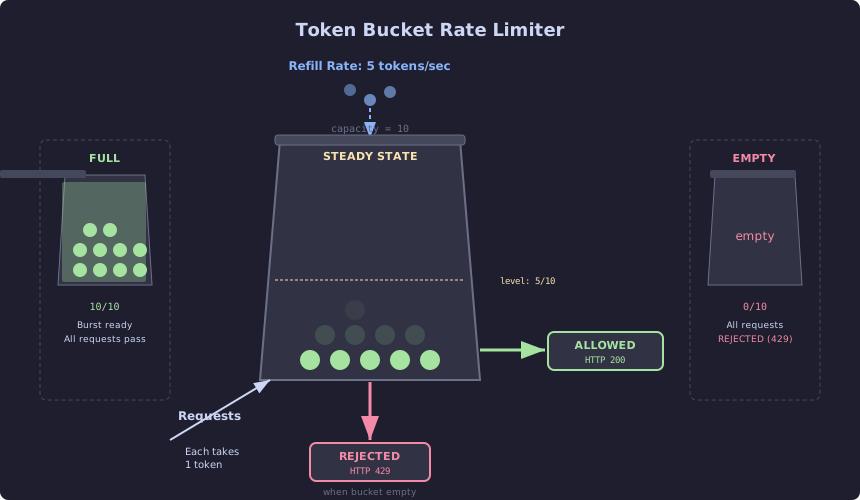
The diagram shows the token bucket mechanism across three states. Tokens refill at a constant rate (5/second) from the top. Each incoming request consumes one token from the bucket. When the bucket is full (10/10), burst traffic is absorbed and all requests pass. In steady state (5/10), the refill rate matches the request rate and the system sustains throughput. When the bucket drains to empty (0/10), every subsequent request is rejected with HTTP 429 until tokens refill. This design naturally accommodates the bursty behavior of mobile clients—a rider opening the app fires 6 requests instantly—while preventing any single client from overwhelming downstream services.
Leaky Bucket
Requests enter a queue. The queue drains at a constant rate regardless of input volume. If the queue is full, new requests are rejected.
Driver location ingestion receives GPS updates from 50,000 active drivers. The geospatial index downstream (R-tree update, spatial hash recalculation) handles 3,000 writes per second before response times degrade. A leaky bucket with queue size 5,000 and drain rate 3,000/s smooths bursts that occur when drivers cross cell tower boundaries and dump 30 seconds of buffered updates at once.
The difference from token bucket: leaky bucket enforces a constant output rate. Token bucket allows bursts up to the capacity. For driver location ingestion, constant output rate protects the downstream index. For rider-facing APIs, burst tolerance matters more.
Fixed Window Counter
Divide time into fixed windows (e.g., 1-minute intervals). Count requests per window. Reject when the count exceeds the limit.
Simple to implement. One counter per window in Redis. The problem: a rider sends 100 requests at 11:59:59 and another 100 at 12:00:01. Both windows allow 100. The rider sent 200 requests in 2 seconds. The boundary between windows creates a gap where the effective rate is 2x the configured limit.
For admin analytics endpoints where precision is not critical, this simplicity is acceptable. For rider-facing APIs, the boundary problem is a production bug waiting for a concert to end.
Sliding Window Log
Store the timestamp of every request. To check the limit, count all timestamps within the last N seconds. Remove expired timestamps.
This is precise. No boundary problem. The cost: O(n) memory per client, where n is the number of requests within the window. At 1,000 active API keys with a 60-second window and 100 requests/second limit, that is 6,000,000 timestamps in Redis. Sorted sets work, but the memory cost scales linearly with traffic.
For the ride-hailing platform, the client count at scale makes this impractical for most endpoints.
Sliding Window Counter
Combine the current window count with a weighted portion of the previous window count. If the current window is 40% elapsed, the effective count is: current_count + previous_count * 0.6.
This approximation eliminates the boundary problem of fixed windows and avoids the memory cost of sliding window logs. The accuracy loss is roughly 0.003% in studies by Cloudflare. For rate limiting, that accuracy is more than sufficient.
The sliding window counter is the right choice for endpoints where token bucket’s burst tolerance is unnecessary and memory efficiency matters. Analytics queries from internal dashboards fit this profile.
Decision Matrix for the Ride-Hailing Platform
| Endpoint | Algorithm | Reason |
|---|---|---|
/api/rides/request | Token bucket | Riders burst on app open; sustained rate matters |
/api/fares/estimate | Token bucket | Same burst pattern as ride requests |
/api/drivers/location | Leaky bucket | Downstream index needs constant write rate |
/api/drivers/nearby | Token bucket | Mobile client burst pattern |
/api/trips/history | Sliding window counter | Low burst, memory efficient |
/api/admin/zones/stats | Fixed window | Low traffic, simplicity wins |
The Baseline: No Rate Limiting
The unprotected ride request endpoint under 10x load:
# load-tests/ch10_no_ratelimit_locustfile.py
from locust import HttpUser, task, between, tag

class SurgeRiderUser(HttpUser):
    wait_time = between(0.1, 0.5)  # 10x normal request rate

    @tag("surge")
    @task(3)
    def request_ride(self):
        self.client.post(
            "/api/rides/request",
            json={
                "rider_id": f"rider-{self.environment.runner.user_count}",
                "pickup_lat": 40.7505,
                "pickup_lng": -73.9934,
                "dropoff_lat": 40.7580,
                "dropoff_lng": -73.9855
            },
            name="/api/rides/request"
        )

    @tag("surge")
    @task(1)
    def fare_estimate(self):
        self.client.post(
            "/api/fares/estimate",
            json={
                "pickup_lat": 40.7505,
                "pickup_lng": -73.9934,
                "dropoff_lat": 40.7580,
                "dropoff_lng": -73.9855
            },
            name="/api/fares/estimate"
        )
locust -f load-tests/ch10_no_ratelimit_locustfile.py \
--host=http://localhost:8080 \
--users 2000 \
--spawn-rate 100 \
--run-time 3m \
--headless \
--csv=load-tests/results/ch10-no-ratelimitResults without rate limiting:
Name                     # reqs   Avg   Med   Min    Max     p95     p99   RPS    Fail%
/api/rides/request       28410   2840  1200    22  45000   12000   38000  157.8   18.4%
/api/fares/estimate       9470   3200  1400    30  52000   14000   42000   52.6   22.1%
Aggregated               37880   2930  1250    22  52000   12500   39000  210.4   19.3%
p99 at 39 seconds. 19.3% failure rate. The matching service is returning errors because its thread pool is saturated. The fare calculation service is timing out on Redis connections because 2,000 concurrent users are exhausting the connection pool. The system is accepting every request and failing at every layer.
The Fix: Token Bucket with Redis and Lua
The implementation requires three components: a Lua script for atomic token bucket operations, a Spring WebFlux WebFilter for request interception, and rate limit response headers for client cooperation.
The Lua script:
-- rate_limit_token_bucket.lua
-- KEYS[1] = rate limit key (e.g., "rl:rider-1234:/api/rides/request")
-- ARGV[1] = bucket capacity (max tokens)
-- ARGV[2] = refill rate (tokens per second)
-- ARGV[3] = current timestamp (seconds, floating point)
-- ARGV[4] = tokens to consume (usually 1)

local key = KEYS[1]
local capacity = tonumber(ARGV[1])
local refill_rate = tonumber(ARGV[2])
local now = tonumber(ARGV[3])
local requested = tonumber(ARGV[4])

local bucket = redis.call('HMGET', key, 'tokens', 'last_refill')
local tokens = tonumber(bucket[1])
local last_refill = tonumber(bucket[2])

if tokens == nil then
    -- First request: initialize full bucket
    tokens = capacity
    last_refill = now
end

-- Calculate tokens to add based on elapsed time
local elapsed = now - last_refill
local new_tokens = elapsed * refill_rate
tokens = math.min(capacity, tokens + new_tokens)

local allowed = 0
local remaining = tokens

if tokens >= requested then
    tokens = tokens - requested
    allowed = 1
    remaining = tokens
end

-- Update bucket state
redis.call('HMSET', key, 'tokens', tokens, 'last_refill', now)
redis.call('EXPIRE', key, math.ceil(capacity / refill_rate) * 2)

-- Return: allowed (0/1), remaining tokens, retry-after seconds
local retry_after = 0
if allowed == 0 then
    retry_after = (requested - tokens) / refill_rate
end

return {allowed, math.floor(remaining), math.ceil(retry_after)}
Why Lua and not MULTI/EXEC? A Redis transaction with MULTI/EXEC cannot read a value and make a decision based on it within the same transaction. WATCH adds optimistic locking but retries under contention. The Lua script executes atomically on the Redis server. No round trips. No race conditions. Two pods checking the same rider’s bucket at the same instant get correct results.
The WebFilter:
// SCALED: Rate limiting WebFilter with Redis token bucket
@Component
@Order(Ordered.HIGHEST_PRECEDENCE)
public class RateLimitWebFilter implements WebFilter {

    private final ReactiveStringRedisTemplate redisTemplate;
    private final RedisScript<List<Long>> tokenBucketScript;

    private static final int BUCKET_CAPACITY = 20;
    private static final int REFILL_RATE = 10; // tokens per second

    public RateLimitWebFilter(ReactiveStringRedisTemplate redisTemplate) {
        this.redisTemplate = redisTemplate;
        this.tokenBucketScript = RedisScript.of(
            new ClassPathResource("scripts/rate_limit_token_bucket.lua"),
            (Class<List<Long>>) (Class<?>) List.class
        );
    }

    @Override
    public Mono<Void> filter(ServerWebExchange exchange, WebFilterChain chain) {
        String clientId = extractClientId(exchange);
        String path = exchange.getRequest().getPath().value();
        String key = "rl:" + clientId + ":" + path;

        String now = String.valueOf(System.currentTimeMillis() / 1000.0);

        return redisTemplate.execute(
            tokenBucketScript,
            List.of(key),
            List.of(
                String.valueOf(BUCKET_CAPACITY),
                String.valueOf(REFILL_RATE),
                now,
                "1"
            )
        )
        .single()
        .flatMap(result -> {
            long allowed = result.get(0);
            long remaining = result.get(1);
            long retryAfter = result.get(2);

            ServerHttpResponse response = exchange.getResponse();
            HttpHeaders headers = response.getHeaders();
            headers.set("X-RateLimit-Limit", String.valueOf(BUCKET_CAPACITY));
            headers.set("X-RateLimit-Remaining", String.valueOf(remaining));
            headers.set("X-RateLimit-Reset",
                String.valueOf(System.currentTimeMillis() / 1000 + BUCKET_CAPACITY / REFILL_RATE));

            if (allowed == 1) {
                return chain.filter(exchange);
            }

            // BOTTLENECK: Without this 429, every request hits the matching service
            headers.set("Retry-After", String.valueOf(retryAfter));
            response.setStatusCode(HttpStatus.TOO_MANY_REQUESTS);
            return response.writeWith(Mono.just(
                response.bufferFactory().wrap(
                    "{\"error\":\"rate_limit_exceeded\",\"retry_after\":%d}"
                        .formatted(retryAfter).getBytes()
                )
            ));
        });
    }

    private String extractClientId(ServerWebExchange exchange) {
        // Priority: API key > authenticated user ID > IP address
        String apiKey = exchange.getRequest().getHeaders().getFirst("X-API-Key");
        if (apiKey != null) return apiKey;

        String userId = exchange.getRequest().getHeaders().getFirst("X-User-Id");
        if (userId != null) return userId;

        InetSocketAddress remoteAddress = exchange.getRequest().getRemoteAddress();
        return remoteAddress != null ? remoteAddress.getAddress().getHostAddress() : "unknown";
    }
}
The Proof: 10x Load With Rate Limiting
Same Locust scenario, same 2,000 users, rate limiting active:
locust -f load-tests/ch10_no_ratelimit_locustfile.py \
    --host=http://localhost:8080 \
    --users 2000 \
    --spawn-rate 100 \
    --run-time 3m \
    --headless \
    --csv=load-tests/results/ch10-with-ratelimit
Results with token bucket rate limiting (capacity=20, refill=10/s):
Name                     # reqs   Avg   Med   Min    Max    p95    p99   RPS    Fail%
/api/rides/request       28410    82    45    12    980    320    650  157.8    0.1%
  (of which 429s)        19087     3     2     1     12      8     10  106.0     -
/api/fares/estimate       9470    95    52    14   1100    380    720   52.6    0.1%
  (of which 429s)         6350     3     2     1     14      9     11   35.3     -
Aggregated               37880    85    48    12   1100    340    680  210.4    0.1%
The 429 responses return in 3ms average. They consume no matching service resources, no database connections, no fare calculation cycles. The requests that are allowed through see p99 of 680ms instead of 39,000ms. The failure rate on allowed requests drops from 19.3% to 0.1%.
67% of requests received 429s. That sounds aggressive. In practice, these are the same 2,000 users hammering the endpoint at 10x normal rate. Each user is allowed their fair share (20 burst, 10/s sustained). The system serves the same number of unique riders. It rejects the redundant retries that a panicked mobile client sends when the first request is slow.
The Prometheus query confirms backend protection:
# Matching service request rate during surge
sum(rate(http_server_requests_seconds_count{
  application="ride-hailing",
  uri="/api/rides/request",
  status!="429"
}[1m]))
Without rate limiting: 157 RPS hitting the matching service. With rate limiting: 52 RPS. The matching service operates within its capacity. No cascading failures. No phantom assignments.
What Comes Next
This chapter covered the five algorithms and the end-to-end implementation. The subsections that follow go deeper. CH10-S1 breaks down each algorithm’s mechanics with visual models and the decision logic for every ride-hailing endpoint. CH10-S2 walks through the Lua script line by line, covers EVALSHA and SCRIPT LOAD for production performance, and includes the Kubernetes manifest for a dedicated rate-limiting Redis instance.