Connection Pools, Thread Pools, and Where Requests Go to Die
Connection Pools, Thread Pools, and Where Requests Go to Die
The ride-hailing platform’s trip history endpoint has a p99 of 8,400ms. The PostgreSQL query takes 45ms. The other 8,355ms is spent waiting. Waiting for a database connection. Waiting for a thread. Waiting in a queue that no log message will tell you about unless you instrument it.
Connection pools and thread pools are the two gatekeepers between your application code and the resources it needs. Size them wrong and requests queue silently. Size them too large and you exhaust the downstream resource. The correct size is a function of your workload, and the default is almost never right.
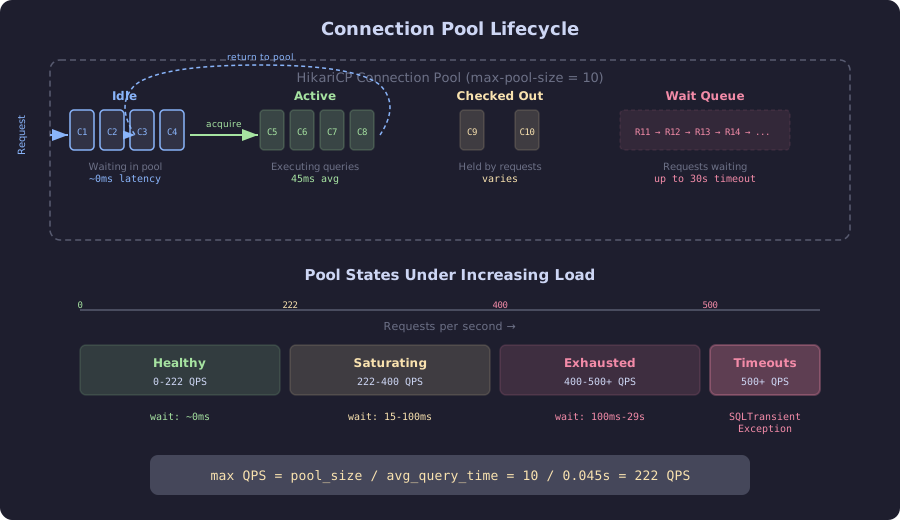
The diagram shows the four states of a connection pool at runtime. Idle connections wait in the pool for requests, active connections are executing queries against the database, and checked-out connections are held by application code. When all connections are in use, incoming requests enter the wait queue. The timeline below shows how the pool degrades under increasing load: below 222 QPS the pool is healthy with near-zero wait times, between 222-400 QPS wait times grow measurably, and above 500 QPS requests start timing out with SQLTransientConnectionException.
HikariCP: The Database Connection Pool
HikariCP is the default connection pool in Spring Boot. It manages a fixed-size pool of database connections. When application code needs a connection, it borrows one from the pool. When the code is done, it returns the connection. If all connections are in use, the request waits.
The default maximum pool size is 10. For a query that takes 45ms, a pool of 10 supports $10 / 0.045 = 222$ queries per second. At 223 queries per second, the queue starts growing. At 300 queries per second, every request waits an average of $(300 - 222) / 222 \times 45 = 15.8\text{ms}$. At 500 queries per second, the wait time exceeds the query time.
# BOTTLENECK: Default HikariCP configuration
spring:
  datasource:
    hikari:
      maximum-pool-size: 10 # Default, almost never correct
      minimum-idle: 10
      connection-timeout: 30000 # 30 seconds before giving up
      idle-timeout: 600000
      max-lifetime: 1800000
The connection timeout of 30 seconds is the maximum time a request will wait for a connection before throwing an exception. Under heavy load, requests wait 29 seconds, get a connection, execute a 45ms query, and return a response after 29 seconds. The client has long since timed out. The request was pointless but consumed database resources anyway.
Lettuce: The Redis Connection
Lettuce, the default Redis client in Spring Boot, uses a single connection for all commands by default. It multiplexes commands over one TCP connection using Redis’s pipelining. This works because Redis is single-threaded and processes commands sequentially.
For most workloads, a single Lettuce connection handles 50,000+ commands per second. The bottleneck is not the connection. It is the serialization/deserialization on the Java side.
When Lettuce’s single-connection multiplexing becomes a bottleneck:
// BOTTLENECK: Large MGET for driver locations saturates the single connection
public Flux<DriverLocation> getDriverLocations(List<String> driverIds) {
    // MGET with 500 keys: 15ms on Redis, but blocks the single connection
    // for 15ms. All other Redis commands queue behind it.
    List<String> keys = driverIds.stream()
        .map(id -> "driver:location:" + id)
        .toList();
    return reactiveRedisTemplate.opsForValue().multiGet(keys);
}
For the ride-hailing platform, the driver matching service issues MGET with 200-500 keys during peak matching cycles. This blocks the shared connection for 8-15ms, stalling all other Redis operations.
The fix: a dedicated Lettuce connection pool for the matching service, separate from the general-purpose connection.
// SCALED: Dedicated connection pool for heavy operations
@Configuration
public class RedisPoolConfig {

    @Bean("matchingRedisTemplate")
    public ReactiveRedisTemplate<String, String> matchingRedisTemplate() {
        LettucePoolingClientConfiguration poolConfig =
            LettucePoolingClientConfiguration.builder()
                .poolConfig(new GenericObjectPoolConfig<>() {{
                    setMaxTotal(8);   // 8 connections for matching
                    setMinIdle(4);
                    setMaxIdle(8);
                }})
                .commandTimeout(Duration.ofMillis(500))
                .build();

        LettuceConnectionFactory factory = new LettuceConnectionFactory(
            new RedisStandaloneConfiguration("redis", 6379),
            poolConfig);
        factory.afterPropertiesSet();

        return new ReactiveRedisTemplate<>(factory,
            RedisSerializationContext.string());
    }
}
The Sizing Formula
The PostgreSQL wiki suggests: connections = (core_count * 2) + effective_spindle_count. For a 4-core database server with SSDs (no spindle concept), that formula gives 8-10. This is a starting point.
The better formula accounts for the actual workload:
$$\text{pool size} = \frac{\text{target QPS} \times \text{avg query duration (s)}}{\text{concurrency factor}}$$
For the ride-hailing platform:
- Target: 500 fare calculation queries per second
- Average query duration: 45ms (0.045s)
- Concurrency factor: 0.8 (leave 20% headroom)
$$\text{pool size} = \frac{500 \times 0.045}{0.8} = 28.1 \approx 30$$
But PostgreSQL has a maximum connections limit too. The default is 100. With 6 application pods each wanting 30 connections, that is 180 connections, exceeding the limit. Either increase max_connections on PostgreSQL (with memory cost, each connection uses ~5-10MB) or use PgBouncer as a connection proxy.
For the ride-hailing platform, 30 connections per pod with 6 pods and PgBouncer in front of PostgreSQL:
# SCALED: Right-sized HikariCP configuration
spring:
  datasource:
    hikari:
      maximum-pool-size: 30
      minimum-idle: 10
      connection-timeout: 5000 # Fail fast at 5 seconds, not 30
      idle-timeout: 300000
      max-lifetime: 1200000
      leak-detection-threshold: 10000 # Alert if connection held > 10s
The connection timeout is now 5 seconds instead of 30. If a request cannot get a connection in 5 seconds, something is seriously wrong, and waiting another 25 seconds will not fix it. Fail fast, return a 503, and let the client retry or the circuit breaker engage.