The Request Lifecycle Under Load: DNS, Load Balancer, JVM, Database, and Back
The Request Lifecycle Under Load
A rider opens the app and taps “Get Fare Estimate.” The response arrives 120ms later. During Friday evening surge, the same tap takes 4,200ms. The code did not change. The infrastructure did not change. The load changed.
To understand why, trace the request through every layer it touches, measure the time spent in each, and watch how each layer degrades differently as concurrent requests increase.
The Layers
A single fare estimate request passes through seven layers before the rider sees a number:
- DNS resolution (0-50ms, usually cached)
- Load balancer (1-5ms routing, potentially seconds in queue)
- TLS termination (0ms if session resumed, 10-50ms for full handshake)
- Spring WebFlux handler (< 1ms to dispatch, but blocked if event loop is saturated)
- Redis cache check (1-3ms on hit, plus 5-800ms for compute on miss)
- PostgreSQL query (5-50ms if connection available, seconds if pool exhausted)
- Response serialization and network return (1-10ms for JSON, more for large payloads)
At low load, the total is dominated by the application logic in layer 5 and 6. At high load, the total is dominated by waiting: waiting for a connection from the pool, waiting for the event loop to pick up the request, waiting for the load balancer queue to drain.
The critical insight: under load, the bottleneck migrates. At 100 RPS, the database query is the slow part. At 1,000 RPS, the connection pool wait is the slow part. At 5,000 RPS, the load balancer queue is the slow part. Optimizing the wrong layer is worse than optimizing nothing because it gives the team false confidence that the problem is solved.
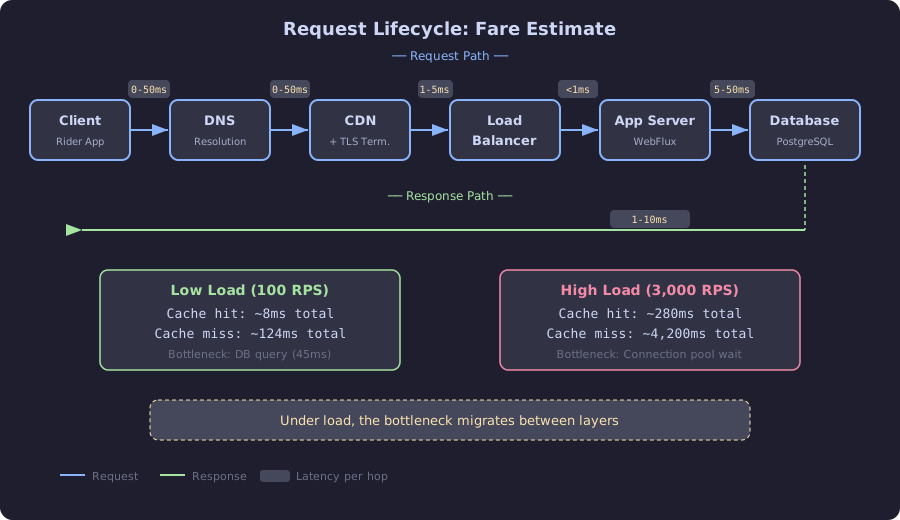
This diagram traces the full request lifecycle for a fare estimate. Each box represents a layer the request must pass through, with latency annotations showing the time cost per hop. The bottom comparison highlights the key insight: at low load the total round-trip is dominated by compute (cache miss calculations and database queries), but at high load it is dominated by waiting in queues. Understanding which layer is the current bottleneck determines where optimization effort should be directed.
Instrumenting Every Hop
Spring Boot Actuator and Micrometer provide most of the instrumentation for free. For the layers they do not cover, add custom metrics:
// SCALED: Instrumentation for every layer of the request lifecycle
@Configuration
public class RequestLifecycleMetrics {

    @Bean
    public WebFilter requestTimingFilter(MeterRegistry registry) {
        Timer handlerTimer = Timer.builder("request.handler.duration")
            .description("Time from request arrival to handler dispatch")
            .publishPercentiles(0.5, 0.95, 0.99)
            .register(registry);

        return (exchange, chain) -> {
            Timer.Sample sample = Timer.start(registry);
            return chain.filter(exchange)
                .doOnTerminate(() -> sample.stop(handlerTimer));
        };
    }
}
For Redis and PostgreSQL, Micrometer auto-instruments Lettuce and HikariCP:
# application.yml
management:
  metrics:
    distribution:
      percentiles-histogram:
        lettuce.command.completion: true
        hikaricp.connections.acquire: true
        http.server.requests: true
The resulting Prometheus metrics:
# Time waiting for a database connection (should be < 5ms)
histogram_quantile(0.99, sum(rate(hikaricp_connections_acquire_seconds_bucket[5m])) by (le))

# Redis command latency (should be < 3ms for GET/SET)
histogram_quantile(0.99, sum(rate(lettuce_command_completion_seconds_bucket{command="GET"}[5m])) by (le))

# Total request latency as seen by the client
histogram_quantile(0.99, sum(rate(http_server_requests_seconds_bucket{uri="/api/fares/estimate"}[5m])) by (le))
The Time Budget
At 100 RPS (low load), the fare estimate request spends its time:
| Layer | Duration | % of total |
|---|---|---|
| DNS | 0ms (cached) | 0% |
| Load balancer | 2ms | 1.5% |
| TLS | 0ms (resumed) | 0% |
| Handler dispatch | 0.5ms | 0.4% |
| Redis GET (cache hit) | 2ms | 1.5% |
| PostgreSQL query (cache miss, 5% of requests) | 35ms | 26% (when it runs) |
| Surge calculation (cache miss) | 80ms | 60% (when it runs) |
| Response serialization | 1ms | 0.8% |
| Network return | 3ms | 2.3% |
| Total (cache hit) | 8ms | |
| Total (cache miss) | 124ms |
At 3,000 RPS (high load), the same request:
| Layer | Duration | % of total |
|---|---|---|
| DNS | 0ms | 0% |
| Load balancer queue | 45ms | 2.5% |
| TLS | 0ms | 0% |
| Handler dispatch | 12ms (event loop backlog) | 0.7% |
| Redis GET | 8ms (Redis CPU saturated) | 0.4% |
| PostgreSQL connection wait | 1,200ms (pool exhausted) | 66% |
| PostgreSQL query | 35ms | 1.9% |
| Surge calculation | 80ms | 4.4% |
| Response serialization | 2ms | 0.1% |
| Network return | 5ms | 0.3% |
| Total (cache miss at high load) | 1,812ms |
The PostgreSQL connection wait went from 0ms to 1,200ms. The query itself is still 35ms. The connection pool, not the query, is the bottleneck. Optimizing the SQL query would save 15ms out of an 1,812ms request. Fixing the connection pool (Chapter 4) saves 1,170ms.
Locust Test: Bottleneck Migration
This Locust test demonstrates bottleneck migration by ramping load and watching which metric degrades first:
# load-tests/lifecycle_locustfile.py
from locust import HttpUser, task, between, LoadTestShape

class FareEstimateUser(HttpUser):
    wait_time = between(0.5, 1.5)

    @task
    def estimate_fare(self):
        self.client.post(
            "/api/fares/estimate",
            json={
                "pickup_lat": 40.7128,
                "pickup_lng": -74.0060,
                "dropoff_lat": 40.7580,
                "dropoff_lng": -73.9855
            },
            name="/api/fares/estimate"
        )


class StepLoadShape(LoadTestShape):
    """Ramp from 50 to 500 users in steps of 50 every 60 seconds."""
    stages = [
        {"duration": 60,  "users": 50,  "spawn_rate": 10},
        {"duration": 120, "users": 100, "spawn_rate": 10},
        {"duration": 180, "users": 200, "spawn_rate": 10},
        {"duration": 240, "users": 300, "spawn_rate": 10},
        {"duration": 300, "users": 400, "spawn_rate": 10},
        {"duration": 360, "users": 500, "spawn_rate": 10},
    ]

    def tick(self):
        run_time = self.get_run_time()
        for stage in self.stages:
            if run_time < stage["duration"]:
                return (stage["users"], stage["spawn_rate"])
        return None
The output at each step shows the bottleneck migrating:
Step 1 (50 users):   p99=  180ms  Bottleneck: PostgreSQL query (35ms of 180ms)
Step 2 (100 users):  p99=  340ms  Bottleneck: PostgreSQL query + some pool wait
Step 3 (200 users):  p99= 1200ms  Bottleneck: Connection pool wait (900ms of 1200ms)
Step 4 (300 users):  p99= 2800ms  Bottleneck: Connection pool exhausted
Step 5 (400 users):  p99= 4500ms  Bottleneck: Connection pool + event loop backlog
Step 6 (500 users):  p99= 8200ms  Bottleneck: Everything is queuing
The inflection point is between step 2 and step 3. At 100 users, the system is handling the load with moderate latency. At 200 users, the connection pool becomes the dominant factor. Every subsequent chapter in Part II targets a specific layer in this breakdown and fixes it.