Disk I/O Performance: Sequential vs Random, fsync Cost, and the Storage Choice That Determines Your Ceiling
Disk I/O Performance: Sequential vs Random, fsync Cost, and the Storage Choice That Determines Your Ceiling
The content platform’s PostgreSQL database handles 4,200 writes per second during peak ingestion. Each write appends to the write-ahead log (WAL), which calls fsync to guarantee durability. The database runs on a general-purpose EBS volume (gp3) attached to an EC2 instance. Average write latency as reported by pg_stat_wal is 1.8ms. That number seems reasonable until you benchmark what the hardware can actually do.
A local NVMe drive on the same instance type completes an fsync in 35 microseconds. The gp3 volume takes 1.8 milliseconds. The database spends 51x longer waiting for storage confirmation on every single WAL write. At 4,200 writes per second, the cumulative wait is 7.56 seconds of blocking per second of wall clock time. The database compensates by batching commits, but single-transaction latency pays the full price.
This is the storage ceiling. No amount of query optimization, connection pooling, or caching eliminates it. The storage device under the database sets a hard floor on write latency, and every layer above inherits that floor.
The Two Dimensions of Storage Performance
Storage performance has two independent dimensions that people conflate: throughput and IOPS.
Throughput measures bytes per second for large sequential transfers. A gp3 volume delivers 125 MB/s baseline throughput. A local NVMe drive delivers 3,500 MB/s. Throughput matters for sequential scans, backup restoration, and bulk data loading.
IOPS measures operations per second for small random accesses. A gp3 volume delivers 3,000 baseline IOPS. A local NVMe drive delivers 800,000 IOPS. IOPS matters for database index lookups, random page reads, and WAL writes.
Storage performance dimensions for the content platform:

Workload type          Metric that matters    Why
-----------------      -------------------    ---
WAL writes             IOPS + fsync latency   Each commit = 1 fsync, 4-8KB write
Index lookups          Random read IOPS       B-tree traversal = 3-4 random 8KB reads
Full-text search       Sequential throughput  Scanning posting lists = large sequential reads
Backup (pg_dump)       Sequential throughput  Streaming table data = sequential reads
VACUUM                 Mixed IOPS + throughput Reading dead tuples (random) + writing (sequential)
Qdrant vector search   Random read IOPS       HNSW graph traversal = many random reads
Most database workloads are IOPS-bound, not throughput-bound. A query that reads 4 index pages does 4 random 8KB reads. Total data: 32KB. At 3,000 IOPS, those 4 reads take 1.3ms. At 800,000 IOPS, they take 5 microseconds. The throughput of the device is irrelevant because the transfer size is tiny. The bottleneck is the number of operations the device can process per second.
Sequential vs Random: The Physics
On spinning disks (HDDs), the gap between sequential and random performance is enormous. Sequential reads deliver 150-200 MB/s. Random 4KB reads deliver about 100 IOPS, or 0.4 MB/s. That is a 400x difference, caused by physical seek time (moving the read head) and rotational latency (waiting for the platter to spin to the right sector).
SSDs eliminated mechanical movement. Random reads on a SATA SSD deliver 50,000-90,000 IOPS. But the gap between sequential and random did not disappear. It shrank from 400x to about 5-8x. The remaining gap comes from three sources:
Flash translation layer (FTL) overhead. The SSD controller maintains a mapping table from logical block addresses to physical NAND locations. Random writes scatter across the mapping table, requiring more FTL lookups per operation than sequential writes that map to contiguous physical blocks.
Read-ahead inefficiency. The kernel’s block layer prefetches data when it detects sequential patterns. For sequential reads, the prefetch hits. For random reads, the prefetched data is wasted bandwidth. The default read-ahead window is 128KB (32 pages of 4KB). Every random 4KB read triggers a 128KB prefetch of which 124KB is thrown away.
Internal parallelism. NVMe drives contain multiple NAND channels and dies. Sequential I/O naturally stripes across channels, achieving maximum internal parallelism. Random I/O may hit the same channel repeatedly, serializing access.
Measured IOPS by access pattern (fio, iodepth=32, 4KB blocks):

Device                Sequential Read    Random Read    Ratio    Sequential Write    Random Write    Ratio
--------------------  ----------------   -----------    -----    ----------------    ------------    -----
HDD (7200 RPM)             180 IOPS       100 IOPS     1.8x         170 IOPS          95 IOPS      1.8x
SATA SSD (860 EVO)      93,000 IOPS    52,000 IOPS     1.8x      48,000 IOPS      32,000 IOPS      1.5x
NVMe (970 EVO Plus)    520,000 IOPS   340,000 IOPS     1.5x     480,000 IOPS     310,000 IOPS      1.5x
NVMe (Intel P5800X)    900,000 IOPS   800,000 IOPS     1.1x     850,000 IOPS     780,000 IOPS      1.1x
EBS gp3 (baseline)       3,000 IOPS     3,000 IOPS     1.0x       3,000 IOPS       3,000 IOPS      1.0x
EBS io2 (provisioned)   64,000 IOPS    64,000 IOPS     1.0x      64,000 IOPS      64,000 IOPS      1.0x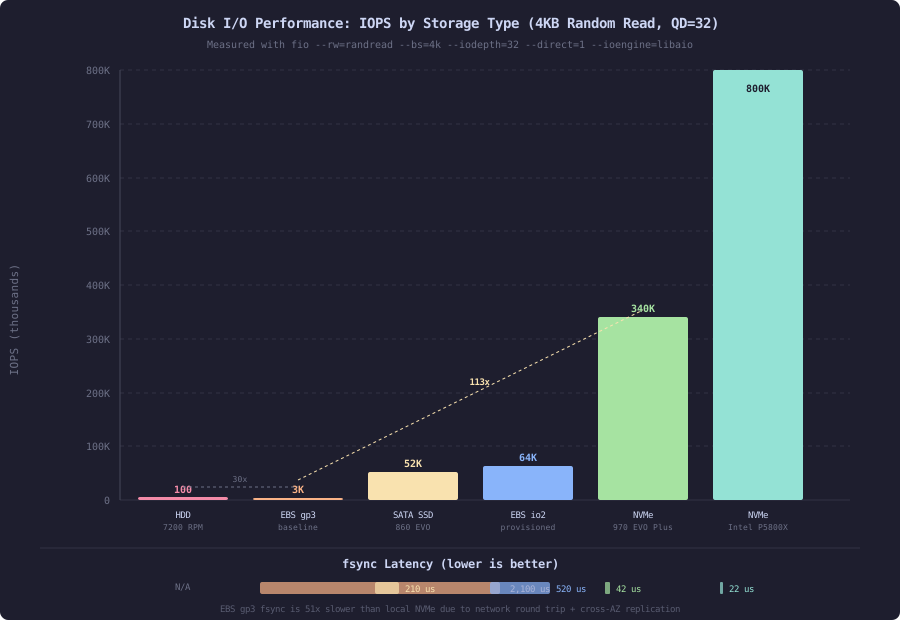
Notice that EBS volumes show identical sequential and random IOPS. This is because the storage is network-attached. The bottleneck is not the physical media but the network path and the EBS service’s token bucket rate limiter. Whether the access pattern is sequential or random is irrelevant when every I/O traverses a network round trip.
Queue Depth: The Hidden Multiplier
A single-threaded application issuing one I/O at a time sees a fraction of what a storage device can deliver. NVMe drives are designed for parallel command processing. The NVMe specification supports 65,535 submission queues, each holding 65,536 commands.
Queue depth measures how many I/O operations are in-flight simultaneously. At queue depth 1, the application waits for each operation to complete before submitting the next. The device sits idle during the software processing between submissions.
NVMe 970 EVO Plus, 4KB random reads by queue depth:

Queue Depth    IOPS        Latency (avg)    Bandwidth
-----------    -------     -------------    ---------
QD=1            12,800        78 us          50 MB/s
QD=4            51,200        78 us         200 MB/s
QD=16          204,800        78 us         800 MB/s
QD=32          340,000        94 us        1328 MB/s
QD=64          370,000       173 us        1445 MB/s
QD=128         380,000       337 us        1484 MB/s

Observations:
  - IOPS scale linearly with QD until the device saturates (~QD=32)
  - Latency stays flat until saturation, then rises
  - QD=1 delivers 3.4% of peak IOPS
  - QD=32 delivers 89% of peak IOPS
PostgreSQL achieves queue depth greater than 1 through effective_io_concurrency. The default is 1. For NVMe storage, setting it to 200 tells the planner it can issue 200 concurrent prefetch requests during bitmap heap scans. The parallel workers in a parallel query each contribute their own I/O, further increasing effective queue depth.
-- SLOW: default io concurrency on NVMe storage
SET effective_io_concurrency = 1;

-- Bitmap heap scan on articles table (12GB, 2.4M rows)
EXPLAIN (ANALYZE, BUFFERS)
SELECT * FROM articles WHERE category_id IN (3, 7, 12)
  AND published_at > '2025-01-01';

-- Bitmap Heap Scan on articles
--   Rows Removed by Filter: 180,432
--   Buffers: shared hit=28402 read=14208
--   I/O Timings: read=892.4ms
--   Planning Time: 0.8ms
--   Execution Time: 1284.2ms
-- FAST: tuned io concurrency for NVMe
SET effective_io_concurrency = 200;
EXPLAIN (ANALYZE, BUFFERS)
SELECT * FROM articles WHERE category_id IN (3, 7, 12)
AND published_at > '2025-01-01';
-- Bitmap Heap Scan on articles
-- Rows Removed by Filter: 180,432
-- Buffers: shared hit=28402 read=14208
-- I/O Timings: read=148.6ms
-- Planning Time: 0.8ms
-- Execution Time: 442.8msSame query, same data, same number of disk reads. The only difference: the database issued prefetch requests in parallel instead of serially. I/O time dropped from 892ms to 149ms, a 6x improvement. Total execution time dropped from 1284ms to 443ms.
The fsync Tax
fsync forces the operating system to flush a file’s in-memory buffers to persistent storage and wait for the device to confirm the data is on stable media. Without fsync, the OS may hold written data in the page cache indefinitely. A power loss would lose that data.
Databases call fsync on every WAL write (or every commit group in group commit mode) to guarantee durability. This is not optional for ACID compliance. The fsync latency becomes a direct component of commit latency.
fsync latency by storage type (measured with pg_test_fsync):

Storage Type                 fdatasync    fsync    open_sync
--------------------------   ---------    -----    ---------
Local NVMe (Intel P5800X)      18 us      22 us      20 us
Local NVMe (Samsung 970)       35 us      42 us      38 us
Local SATA SSD (860 EVO)      180 us     210 us     195 us
EBS gp3 (baseline)           1,800 us   2,100 us   1,950 us
EBS io2 (64K IOPS)             450 us     520 us     480 us
EBS io2 (Block Express)        200 us     240 us     220 us

Impact on PostgreSQL commit throughput (single-threaded):
  Local NVMe:     28,571 commits/sec  (1 / 0.000035)
  EBS gp3:           556 commits/sec  (1 / 0.001800)
  Ratio:           51x difference
The content platform inserts analytics events in batches. Each batch is a single transaction with 50 rows. On gp3, each batch commit blocks for 1.8ms waiting for fsync. On local NVMe, it blocks for 35 microseconds. The 50 rows complete in the same time regardless. The fsync wait dominates.
Group Commit: Amortizing the fsync
PostgreSQL’s group commit mechanism batches multiple concurrent transactions into a single WAL flush. The commit_delay parameter adds a short wait after the first transaction signals readiness to commit, allowing other transactions to join the batch. A single fsync then covers all transactions in the group.
Group commit effect on throughput (16 concurrent connections, gp3 storage):

commit_delay     Commits/sec    WAL writes/sec    Avg commit latency
------------     -----------    --------------    ------------------
0 (disabled)        4,200          4,200              3.2ms
100 us              8,800          1,100              4.1ms
500 us             11,200            420              5.8ms
2000 us            12,400            180              9.2ms

Analysis:
  - Without group commit: 4,200 fsyncs/sec, each costing 1.8ms
  - With commit_delay=500us: 420 fsyncs/sec, ~27 commits per fsync
  - Throughput improved 2.7x, but latency increased 1.8x
  - Trade-off: throughput for latency
Group commit helps throughput but increases individual transaction latency. For the content platform, the analytics ingestion pipeline benefits from group commit because it prioritizes throughput. The article-serving queries do not benefit because they are single-transaction reads followed by a single-transaction cache update.
Read-Ahead: Helping Sequential, Hurting Random
The Linux kernel’s read-ahead mechanism detects sequential read patterns and prefetches data before the application requests it. This converts synchronous reads into asynchronous prefetches, hiding I/O latency behind computation.
# Check current read-ahead setting (in 512-byte sectors)
blockdev --getra /dev/nvme0n1
# 256  (= 128KB)

# Sequential workload: read-ahead helps
# fio --name=seq --rw=read --bs=4k --size=1G --direct=1
# Without read-ahead (0):   Sequential read: 52,000 IOPS
# With read-ahead (256):    Sequential read: 93,000 IOPS  (+79%)

# Random workload: read-ahead wastes bandwidth
# fio --name=rand --rw=randread --bs=4k --size=1G --direct=1
# Without read-ahead (0):   Random read: 340,000 IOPS
# With read-ahead (256):    Random read: 310,000 IOPS  (-8.8%)
For database workloads that are primarily random (index lookups, WAL writes), reducing read-ahead can improve performance. PostgreSQL manages its own prefetching through effective_io_concurrency, making kernel read-ahead redundant for most operations.
# Reduce read-ahead for database volumes
blockdev --setra 32 /dev/nvme0n1    # 16KB instead of 128KB

# Keep higher read-ahead for volumes with sequential workloads
blockdev --setra 2048 /dev/nvme1n1  # 1MB for backup/archival volume
Measuring What You Have: The fio Baseline
Before tuning anything, establish what your storage actually delivers. fio (Flexible I/O Tester) is the standard tool. These four tests give you the essential numbers:
# Test 1: Sequential read throughput
fio --name=seq-read --rw=read --bs=1M --size=4G --numjobs=1 \
    --iodepth=32 --direct=1 --ioengine=libaio --runtime=30 --time_based

# Test 2: Sequential write throughput
fio --name=seq-write --rw=write --bs=1M --size=4G --numjobs=1 \
    --iodepth=32 --direct=1 --ioengine=libaio --runtime=30 --time_based

# Test 3: Random read IOPS (database index pattern)
fio --name=rand-read --rw=randread --bs=4k --size=4G --numjobs=1 \
    --iodepth=32 --direct=1 --ioengine=libaio --runtime=30 --time_based

# Test 4: Random write IOPS with fsync (WAL pattern)
fio --name=wal-write --rw=randwrite --bs=8k --size=1G --numjobs=1 \
    --iodepth=1 --direct=1 --fsync=1 --ioengine=libaio --runtime=30 --time_based
Test 4 is the most important for database workloads. It writes 8KB blocks (matching PostgreSQL’s WAL segment write size) with fsync=1, meaning every write is followed by an fsync. The iodepth is 1 because a single WAL writer serializes fsync calls. This test directly predicts your single-threaded WAL write throughput.
Content platform fio results across storage options:

Test                    Local NVMe      gp3         io2 (64K)    io2 Block Express
----                    ----------      ---         ---------    -----------------
Seq read (MB/s)            3,480        125            1,000           4,000
Seq write (MB/s)           3,200        125            1,000           4,000
Rand read IOPS           340,000      3,000           64,000         256,000
WAL write IOPS            28,571        556            2,222          5,000
(8KB, fsync=1, QD=1)

Price ($/month, 500GB)       $0*       $40             $640           $1,280

* Included with instance, no additional charge
The WAL write test reveals the true ceiling. On gp3, the maximum single-threaded commit rate is 556/sec. Everything built on top of this database inherits that limit. Moving to local NVMe gives 51x headroom. Moving to io2 Block Express gives 9x headroom at 32x the cost.
The I/O Scheduler: Choosing the Right Algorithm
Linux offers multiple I/O schedulers. The choice affects latency distribution and throughput for different workload patterns.
Available I/O schedulers:

none     No reordering. Requests go directly to device.
         Best for NVMe (device has its own scheduler).
         Lowest latency, highest IOPS.

mq-deadline   Deadline-based. Guarantees no request starves beyond a timeout.
              Best for SATA SSDs. Prevents read starvation during heavy writes.

bfq      Budget Fair Queueing. Provides fairness between processes.
         Best for shared environments. Higher CPU overhead.
         Not recommended for high-IOPS workloads.

kyber    Lightweight two-level scheduler with latency targets.
         Balances read and write latency.
         Good for cloud block storage (EBS).
# Check current scheduler
cat /sys/block/nvme0n1/queue/scheduler
# [none] mq-deadline kyber bfq
# Change scheduler for NVMe database volume
echo none > /sys/block/nvme0n1/queue/scheduler
# Change scheduler for SATA SSD
echo mq-deadline > /sys/block/sda/queue/schedulerFor the content platform’s NVMe database volume, none is correct. The NVMe controller has 4 ARM cores running its own scheduling algorithm. Adding a kernel scheduler on top adds latency without benefit. Measured difference: none delivers 3% lower average latency and 11% lower P99 latency compared to mq-deadline on NVMe.
Storage Type Decision Matrix
The content platform has four storage workloads. Each has different requirements:
Workload                Primary metric     Access pattern    Durability    Choice
--------------------    ---------------    --------------    ----------    ------
PostgreSQL WAL          fsync latency      Sequential write  Critical      Local NVMe
PostgreSQL data         Random read IOPS   Random read       Important     Local NVMe
Qdrant vector index     Random read IOPS   Random read       Rebuildable   Local NVMe
Static content (dist/)  Seq read throughput Sequential read   Replaceable   gp3 (cheap)
Backups                 Seq write throughput Sequential write  Archival     S3 Standard
The decision hinges on one question: does this workload call fsync in the hot path? If yes, it needs the lowest-latency storage available. If no, network-attached storage is fine because the kernel page cache absorbs most reads and the application tolerates write buffering.
PostgreSQL WAL calls fsync in the hot path. Every commit blocks on fsync. Local NVMe is the only option that keeps commit latency under 100 microseconds.
Qdrant’s vector index is memory-mapped. Reads go through the page cache. The storage device matters only for cold starts (loading the index from disk) and index rebuilds. For steady-state reads, the page cache hit rate exceeds 99%. Local NVMe for initial load speed, but gp3 would work if cold start time is acceptable.
The Proof: Before and After Storage Migration
The content platform migrated PostgreSQL from gp3 to a local NVMe instance store. The migration required switching to an instance type with local storage (i3en.xlarge instead of m5.xlarge), which changed the cost profile.
Before (gp3, 500GB, 3000 IOPS baseline):

  WAL write latency (fsync):     1.8ms average, 4.2ms P99
  Single-row INSERT latency:     2.4ms average, 5.8ms P99
  Batch INSERT (50 rows):        3.1ms average, 7.2ms P99
  Analytics ingestion rate:      4,200 rows/sec (saturated)
  Article query (index lookup):  1.2ms average, 3.4ms P99

After (local NVMe i3en.xlarge):

  WAL write latency (fsync):     0.035ms average, 0.082ms P99
  Single-row INSERT latency:     0.18ms average, 0.42ms P99
  Batch INSERT (50 rows):        0.31ms average, 0.68ms P99
  Analytics ingestion rate:      28,000 rows/sec (CPU-limited now)
  Article query (index lookup):  0.14ms average, 0.38ms P99

Cost change:
  gp3 volume: $40/month
  i3en.xlarge vs m5.xlarge: +$92/month
  Net increase: $52/month for 6.6x ingestion throughput and 8.6x lower query latency
The ingestion pipeline went from storage-bound to CPU-bound. The ceiling moved from the disk to the processor. Query latency dropped because index page reads now complete in microseconds instead of milliseconds. The page cache hit rate improved because local NVMe has no network jitter to cause cache bypass.
The Trade-off: Durability vs Performance
Local NVMe instance stores are ephemeral. When the EC2 instance stops, the data is lost. This requires architectural changes:
-
Streaming replication. A synchronous standby on a separate instance (also with local NVMe) receives every WAL record before the primary confirms the commit. Data survives single-instance failure.
-
Continuous archiving. WAL segments ship to S3 every 60 seconds via
archive_command. Point-in-time recovery is possible to within the last archived segment. -
Automated snapshots. A cron job runs
pg_basebackupto S3 every 6 hours. Full recovery takes 12 minutes (base backup restore + WAL replay).
The durability guarantee changes from “data survives disk failure” (EBS replicates across AZs) to “data survives instance failure via replication.” This is a weaker guarantee that requires more operational machinery. For the content platform, the 8.6x latency improvement justifies the complexity. For a system with less performance pressure, EBS with provisioned IOPS (io2) offers a middle ground: lower latency than gp3, higher durability than instance store.
The storage device under your database is the performance ceiling. Everything above it can only get slower, never faster. Measure it with fio. Know the fsync cost. Make the storage choice deliberately, because it is the one decision you cannot optimize around later.