Connection and Transaction Overhead: The Cost Per Query That Accumulates at Scale
Connection and Transaction Overhead: The Cost Per Query That Accumulates at Scale
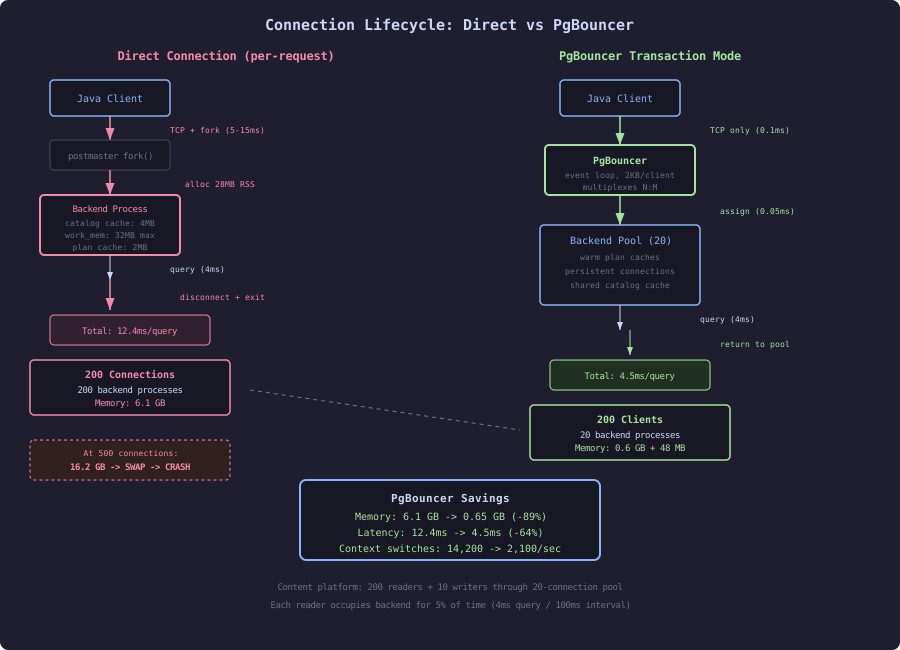
PostgreSQL forks a new OS process for every client connection. Each process allocates its own memory for query parsing, plan caching, sort buffers, and work memory. At 10 connections, this is invisible. At 500 connections during a traffic spike, it consumes 4GB of RAM and the OS scheduler thrashes through context switches. The content platform serves 200 concurrent readers and 10 concurrent writers. Without pooling, that requires 210 PostgreSQL backend processes. With PgBouncer in transaction mode, 20 backends handle the same load.
The Process-Per-Connection Model
When a client connects to PostgreSQL:
postmasterprocess accepts the TCP connectionpostmasterforks a new backend process- Backend allocates private memory:
work_mem, catalog caches, plan cache - Backend authenticates the client (password hash, SSL handshake)
- Backend is ready for queries
The fork takes 2-5ms on Linux (COW page tables). Authentication adds 1-10ms depending on method. Total connection establishment: 5-15ms minimum.
Memory Cost Per Connection
Each backend process consumes:
-- Base memory per backend (before any queries)
-- Measured via /proc/[pid]/status on Linux

-- Shared: mapped from shared_buffers (not counted per process)
-- Private (RSS - shared):
--   Catalog cache:   2-8 MB (grows with schema complexity)
--   Plan cache:      1-5 MB (grows with query variety)
--   work_mem:        4 MB default (per sort/hash operation)
--   temp_buffers:    8 MB default (per session temp table access)
--   Stack:           2-4 MB
Measuring actual per-connection memory:
-- Connect 100 idle clients, measure total RSS
-- Before: 100 connections
SELECT count(*) FROM pg_stat_activity WHERE state = 'idle';
-- 100

-- From OS: total RSS of all postgres backend processes
-- ps aux | grep "postgres:" | awk '{sum += $6} END {print sum/1024 "MB"}'
-- Result: 2,847 MB for 100 idle connections = 28.5 MB per connection
At 500 connections during traffic spikes:
Connections | Total Backend RSS | Per-Connection | OS Available
50          |       1.2 GB      |     24 MB      |    14.8 GB
100         |       2.8 GB      |     28 MB      |    13.2 GB
200         |       6.1 GB      |     30 MB      |     9.9 GB
500         |      16.2 GB      |     32 MB      |    -0.2 GB (swap!)
At 500 connections on a 16GB server, the system enters swap. Query latency increases 10-100x. This is the “thundering herd” failure mode: a traffic spike creates more connections, which consume more memory, which causes swapping, which makes queries slower, which causes connection timeouts, which triggers retries, which creates more connections.
Connection Establishment Overhead
Benchmarking connection-per-query vs persistent connections:
// SLOW: new connection per query
public Article getArticle(String dataSourceUrl, long articleId) throws SQLException {
    try (Connection conn = DriverManager.getConnection(dataSourceUrl)) {
        try (PreparedStatement ps = conn.prepareStatement(
                "SELECT * FROM articles WHERE id = ?")) {
            ps.setLong(1, articleId);
            try (ResultSet rs = ps.executeQuery()) {
                return rs.next() ? mapArticle(rs) : null;
            }
        }
    } // connection closed, backend process exits
}
// FAST: connection pool (HikariCP)
public Article getArticle(DataSource pool, long articleId) throws SQLException {
try (Connection conn = pool.getConnection()) { // borrows from pool: <0.1ms
try (PreparedStatement ps = conn.prepareStatement(
"SELECT * FROM articles WHERE id = ?")) {
ps.setLong(1, articleId);
try (ResultSet rs = ps.executeQuery()) {
return rs.next() ? mapArticle(rs) : null;
}
}
} // returned to pool, not closed
}Benchmark (1000 sequential queries, single thread):
Connection per query:  12.4 sec (12.4ms/query, including 8ms connect + 4.4ms query)
Connection pool:        4.5 sec ( 4.5ms/query, 0.05ms pool checkout + 4.45ms query)
Improvement:           2.8x
The pool eliminates 8ms per query in connection overhead. Under concurrency, the improvement is larger because pool connections stay warm (plan cache populated, catalog cache hot).
PgBouncer: Server-Side Connection Pooling
Application-side pools (HikariCP) reduce connection churn but each application instance still holds persistent connections. With 20 application pods holding 10 connections each, PostgreSQL maintains 200 backend processes.
PgBouncer sits between applications and PostgreSQL, multiplexing many client connections onto fewer server connections:
; pgbouncer.ini
[databases]
content = host=127.0.0.1 port=5432 dbname=content

[pgbouncer]
listen_port = 6432
pool_mode = transaction
max_client_conn = 1000
default_pool_size = 20
reserve_pool_size = 5
reserve_pool_timeout = 3
server_idle_timeout = 300
Pool Modes
Session mode: Client holds a server connection for its entire session. Useful only for connection limiting, not multiplexing.
Transaction mode: Client gets a server connection only during a transaction. Between transactions, the server connection returns to the pool. This is the standard production mode.
Statement mode: Client gets a server connection for a single statement. Cannot use transactions spanning multiple statements. Highest multiplexing ratio but most restrictive.
Transaction Mode Benchmark
Simulating the content platform workload: 200 readers (each executing a query every 100ms) and 10 writers (each inserting a batch every 5 seconds):
Without PgBouncer (direct to PostgreSQL):
  PostgreSQL backends:    210
  Backend memory:         6.3 GB
  Query P50 latency:     4.2 ms
  Query P99 latency:     18.7 ms
  Context switches/sec:  14,200

With PgBouncer (transaction mode, pool_size=20):
  PostgreSQL backends:    20
  Backend memory:         0.6 GB
  PgBouncer memory:       48 MB (for 210 client connections)
  Query P50 latency:     4.0 ms
  Query P99 latency:     12.1 ms
  Context switches/sec:  2,100
  Wait time (pool):      0.3 ms avg
20 backend processes serve 210 clients because each reader’s transaction lasts only 4-5ms (the query duration). With 100ms between queries, each client occupies a backend 5% of the time. 20 backends can serve 200 clients at 5% utilization each: 200 * 0.05 = 10 backends needed, with 20 providing 2x headroom.
Transaction Overhead
Every transaction, even read-only, has overhead:
-- Minimal transaction cost
BEGIN;
SELECT 1;
COMMIT;
This trivial transaction performs:
- Allocate a transaction ID (XID) from shared counter
- Take a snapshot of active transactions (for MVCC visibility)
- Execute the query
- Mark the transaction as committed in
pg_xact
The snapshot step is the expensive part under high concurrency. Each snapshot must read the ProcArray (list of all active transaction IDs) while holding a lightweight lock.
Read-Only Transaction Optimization
-- Explicit read-only declaration
BEGIN READ ONLY;
SELECT * FROM articles WHERE id = 42;
COMMIT;

-- Or via SET
SET default_transaction_read_only = on;
Read-only transactions skip XID allocation (no permanent transaction ID needed) and skip pg_xact commit marking. The savings:
Read-write transaction overhead:  0.08 ms
Read-only transaction overhead:   0.03 ms
Savings per transaction:          0.05 ms (62%)
At 2000 read transactions/sec, this saves 100ms of cumulative CPU time per second. Small per-transaction, significant at scale.
// FAST: declare read-only intent for content serving
public Article getArticle(DataSource pool, long articleId) throws SQLException {
    try (Connection conn = pool.getConnection()) {
        conn.setReadOnly(true); // tells PostgreSQL: no writes in this transaction
        conn.setTransactionIsolation(Connection.TRANSACTION_READ_COMMITTED);
        try (PreparedStatement ps = conn.prepareStatement(
                "SELECT * FROM articles WHERE id = ?")) {
            ps.setLong(1, articleId);
            try (ResultSet rs = ps.executeQuery()) {
                return rs.next() ? mapArticle(rs) : null;
            }
        }
    }
}
Idle Transactions: The Silent Killer
An idle transaction holds resources without doing work:
-- Find idle-in-transaction sessions
SELECT pid, state, state_change, now() - state_change AS idle_duration,
       query, wait_event_type, wait_event
FROM pg_stat_activity
WHERE state = 'idle in transaction'
ORDER BY idle_duration DESC;
Problems caused by idle transactions:
- Holds a snapshot, preventing vacuum from cleaning dead tuples
- Holds row locks, blocking other writers
- Occupies a backend process (memory)
- Occupies a PgBouncer server connection (if in transaction mode)
The content platform sets aggressive timeouts:
-- Kill transactions idle longer than 30 seconds
ALTER SYSTEM SET idle_in_transaction_session_timeout = '30s';

-- Kill idle sessions after 5 minutes
ALTER SYSTEM SET idle_session_timeout = '300s';
SELECT pg_reload_conf();
// Application-side: set statement timeout for safety
public Connection getConnection(DataSource pool) throws SQLException {
Connection conn = pool.getConnection();
try (Statement stmt = conn.createStatement()) {
stmt.execute("SET statement_timeout = '10s'");
stmt.execute("SET idle_in_transaction_session_timeout = '30s'");
}
return conn;
}The Content Platform Connection Strategy
The content platform separates read and write pools:
public class ConnectionConfig {
    // Read pool: high concurrency, short transactions
    public static HikariConfig readPool() {
        var config = new HikariConfig();
        config.setJdbcUrl("jdbc:postgresql://pgbouncer:6432/content");
        config.setMaximumPoolSize(30);
        config.setMinimumIdle(10);
        config.setConnectionTimeout(3000);      // fail fast
        config.setIdleTimeout(60000);
        config.setReadOnly(true);
        config.addDataSourceProperty("defaultRowFetchSize", "100");
        config.addDataSourceProperty("prepareThreshold", "5");
        return config;
    }

    // Write pool: low concurrency, batch operations
    public static HikariConfig writePool() {
        var config = new HikariConfig();
        config.setJdbcUrl("jdbc:postgresql://localhost:5432/content"); // direct, no PgBouncer
        config.setMaximumPoolSize(5);
        config.setMinimumIdle(2);
        config.setConnectionTimeout(5000);
        config.setIdleTimeout(120000);
        config.setReadOnly(false);
        config.addDataSourceProperty("reWriteBatchedInserts", "true");
        return config;
    }
}
Why the write pool bypasses PgBouncer:
- Batch inserts use COPY protocol (incompatible with PgBouncer transaction mode)
- Write transactions hold connections longer (batch duration)
- Only 5 write connections needed vs 200+ read connections
Total PostgreSQL backend processes:
PgBouncer pool (reads):  20 backends
Direct write pool:        5 backends
Monitoring/admin:         2 backends
Total:                   27 backends
Memory:                  810 MB
Compare to 210 backends without pooling (6.3 GB). The 87% memory reduction frees RAM for shared_buffers, OS page cache, and headroom for traffic spikes.
Max Connections Tuning
The default max_connections = 100 is appropriate for pooled configurations. Without pooling, applications often increase this to 500+, which creates the memory problems described above.
-- Content platform setting
ALTER SYSTEM SET max_connections = 50;  -- PgBouncer pool + writes + admin
With only 27 actual backend connections needed, setting max_connections = 50 provides headroom while preventing runaway connection creation during incidents. PgBouncer queues excess clients, returning them a connection when one becomes available, rather than PostgreSQL spawning hundreds of memory-consuming backends.
The next sections detail PgBouncer configuration and benchmarking (Section 1) and transaction isolation overhead measurement (Section 2).