The Measurement Discipline: Benchmarks, Profilers, and Why Your Intuition Is Wrong
The Measurement Discipline: Benchmarks, Profilers, and Why Your Intuition Is Wrong
You have been wrong about your bottleneck.
Not always. Not on every system. But on the last production performance investigation you ran, there is a high probability that your first hypothesis about what was slow was incorrect. You fixed something, latency improved, and you moved on. But the actual bottleneck was somewhere else. The improvement you saw was incidental, or it masked a deeper problem that will surface under higher load.
This is not an insult. This is a measurable, repeatable phenomenon. Senior engineers misidentify bottlenecks because they optimize what they understand rather than what the profiler shows. A backend developer assumes the database is slow. A frontend developer assumes the API is slow. A DBA assumes the application is holding locks. They are all optimizing from expertise, not from evidence.
Performance engineering is not programming faster. It is measuring first.
The Four Opinions
This book holds four opinions. Every chapter implements them.
Opinion 1: Measure before you change anything. An optimization without a before-and-after benchmark is a guess with extra steps. Every chapter that introduces an optimization technique requires a JMH benchmark, a Locust result, or a PostgreSQL execution plan comparison before and after the change. Opinion without a number is not performance engineering.
Opinion 2: The bottleneck is almost never where you think it is. CPU flame graphs, allocation profilers, and query execution plans exist because intuition fails at the layer below the one you are watching. This book treats profiling as the first step of every investigation, not a last resort.
Opinion 3: Algorithms and data structure choices outperform micro-optimizations by orders of magnitude. Replacing ArrayList with ArrayDeque for a queue is a micro-optimization. Replacing an O(n) linear scan with an O(1) hash lookup on a hot path serving 10,000 requests per second is architectural. This book treats algorithmic complexity as a performance engineering discipline.
Opinion 4: PostgreSQL performance is application code performance. The query the ORM generates, the index the schema is missing, the transaction boundary that holds a lock too long: these are application decisions with database consequences. PostgreSQL is not a black box.
If you disagree with any of these, keep reading. The benchmarks will either convince you or give you the ammunition to prove these opinions wrong in your specific context. Both outcomes are useful.
The Content Platform
Every chapter in this book uses the same domain: a high-traffic content delivery and analytics platform. The system has six core operations:
-
Article ingestion: Writers submit articles through an API. Articles have a title, body (up to 50KB of markdown), categories, tags, and author metadata. Ingestion triggers full-text indexing and embedding generation for recommendations.
-
Full-text search: Users search across millions of articles. Search must return ranked results in under 200ms at the 99th percentile. The search index is PostgreSQL full-text search backed by GIN indexes.
-
Read-heavy content serving: The dominant traffic pattern. Articles are read 1,000x more than they are written. The API serves article content, author info, related articles, and view counts in a single response. Target: p99 under 50ms for cached content, under 200ms for cache misses.
-
Real-time view counting: Every article view increments a counter. At 10,000 requests per second, this is 10,000 writes per second to a counter. Naive implementations either lose counts or create write contention that slows reads.
-
Recommendation ranking: When a user reads an article, the system ranks related articles by a scoring function that combines content similarity, recency, and popularity. The scoring function runs on every article read. It must complete in under 20ms.
-
Usage analytics aggregation: Every hour, the system aggregates view counts, search queries, and reading patterns into analytics tables. These aggregation queries scan millions of rows. They must complete without degrading live traffic.
This domain is deliberately read-heavy and write-mixed. It stresses every layer this book covers: JVM allocation, cache hit rates, PostgreSQL read and write paths, serialization throughput, and network payload size. When you see code examples, they reference these operations. When you see benchmarks, they measure these operations.
Here is the core domain model:
// Content platform domain model used throughout the book
public record Article(
    long id,
    String title,
    String body,
    String slug,
    List<String> categories,
    List<String> tags,
    long authorId,
    Instant createdAt,
    Instant updatedAt
) {}

public record ArticleView(
    long articleId,
    long viewCount,
    Instant lastViewedAt
) {}

public record SearchResult(
    long articleId,
    String title,
    String snippet,
    float relevanceScore
) {}

public record RecommendationResult(
    long articleId,
    String title,
    double score,
    String reason
) {}
Why System.nanoTime() Loops Are Not Benchmarks
You have written code like this:
// SLOW: This is not a benchmark
long start = System.nanoTime();
for (int i = 0; i < 1_000_000; i++) {
    articleService.serializeArticle(sampleArticle);
}
long elapsed = System.nanoTime() - start;
System.out.println("Average: " + (elapsed / 1_000_000) + " ns/op");
This code measures something. It does not measure what you think it measures.
Three things invalidate this result:
JIT compilation. The JVM interprets bytecode for the first several thousand invocations, then compiles the hot method with the C1 compiler, then recompiles it with the C2 compiler using aggressive optimizations. Your loop includes interpreter-speed iterations averaged with compiled-speed iterations. The average is meaningless. A real benchmark must wait for JIT compilation to stabilize.
Dead code elimination. The C2 compiler sees that serializeArticle returns a value that is never used. It may eliminate the entire method body. Your benchmark now measures the cost of an empty loop. You get a result of 2 nanoseconds per operation and conclude that serialization is free. It is not free. The compiler just decided your benchmark was pointless.
Constant folding. If sampleArticle never changes, the compiler may precompute the serialization result and reuse it across iterations. Your benchmark measures memory access, not serialization.
The correct version uses JMH:
// FAST: Actual benchmark using JMH
@BenchmarkMode(Mode.AverageTime)
@OutputTimeUnit(TimeUnit.NANOSECONDS)
@Warmup(iterations = 5, time = 2, timeUnit = TimeUnit.SECONDS)
@Measurement(iterations = 5, time = 2, timeUnit = TimeUnit.SECONDS)
@Fork(2)
@State(Scope.Benchmark)
public class ArticleSerializationBenchmark {

    private ObjectMapper mapper;
    private Article article;

    @Setup
    public void setup() {
        mapper = new ObjectMapper();
        mapper.registerModule(new JavaTimeModule());
        article = new Article(
            1L, "Performance Engineering",
            "A".repeat(10_000), "perf-eng",
            List.of("java", "performance"),
            List.of("jvm", "profiling"),
            42L, Instant.now(), Instant.now()
        );
    }

    @Benchmark
    public byte[] serialize(Blackhole bh) {
        return mapper.writeValueAsBytes(article);
    }
}
JMH handles all three problems. @Warmup lets the JIT stabilize. Returning a value from the benchmark method prevents dead code elimination. @State prevents constant folding across iterations. @Fork runs the benchmark in fresh JVMs to avoid profile pollution.
The difference between the naive loop and the JMH benchmark is not style. It is correctness. The naive loop produces numbers. JMH produces measurements.
async-profiler: Seeing Where Time Goes
JMH tells you how fast an isolated operation is. async-profiler tells you where time goes in a running application.
async-profiler is a low-overhead sampling profiler for the JVM. Unlike most Java profilers, it does not use the JVM Tool Interface (JVMTI) GetCallTrace, which suffers from safepoint bias. async-profiler uses AsyncGetCallTrace combined with perf_events on Linux, which can sample at any point in execution, including inside JIT-compiled native code, GC pauses, and kernel calls.
The practical difference: traditional profilers only sample at safepoints, which means they over-represent code that frequently reaches safepoints and under-represent tight loops. async-profiler samples uniformly.
Basic usage:
# Attach to a running JVM and profile CPU for 30 seconds
./asprof -d 30 -f /tmp/flamegraph.html <pid>

# Profile allocation hotspots
./asprof -e alloc -d 30 -f /tmp/alloc.html <pid>

# Profile with specific sampling interval (in nanoseconds)
./asprof -i 1000000 -d 60 -f /tmp/flamegraph.html <pid>
The output is a flame graph. Here is what a flame graph of our content platform looks like when serving article requests:
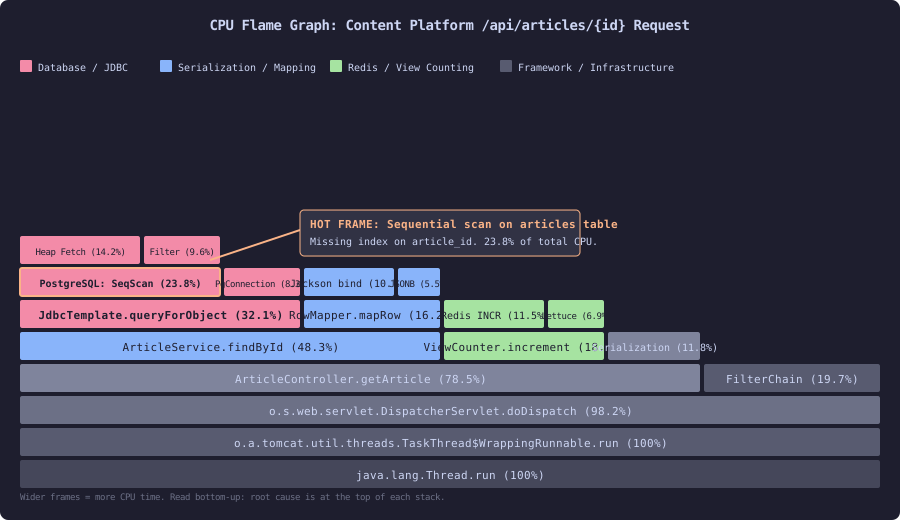
This flame graph shows a single request path through the content platform’s article serving endpoint. The horizontal axis represents CPU time percentage. Each rectangle is a stack frame. Wider frames consumed more CPU. The bottom shows the thread root; the top shows the leaf methods where CPU time was actually spent. The annotated hot frame shows a sequential scan on the articles table consuming 23.8% of total CPU, caused by a missing index on article_id. The red-highlighted frames in the database and JDBC category dominate the profile, while serialization (blue) and Redis view counting (green) are secondary consumers.
Reading a flame graph is a skill you develop by reading flame graphs. The key insight: the widest frame at the top of a stack is your bottleneck. In this profile, PostgreSQL: SeqScan is the widest top-level frame. The fix is an index, not application code changes. A developer looking only at Java code would never find this.
Locust: Baseline Load Testing
JMH measures isolated operations. async-profiler shows where CPU time goes. Locust measures the system under realistic load.
Locust is a Python-based load testing framework. It defines user behavior as Python classes and generates concurrent traffic against your system. Here is the baseline Locust script for the content platform:
# locust_baseline.py
# Baseline load test for the content platform
from locust import HttpUser, task, between, tag
import random


class ContentPlatformUser(HttpUser):
    wait_time = between(0.5, 2.0)
    article_ids = list(range(1, 10001))

    @tag("read")
    @task(50)
    def read_article(self):
        """Dominant traffic pattern: read an article."""
        article_id = random.choice(self.article_ids)
        self.client.get(
            f"/api/articles/{article_id}",
            name="/api/articles/[id]",
        )

    @tag("search")
    @task(20)
    def search_articles(self):
        """Full-text search."""
        queries = [
            "java performance", "database indexing",
            "cache invalidation", "microservices",
            "distributed systems", "JVM tuning",
        ]
        self.client.get(
            "/api/articles/search",
            params={"q": random.choice(queries), "limit": 20},
            name="/api/articles/search",
        )

    @tag("recommend")
    @task(15)
    def get_recommendations(self):
        """Recommendation ranking for a read article."""
        article_id = random.choice(self.article_ids)
        self.client.get(
            f"/api/articles/{article_id}/recommendations",
            name="/api/articles/[id]/recommendations",
        )

    @tag("write")
    @task(1)
    def view_count(self):
        """Increment view counter."""
        article_id = random.choice(self.article_ids)
        self.client.post(
            f"/api/articles/{article_id}/view",
            name="/api/articles/[id]/view",
        )
Run it with:
locust -f locust_baseline.py --host http://localhost:8080 \
       --users 100 --spawn-rate 10 --run-time 5m --headless \
       --csv baseline
The --csv baseline flag writes results to CSV files. The file baseline_stats.csv contains per-endpoint percentile latencies. This is your before measurement. Every optimization in this book includes a re-run of this Locust script to produce the after measurement.
The task weights mirror production traffic patterns: reads dominate (50), search is frequent (20), recommendations accompany reads (15), and writes are rare relative to reads (1). Adjusting these weights to match your production traffic ratios is the first thing you do when adapting this book’s techniques to your system.
The Investigation Loop
Every performance investigation in this book follows the same loop:
-
Observe the symptom. Latency is high. Throughput is low. GC pauses are long. A Locust test shows p99 latency exceeding the target.
-
Profile the system. Attach async-profiler to the running JVM. Capture a CPU flame graph. Read the flame graph. Identify the widest top-level frame.
-
Form a hypothesis. The flame graph shows that 32% of CPU time is in
JdbcTemplate.queryForObject. Hypothesis: the database query is slow. -
Measure the isolated operation. Write a JMH benchmark for the suspected slow operation. Get a baseline number.
-
Apply the fix. Add an index. Replace the query. Change the algorithm.
-
Measure again. Re-run the JMH benchmark. Re-run the Locust test. Compare before and after.
-
Verify in production. Deploy with monitoring. Confirm the improvement holds under real traffic patterns.
Skipping step 2 is how you optimize the wrong thing. Skipping step 4 is how you make changes without knowing whether they helped. Skipping step 6 is how you ship regressions.
This loop is the method. The rest of this book fills in the details for each layer of the stack: JVM, algorithms, database, caching, serialization, and network. But the loop does not change. Measure, profile, hypothesize, fix, measure again.
What This Book Does Not Cover
This book does not cover frontend performance, mobile performance, or browser rendering. It does not cover network infrastructure or CDN configuration. It does not teach Java from scratch, SQL from scratch, or Linux administration. It assumes you have written a Spring Boot application, connected it to PostgreSQL, and deployed it to production. It assumes you know what a database index is and what a thread pool does.
If you have never run a production system under load, parts of this book will feel abstract. Read them anyway. When your system is slow for the first time and your manager asks why, you will know exactly which tool to reach for.
The next two sections set up the measurement stack you will use throughout the book. The first section addresses why your performance intuition fails and how cognitive biases lead you to optimize the wrong thing. The second section walks through the concrete setup of JMH, async-profiler, and Locust so you can run every benchmark in this book.