JVM Profiling: CPU Flames, Allocation Profiling, and Reading a Heap Dump Without Guessing
JVM Profiling: CPU Flames, Allocation Profiling, and Reading a Heap Dump Without Guessing
A flame graph is not a performance dashboard. It is an X-ray.
Dashboards show you symptoms: latency went up, throughput went down, error rate spiked. A flame graph shows you anatomy: which methods consumed CPU time, in what proportion, called from which code paths. Dashboards tell you the patient is sick. Flame graphs tell you which organ is failing.
This chapter teaches you to read flame graphs fluently, to use allocation profiling to find hidden object creation that pressures the garbage collector, and to analyze heap dumps when your application’s memory usage grows without bound. All three techniques use the content platform as the running example.
CPU Profiling with async-profiler
async-profiler produces two types of CPU profiles: wall-clock profiles and CPU-time profiles.
CPU-time profiles sample only when the thread is consuming CPU. Threads waiting on I/O, locks, or Thread.sleep() do not appear. This is what you want when the question is “what code is burning CPU?”
Wall-clock profiles sample at fixed intervals regardless of thread state. Threads blocked on I/O appear in the profile. This is what you want when the question is “why is my response time high?” because the answer might be “the thread was waiting for a database connection.”
# CPU-time profile (default): what is burning CPU?
./asprof -d 30 -f /tmp/cpu-profile.html <pid>

# Wall-clock profile: why is the response time high?
./asprof -e wall -d 30 -f /tmp/wall-profile.html <pid>

# CPU profile with thread separation
./asprof -d 30 -t -f /tmp/cpu-threads.html <pid>
The -t flag separates the flame graph by thread. This is critical when your application has thread pools with different purposes. In the content platform, the Tomcat thread pool handles HTTP requests, the scheduled executor runs analytics aggregation, and the ForkJoinPool handles async recommendation computation. A merged flame graph mixes all three. A per-thread flame graph shows each pool’s profile independently.
Reading a Flame Graph
Flame graphs have a specific visual grammar:
Width equals time. A frame that occupies 40% of the horizontal space consumed 40% of the sampled CPU time. Width is the only metric that matters.
Vertical position is the call stack. The bottom frame is the thread entry point. Each frame above it is a method called by the frame below. The topmost frame is where CPU time was actually spent.
Color is categorical, not quantitative. async-profiler uses color to distinguish frame types: green for Java methods, yellow for C++ native methods, red for kernel calls. A “redder” frame is not slower than a “greener” frame. Only width indicates time.
The root cause is at the top. The widest frame at the top of a tall stack is your bottleneck. If HashMap.get() occupies 30% of the width at the top of a stack, your application spends 30% of its CPU time in hash lookups. The frames below it tell you who called it. The frame itself tells you what is slow.
Here is how to diagnose the content platform’s article serving endpoint using a flame graph:
# Start the content platform under load
locust -f locust_baseline.py --host http://localhost:8080 \
       --users 100 --spawn-rate 10 &

# Profile for 30 seconds during load
./asprof -d 30 -f /tmp/article-serving.html $(jps | grep ContentPlatform | cut -d' ' -f1)
Common patterns you will see in the flame graph:
Wide database frames. If org.postgresql.jdbc.PgStatement.executeQuery or HikariCP.getConnection frames are wide, your database queries are slow or your connection pool is saturated. The fix is in the query, the index, or the pool size.
Wide serialization frames. If com.fasterxml.jackson.databind.ser.DefaultSerializerProvider.serializeValue is wide, serialization is expensive. The fix might be a smaller response payload, a cached serialization result, or a faster serializer.
Wide GC frames. If GCTaskThread::run or G1CollectedHeap::do_collection_pause frames are wide, garbage collection is consuming CPU. The fix is to reduce allocation rate, increase heap size, or tune the GC.
Wide lock contention frames. If ObjectMonitor::wait or ReentrantLock.lock frames are wide, threads are waiting for locks. The fix is to reduce the scope of synchronization, use concurrent data structures, or eliminate shared mutable state.
The Profiling Investigation
A real investigation on the content platform. The recommendation endpoint has a p99 latency of 450ms. The target is 200ms.
Step 1: Profile under load.
# Generate load focused on the recommendation endpoint
locust -f locust_baseline.py --host http://localhost:8080 \
       --users 100 --spawn-rate 10 --tags recommend &

./asprof -d 60 -f /tmp/recommendations.html <pid>
Step 2: Read the flame graph. The widest top-level stack shows:
RecommendationService.rankArticles            62.3%
  ├── CosineSimilarity.compute                48.1%
  │     └── double[] multiply loop            38.4%
  ├── ArticleRepository.findCandidates        11.2%
  └── ScoreNormalizer.normalize                3.0%
The bottleneck is CosineSimilarity.compute, called once per candidate article. With 500 candidates per request and 512-dimensional embedding vectors, each request performs 256,000 floating-point multiplications.
Step 3: Benchmark the isolated operation.
// Benchmark: cosine similarity computation
@BenchmarkMode(Mode.AverageTime)
@OutputTimeUnit(TimeUnit.NANOSECONDS)
@Warmup(iterations = 5, time = 2, timeUnit = TimeUnit.SECONDS)
@Measurement(iterations = 5, time = 2, timeUnit = TimeUnit.SECONDS)
@Fork(2)
@State(Scope.Benchmark)
public class CosineSimilarityBenchmark {

    private double[] vectorA;
    private double[] vectorB;

    @Setup
    public void setup() {
        var random = new java.util.Random(42);
        vectorA = random.doubles(512).toArray();
        vectorB = random.doubles(512).toArray();
    }

    // SLOW: Naive implementation computing norms every time
    @Benchmark
    public double naiveCosine() {
        double dot = 0, normA = 0, normB = 0;
        for (int i = 0; i < vectorA.length; i++) {
            dot += vectorA[i] * vectorB[i];
            normA += vectorA[i] * vectorA[i];
            normB += vectorB[i] * vectorB[i];
        }
        return dot / (Math.sqrt(normA) * Math.sqrt(normB));
    }

    // FAST: Pre-normalized vectors, single dot product
    @Benchmark
    public double preNormalizedDotProduct() {
        double dot = 0;
        for (int i = 0; i < vectorA.length; i++) {
            dot += vectorA[i] * vectorB[i];
        }
        return dot;
    }
}
The naive version computes two vector norms for every comparison. If vectors are normalized at ingestion time (divide each vector by its L2 norm), cosine similarity reduces to a dot product. The dot product loop is half the FLOPs.
But the real optimization is not the loop. The real optimization is calling this function 500 times fewer. Instead of computing similarity against all candidates, pre-filter candidates using an approximate nearest neighbor index (like HNSW), reducing the candidate set from 500 to 20. The per-call optimization gives 2x. The algorithmic optimization gives 25x.
This is the recurring theme: profile first to find the bottleneck, then decide whether the fix is micro-optimization or algorithmic change. The profiler tells you where. Your judgment tells you how.
Allocation Profiling
CPU profiling shows where computation time goes. Allocation profiling shows where objects are created. Both matter because object allocation drives garbage collection, and garbage collection consumes CPU time and causes latency spikes.
# Profile object allocations
./asprof -e alloc -d 30 -f /tmp/alloc-profile.html <pid>

# Profile allocations with a size threshold (only objects > 1KB)
./asprof -e alloc --alloc 1k -d 30 -f /tmp/large-alloc.html <pid>
The allocation flame graph looks like a CPU flame graph, but the width of each frame represents bytes allocated, not CPU time. A wide frame means that code path allocated a large volume of objects.
Common allocation hotspots in Java web applications:
String concatenation. Every + operator on strings creates a new char[] and a new String object. In a loop, this creates O(n) garbage.
Autoboxing. int to Integer conversion creates an object for each value outside the cached range (-128 to 127). Storing primitives in Map<Integer, Integer> creates two objects per entry just for the keys and values.
Stream API intermediate results. Stream operations create iterator objects, spliterator objects, and lambda capture objects. For hot paths called millions of times, traditional loops allocate less.
Jackson deserialization. Jackson creates intermediate JsonNode objects, TokenBuffer entries, and temporary strings during deserialization. For large responses, this can be megabytes of garbage per request.
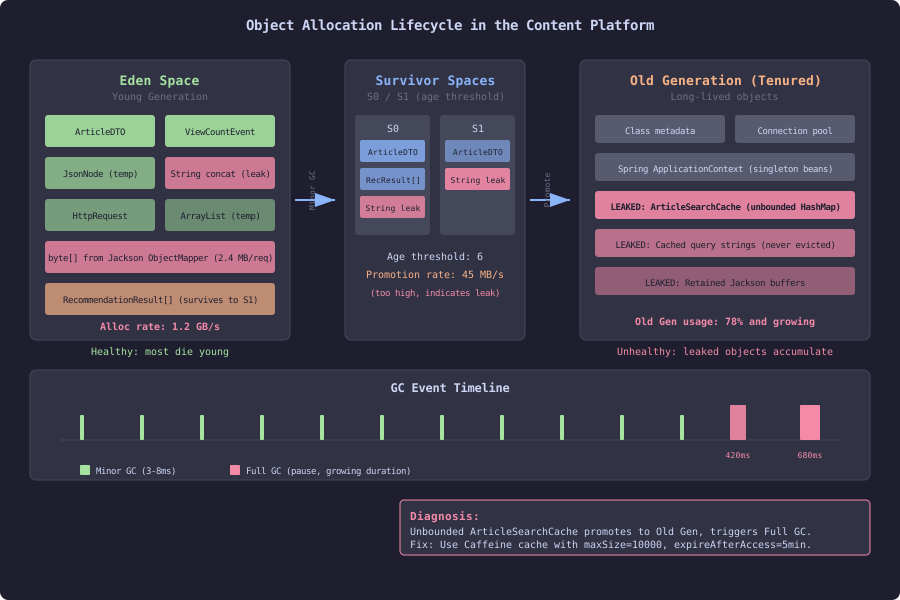
This diagram shows how objects flow through the JVM’s generational garbage collector in the content platform. Objects are born in Eden space, where most die young during minor GC cycles. Survivors are copied between S0 and S1 spaces, aging with each collection. Objects that survive past the age threshold are promoted to Old Generation. The diagram highlights the pathological case: an unbounded ArticleSearchCache that retains query strings and results without eviction, causing a steady stream of promotions that fills Old Gen and triggers increasingly expensive Full GC pauses. The fix is replacing the unbounded HashMap with a size-limited, time-expired Caffeine cache.
Heap Dumps: When Memory Grows Without Bound
Allocation profiling shows where objects are created. Heap dumps show where objects are retained. The difference matters: an object can be allocated frequently but collected quickly (high allocation rate, low retention). Or an object can be allocated rarely but never collected (low allocation rate, memory leak).
A memory leak in Java is an object that is reachable (the GC cannot collect it) but no longer useful (the application does not need it). The classic examples: unbounded caches, event listener registrations that are never removed, and static collections that grow without pruning.
# Trigger a heap dump from the command line
jcmd <pid> GC.heap_dump /tmp/heap.hprof

# Or configure the JVM to dump on OOM
java -XX:+HeapDumpOnOutOfMemoryError \
     -XX:HeapDumpPath=/tmp/oom-heap.hprof \
     -jar content-platform.jar
The .hprof file can be analyzed with Eclipse MAT (Memory Analyzer Tool), VisualVM, or IntelliJ’s built-in profiler.
Analyzing a Heap Dump
Open the heap dump in Eclipse MAT and look at two views:
Dominator tree. Shows which objects retain the most memory. The dominator of an object is the closest object in the reference chain that, if removed, would make the dominated object eligible for GC. If a HashMap dominates 800MB of retained memory, removing that HashMap would free 800MB.
Leak suspects report. MAT’s automated analysis identifies objects that retain disproportionately large amounts of memory relative to the total heap. It produces a report with the reference chain from GC root to the suspected leaked object.
In the content platform, a common leak pattern:
// SLOW: Unbounded cache that leaks memory
public class ArticleSearchCache {
    // This HashMap grows without bound
    private final Map<String, List<SearchResult>> cache = new HashMap<>();

    public List<SearchResult> search(String query) {
        return cache.computeIfAbsent(query, q -> {
            // Execute the search and cache the result
            return searchService.executeSearch(q);
        });
    }
}
// FAST: Bounded cache with eviction
public class ArticleSearchCache {
private final Cache<String, List<SearchResult>> cache = Caffeine.newBuilder()
.maximumSize(10_000)
.expireAfterAccess(Duration.ofMinutes(5))
.recordStats()
.build();
public List<SearchResult> search(String query) {
return cache.get(query, q -> searchService.executeSearch(q));
}
}The unbounded HashMap stores every unique search query and its results. With millions of unique queries, this consumes gigabytes. The Caffeine cache limits entries to 10,000 and evicts entries not accessed in 5 minutes. The recordStats() call enables cache hit rate monitoring, which you should track in production to validate that the cache size is adequate.
Production Profiling
async-profiler is safe for production use under these conditions:
CPU overhead. CPU profiling adds 1-2% overhead at the default sampling interval (10ms between samples). Increase the interval for lower overhead:
# Default: 10ms interval (~100 samples/sec)
./asprof -d 30 -f /tmp/prod-cpu.html <pid>

# Lower overhead: 100ms interval (~10 samples/sec)
./asprof -i 100000000 -d 30 -f /tmp/prod-cpu.html <pid>
Allocation profiling overhead depends on the allocation rate. For applications allocating under 1 GB/s, overhead is under 5%. For higher allocation rates, use the --alloc threshold to sample only large allocations.
No stop-the-world. async-profiler does not trigger GC, does not require a safepoint, and does not pause application threads. It is fundamentally different from heap dumps, which do pause the application.
Heap dumps in production pause the application for the duration of the dump. A 4GB heap takes 10-30 seconds to dump. During that time, no requests are served. Take heap dumps only on instances that have been removed from the load balancer, or during maintenance windows.
The sections that follow go deeper into both areas: CPU flame graph interpretation and allocation profiling with heap dump analysis.