The Database: Beyond ORM Magic
SummaryDeconstructs ORM-generated SQL to reveal what actually happens...
Deconstructs ORM-generated SQL to reveal what actually happens...
Deconstructs ORM-generated SQL to reveal what actually happens inside the database: query planning, index selection, transaction isolation, and the N+1 problem. Uses PostgreSQL as reference to show EXPLAIN output, index types, isolation level anomalies, and concrete fixes.
The Database: Beyond ORM Magic
You write this line:
User.objects.filter(active=True).order_by('-created_at')[:10]And you get users back. Fast enough. Ship it.
But what did you just ask the database to do? Not in the hand-wavy “it queries the database” sense. What operations, at what cost, in what order?
Here is the SQL that Django generates:
SELECT "auth_user"."id",
       "auth_user"."password",
       "auth_user"."last_login",
       "auth_user"."is_superuser",
       "auth_user"."username",
       "auth_user"."first_name",
       "auth_user"."last_name",
       "auth_user"."email",
       "auth_user"."is_staff",
       "auth_user"."is_active",
       "auth_user"."date_joined"
FROM "auth_user"
WHERE "auth_user"."is_active" = true
ORDER BY "auth_user"."date_joined" DESC
LIMIT 10
Notice a few things. Django selected every column, including the hashed password, because you didn’t tell it otherwise. It used date_joined because that’s the actual column behind created_at on Django’s User model. And the LIMIT 10 comes from your Python slice.
Now run EXPLAIN ANALYZE on that query against a table with 2 million rows:
Sort  (cost=84321.47..89321.47 rows=2000000 width=140) (actual time=1847.321..1847.325 rows=10 loops=1)
  Sort Key: date_joined DESC
  Sort Method: top-N heapsort  Memory: 27kB
  ->  Seq Scan on auth_user  (cost=0.00..54821.00 rows=2000000 width=140) (actual time=0.017..743.291 rows=1893421 loops=1)
        Filter: (is_active = true)
        Rows Removed by Filter: 106579
Planning Time: 0.089 ms
Execution Time: 1847.412 ms
Almost two seconds. The database read every single row, filtered out inactive users, sorted the 1.89 million survivors by date, then threw away everything except the top 10. That’s what your one-liner actually costs.
The Query Planner: Your Code’s Silent Optimizer
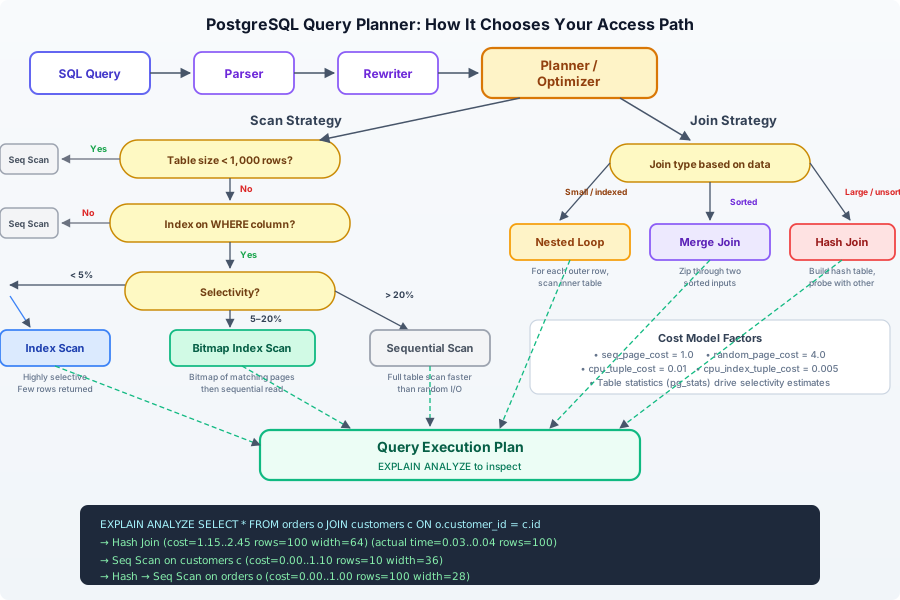
When PostgreSQL receives a query, it doesn’t just execute it. It plans it. The query planner examines every possible execution strategy and picks the one it estimates will be cheapest. This is an optimizer that runs before your query touches a single data page.
The planner considers these access methods:
Sequential Scan: Read the entire table from disk, row by row. This sounds stupid, but for small tables or queries returning most rows, it’s actually the fastest option. Random I/O is expensive; sequential reads are cheap. If you need 60% of a table’s rows, a sequential scan beats an index scan because it avoids the random disk seeks that index lookups require.
Index Scan: Use a B-tree (or other index) to locate matching rows, then fetch each row from the table by its physical location. Fast when you’re selecting a small percentage of rows. Slow when you’re selecting many, because each row fetch is a random I/O operation.
Index Only Scan: The holy grail. If your index contains all the columns the query needs, PostgreSQL never touches the table at all. It reads the answer directly from the index. This is why covering indexes exist.
Bitmap Heap Scan: A middle ground. The planner first scans the index to build a bitmap of which pages contain matching rows, then reads those pages in physical order. This converts random I/O into sequential I/O while still skipping most of the table. PostgreSQL uses this when too many rows match for an index scan but too few for a sequential scan.
The planner makes its choice based on statistics it maintains about your data: how many rows each table has, how values are distributed across columns, correlation between physical row order and column values. These statistics come from ANALYZE (which you should run, or let autovacuum handle).
Here’s the critical insight: the planner can be wrong. If statistics are stale, if your data distribution is skewed, if the estimated row count is off by orders of magnitude, the planner picks a bad plan. Reading EXPLAIN output is how you catch this.
Indexes: The Right Tool for the Right Query
Every time someone says “just add an index,” they’re skipping the question that matters: which kind?
B-tree (the default)
CREATE INDEX idx_users_date_joined ON auth_user (date_joined DESC);B-tree indexes handle equality and range queries: =, <, >, <=, >=, BETWEEN, IN, IS NULL. They store data in sorted order, so they also accelerate ORDER BY. This is the default for good reason — it covers 90% of use cases.
But a B-tree on date_joined won’t help our original query alone. We’re filtering on is_active AND sorting on date_joined. We need a composite index:
CREATE INDEX idx_users_active_date ON auth_user (is_active, date_joined DESC);Now re-run the EXPLAIN:
Limit  (cost=0.43..1.87 rows=10 width=140) (actual time=0.031..0.048 rows=10 loops=1)
  ->  Index Scan using idx_users_active_date on auth_user  (cost=0.43..271893.22 rows=1893421 width=140) (actual time=0.029..0.044 rows=10 loops=1)
        Index Cond: (is_active = true)
Planning Time: 0.152 ms
Execution Time: 0.069 ms
From 1847ms to 0.069ms. The database walks the index to the first entry where is_active = true, reads 10 entries in descending date_joined order, and stops. It never scans the table. It never sorts anything. The index is pre-sorted.
Hash Indexes
CREATE INDEX idx_users_email_hash ON auth_user USING hash (email);Hash indexes only support equality (=). No ranges, no sorting. They’re faster than B-tree for pure equality lookups on high-cardinality columns (like email addresses or UUIDs). Before PostgreSQL 10, hash indexes weren’t crash-safe. Now they are, but they’re still niche.
GIN (Generalized Inverted Index)
CREATE INDEX idx_posts_tags ON posts USING gin (tags);GIN indexes are for values that contain multiple elements: arrays, JSONB documents, full-text search vectors. If you have a tags column that’s a PostgreSQL array, a GIN index lets you query WHERE tags @> ARRAY['python'] efficiently. A B-tree can’t do this — it would need to compare entire arrays.
GiST (Generalized Search Tree)
CREATE INDEX idx_locations_coords ON locations USING gist (coordinates);GiST indexes handle geometric data, range types, and full-text search. If you’re doing WHERE coordinates <-> point(40.7128, -74.0060) < 1000 (find locations within 1km of a point), a GiST index makes this feasible. Without it, PostgreSQL checks every row.
The rule: know your query patterns before choosing an index type. A B-tree on a JSONB column is mostly useless. A GIN index on an integer primary key is wasteful. Match the index to the operation.
Transactions: What ACID Actually Means at Runtime
You’ve heard ACID: Atomicity, Consistency, Isolation, Durability. These aren’t abstract properties. They’re engineering constraints that cost real performance.
Atomicity means a transaction either fully commits or fully rolls back. PostgreSQL implements this through write-ahead logging (WAL). Before any data page changes on disk, the change is written to the WAL. If the server crashes mid-transaction, PostgreSQL replays the WAL on startup and undoes incomplete transactions. Your INSERT into a table doesn’t modify the table immediately; it writes to a log first.
Durability means once COMMIT returns, the data survives a power failure. This requires fsync — forcing the operating system to flush the WAL to physical disk. This is the single most expensive operation in database writes. Every commit waits for a disk sync. This is why COMMIT after every single row insert is catastrophically slow, and why batch inserts wrapped in a single transaction are orders of magnitude faster.
Isolation is where things get genuinely hard. When two transactions run concurrently, what can each one see? The answer depends on the isolation level, and getting this wrong causes data corruption that’s almost impossible to debug in production.
Isolation Levels in Practice
Consider two concurrent sessions operating on an accounts table:
READ COMMITTED (PostgreSQL’s default):
-- Session A                          -- Session B
BEGIN;                                BEGIN;
SELECT balance FROM accounts
  WHERE id = 1;
-- Returns: 1000
                                      UPDATE accounts SET balance = 500
                                        WHERE id = 1;
                                      COMMIT;
SELECT balance FROM accounts
  WHERE id = 1;
-- Returns: 500 (sees B's commit!)
COMMIT;
Within a single transaction, the same query returns different results. This is a non-repeatable read. For most applications this is fine. For financial calculations where you read a value, compute something, and write it back — this is a data corruption vector.
SERIALIZABLE:
-- Session A                          -- Session B
BEGIN ISOLATION LEVEL SERIALIZABLE;   BEGIN ISOLATION LEVEL SERIALIZABLE;
SELECT balance FROM accounts
  WHERE id = 1;
-- Returns: 1000
                                      UPDATE accounts SET balance = 500
                                        WHERE id = 1;
                                      COMMIT;
SELECT balance FROM accounts
  WHERE id = 1;
-- Still returns: 1000 (snapshot!)
UPDATE accounts SET balance = balance - 100
  WHERE id = 1;
COMMIT;
-- ERROR: could not serialize access
-- due to concurrent update
PostgreSQL detects the conflict and aborts one transaction. Your application must catch this error and retry. Most ORMs don’t do this automatically.
Phantom Reads
-- Session A                              -- Session B
BEGIN ISOLATION LEVEL READ COMMITTED;
SELECT count(*) FROM orders
  WHERE status = 'pending';
-- Returns: 5
                                          BEGIN;
                                          INSERT INTO orders (status)
                                            VALUES ('pending');
                                          COMMIT;
SELECT count(*) FROM orders
  WHERE status = 'pending';
-- Returns: 6 (phantom row appeared!)
COMMIT;
A new row materialized between two identical queries. Under REPEATABLE READ or SERIALIZABLE, Session A would still see 5. The choice of isolation level determines whether your application logic can trust that the world doesn’t change mid-transaction.
The N+1 Problem: Abstraction Blindness in Action
This is the canonical ORM failure. You write this in Django:
posts = Post.objects.filter(published=True)[:20]
for post in posts:
    print(post.author.name)
It looks like one operation. It executes 21 queries:
-- Query 1: fetch posts
SELECT * FROM posts WHERE published = true LIMIT 20;

-- Queries 2-21: fetch each author individually
SELECT * FROM authors WHERE id = 3;
SELECT * FROM authors WHERE id = 7;
SELECT * FROM authors WHERE id = 3;  -- yes, the same author again
SELECT * FROM authors WHERE id = 12;
-- ... 16 more queries
Twenty database round trips to fetch data that’s one JOIN away. Each round trip incurs network latency (even on localhost: ~0.1ms), query parsing, planning, and execution overhead. At 20 queries it’s annoying. At 200 (paginated list with nested relations), it’s a production incident.
The fix in Django:
posts = Post.objects.filter(published=True).select_related('author')[:20]This generates:
SELECT posts.*, authors.*
FROM posts
INNER JOIN authors ON posts.author_id = authors.id
WHERE posts.published = true
LIMIT 20;
One query. One round trip. The data was always there; the ORM just didn’t ask for it until you told it to.
For many-to-many or reverse foreign key relationships, use prefetch_related:
posts = Post.objects.filter(published=True).prefetch_related('tags')[:20]This runs exactly two queries:
SELECT * FROM posts WHERE published = true LIMIT 20;
SELECT * FROM posts_tags
  INNER JOIN tags ON posts_tags.tag_id = tags.id
  WHERE posts_tags.post_id IN (1, 2, 3, ..., 20);
Two queries instead of 21. The ORM batches the second lookup using an IN clause.
The N+1 problem is a perfect metaphor for abstraction blindness. The code post.author.name hides a database query behind a property access. It looks like reading a field from memory. It’s actually a network round trip to a different process that reads from disk. The abstraction made the cost invisible, so you stopped thinking about it.
The Professional Baseline
Here’s what this chapter reduces to: a professional software engineer should be able to open a database shell, run EXPLAIN ANALYZE on any query their application generates, and understand what comes back. Not as a DBA specialty skill. As a basic literacy requirement, like reading a stack trace or using a debugger.
Your ORM is a productivity tool, not a replacement for understanding SQL. The moment you treat it as a replacement — the moment you stop asking “what SQL does this generate?” — you’ve handed control of your application’s performance to an abstraction that optimizes for developer convenience, not runtime efficiency.
Run EXPLAIN ANALYZE. Read the output. Understand why the database chose the plan it chose. Add the right index, not just any index. Set the right isolation level, not just the default. These are not advanced skills. They’re the minimum standard for anyone who writes code that touches a database.
The database is not a black box. It’s the most transparent component in your entire stack — if you bother to ask it what it’s doing.