Concurrency: Threads, the GIL, and the Event Loop
SummaryDissects concurrency from the OS level up —...
Dissects concurrency from the OS level up —...
Dissects concurrency from the OS level up — OS threads and the CFS scheduler, Python's GIL and what it actually locks, asyncio's epoll-based event loop, and Go's M:N goroutine scheduling — with benchmarks and code that expose the real costs and tradeoffs.
Concurrency: Threads, the GIL, and the Event Loop
Most discussions of concurrency start with metaphors. Cooks in a kitchen. Lanes on a highway. Let’s skip the metaphors and talk about what the CPU and kernel actually do.
Your CPU core can execute one instruction stream at a time. One. “Concurrency” is the illusion that multiple things are happening at once on a single core. “Parallelism” is when multiple things actually are happening at once, across multiple cores. Everything you’ve ever been confused about regarding threads, async, and the GIL comes down to the distinction between these two words.
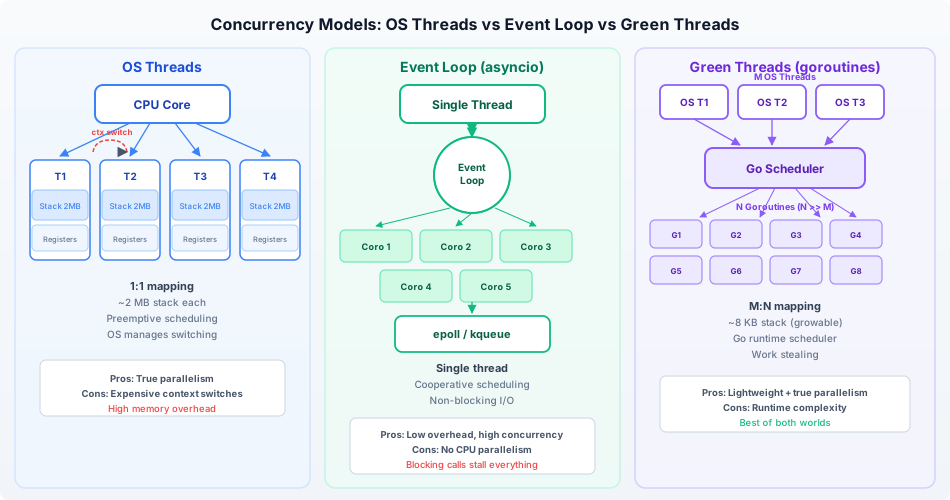
Concurrency models comparison: OS threads (left) give each concurrent task a full kernel-managed stack (~8 MB default), preemptive scheduling by the kernel, and true parallelism on multi-core systems — but context switches cost ~1–10 μs and memory overhead becomes significant at thousands of threads. The event loop model (center, used by Node.js and Python asyncio) runs all I/O-bound tasks on a single OS thread, using non-blocking syscalls and epoll/kqueue to multiplex thousands of connections with minimal memory — but blocks the entire program if any task does CPU work without yielding. Green threads and goroutines (right, used by Go and Erlang) take a middle path: multiplexed M:N scheduling where many lightweight user-space threads share fewer OS threads, with cooperative or work-stealing preemption. Understanding which model your runtime uses determines how you diagnose blocking bugs, CPU saturation, and “mysterious slowdowns under load.”
OS Threads and the Scheduler
An OS thread (sometimes called a “kernel thread” or “native thread”) is a task_struct in the Linux kernel, as we covered in the parent chapter. The kernel’s scheduler — the Completely Fair Scheduler (CFS) — decides which threads run on which CPU cores and for how long.
CFS works roughly like this:
- Each runnable thread has a virtual runtime (
vruntime) that tracks how much CPU time it’s consumed - The scheduler always picks the thread with the lowest
vruntime— the thread that’s been least served - That thread runs for a time slice (typically 1-4 milliseconds on a desktop, sometimes longer on servers)
- When the time slice expires, or the thread voluntarily yields (e.g., by calling
read()on a socket), the scheduler picks the next thread
The switching between threads is a context switch: the kernel saves all CPU registers (program counter, stack pointer, general-purpose registers, floating-point state) for the outgoing thread and loads the saved registers for the incoming thread. On modern Linux, a context switch takes roughly 1-5 microseconds — but the indirect costs are higher because it trashes CPU caches.
You can measure context switches for a running process:
# Voluntary (thread chose to wait) vs involuntary (preempted by scheduler)
grep ctxt /proc/$$/status
# voluntary_ctxt_switches:    150
# nonvoluntary_ctxt_switches: 12
High involuntary context switches mean your threads are competing for CPU. High voluntary switches mean they’re spending a lot of time waiting for I/O. Both numbers tell you something about your application’s behavior that no profiler will show you.
The GIL: What It Actually Locks
Python’s Global Interpreter Lock is the most misunderstood mechanism in modern software. Here’s what it actually is: a mutex (mutual exclusion lock) inside the CPython interpreter that ensures only one thread can execute Python bytecode at a time.
Not “only one thread can run.” Only one thread can execute Python bytecode. The distinction is critical.
When a Python thread calls a C extension that releases the GIL (and most I/O operations do), other Python threads can run. When a thread does a socket.recv(), the C implementation releases the GIL before blocking on the syscall. Another thread picks up the GIL and runs Python code. When the I/O completes, the first thread waits to reacquire the GIL.
This is why threading works fine for I/O-bound Python programs. And it’s why threads are nearly useless for CPU-bound Python programs. Observe:
import threading
import time

def cpu_work():
    """Pure CPU-bound work"""
    total = 0
    for i in range(20_000_000):
        total += i * i
    return total

# Single-threaded
start = time.perf_counter()
cpu_work()
cpu_work()
single = time.perf_counter() - start
print(f"Sequential: {single:.2f}s")

# Two threads
start = time.perf_counter()
t1 = threading.Thread(target=cpu_work)
t2 = threading.Thread(target=cpu_work)
t1.start(); t2.start()
t1.join(); t2.join()
threaded = time.perf_counter() - start
print(f"Threaded:   {threaded:.2f}s")
Sequential: 2.41s
Threaded: 2.53sThe threaded version is slower. Not the same speed — slower. Two threads are fighting over the GIL, and the overhead of acquiring and releasing it (plus the associated context switches) adds time. You spun up two threads and got negative benefit.
Now try the same experiment with I/O-bound work:
import threading
import time
import urllib.request

def io_work():
    """I/O-bound work"""
    urllib.request.urlopen("https://httpbin.org/delay/1")

# Sequential: ~2 seconds (two 1-second waits)
start = time.perf_counter()
io_work()
io_work()
print(f"Sequential: {time.perf_counter() - start:.2f}s")

# Threaded: ~1 second (two waits happen concurrently)
start = time.perf_counter()
t1 = threading.Thread(target=io_work)
t2 = threading.Thread(target=io_work)
t1.start(); t2.start()
t1.join(); t2.join()
print(f"Threaded:   {time.perf_counter() - start:.2f}s")
Sequential: 2.14s
Threaded: 1.08sThreading works here because both threads release the GIL while waiting for network I/O. The GIL isn’t blocking anything — both threads spend most of their time in C code that doesn’t hold the GIL.
The fix for CPU-bound parallelism in Python is multiprocessing — separate processes, each with its own GIL, each capable of running on a different core:
from multiprocessing import Process
import time

def cpu_work():
    total = 0
    for i in range(20_000_000):
        total += i * i

start = time.perf_counter()
p1 = Process(target=cpu_work)
p2 = Process(target=cpu_work)
p1.start(); p2.start()
p1.join(); p2.join()
print(f"Multiprocess: {time.perf_counter() - start:.2f}s")
Multiprocess: 1.28sNearly 2x speedup, because each process has its own interpreter and its own GIL, running on separate cores.
The Event Loop: What asyncio Actually Does
An event loop is a single thread that monitors multiple I/O sources and dispatches callbacks when data is available. There’s nothing magical about it. At the OS level, it’s a loop around epoll (Linux) or kqueue (macOS/BSD).
Here’s what epoll does in simplified terms:
// Pseudocode for an event loop
int epfd = epoll_create1(0);   // Create an epoll instance

// Register interest in file descriptors
epoll_ctl(epfd, EPOLL_CTL_ADD, socket_fd_1, &event1);
epoll_ctl(epfd, EPOLL_CTL_ADD, socket_fd_2, &event2);
epoll_ctl(epfd, EPOLL_CTL_ADD, socket_fd_3, &event3);

while (1) {
    // Block until at least one fd is ready — this is the "wait"
    int n = epoll_wait(epfd, events, MAX_EVENTS, timeout);

    // Process the ready file descriptors
    for (int i = 0; i < n; i++) {
        handle_event(events[i]);  // Run the callback for this fd
    }
}
epoll_wait is a single syscall that can monitor thousands of file descriptors simultaneously. Instead of having one thread per connection (each blocking on read()), you have one thread watching all connections. When data arrives on any of them, epoll_wait returns and tells you which ones are ready.
Python’s asyncio wraps this mechanism. When you write:
import asyncio
import aiohttp

async def fetch(session, url):
    async with session.get(url) as response:
        return await response.text()

async def main():
    async with aiohttp.ClientSession() as session:
        # These three requests happen concurrently on ONE thread
        results = await asyncio.gather(
            fetch(session, "https://httpbin.org/delay/1"),
            fetch(session, "https://httpbin.org/delay/1"),
            fetch(session, "https://httpbin.org/delay/1"),
        )
        print(f"Got {len(results)} responses")

asyncio.run(main())
Here’s what actually happens:
asyncio.run()creates an event loop (wrappingepoll_create1)- Each
fetch()coroutine opens a socket and starts a non-blocking connect - The coroutine
awaits the response — this suspends it and returns control to the event loop - The event loop adds all three socket file descriptors to its
epollinstance - It calls
epoll_wait()— a single syscall blocks until any socket has data - When data arrives, the event loop resumes the corresponding coroutine
- Repeat until all coroutines complete
Three concurrent network requests. One thread. One epoll instance. No GIL contention (there’s only one thread). No context switch overhead (coroutine switching is a function call, not a kernel operation). This is why async is efficient for I/O-bound workloads: you pay for one thread and get the concurrency of thousands.
But async is still single-threaded. CPU-bound work in a coroutine blocks the entire event loop:
import asyncio
import time

async def cpu_heavy():
    # This blocks the event loop for ~2 seconds
    # No other coroutine can run during this time
    total = 0
    for i in range(20_000_000):
        total += i * i
    return total

async def timer():
    start = time.perf_counter()
    while True:
        await asyncio.sleep(0.5)
        print(f"  tick at {time.perf_counter() - start:.1f}s")

async def main():
    timer_task = asyncio.create_task(timer())
    print("Starting CPU work...")
    result = await cpu_heavy()  # Timer stops ticking during this!
    print(f"Done. Timer was frozen for the duration.")
    timer_task.cancel()

asyncio.run(main())
Starting CPU work...
tick at 2.4s
Done. Timer was frozen for the duration.The timer should tick every 0.5 seconds but it can’t — cpu_heavy() never yields control back to the event loop. There’s no await inside the loop body, so the event loop is stuck running Python bytecode on the only thread it has.
Go’s Goroutines: M:N Scheduling
Go takes a different approach. Goroutines are green threads — lightweight threads managed by the Go runtime, not the OS. The Go scheduler maps M goroutines onto N OS threads (M >> N), which is why this is called M:N scheduling.
A goroutine starts with a stack of only 2-8 KB (compared to 1-8 MB for an OS thread). You can run millions of goroutines in a single process. The Go runtime maintains its own run queues and performs its own context switches between goroutines — which are cheaper than kernel context switches because they don’t involve a privilege transition or full register save/restore.
package main

import (
    "fmt"
    "runtime"
    "sync"
)

func main() {
    fmt.Println("OS threads available:", runtime.GOMAXPROCS(0))

    var wg sync.WaitGroup
    for i := 0; i < 100_000; i++ {
        wg.Add(1)
        go func(id int) {
            defer wg.Done()
            // Each goroutine does some work
            sum := 0
            for j := 0; j < 1000; j++ {
                sum += j
            }
            _ = sum
        }(i)
    }
    wg.Wait()
    fmt.Println("100,000 goroutines completed")
}
Spawning 100,000 OS threads would require ~800 GB of stack space and overwhelm the scheduler. 100,000 goroutines use maybe 400 MB and complete in milliseconds.
When a goroutine makes a blocking syscall, the Go runtime transparently moves it to a dedicated OS thread so the other goroutines on the original thread can keep running. When the syscall completes, the goroutine returns to a run queue. You get the programming model of “one thread per task” without the OS overhead.
The Cost of Context Switching
How expensive is a context switch, really? Here’s a benchmark approach:
import threading
import time
import os

def measure_context_switch_overhead(num_switches=100_000):
    """Measure the overhead of thread context switches using a pipe."""
    r, w = os.pipe()

    total_switches = [0]

    def writer():
        for _ in range(num_switches):
            os.write(w, b'x')
            # After write, this thread will likely be descheduled
            # while the reader thread runs

    start = time.perf_counter()
    t = threading.Thread(target=writer)
    t.start()

    for _ in range(num_switches):
        os.read(r, 1)

    t.join()
    elapsed = time.perf_counter() - start

    os.close(r)
    os.close(w)

    per_switch = (elapsed / num_switches) * 1_000_000  # microseconds
    print(f"{num_switches} round-trips: {elapsed:.3f}s")
    print(f"Per context switch: ~{per_switch:.1f} µs")

measure_context_switch_overhead()
100000 round-trips: 0.487s
Per context switch: ~4.9 µsAbout 5 microseconds per switch. That’s ~15,000 CPU cycles on a 3 GHz processor. Not huge for one switch. Devastating at scale. A web server doing 10,000 requests/second with two context switches per request burns 100 milliseconds of CPU time per second just on switching — time spent saving and restoring registers, not doing your work.
Concurrency Bugs: Where Understanding Breaks Down
Race conditions happen when two threads access shared state without synchronization and at least one is writing:
import threading

counter = 0

def increment():
    global counter
    for _ in range(1_000_000):
        counter += 1  # NOT atomic: read, add, store

threads = [threading.Thread(target=increment) for _ in range(4)]
for t in threads:
    t.start()
for t in threads:
    t.join()

print(f"Expected: 4,000,000")
print(f"Actual:   {counter}")
Expected: 4,000,000
Actual: 1,247,833counter += 1 is not atomic. It’s three operations: load counter into a register, add 1, store it back. Two threads can load the same value, both add 1, and both store the same result — losing an increment. The GIL doesn’t save you here because the GIL can be released between any two bytecodes, and counter += 1 compiles to multiple bytecodes (LOAD_GLOBAL, LOAD_CONST, BINARY_ADD, STORE_GLOBAL).
Deadlocks happen when two threads each hold a lock the other needs:
import threading
import time

lock_a = threading.Lock()
lock_b = threading.Lock()

def thread_1():
    with lock_a:
        time.sleep(0.1)  # Give thread_2 time to grab lock_b
        print("Thread 1: got lock_a, waiting for lock_b...")
        with lock_b:  # DEADLOCK: thread_2 holds lock_b
            print("Thread 1: got both locks")

def thread_2():
    with lock_b:
        time.sleep(0.1)  # Give thread_1 time to grab lock_a
        print("Thread 2: got lock_b, waiting for lock_a...")
        with lock_a:  # DEADLOCK: thread_1 holds lock_a
            print("Thread 2: got both locks")

t1 = threading.Thread(target=thread_1)
t2 = threading.Thread(target=thread_2)
t1.start(); t2.start()
# This program hangs forever. Neither thread can proceed.
The fix is always acquiring locks in a consistent order. If every thread acquires lock_a before lock_b, deadlock is impossible. Simple rule, routinely violated in complex codebases.
The Decision Framework
| Workload | Python | Go | General |
|---|---|---|---|
| CPU-bound parallel | multiprocessing | Goroutines | OS threads / processes |
| I/O-bound, many connections | asyncio | Goroutines | Event loop / green threads |
| I/O-bound, simple | threading | Goroutines | OS threads |
| Mixed CPU + I/O | Process pool + asyncio | Goroutines | Depends on ratio |
The right concurrency model depends on what your program spends its time doing: computing (CPU-bound) or waiting (I/O-bound). There is no universal answer, and anyone who tells you “just use async everywhere” or “threads are always fine” is telling you they haven’t hit the edge cases yet.
Concurrency isn’t a library feature. It’s an OS feature. The scheduler, the context switch, the file descriptor, the epoll instance — these are the mechanisms. Libraries just choose which mechanisms to expose and which to hide. When you understand the mechanisms, you can reason about any library’s concurrency model. When you only understand the library, you’re stuck the moment it behaves unexpectedly.