TCP: The Reliable Illusion
SummaryA deep technical exploration of TCP internals —...
A deep technical exploration of TCP internals —...
A deep technical exploration of TCP internals — from the three-way handshake through connection states, keepalive configuration, Nagle's algorithm, connection pooling, and the production traps lurking in ephemeral ports, SYN floods, and backlog queues.
TCP: The Reliable Illusion
TCP promises reliable, ordered delivery of bytes. You write bytes into one end of a socket, and they come out the other end, in order, without loss. That’s the contract. What TCP doesn’t promise — and what most engineers never consider — is how it delivers on that contract, and at what cost.
TCP maintains a state machine with eleven states and dozens of tunable parameters, most of which ship with defaults chosen in the 1980s for network conditions that no longer exist. Understanding this state machine is the difference between diagnosing a connection exhaustion incident in five minutes and spending a full day blaming the application server.
The Three-Way Handshake: Byte by Byte
When your application calls connect() on a socket aimed at 93.184.216.34:443, the kernel begins the TCP handshake. Here’s what actually goes on the wire:
Client (192.168.1.100:52431) → Server (93.184.216.34:443)
  TCP SYN
  Sequence Number: 0xa3f2b100 (2750349568)
  Window Size: 65535
  Options: MSS=1460, SACK Permitted, Window Scale=7

Server (93.184.216.34:443) → Client (192.168.1.100:52431)
  TCP SYN-ACK
  Sequence Number: 0x7c1e0400 (2082767872)
  Acknowledgment: 0xa3f2b101 (2750349569)
  Window Size: 65535
  Options: MSS=1460, SACK Permitted, Window Scale=7

Client → Server
  TCP ACK
  Sequence Number: 0xa3f2b101 (2750349569)
  Acknowledgment: 0x7c1e0401 (2082767873)
The initial sequence numbers (ISNs) are randomized for security — predictable ISNs were exploited in the famous Kevin Mitnick attack in 1994. Each side acknowledges the other’s sequence number by adding 1 to it. After the ACK, the connection enters ESTABLISHED on both sides, and data can flow.
You can build this from scratch in Python. Here’s a raw TCP connection that sends an HTTP request without any library:
import socket

# Create a TCP socket
sock = socket.socket(socket.AF_INET, socket.SOCK_STREAM)
sock.settimeout(5.0)

# This triggers the three-way handshake
sock.connect(("example.com", 80))

# Connection is now ESTABLISHED — send an HTTP/1.1 request
request = (
    "GET / HTTP/1.1\r\n"
    "Host: example.com\r\n"
    "Connection: close\r\n"
    "\r\n"
)
sock.sendall(request.encode("ascii"))

# Read the response
response = b""
while True:
    chunk = sock.recv(4096)
    if not chunk:
        break
    response += chunk

print(response.decode("utf-8")[:500])
sock.close()
That sock.connect() call blocks until the three-way handshake completes — or until settimeout fires. When you call sock.sendall(), the kernel segments your data, adds TCP headers, wraps it in IP, hands it to the network interface, and manages retransmission if any segment is lost. You see none of this. That’s the abstraction. And it works beautifully until it doesn’t.
TCP Connection States
TCP connections are state machines. Each connection moves through a well-defined sequence of states — visualized in the diagram below — from CLOSED through the three-way handshake, data transfer, and the four-way teardown. The states you need to know:
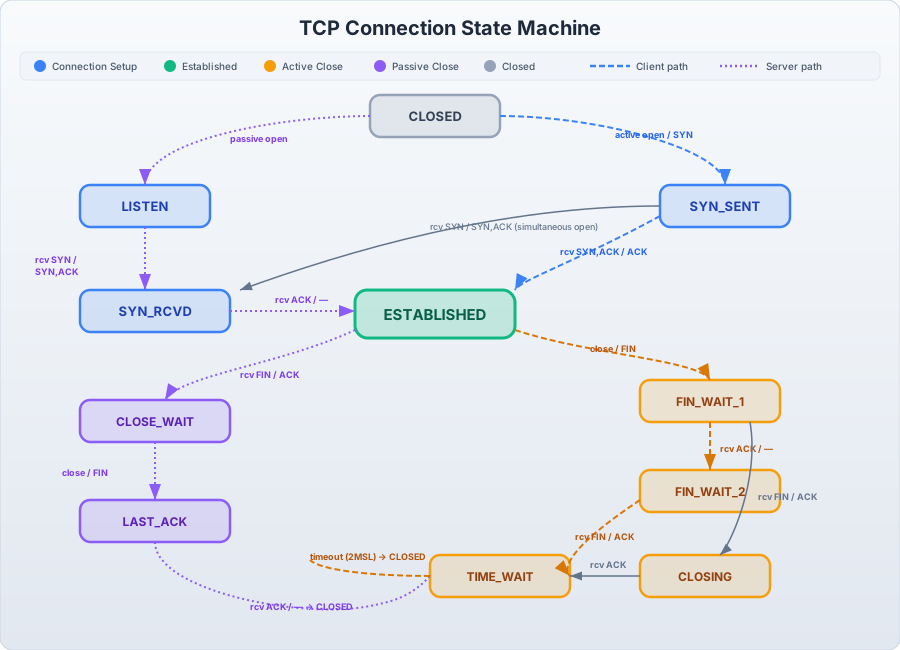
TCP Connection State Machine: complete state transition diagram showing client path (blue dashed), server path (purple dashed), and the four-way teardown sequence. The states most critical for debugging production issues are CLOSE_WAIT (application has a connection leak — remote closed but local code never called close()) and TIME_WAIT (normal post-close lingering for 2×MSL ≈ 60s, problematic only when ephemeral ports are exhausted). The three-way handshake (SYN → SYN-ACK → ACK) establishes the connection; the four-way teardown (FIN → ACK → FIN → ACK) closes it — and both sides must independently complete their half-close.
LISTEN — Server socket waiting for incoming connections. This is what your web server does on port 443.
SYN_SENT → ESTABLISHED — Client has sent SYN, awaiting SYN-ACK. After receiving SYN-ACK and sending ACK, the connection is established.
ESTABLISHED — Data is flowing. Both sides can send and receive. This is the steady state.
CLOSE_WAIT — The remote side has sent a FIN (requesting to close), and the local side has acknowledged it but hasn’t closed its own end yet. If you see thousands of CLOSE_WAIT sockets on your server, your application has a connection leak. It received the close signal from the peer but never called close() on the socket. This is the most common TCP-related application bug.
TIME_WAIT — The connection has been fully closed, but the socket lingers for 2×MSL (Maximum Segment Lifetime), typically 60 seconds on Linux. This exists to handle delayed packets — if a stray packet from the old connection arrives, the OS needs to know to discard it rather than delivering it to a new connection that reused the same port. TIME_WAIT is normal and expected. It becomes a problem only when you’re opening and closing connections so rapidly that you exhaust the ephemeral port range.
FIN_WAIT_1 → FIN_WAIT_2 — The local side has sent a FIN and is waiting for the remote to acknowledge it and send its own FIN.
The critical insight: closing a TCP connection is a four-step process (FIN, ACK, FIN, ACK), not two. Both sides must independently agree to close. A half-closed connection — where one side has sent a FIN but the other hasn’t — is a valid and sometimes useful state, though most applications never intentionally use it.
TCP Keepalives: The Two-Hour Silence
TCP keepalives are probes sent on an idle connection to verify the remote side is still alive. The Linux defaults are catastrophic for modern services:
$ sysctl net.ipv4.tcp_keepalive_time
net.ipv4.tcp_keepalive_time = 7200    # 2 hours before first probe

$ sysctl net.ipv4.tcp_keepalive_intvl
net.ipv4.tcp_keepalive_intvl = 75     # 75 seconds between probes

$ sysctl net.ipv4.tcp_keepalive_probes
net.ipv4.tcp_keepalive_probes = 9     # 9 failed probes before declaring dead
Think about what this means: if the remote host crashes, it takes 2 hours + (9 × 75 seconds) = 2 hours and 11 minutes before TCP declares the connection dead. During that entire time, your application thinks the connection is healthy. Any data it writes sits in the kernel send buffer, unacknowledged, until the keepalive timeout expires.
In practice, cloud load balancers and NAT gateways make this worse. AWS Network Load Balancers have a 350-second idle timeout by default. If your TCP keepalive is set to 7200 seconds, the NLB silently drops the connection after 350 seconds of inactivity. The next time your application sends data, it goes into a black hole — the packet reaches the NLB, which has no record of the connection, and drops it. Your application hangs until the TCP retransmission timeout expires (typically 13-30 minutes with exponential backoff).
Fix this per-socket in Python:
import socket

sock = socket.socket(socket.AF_INET, socket.SOCK_STREAM)

# Enable keepalive
sock.setsockopt(socket.SOL_SOCKET, socket.SO_KEEPALIVE, 1)

# Start probing after 60 seconds of idle
sock.setsockopt(socket.IPPROTO_TCP, socket.TCP_KEEPIDLE, 60)

# Probe every 10 seconds
sock.setsockopt(socket.IPPROTO_TCP, socket.TCP_KEEPINTVL, 10)

# Declare dead after 3 failed probes (60 + 3*10 = 90 seconds total)
sock.setsockopt(socket.IPPROTO_TCP, socket.TCP_KEEPCNT, 3)
Or system-wide:
sudo sysctl -w net.ipv4.tcp_keepalive_time=60
sudo sysctl -w net.ipv4.tcp_keepalive_intvl=10
sudo sysctl -w net.ipv4.tcp_keepalive_probes=3
Production-grade connection pools (database pools, HTTP connection pools) typically implement their own application-level health checks rather than relying on TCP keepalives, precisely because the defaults are so poor.
Nagle’s Algorithm and TCP_NODELAY
In 1984, John Nagle proposed an algorithm to reduce the number of small packets on the network. Nagle’s algorithm buffers small writes and coalesces them into larger segments before sending. Specifically: if there is unacknowledged data in flight, buffer subsequent small writes until the outstanding data is acknowledged or the buffer fills to MSS (Maximum Segment Size, typically 1460 bytes).
For bulk data transfer, this is optimal. For interactive protocols — where you send a small request and wait for a response — it’s devastating. Your 50-byte request sits in the buffer waiting for the ACK from the previous send to come back before it’s transmitted. Combined with TCP delayed acknowledgments (where the receiver waits 40ms before sending an ACK, hoping to piggyback it on a response), you get an interaction penalty of up to 40ms on every small write.
This is why every high-performance network application sets TCP_NODELAY:
import socket

sock = socket.socket(socket.AF_INET, socket.SOCK_STREAM)
# Disable Nagle's algorithm — send data immediately
sock.setsockopt(socket.IPPROTO_TCP, socket.TCP_NODELAY, 1)
Redis, memcached, gRPC, and virtually every database driver set TCP_NODELAY. If your custom protocol sends small messages and you notice unexplained 40ms latency on each exchange, this is almost certainly the cause.
Connection Pooling: Why It Exists
Every new TCP connection costs:
- A three-way handshake (1 RTT)
- A TLS handshake if encrypted (1 RTT with TLS 1.3, 2 with TLS 1.2)
- A
TIME_WAITsocket for 60 seconds after closing
HTTP/1.1’s Connection: keep-alive header (enabled by default) tells both sides to keep the TCP connection open after the response, so subsequent requests to the same host reuse it. HTTP/2 takes this further with multiplexing — many requests and responses interleaved on a single connection.
Connection pools manage a set of pre-established connections and hand them out to callers:
# urllib3 (used by requests) maintains a connection pool per host
import urllib3

pool = urllib3.HTTPConnectionPool("example.com", maxsize=10)

# These share connections from the pool — no new handshakes
response1 = pool.request("GET", "/api/users")
response2 = pool.request("GET", "/api/posts")
response3 = pool.request("GET", "/api/comments")
Database connection pools work identically — psycopg2.pool, HikariCP, SQLAlchemy’s pool all maintain warm TCP connections to the database, avoiding the cost of a handshake on every query.
Reading Socket State: ss and netstat
When you suspect a TCP-level problem, ss -tnp is your first tool:
$ ss -tnp

State    Recv-Q  Send-Q  Local Address:Port   Peer Address:Port    Process
ESTAB    0       0       192.168.1.100:52431  93.184.216.34:443    users:(("python3",pid=12345,fd=5))
ESTAB    0       0       192.168.1.100:52432  10.0.1.50:5432       users:(("python3",pid=12345,fd=6))
TIME-WAIT 0      0       192.168.1.100:52400  93.184.216.34:443
TIME-WAIT 0      0       192.168.1.100:52401  93.184.216.34:443
CLOSE-WAIT 0     0       192.168.1.100:52399  10.0.2.75:8080       users:(("java",pid=6789,fd=42))
Reading this:
- ESTAB with Send-Q=0: Healthy established connections. Data is being sent and acknowledged.
- ESTAB with Send-Q > 0: Data is queued to send but hasn’t been acknowledged. The remote side may be struggling, or the network is congested.
- TIME-WAIT: Recently closed connections, waiting for stray packets. Normal unless you have thousands.
- CLOSE-WAIT: The remote side closed, but the local application hasn’t. This is a bug. That Java process (pid 6789) received a connection close from
10.0.2.75:8080and never calledclose()on its socket.
Count connection states across your system:
$ ss -tn state time-wait | wc -l
42

$ ss -tn state close-wait | wc -l
3

$ ss -tn state established | wc -l
156

# Or summarize all states at once
$ ss -s
Total: 201
TCP:   201 (estab 156, closed 0, orphaned 0, timewait 42)
The legacy netstat gives similar information but is slower on systems with many connections:
$ netstat -tn | awk '{print $6}' | sort | uniq -c | sort -rn
    156 ESTABLISHED
     42 TIME_WAIT
      3 CLOSE_WAIT
Production Traps
Ephemeral Port Exhaustion
When your application opens a connection, the kernel assigns a local (ephemeral) port from a configured range:
$ sysctl net.ipv4.ip_local_port_range
net.ipv4.ip_local_port_range = 32768    60999
That’s 28,231 available ephemeral ports. Each TIME_WAIT socket occupies one for 60 seconds. If your application opens and closes more than ~470 connections per second to the same destination IP and port, you’ll exhaust the ephemeral range. New connections fail with EADDRNOTAVAIL — “Cannot assign requested address.”
This frequently hits services that make rapid HTTP calls to a single backend without connection pooling. The fix is straightforward:
# Widen the ephemeral port range
sudo sysctl -w net.ipv4.ip_local_port_range="1024 65535"   # ~64k ports

# Allow reuse of TIME_WAIT sockets (use with caution)
sudo sysctl -w net.ipv4.tcp_tw_reuse=1
But the real fix is use connection pooling. If you’re exhausting ephemeral ports, you’re creating and destroying connections instead of reusing them.
SYN Flood and the Backlog Queue
When a TCP SYN arrives at a server, the kernel allocates resources for the half-open connection and places it in the SYN queue (also called the half-open queue). When the handshake completes (ACK received), the connection moves to the accept queue (also called the backlog), where it waits for the application to call accept().
Both queues are bounded:
# Maximum number of pending connections in the accept queue
$ sysctl net.core.somaxconn
net.core.somaxconn = 4096

# Maximum number of half-open connections (SYN queue)
$ sysctl net.ipv4.tcp_max_syn_backlog
net.ipv4.tcp_max_syn_backlog = 1024
If the accept queue fills up because your application is too slow to call accept(), the kernel silently drops new SYN packets. There’s no RST, no ICMP error — the client just retries, backs off, and eventually times out. From the client’s perspective, the server is unreachable. From the server’s perspective, the application has no idea anything is wrong — it’s just slow.
In Python, the backlog is set when you call listen():
import socket

server = socket.socket(socket.AF_INET, socket.SOCK_STREAM)
server.setsockopt(socket.SOL_SOCKET, socket.SO_REUSEADDR, 1)
server.bind(("0.0.0.0", 8080))
server.listen(128)  # backlog of 128 — capped by net.core.somaxconn

while True:
    client_sock, addr = server.accept()  # If this is slow, the queue fills
    handle_client(client_sock)
If handle_client is slow and single-threaded, the accept queue fills after 128 pending connections, and new clients experience timeouts. This is why production web servers use process-per-connection (Apache prefork), thread-per-connection, or async event loops — to keep the accept queue drained.
Monitor the overflow:
# Check for SYN queue overflows
$ netstat -s | grep -i "syn"
    234 SYNs to LISTEN sockets dropped

# Check for accept queue overflows
$ ss -tnlp | grep 8080
LISTEN  0  128  0.0.0.0:8080  *:*  users:(("python3",pid=12345,fd=3))
#       ^  ^
#       |  backlog
#       current queue size
If the first number approaches the second, you’re about to drop connections.
The TIME_WAIT Assassination Fallacy
Engineers sometimes reach for net.ipv4.tcp_tw_recycle (now removed from modern kernels) or aggressively try to eliminate TIME_WAIT sockets. This is usually wrong. TIME_WAIT exists for correctness — without it, a delayed packet from a previous connection could be delivered to a new connection that reused the same port tuple, causing silent data corruption.
The right response to “too many TIME_WAIT sockets” is almost never to shorten the TIME_WAIT duration. It’s to ask: why are you opening so many short-lived connections? Use connection pooling. Use HTTP/2 multiplexing. Use Keep-Alive. Solve the architectural problem instead of patching the symptom.
The Reliable Illusion
TCP’s reliability is real, but it has a cost: complexity. A TCP connection isn’t a wire — it’s two coordinated state machines negotiating sequence numbers, window sizes, retransmission timers, congestion windows, and keepalive probes. When anything in that machinery misfires — a misconfigured keepalive, a full backlog queue, an exhausted port range — the failure mode is almost always a silent hang rather than an explicit error.
Silent hangs are the worst kind of failure. Your monitoring shows healthy connections. Your application logs show nothing. Your users experience 30-second freezes or indefinite loading spinners. And you’re staring at application-level dashboards wondering why your perfectly correct code stopped working.
The answer is always at a layer below.