Analysis Pipeline: Tokenization, Normalization, Stemming, and Why Search Breaks on Technical Terms
Analysis Pipeline
A user searches for getConnection in the documentation search engine. Zero results. The document titled “Managing Database Connections with getConnection()” is in the index. It was indexed yesterday. The inverted index contains the document. The query returns nothing.
The problem is not in the query. The problem is in the analysis pipeline. The standard analyzer lowercased getConnection to getconnection and stored it as a single token. It did the same to the document body. But the document body contains the method name inside a sentence: “Call getConnection() to obtain a pooled connection.” The standard analyzer tokenized this into call, getconnection, to, obtain, a, pooled, connection. The search for getconnection should match. And it does, if the user types it exactly.
But users do not search for getconnection. They search for getConnection, or get connection, or get_connection. The standard analyzer cannot bridge these variations because it was designed for natural language, not for identifiers written in camelCase, snake_case, or dot-separated notation.
The Three Stages of Analysis
Every text field in OpenSearch passes through an analysis pipeline when indexed and (by default) when queried. The pipeline has three stages:
Character Filters operate on the raw character stream before tokenization. They can strip HTML tags, replace characters, or normalize Unicode. Zero or more character filters can be configured.
Tokenizer splits the character stream into individual tokens. Exactly one tokenizer is required. The choice of tokenizer determines the fundamental unit of search: words, whitespace-delimited chunks, n-grams, or path components.
Token Filters modify, add, or remove tokens after tokenization. Lowercasing, stemming, synonym expansion, and stop word removal all happen here. Zero or more token filters can be configured, and they execute in order.
The standard analyzer uses no character filters, the standard tokenizer (which splits on word boundaries defined by Unicode text segmentation), and two token filters: lowercase and stop words (disabled by default in OpenSearch).
Why Standard Analysis Fails for Technical Documentation
Consider indexing this documentation page:
The
HttpClientFactory.getConnection()method returns a pooledjava.sql.Connectionfrom theHikariDataSource. ConfiguremaxPoolSizeinapplication.yml.
The standard analyzer produces these tokens:
httpclientfactory.getconnection
method
returns
pooled
java.sql.connection
hikariDatasource       (lowercased: hikaridatasource)
configure
maxpoolsize
application.yml
Three problems:
-
Dotted identifiers remain intact.
HttpClientFactory.getConnection()becomeshttpclientfactory.getconnection. A user searching forgetConnectiondoes not match becausegetconnectionis a substring of the stored token, not a separate token. -
CamelCase is not decomposed.
HikariDataSourcebecomeshikaridatasource. A search fordata sourcereturns zero results. -
File extensions are split inconsistently.
application.ymlmay or may not split on the dot depending on the tokenizer version and Unicode rules.
The _analyze API reveals exactly what tokens an analyzer produces:
POST _analyze
{
  "analyzer": "standard",
  "text": "HttpClientFactory.getConnection() returns a java.sql.Connection"
}
Response:
{
  "tokens": [
    {
      "token": "httpclientfactory.getconnection",
      "start_offset": 0,
      "end_offset": 31
    },
    { "token": "returns", "start_offset": 34, "end_offset": 41 },
    { "token": "a", "start_offset": 42, "end_offset": 43 },
    { "token": "java.sql.connection", "start_offset": 44, "end_offset": 63 }
  ]
}
This is the analysis pipeline working exactly as designed. It is the wrong design for this content.
Building a Code-Aware Analyzer
The documentation search platform needs an analyzer that handles three patterns: camelCase decomposition, dot-separated splitting, and underscore splitting. The following custom analyzer addresses all three:
// HARDENED: Custom analyzer for technical documentation
// Decomposes camelCase, splits on dots and underscores, preserves original form

CreateIndexRequest request = CreateIndexRequest.of(idx -> idx
    .index("docs-v1")
    .settings(s -> s
        .analysis(a -> a
            .analyzer("code_analyzer", an -> an
                .custom(c -> c
                    .tokenizer("code_tokenizer")
                    .filter("lowercase", "camel_case_split", "word_delimiter_filter")
                )
            )
            .tokenizer("code_tokenizer", t -> t
                .definition(d -> d
                    .pattern(p -> p
                        .pattern("[.\\s(){}\\[\\];,<>]")
                    )
                )
            )
            .filter("camel_case_split", f -> f
                .definition(d -> d
                    .wordDelimiterGraph(w -> w
                        .generateWordParts(true)
                        .generateNumberParts(true)
                        .splitOnCaseChange(true)
                        .splitOnNumerics(true)
                        .preserveOriginal(true)
                    )
                )
            )
            .filter("word_delimiter_filter", f -> f
                .definition(d -> d
                    .wordDelimiterGraph(w -> w
                        .generateWordParts(true)
                        .generateNumberParts(true)
                        .splitOnCaseChange(false)
                        .preserveOriginal(false)
                    )
                )
            )
        )
    )
    .mappings(m -> m
        .properties("body", p -> p.text(t -> t.analyzer("code_analyzer")))
        .properties("title", p -> p.text(t -> t
            .analyzer("code_analyzer")
            .fields("standard", f -> f.text(tx -> tx.analyzer("standard")))
            .fields("exact", f -> f.keyword(k -> k.ignoreAbove(512)))
        ))
    )
);
With this analyzer, HttpClientFactory.getConnection() produces:
httpclientfactory, http, client, factory, getconnection, get, connectionA search for getConnection matches. A search for connection matches. A search for factory matches. A search for HttpClientFactory matches via the preserved original. The search behaves the way a developer expects.
Multi-Field Analysis Strategy
The documentation platform uses multiple analysis strategies on the same field through multi-field mappings. The title field in the mapping above has three representations:
| Sub-field | Analyzer | Use Case |
|---|---|---|
title | code_analyzer | Full-text search with camelCase and dot decomposition |
title.standard | standard | Natural language search, phrase queries |
title.exact | (keyword) | Exact title match, aggregations, sorting |
A search query can boost these sub-fields differently:
SearchRequest request = SearchRequest.of(s -> s
    .index("docs-v1")
    .query(q -> q
        .bool(b -> b
            .should(sh -> sh.match(m -> m.field("title").query(userQuery).boost(2.0f)))
            .should(sh -> sh.match(m -> m.field("title.standard").query(userQuery).boost(1.0f)))
            .should(sh -> sh.term(t -> t.field("title.exact").value(userQuery).boost(5.0f)))
        )
    )
);
An exact title match scores highest. A code-aware match scores next. A standard natural-language match provides a fallback. This layered analysis is what makes the documentation search engine return getConnection as the top result when a developer searches for exactly that method name, while still returning conceptually relevant pages when they search for “connection management.”
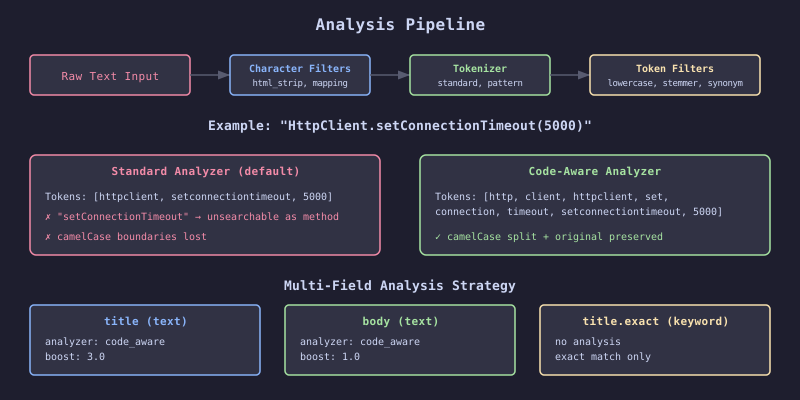
The diagram illustrates how a single input string passes through the three stages of analysis. The character filter cleans the raw input, the tokenizer splits it into initial tokens, and the token filter chain (lowercase, word delimiter, etc.) transforms those tokens into the final terms stored in the inverted index. Different analyzers produce different tokens from the same input, and once stored, those tokens define what queries can match.