Search Observability: Metrics, Dashboards, and Alerting
Search Observability: Metrics, Dashboards, and Alerting
A search cluster with no monitoring degrades silently. Shard count creeps upward. Heap usage climbs. Query latency increases by 5ms per week. No alert fires. After three months, a user reports that “search feels slow.” Investigation reveals 800 shards across 12 nodes, heap at 88%, and query latency at 4x the original baseline.
The Metrics Hierarchy
Search observability operates at three layers, each answering a different question:
| Layer | Question | Example Metrics |
|---|---|---|
| Business | Are users finding what they need? | Zero-result rate, click-through rate, search abandonment |
| Application | Is search behaving correctly? | Query latency (p50/p95/p99), error rate, result count distribution |
| Infrastructure | Is the cluster healthy? | Heap usage, GC overhead, shard count, disk usage, thread pool rejections |
Most teams monitor only the infrastructure layer, which tells them the cluster is running but not whether search is working.
Essential Metrics Collection
// HARDENED: Comprehensive metrics collector for search observability

public class SearchMetricsCollector {

    private final OpenSearchClient client;

    public SearchMetricsCollector(OpenSearchClient client) {
        this.client = client;
    }

    public record ClusterMetrics(
        String status,
        int nodeCount,
        int dataNodeCount,
        long activeShards,
        long unassignedShards,
        long activePrimaryShards,
        double shardPerNode
    ) {}

    public ClusterMetrics collectClusterMetrics() throws IOException {
        var health = client.cluster().health();

        return new ClusterMetrics(
            health.status().jsonValue(),
            health.numberOfNodes(),
            health.numberOfDataNodes(),
            health.activeShards(),
            health.unassignedShards(),
            health.activePrimaryShards(),
            health.numberOfDataNodes() > 0
                ? (double) health.activeShards() / health.numberOfDataNodes()
                : 0
        );
    }

    public record NodeMetrics(
        String nodeName,
        double heapPercent,
        double cpuPercent,
        long searchQueryCount,
        long searchQueryTimeMs,
        long indexingCount,
        long indexingTimeMs,
        long mergeCount,
        long mergeTimeMs,
        long writeRejections,
        long searchRejections,
        double diskUsedPercent
    ) {}

    public List<NodeMetrics> collectNodeMetrics() throws IOException {
        var stats = client.nodes().stats(ns -> ns
            .metric("jvm", "os", "indices", "thread_pool", "fs"));

        List<NodeMetrics> results = new ArrayList<>();

        for (var entry : stats.nodes().entrySet()) {
            var node = entry.getValue();
            var jvm = node.jvm();
            var os = node.os();
            var indices = node.indices();
            var writePool = node.threadPool().get("write");
            var searchPool = node.threadPool().get("search");
            var fs = node.fs();

            long totalDisk = fs.total().totalInBytes();
            long freeDisk = fs.total().freeInBytes();

            results.add(new NodeMetrics(
                node.name(),
                jvm.mem().heapUsedPercent(),
                os.cpu().percent(),
                indices.search().queryTotal(),
                indices.search().queryTimeInMillis(),
                indices.indexing().indexTotal(),
                indices.indexing().indexTimeInMillis(),
                indices.merges().total(),
                indices.merges().totalTimeInMillis(),
                writePool.rejected(),
                searchPool.rejected(),
                totalDisk > 0
                    ? (double)(totalDisk - freeDisk) / totalDisk * 100
                    : 0
            ));
        }

        return results;
    }
}
Application-Level Search Metrics
// HARDENED: Search request instrumentation

public class InstrumentedSearchService {

    private final SearchService delegate;

    public InstrumentedSearchService(SearchService delegate) {
        this.delegate = delegate;
    }

    public SearchResult search(String tenantId, String query, int page)
            throws IOException {

        long start = System.nanoTime();
        SearchResult result;
        boolean error = false;

        try {
            result = delegate.search(tenantId, query, page);
        } catch (Exception e) {
            error = true;
            emitMetric("search.errors", 1, tenantId);
            throw e;
        } finally {
            long durationMs = TimeUnit.NANOSECONDS.toMillis(
                System.nanoTime() - start);
            emitMetric("search.latency_ms", durationMs, tenantId);
        }

        // Result quality metrics
        int resultCount = result.totalHits();
        emitMetric("search.result_count", resultCount, tenantId);

        if (resultCount == 0) {
            emitMetric("search.zero_results", 1, tenantId);
        }

        // Log for search analytics
        logSearchEvent(tenantId, query, resultCount,
            TimeUnit.NANOSECONDS.toMillis(System.nanoTime() - start));

        return result;
    }
}
Alerting Rules
| Metric | Warning Threshold | Critical Threshold | Action |
|---|---|---|---|
| Cluster status | Yellow > 5 min | Red | Check unassigned shards |
| Heap usage (any node) | > 75% | > 85% | Investigate caches, reduce load |
| CPU usage (any node) | > 80% sustained | > 95% | Check hot threads, scale out |
| Search p99 latency | > 500ms | > 2s | Profile slow queries |
| Write rejections | > 0 | > 100/min | Reduce write throughput |
| Search rejections | > 0 | > 50/min | Add replicas or nodes |
| Zero-result rate | > 10% | > 20% | Analyze zero-result queries |
| Unassigned shards | > 0 for > 10min | > 0 for > 30min | Check allocation explain |
| Disk usage | > 75% | > 85% | Add storage or purge old indices |
| Shard count per node | > 600 | > 800 | Reduce shards, increase nodes |
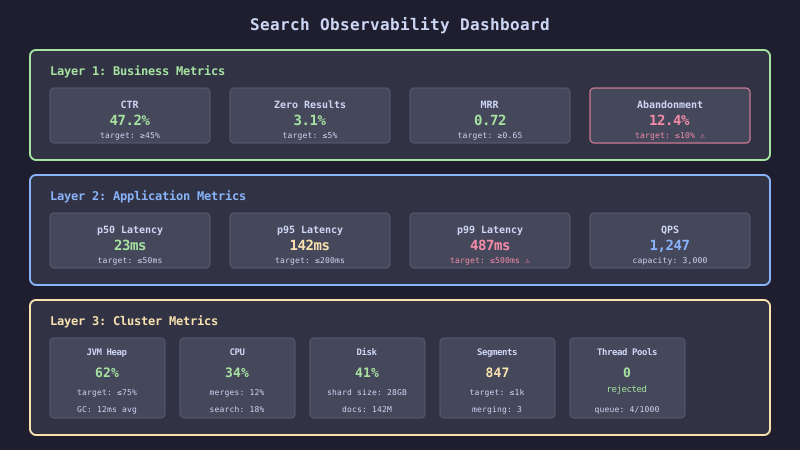
The dashboard layout shows three rows: business metrics at top (zero-result rate, search volume), application metrics in the middle (latency percentiles, error rate), and infrastructure metrics at bottom (heap, CPU, disk, shard distribution).
The Decision Rule
Monitor all three layers: business, application, and infrastructure. An infrastructure alert tells you the cluster is unhealthy. An application alert tells you search is slow. A business alert tells you users are not finding what they need. Only the combination provides complete observability.
Set alerts on rate-of-change, not absolute values. Heap usage at 70% is normal. Heap usage increasing by 5% per hour is a memory leak. Query latency at 200ms is fine. Query latency doubling over a week is a regression.
Track zero-result rate as the primary search quality indicator in production. It requires no relevance judgments, updates in real-time, and directly correlates with user satisfaction. A zero-result rate above 15% warrants immediate investigation.