Performance Profiling with the Profile API and Slow Logs
Performance Profiling with the Profile API and Slow Logs
A search query takes 800ms in production. The team’s first reaction: “The cluster is slow.” The cluster is not slow. One query is slow. Profiling reveals that a single wildcard query inside a bool clause scans 4 million terms in the inverted index. The rest of the query executes in 12ms.
The Profile API
The Profile API adds detailed timing information to a search response. Every query clause, every collector, every aggregation reports its execution time, the number of documents it matched, and the Lucene-level operations it performed.
// HARDENED: Profile a slow query to identify the bottleneck

public SearchResponse<DocPage> profileSearch(String tenantId, String query)
        throws IOException {
    return client.search(s -> s
        .index("docs-" + tenantId)
        .profile(true)  // Enable profiling
        .query(q -> q.bool(b -> b
            .must(mu -> mu.multiMatch(mm -> mm
                .query(query)
                .fields("title^3", "body", "code_snippets")
                .type(TextQueryType.CrossFields)
            ))
            .should(sh -> sh.matchPhrase(mp -> mp
                .field("title")
                .query(query)
                .boost(2.0f)
            ))
        ))
        .size(10),
        DocPage.class
    );
}
Profile Output Interpretation
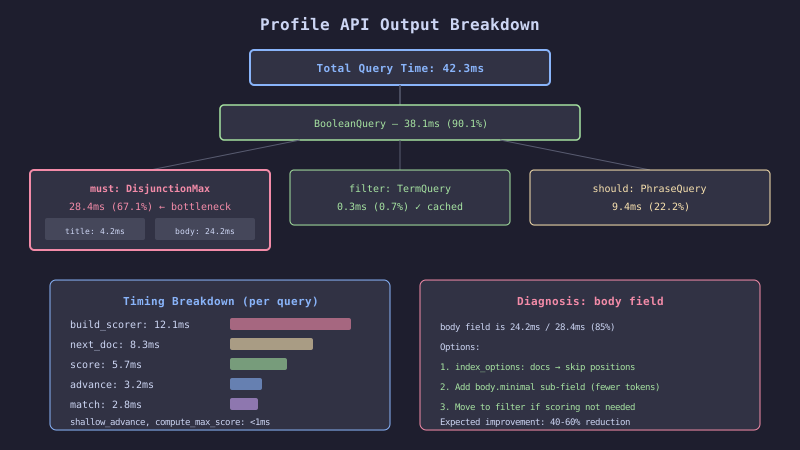
The profile output is a tree of query nodes. Each node reports:
| Field | Meaning |
|---|---|
type | Lucene query class (e.g., BooleanQuery, TermQuery, WildcardQuery) |
description | The query’s string representation |
time_in_nanos | Total wall-clock time for this query node |
breakdown | Sub-timings: build_scorer, next_doc, advance, score, match |
children | Child query nodes (for compound queries) |
// Extract the slowest query clause from profile output

public record QueryProfile(
    String type,
    String description,
    long timeNanos,
    Map<String, Long> breakdown
) {}

public List<QueryProfile> extractSlowClauses(SearchResponse<DocPage> response,
        long thresholdMs) {

    List<QueryProfile> slowClauses = new ArrayList<>();

    for (var shardProfile : response.profile().shards()) {
        for (var searchProfile : shardProfile.searches()) {
            for (var queryProfile : searchProfile.query()) {
                collectSlowClauses(queryProfile, thresholdMs, slowClauses);
            }
        }
    }

    return slowClauses.stream()
        .sorted(Comparator.comparingLong(QueryProfile::timeNanos).reversed())
        .toList();
}

private void collectSlowClauses(
        co.elastic.clients.elasticsearch.core.search.QueryProfile node,
        long thresholdMs,
        List<QueryProfile> results) {

    long timeMs = node.timeInNanos() / 1_000_000;
    if (timeMs >= thresholdMs) {
        results.add(new QueryProfile(
            node.type(),
            node.description(),
            node.timeInNanos(),
            node.breakdown()
        ));
    }

    if (node.children() != null) {
        for (var child : node.children()) {
            collectSlowClauses(child, thresholdMs, results);
        }
    }
}
Common Profile Patterns
| Pattern | Profile Signature | Root Cause | Fix |
|---|---|---|---|
| Wildcard scan | WildcardQuery with high next_doc count | Leading wildcard *error* | Use n-gram field or keyword search |
| Deep scoring | FunctionScoreQuery with high score time | Complex score function | Simplify or use rescore on top N |
| Many clause expansion | BooleanQuery with 1000+ children | Fuzzy query or synonym expansion | Limit fuzzy expansion, reduce synonyms |
| Slow fetch | Low query time, high fetch time | Large _source, many highlight fields | Use source filtering, limit highlights |
Slow Logs
The Profile API is for ad-hoc diagnosis. Slow logs are for production monitoring. They log queries and fetches that exceed a time threshold.
# Index-level slow log settings
index.search.slowlog.threshold.query.warn: 5s
index.search.slowlog.threshold.query.info: 2s
index.search.slowlog.threshold.query.debug: 500ms
index.search.slowlog.threshold.query.trace: 100ms

index.search.slowlog.threshold.fetch.warn: 1s
index.search.slowlog.threshold.fetch.info: 500ms

# Log the full query source (required for debugging)
index.search.slowlog.level: info
index.search.slowlog.source: 1000 # Max chars of query source to log
// Set slow log thresholds via the Java client
public void configureSlowLogs(String indexName) throws IOException {
client.indices().putSettings(ps -> ps
.index(indexName)
.settings(s -> s
.putAll(Map.of(
"index.search.slowlog.threshold.query.warn",
JsonData.of("5s"),
"index.search.slowlog.threshold.query.info",
JsonData.of("2s"),
"index.search.slowlog.threshold.query.debug",
JsonData.of("500ms"),
"index.search.slowlog.threshold.fetch.warn",
JsonData.of("1s"),
"index.search.slowlog.source",
JsonData.of("2000")
))
)
);
}The Decision Rule
Enable slow logs on all production indices with query.warn: 5s and query.info: 2s. These thresholds catch pathological queries without flooding the log.
Use the Profile API for targeted investigation after slow logs identify a problematic query. The Profile API adds significant overhead (20-50%) and should not be enabled for production traffic.
Focus on the breakdown.next_doc and breakdown.advance counters in the profile output. High values for these counters indicate that the query is scanning many documents rather than using the inverted index efficiently. This points to wildcard queries, regex queries, or script queries that bypass the index.