Transfer Learning and Hardware Realities
SummaryTransfer learning is the single most impactful idea...
Transfer learning is the single most impactful idea...
Transfer learning is the single most impactful idea in modern deep learning: instead of training from scratch, you adapt a model that already encodes rich representations from massive datasets. This section covers the freeze-then-unfreeze strategy, discriminative learning rates for fine-tuning different layers at different speeds, and the failure modes when domain gap makes transfer ineffective. The second half addresses the engineering constraints that dominate real-world deep learning work — GPU memory management through gradient accumulation and checkpointing, mixed precision training for nearly free 2x speedups, data loading optimization that prevents GPU starvation, and cost estimation techniques so you can budget GPU hours before committing resources. A cloud GPU comparison table provides concrete cost/performance data for planning.
Transfer Learning and Hardware Realities
6.3 — Transfer Learning
Training a neural network from scratch means starting from random weights and learning every feature detector, every abstraction, every compositional pattern from your data alone. A ResNet-50 has 25.6 million parameters. Training it from random initialization on ImageNet (1.2 million images) takes ~90 GPU-hours on a V100. Training it on your dataset of 5,000 product images from random initialization will produce one thing: a badly overfitted model that memorizes your training set.
Transfer learning reverses the economics. Instead of learning from scratch, you start with a model that already knows something. A ResNet pre-trained on ImageNet has learned edge detectors in its early layers, texture recognizers in its middle layers, and object-part detectors in its later layers. These features transfer. A model trained on 1.2 million natural images already understands shape, texture, color composition, and spatial relationships that are relevant to almost any image task.
The implication: with transfer learning, you can achieve competitive accuracy on your 5,000-image dataset using a fraction of the compute. The pre-trained model is your starting capital — you are not building from zero, you are adapting from a high baseline.
The Freeze-Then-Unfreeze Strategy
The standard approach has two phases:
Phase 1: Freeze backbone, train head. Replace the pre-trained model’s final classification layer with one suited to your task. Freeze all other parameters (set requires_grad=False). Train only the new head on your data. This is fast — you are optimizing a handful of parameters while the entire backbone acts as a fixed feature extractor.
Phase 2: Unfreeze and fine-tune. Once the head has converged, unfreeze the backbone (or its later layers) and train the entire model with a low learning rate. The backbone weights are already good — you are making small adjustments, not learning from scratch. Use a learning rate 10–100x smaller than what you used for the head.
import torch
import torch.nn as nn
from torchvision import models
from torchvision.models import ResNet50_Weights
from torch.optim import AdamW


def create_transfer_model(
    n_classes: int, freeze_backbone: bool = True
) -> nn.Module:
    """Create a ResNet-50 model adapted for custom classification."""
    # Load pre-trained weights
    model = models.resnet50(weights=ResNet50_Weights.IMAGENET1K_V2)

    # Freeze backbone if requested
    if freeze_backbone:
        for param in model.parameters():
            param.requires_grad = False

    # Replace the final fully connected layer
    n_features: int = model.fc.in_features  # 2048 for ResNet-50
    model.fc = nn.Sequential(
        nn.Dropout(0.3),
        nn.Linear(n_features, 256),
        nn.ReLU(),
        nn.Dropout(0.2),
        nn.Linear(256, n_classes),
    )
    # New layers have requires_grad=True by default
    return model


# Phase 1: Train head only
model = create_transfer_model(n_classes=10, freeze_backbone=True)
optimizer_phase1 = AdamW(
    filter(lambda p: p.requires_grad, model.parameters()),
    lr=1e-3,
)
# ... train for 5-10 epochs with train_model() from Section 6.1 ...

# Phase 2: Unfreeze and fine-tune
for param in model.parameters():
    param.requires_grad = True

optimizer_phase2 = AdamW(model.parameters(), lr=1e-5)  # Much lower LR
# ... train for 10-20 more epochs ...
The learning rate difference between phases is critical. Phase 1 uses 1e-3 because the head is randomly initialized and needs large updates. Phase 2 uses 1e-5 because the backbone weights are already good — large updates would destroy the learned features. This 100x gap is typical.
Discriminative Learning Rates
Phase 2 treats all backbone layers equally, but they are not equal. Early layers (edge detectors, texture filters) are highly general and transfer well to any domain — they need minimal adjustment. Later layers (object-part detectors, high-level feature combiners) are more task-specific and benefit from larger updates.
Discriminative learning rates assign different learning rates to different parameter groups: low for early layers, higher for later layers, highest for the classification head.
def get_discriminative_param_groups(
    model: nn.Module,
    base_lr: float = 1e-5,
    lr_multiplier: float = 2.5,
) -> list[dict]:
    """Create parameter groups with increasing learning rates for fine-tuning.

    Early layers get base_lr, later layers get progressively higher rates,
    and the classification head gets the highest rate.
    """
    # Group ResNet layers by depth
    layer_groups: list[list[nn.Parameter]] = [
        list(model.conv1.parameters()) + list(model.bn1.parameters()),  # Stem
        list(model.layer1.parameters()),   # Early features
        list(model.layer2.parameters()),   # Mid-level features
        list(model.layer3.parameters()),   # High-level features
        list(model.layer4.parameters()),   # Task-adjacent features
        list(model.fc.parameters()),       # Classification head
    ]

    param_groups: list[dict] = []
    for i, params in enumerate(layer_groups):
        lr = base_lr * (lr_multiplier ** i)
        param_groups.append({"params": params, "lr": lr})
        print(f"Group {i}: {sum(p.numel() for p in params):>10,} params, lr={lr:.2e}")

    return param_groups


# Example output:
# Group 0:      9,536 params, lr=1.00e-05  (stem)
# Group 1:    215,808 params, lr=2.50e-05  (layer1)
# Group 2:  1,219,584 params, lr=6.25e-05  (layer2)
# Group 3:  7,098,368 params, lr=1.56e-04  (layer3)
# Group 4: 14,964,736 params, lr=3.91e-04  (layer4)
# Group 5:    526,090 params, lr=9.77e-04  (head)

param_groups = get_discriminative_param_groups(model, base_lr=1e-5)
optimizer = AdamW(param_groups, weight_decay=1e-2)
The multiplier of 2.5 means each deeper group gets 2.5x the learning rate of the group before it. The stem learns at 1e-5. The classification head learns at ~1e-3. This gradient of learning rates matches the gradient of transferability: early layers transfer well (small updates), later layers need more adaptation (larger updates).
When Transfer Learning Fails
Transfer learning is not a universal solution. It fails in predictable ways:
Domain gap too large. A model pre-trained on natural images (ImageNet) transfers well to medical images, satellite imagery, and product photos — the low-level features (edges, textures, shapes) are universal. But it transfers poorly to spectrograms, microscopy images with drastically different scales, or synthetic images with no natural texture. If your target domain shares no visual structure with the source domain, transfer may hurt performance versus training from scratch on your data.
Task mismatch. An ImageNet classifier learns features optimized for object recognition. These features transfer well to similar classification tasks, reasonably well to object detection, and poorly to pixel-level tasks like medical image segmentation where fine spatial detail matters more than classification-oriented abstractions. For segmentation, start from a model pre-trained for dense prediction (e.g., a UNet backbone) rather than an ImageNet classifier.
Insufficient target data without augmentation. Even with transfer learning, 50 images per class is not enough for reliable fine-tuning. Below ~200 images per class, you need aggressive data augmentation (random crops, rotations, color jitter, mixup) to prevent overfitting. Below ~50 images per class, consider few-shot approaches or simply using the pre-trained model as a fixed feature extractor without fine-tuning.
6.4 — Hardware Realities
The most overlooked skill in deep learning is not architecture design or loss function engineering. It is hardware management. Your model does not run in an abstract mathematical space — it runs on a GPU with a fixed amount of memory, a specific memory bandwidth, and a finite compute throughput. Understanding these constraints separates practitioners who ship models from those who run out of VRAM and add “TODO: fix OOM” to their code.
GPU Utilization: Why Your GPU Sits Idle
Open any cloud GPU dashboard and check the utilization graph. For most training runs, it oscillates between 100% (computing a forward/backward pass) and 0% (waiting for the next batch of data). The GPU is faster than your data pipeline. It finishes processing a batch and then sits idle while the CPU loads, preprocesses, and transfers the next batch.
The fix is the DataLoader configuration:
from torch.utils.data import DataLoader
import multiprocessing


def create_optimized_loader(
    dataset,
    batch_size: int = 64,
    shuffle: bool = True,
    is_training: bool = True,
) -> DataLoader:
    """DataLoader configured to keep the GPU fed."""
    n_cpus: int = multiprocessing.cpu_count()
    num_workers: int = min(n_cpus, 8)  # Diminishing returns beyond 8

    return DataLoader(
        dataset,
        batch_size=batch_size,
        shuffle=shuffle,
        num_workers=num_workers,
        pin_memory=True,           # Pre-allocate pinned (page-locked) memory
        prefetch_factor=3,         # Each worker prefetches 3 batches ahead
        persistent_workers=True,   # Keep workers alive between epochs
        drop_last=is_training,     # Only drop last incomplete batch during training
)num_workers: Spawns this many subprocesses to load data in parallel. Rule of thumb: 4 per GPU, up to 8. More workers mean more memory consumption for diminishing throughput gains.
pin_memory: Allocates CPU-side batch tensors in pinned (page-locked) memory. This allows asynchronous, DMA-based transfer to the GPU, bypassing the normal paged memory path. The speedup is substantial — typically 2–3x faster host-to-device transfer.
prefetch_factor: Each worker loads this many batches ahead of time. With num_workers=4 and prefetch_factor=3, you have 12 batches ready in a queue at any moment. This buffers against inconsistent I/O latency.
persistent_workers: Keeps worker processes alive between epochs. Without this, workers are destroyed and re-spawned every epoch, incurring process creation overhead that is significant for fast-iterating datasets.
VRAM Constraints: When the Model Does Not Fit
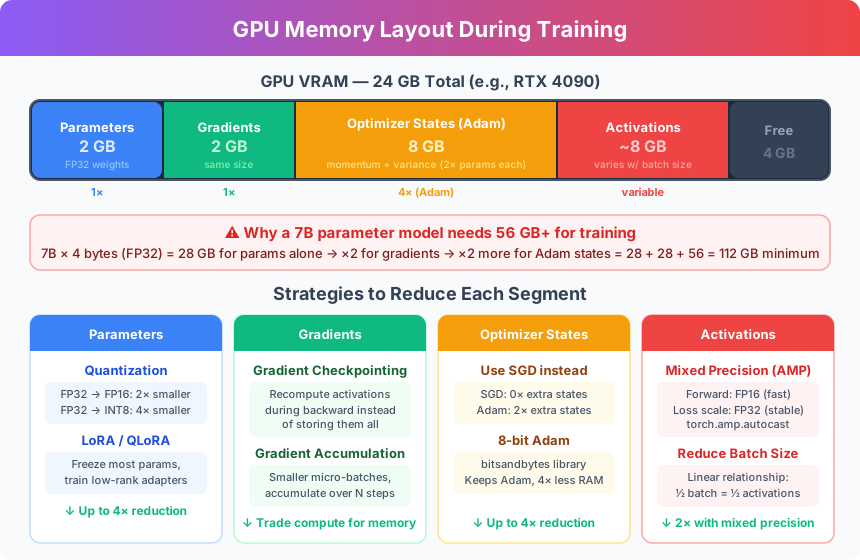
Your model requires more GPU memory than you have. This is not a hypothetical — it is the default situation for any model larger than a ResNet. A model’s memory footprint during training is roughly:
- Parameters: 4 bytes per float32 parameter (ResNet-50: ~100 MB)
- Gradients: Same size as parameters (~100 MB for ResNet-50)
- Optimizer state: 2x parameter size for Adam (momentum + variance: ~200 MB)
- Activations: Stored for backward pass, scales with batch size (often the largest component)
For a ResNet-50 with batch size 64, total VRAM is approximately 4–6 GB. For a ViT-Large or a modest language model, it is 16–40 GB. For anything LLM-scale, a single GPU cannot hold the model.
Gradient accumulation is the simplest solution: compute forward and backward passes on small batches, accumulate the gradients, and update weights only after N small batches. The effective batch size is physical_batch_size × accumulation_steps, but VRAM usage corresponds to the physical batch size only.
def train_with_gradient_accumulation(
    model: nn.Module,
    train_loader: DataLoader,
    optimizer: torch.optim.Optimizer,
    criterion: nn.Module,
    device: torch.device,
    accumulation_steps: int = 8,  # Effective batch = physical_batch × 8
) -> float:
    """Training loop with gradient accumulation for large effective batch sizes.

    Physical batch size = 32, accumulation_steps = 8
    → Effective batch size = 256, but VRAM usage of batch_size=32.
    """
    model.train()
    total_loss: float = 0.0
    optimizer.zero_grad()

    for step, (inputs, targets) in enumerate(train_loader):
        inputs = inputs.to(device)
        targets = targets.to(device)

        # Forward + backward (gradients accumulate in .grad)
        predictions = model(inputs)
        loss = criterion(predictions.squeeze(), targets)
        # Scale loss to account for accumulation (mean across accumulated steps)
        scaled_loss = loss / accumulation_steps
        scaled_loss.backward()

        total_loss += loss.item()

        # Update weights every accumulation_steps batches
        if (step + 1) % accumulation_steps == 0:
            torch.nn.utils.clip_grad_norm_(model.parameters(), max_norm=1.0)
            optimizer.step()
            optimizer.zero_grad()

    # Handle any remaining accumulated gradients
    if (step + 1) % accumulation_steps != 0:
        torch.nn.utils.clip_grad_norm_(model.parameters(), max_norm=1.0)
        optimizer.step()
        optimizer.zero_grad()

    return total_loss / len(train_loader)
The critical detail: divide the loss by accumulation_steps before .backward(). Without this scaling, accumulated gradients are accumulation_steps times too large, equivalent to using a learning rate that is accumulation_steps times higher than intended. The gradient clipping (clip_grad_norm_) is not optional — accumulated gradients amplify any instability in the loss landscape.
Mixed Precision Training
Every modern GPU (Volta architecture and newer: V100, A100, H100, T4, RTX 3000/4000/5000 series) has dedicated hardware for float16 (and bfloat16) arithmetic that runs 2x faster than float32. Mixed precision training exploits this: the forward pass and backward pass run in float16 for speed, while parameter updates happen in float32 for numerical stability.
PyTorch’s torch.amp module makes this nearly transparent:
from torch.amp import autocast, GradScaler


def train_mixed_precision(
    model: nn.Module,
    train_loader: DataLoader,
    optimizer: torch.optim.Optimizer,
    criterion: nn.Module,
    device: torch.device,
    n_epochs: int = 20,
) -> nn.Module:
    """Training with automatic mixed precision — nearly free 2x speedup."""
    scaler = GradScaler("cuda")

    for epoch in range(n_epochs):
        model.train()
        epoch_loss: float = 0.0

        for inputs, targets in train_loader:
            inputs = inputs.to(device)
            targets = targets.to(device)

            optimizer.zero_grad()

            # Forward pass in float16 — 2x faster matrix multiplications
            with autocast("cuda"):
                predictions = model(inputs)
                loss = criterion(predictions.squeeze(), targets)

            # Backward pass: scaler handles float16 gradient underflow
            scaler.scale(loss).backward()
            scaler.step(optimizer)
            scaler.update()

            epoch_loss += loss.item()

        avg_loss: float = epoch_loss / len(train_loader)
        print(f"Epoch {epoch+1}: loss={avg_loss:.4f}")

    return model
GradScaler solves the underflow problem. Float16 has a limited range: values below ~6e-8 flush to zero. Gradients in deep networks routinely fall below this threshold. The scaler multiplies the loss by a large factor before .backward() (scaling gradients up into float16 range), then divides the gradients back down before the optimizer step. If it detects inf/nan gradients (overflow), it skips the optimizer step and reduces the scale factor. This is an adaptive process that runs automatically.
On an A100, mixed precision training typically delivers:
- 1.5–2x training speedup (measured wall-clock time, not theoretical FLOPS)
- ~30% reduction in VRAM usage (activations stored in float16 instead of float32)
- No measurable accuracy loss for the vast majority of models
If you are training on any modern GPU and not using mixed precision, you are leaving free performance on the table.
Cost Estimation: Budget Before You Train
The worst surprise in a deep learning project is discovering halfway through that your training run will cost $3,000 and take 72 hours. Estimate costs before committing resources.
Step 1: Measure per-batch time. Run 100 batches and measure wall-clock time. This captures real throughput including data loading overhead.
import time


def estimate_training_cost(
    model: nn.Module,
    train_loader: DataLoader,
    device: torch.device,
    n_epochs: int,
    gpu_cost_per_hour: float,
    warmup_batches: int = 20,
    timing_batches: int = 100,
) -> dict[str, float]:
    """Estimate total training time and cost before committing to a full run."""
    model = model.to(device)
    criterion = nn.MSELoss()

    # Warmup — first batches are slower due to CUDA initialization, JIT compilation
    model.train()
    for i, (inputs, targets) in enumerate(train_loader):
        if i >= warmup_batches:
            break
        inputs = inputs.to(device)
        targets = targets.to(device)
        _ = model(inputs)

    torch.cuda.synchronize()

    # Time the next N batches
    start: float = time.perf_counter()
    batch_count: int = 0
    for i, (inputs, targets) in enumerate(train_loader):
        if i < warmup_batches:
            continue
        if batch_count >= timing_batches:
            break
        inputs = inputs.to(device)
        targets = targets.to(device)
        out = model(inputs)
        loss = criterion(out.squeeze(), targets)
        loss.backward()
        batch_count += 1

    torch.cuda.synchronize()
    elapsed: float = time.perf_counter() - start

    # Extrapolate
    seconds_per_batch: float = elapsed / batch_count
    total_batches: int = len(train_loader) * n_epochs
    total_seconds: float = seconds_per_batch * total_batches
    total_hours: float = total_seconds / 3600
    total_cost: float = total_hours * gpu_cost_per_hour

    return {
        "seconds_per_batch": round(seconds_per_batch, 4),
        "total_batches": total_batches,
        "estimated_hours": round(total_hours, 2),
        "estimated_cost_usd": round(total_cost, 2),
    }

# Example usage:
# estimate = estimate_training_cost(
#     model, train_loader, device,
#     n_epochs=50, gpu_cost_per_hour=1.10  # A100 spot price
# )
# print(estimate)
# {'seconds_per_batch': 0.0342, 'total_batches': 195000,
#  'estimated_hours': 1.85, 'estimated_cost_usd': 2.04}
Step 2: Compare hardware options. Not all GPUs are equal, and not all are cost-effective for your workload.
| GPU | VRAM | FP16 TFLOPS | On-Demand ($/hr) | Spot ($/hr) | Best For |
|---|---|---|---|---|---|
| T4 | 16 GB | 65 | $0.53 | $0.16 | Inference, small model fine-tuning |
| A10G | 24 GB | 125 | $1.21 | $0.45 | Medium fine-tuning, prototyping |
| V100 | 16 GB | 125 | $3.06 | $0.92 | Legacy, avoid for new workloads |
| A100 40GB | 40 GB | 312 | $4.10 | $1.10 | Production training, medium LLMs |
| A100 80GB | 80 GB | 312 | $5.12 | $1.55 | Large models, attention bottlenecked |
| H100 | 80 GB | 990 | $8.10 | $2.85 | LLM training, large-scale experiments |
| L4 | 24 GB | 121 | $0.81 | $0.24 | Inference, cost-effective fine-tuning |
Prices are approximate as of 2025, vary by cloud provider and region. Spot prices fluctuate.
Key observations from this table:
The T4 is underrated. For fine-tuning models that fit in 16 GB and for inference workloads, the T4 at $0.16/hr spot is hard to beat. It is 25x cheaper per hour than an A100 and still delivers reasonable throughput for small models.
The V100 is a legacy trap. It has the same VRAM as a T4 but costs 6x more. Unless your cloud provider only offers V100s, use a T4 or A10G instead.
The H100 earns its price on large models. The 3x higher TFLOPS versus A100 translates to genuine wall-clock speedups for LLM-scale training. For fine-tuning a ResNet, the H100’s advantages are irrelevant — the model is too small to saturate it.
Spot instances are the pragmatic choice. If your training pipeline supports checkpointing (and after Section 6.1, it does), use spot instances. A preemption costs you the time since the last checkpoint — typically minutes. The 60–70% cost reduction makes experiments that were prohibitively expensive suddenly feasible.
The bottom line: deep learning engineering is as much about managing hardware constraints as it is about model architecture. A model that runs out of memory, takes a week to train, or costs $5,000 per experiment is not a good model — regardless of its theoretical accuracy. The techniques in this section — gradient accumulation, mixed precision, optimized data loading, and cost estimation — are not optimizations. They are prerequisites for production deep learning work.