High-Performance Data Manipulation
SummaryThis chapter confronts the reality that Pandas —...
This chapter confronts the reality that Pandas —...
This chapter confronts the reality that Pandas — the default choice for Python data work — becomes a liability at scale. You will learn when and why Pandas fails, understand three competing paradigms (eager, lazy, and SQL-native), and build the mental model needed to pick the right tool for your workload. We cover Polars for high-performance lazy evaluation, DuckDB for analytical SQL without a server, and out-of-core techniques for datasets that exceed available RAM.
High-Performance Data Manipulation
You have a pipeline. It reads three CSV files, joins them, filters rows, computes aggregates, and writes Parquet. Straightforward work. In development, with 100K rows, it finishes in two seconds. In production, with 200 million rows, it takes 45 minutes — and sometimes crashes with MemoryError.
This is not a hypothetical. This is the exact failure mode that every data team hits when they graduate from prototype to production. The tool that got you here — Pandas — is now the thing holding you back.
The Pandas Tax
Pandas was designed in 2008 for financial time series on a single analyst’s workstation. It has three structural problems that cannot be fixed without breaking its API:
1. Memory amplification. A 1GB CSV file routinely consumes 3–4GB of RAM once loaded into a DataFrame. Every string column becomes an array of Python object pointers. Every operation — filtering, grouping, joining — creates intermediate copies. A pipeline with five transformation steps can peak at 10–15× the original file size in memory.
2. Single-threaded execution. Your machine has 8 cores. Pandas uses one. A groupby().agg() on 100 million rows will saturate a single core while the other seven sit idle. You are paying for hardware you cannot use.
3. Eager evaluation. Every operation executes immediately, even if the downstream step discards 99% of the rows. There is no query planner. There is no opportunity to push filters before joins, or to prune columns before aggregation. You, the programmer, must manually optimize the execution order — and you will get it wrong.
# The Pandas pipeline that takes 45 minutes
import pandas as pd

orders = pd.read_csv("orders.csv")          # 8GB in memory
customers = pd.read_csv("customers.csv")    # 2GB in memory
products = pd.read_csv("products.csv")      # 1GB in memory

# Peak memory: ~30GB after join + intermediate copies
merged = orders.merge(customers, on="customer_id")
merged = merged.merge(products, on="product_id")
merged = merged[merged["order_date"] >= "2025-01-01"]  # Filter AFTER join

result = merged.groupby("category").agg(
    total_revenue=("amount", "sum"),
    order_count=("order_id", "nunique"),
)
The filter on order_date runs after two full joins. A query planner would push that filter to the scan phase, discarding 80% of rows before any join occurs. Pandas cannot do this because it has no concept of a query plan.
Three Paradigms
Modern data processing in Python offers three paradigms. Each makes a different trade-off:
| Paradigm | Tool | Execution | Memory Model | Best For |
|---|---|---|---|---|
| Eager | Pandas | Immediate | Full materialization | Exploration, <1GB |
| Lazy | Polars | Deferred + optimized | Streaming + Arrow | ETL, transforms, 1–100GB |
| SQL-native | DuckDB | Query-planned | Column-oriented | Analytics, joins, ad-hoc queries |
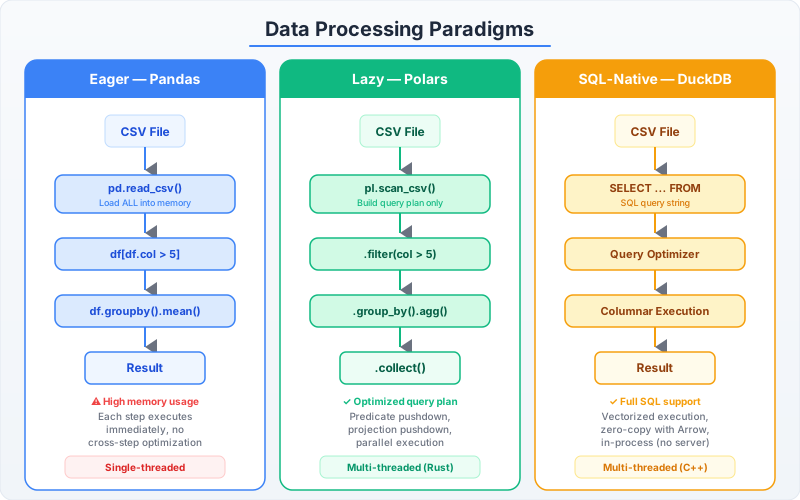
When to Use Which — Decision Matrix
Choose Polars when:
- You are building an ETL pipeline with chained transformations
- You need predictable performance on multi-GB datasets
- Your team writes Python and prefers a DataFrame API over SQL
- You need fine-grained control over parallelism and memory
Choose DuckDB when:
- Your workload is analytical: complex joins, window functions, CTEs
- You want to query Parquet/CSV files directly without loading them
- Your team already thinks in SQL
- You need to prototype queries interactively before embedding them in code
Choose Pandas when:
- Your data fits comfortably in memory (under 1GB)
- You need a specific library that only accepts Pandas DataFrames
- You are doing exploratory analysis in a notebook and need the ecosystem
Choose none of them (go distributed) when:
- Your data exceeds 100GB and cannot be partitioned
- You need to process data across multiple machines
- Latency requirements demand cluster-level parallelism
The rest of this chapter teaches you how to use Polars and DuckDB effectively, and how to handle datasets that exceed your machine’s RAM without reaching for a cluster.
What You Will Build
By the end of this chapter, you will rewrite the 45-minute Pandas pipeline above in both Polars and DuckDB — each completing in under 30 seconds on the same hardware, using one-quarter of the memory. You will understand why they are faster, not by faith, but by reading query plans and profiling memory allocation.
The next section starts with Polars: the DataFrame library that treats your hardware with respect.