Containerization and Infrastructure
SummaryA model packaged in a FastAPI service still...
A model packaged in a FastAPI service still...
A model packaged in a FastAPI service still depends on your Python version, your system libraries, your CUDA driver version, and your specific directory layout. Containerization eliminates these dependencies by packaging everything into a single image that runs identically on your laptop, your CI server, and your production cluster. But ML containers are special: naive Docker images for PyTorch or TensorFlow routinely exceed 4GB, CUDA drivers must match the host GPU, and model weights push layers beyond registry size limits. This section builds a production Dockerfile using multi-stage builds to cut image size from gigabytes to hundreds of megabytes, then constructs a Docker Compose setup for local development. The second half confronts the infrastructure decision: serverless functions offer zero cost at zero traffic but suffer cold starts that can take 30 seconds for a 500MB model, dedicated endpoints provide consistent latency at predictable cost, and managed platforms like SageMaker abstract the infrastructure at a premium. A quantitative decision framework based on latency requirements, request volume, and model size guides the choice.
Containerization and Infrastructure
10.3 — Docker for ML Services
Your FastAPI inference service works on your machine. It will not work on your colleague’s machine, because they have Python 3.12 and you have 3.11, their NumPy is 2.0 and yours is 1.26, and they are on macOS ARM while your production server runs Linux x86_64. This is not a hypothetical — it is the default state of ML development.
Docker solves this by packaging your application, its dependencies, and its runtime environment into a single image. You build the image once, and it runs identically everywhere. But ML containers have specific challenges that web application containers do not.
Why ML Containers Are Special
Three properties make ML Docker images different from typical web service images:
Large base images. A minimal Python image is ~150MB. Add PyTorch and it jumps to 2GB. Add CUDA support and it exceeds 4GB. Your CI pipeline now takes 20 minutes to build, your container registry fills up, and cold starts take forever because the image must be pulled before the container starts.
Model weights. Your model file might be 50MB (XGBoost) or 5GB (large neural network). Baking the model into the image makes the image enormous and forces a full rebuild every time the model is retrained. Mounting the model as a volume at runtime is more flexible but adds deployment complexity.
CUDA driver compatibility. GPU inference requires matching the CUDA toolkit version in the container with the CUDA driver version on the host. A mismatch produces cryptic CUDA driver version is insufficient for CUDA runtime version errors at startup.
Multi-Stage Builds: From 4GB to 400MB
The solution is multi-stage builds. Stage one installs build tools and compiles dependencies. Stage two copies only the compiled artifacts into a minimal runtime image. The build tools — compilers, header files, pip cache — are discarded.
# === Stage 1: Build dependencies ===
FROM python:3.11-slim AS builder

# Install build tools needed to compile native extensions
RUN apt-get update && apt-get install -y --no-install-recommends \
    build-essential \
    && rm -rf /var/lib/apt/lists/*

# Create virtual environment to isolate dependencies
RUN python -m venv /opt/venv
ENV PATH="/opt/venv/bin:$PATH"

# Install Python dependencies
COPY requirements.txt .
RUN pip install --no-cache-dir --upgrade pip \
    && pip install --no-cache-dir -r requirements.txt


# === Stage 2: Runtime image ===
FROM python:3.11-slim AS runtime

# Security: run as non-root user
RUN groupadd -r appuser && useradd -r -g appuser -d /app -s /sbin/nologin appuser

# Copy only the virtual environment from builder — no compilers, no cache
COPY --from=builder /opt/venv /opt/venv
ENV PATH="/opt/venv/bin:$PATH"

# Install minimal runtime dependencies
RUN apt-get update && apt-get install -y --no-install-recommends \
    libgomp1 \
    curl \
    && rm -rf /var/lib/apt/lists/*

WORKDIR /app

# Copy application code
COPY app/ ./app/
COPY model.onnx .

# Switch to non-root user
USER appuser

# Expose port
EXPOSE 8000

# Health check: container orchestrators use this to determine readiness
HEALTHCHECK --interval=30s --timeout=5s --start-period=60s --retries=3 \
    CMD curl -f http://localhost:8000/health || exit 1

# Run with uvicorn — workers should match available CPU cores
CMD ["uvicorn", "app.main:app", "--host", "0.0.0.0", "--port", "8000", "--workers", "2"]
Why each decision matters:
python:3.11-sliminstead ofpython:3.11saves ~700MB. The full image includes GCC, dev headers, and documentation you do not need at runtime.- Non-root user is a security requirement. If your container is compromised, the attacker has limited privileges. Many container runtimes reject root containers by default.
--no-cache-dirprevents pip from caching downloaded packages inside the image. Without this, you ship megabytes of.whlfiles you will never use again.libgomp1is the OpenMP runtime — XGBoost and many sklearn operations need it. Forget this and you getlibgomp.so.1: cannot open shared object fileat runtime.--start-period=60sgives the container time to load the model before the health check declares it unhealthy. A 200MB ONNX model takes 5–15 seconds to load. Without a start period, the orchestrator restarts the container in an infinite loop because the health check fails during model loading.
Pair the Dockerfile with a .dockerignore to prevent unnecessary files from entering the build context:
# .dockerignore
__pycache__/
*.pyc
.git/
.env
*.egg-info/
data/
notebooks/
tests/
.pytest_cache/
.mypy_cache/
.venv/
README.md
Without .dockerignore, Docker sends your entire directory — including your training data, notebooks, and git history — as the build context. A 2GB dataset turns a 30-second build into a 5-minute build.
Docker Compose for Local Development
During development, you need more than just the inference API. You need a monitoring stack, a model registry, or a database for logging predictions. Docker Compose orchestrates multiple containers:
# docker-compose.yml
services:
  inference-api:
    build:
      context: .
      dockerfile: Dockerfile
    ports:
      - "8000:8000"
    volumes:
      - ./models:/app/models:ro  # Mount model directory read-only
    environment:
      - MODEL_PATH=/app/models/model.onnx
      - LOG_LEVEL=info
      - WORKERS=2
    healthcheck:
      test: ["CMD", "curl", "-f", "http://localhost:8000/health"]
      interval: 30s
      timeout: 5s
      retries: 3
      start_period: 60s
    deploy:
      resources:
        limits:
          memory: 2G       # Prevent OOM from killing the host
          cpus: "2.0"      # Limit CPU to match production allocation
        reservations:
          memory: 512M     # Guarantee minimum memory

  prometheus:
    image: prom/prometheus:v2.51.0
    ports:
      - "9090:9090"
    volumes:
      - ./monitoring/prometheus.yml:/etc/prometheus/prometheus.yml:ro
    depends_on:
      inference-api:
        condition: service_healthy

  grafana:
    image: grafana/grafana:10.4.0
    ports:
      - "3000:3000"
    environment:
      - GF_SECURITY_ADMIN_PASSWORD=admin
    volumes:
      - grafana-data:/var/lib/grafana
    depends_on:
      - prometheus

volumes:
  grafana-data:
Key decisions:
volumes: ./models:/app/models:romounts models as read-only volumes. You can swap model files without rebuilding the image. The:roflag prevents the container from modifying the model — defense in depth.- Resource limits prevent a memory leak in your inference code from taking down the host machine. Set
limits.memoryto what your service actually needs, not what the host has available. If the container exceeds this limit, the OOM killer terminates it — which is better than it consuming all host memory and crashing everything else. depends_on: condition: service_healthyensures Prometheus does not start scraping an API that is still loading its model. Without this, you get noisy error logs and false alerts during startup.
Run docker compose up --build and you have a complete local ML development stack with monitoring, identical to what you will run in production.
Image Size Optimization: A Checklist
If your final image is still large, walk through this checklist:
| Technique | Typical Savings |
|---|---|
| Multi-stage build | 40-60% — eliminates build tools |
python:3.11-slim base | ~700MB vs. full image |
--no-cache-dir in pip install | 50–200MB of cached wheels |
| Pin specific packages (no extras) | Varies — avoid pulling transitive deps |
.dockerignore | Prevents data/notebooks bloating context |
CPU-only PyTorch (--index-url https://download.pytorch.org/whl/cpu) | ~1.5GB — removes CUDA from PyTorch |
| Use ONNX Runtime instead of full PyTorch | ~1.8GB — ONNX Runtime CPU is ~50MB |
The last row deserves emphasis. If you export your PyTorch model to ONNX (Section 10.1), you do not need PyTorch in your inference container at all. You need onnxruntime (~50MB) instead of torch (~2GB). This single decision can reduce your image by 80%.
10.4 — Serverless vs. Dedicated Inference Endpoints
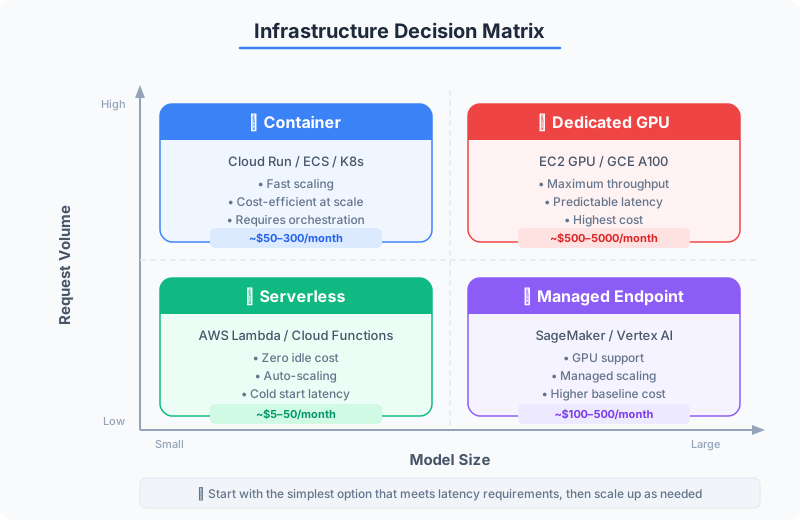
Your containerized service runs locally. Now you need to put it somewhere that handles real traffic. The infrastructure you choose determines your latency characteristics, your cost structure, and your operational burden. There are three categories, and each involves trade-offs you must quantify — not guess at.
Serverless: Zero Cost at Zero Traffic
Serverless platforms (AWS Lambda, Google Cloud Functions, Azure Functions) run your code in response to events. You pay only for the compute time consumed. At zero traffic, you pay nothing.
This sounds ideal until you encounter cold starts. When a serverless function has not been invoked recently, the platform must: allocate compute resources, download your container image, start the container, load your application, and load your model into memory. For an ML model, this sequence is devastating:
| Component | Cold Start Time |
|---|---|
| Container allocation | 0.5–2s |
| Image pull (500MB image) | 3–8s |
| Python interpreter startup | 0.5–1s |
| Model loading (200MB ONNX) | 2–5s |
| Model loading (500MB PyTorch) | 8–15s |
| Total (ONNX) | ~6–16s |
| Total (PyTorch) | ~12–30s |
Your user sent an HTTP request. They waited 15 seconds. They left. Cold starts are not an edge case for ML workloads — they are the defining limitation.
Mitigations exist but erode the cost advantage. Provisioned concurrency keeps instances warm, but you pay for idle compute — defeating the point of serverless. Model size reduction through quantization or distillation helps but requires engineering effort. SnapStart (AWS) and min instances (GCP) reduce cold starts to 1–3 seconds but add fixed costs.
Serverless works well for ML when: the model is small (<50MB), latency tolerance is high (>5 seconds), and traffic is genuinely sparse and unpredictable.
Dedicated Endpoints: Consistent Latency
Dedicated infrastructure — a container running on a VM, an ECS task, a Kubernetes pod — is always on. The model is loaded, the process is warm, and inference latency is determined by computation alone, not resource allocation.
The cost model is the inverse of serverless: you pay whether or not anyone sends a request. A t3.medium instance running 24/7 costs ~$30/month. A g4dn.xlarge with a GPU costs ~$380/month. If your traffic is consistent and your latency requirements are strict (<200ms p99), dedicated infrastructure is both cheaper and more predictable than serverless.
Managed ML Platforms: Abstraction at a Premium
AWS SageMaker, Google Vertex AI, and Azure ML endpoints provide managed infrastructure specifically designed for model serving. You upload a model artifact, specify an instance type, and the platform handles deployment, auto-scaling, monitoring, and A/B testing.
When this is worth the cost:
- Your team does not have DevOps expertise to manage containers in production
- You need built-in A/B testing between model versions
- You want automatic scaling policies tuned for ML workload patterns
- You are already deep in one cloud provider’s ecosystem
When this is not worth the cost:
- SageMaker real-time endpoints have a minimum cost of ~$60/month (ml.t2.medium) whether or not you receive any traffic
- Vendor lock-in makes migration painful — your deployment artifacts, scaling configs, and monitoring dashboards are platform-specific
- The abstraction can obscure performance problems that would be obvious with direct container access
Decision Framework
Do not choose infrastructure based on what you read in a blog post. Choose based on three quantitative dimensions:
Dimension 1: Latency requirement. What is the maximum acceptable p99 latency for a prediction?
Dimension 2: Request volume. How many requests per second do you expect at peak? How variable is the traffic?
Dimension 3: Model size. How large is the serialized model, and how long does it take to load?
| Scenario | Latency | Volume | Model Size | Recommendation |
|---|---|---|---|---|
| Internal analytics dashboard | 5s+ OK | <10 req/min | <50MB | Serverless |
| Real-time fraud detection | <100ms | 500+ req/s | 200MB | Dedicated GPU |
| Customer-facing recommendation | <500ms | 50-200 req/s | 100MB | Dedicated CPU or Cloud Run |
| Batch scoring pipeline | Minutes OK | Periodic bursts | Any | Serverless or spot instances |
| Experiment with A/B testing needs | <1s | Variable | Any | Managed platform (SageMaker/Vertex) |
Cost Estimation
Cost estimation is how you avoid the surprise $10,000 cloud bill. Here is the math for each option at 100 requests per second, sustained:
Serverless (AWS Lambda, 256MB, 500ms per invocation):
- Compute: 100 req/s × 86,400 s/day × 30 days × 0.5s × $0.0000166667/GB-s × 0.25GB = ~$540/month
- Requests: 259M requests × $0.20/1M = ~$52/month
- Total: ~$592/month
Dedicated (c5.xlarge, 4 vCPU, enough for 100 req/s):
- On-demand: ~$124/month
- Reserved (1-year): ~$78/month
- Spot: ~$37/month (but can be interrupted)
Managed (SageMaker ml.c5.xlarge):
- Endpoint: ~$149/month (SageMaker adds ~20% markup over raw EC2)
- Plus per-request inference charges
At sustained load, dedicated infrastructure is 5–8× cheaper than serverless. The breakeven point — where serverless becomes cheaper than dedicated — is typically below 5–10 requests per second for a 500ms inference workload.
Auto-Scaling: Scaling to Zero with Containers
The gap between serverless and dedicated has narrowed with platforms that scale containers to zero:
Google Cloud Run scales containers from zero instances to thousands based on request volume. Cold starts are 1–5 seconds (much less than Lambda because the container image is pre-cached). You pay only for request processing time, with a per-second billing model. This gives you serverless economics with container flexibility.
Knative provides the same scaling behavior on Kubernetes. If you already run a Kubernetes cluster, Knative adds scale-to-zero without changing your deployment model.
AWS App Runner offers a similar model — containers that scale based on traffic with lower cold starts than Lambda.
These platforms represent the pragmatic middle ground for many ML workloads: container-based deployment (you control the image), automatic scaling (including to zero), and cold starts measured in seconds rather than tens of seconds.
The Honest Recommendation
For most teams deploying their first ML model to production:
- Start with a dedicated container on whatever cloud you already use. A single VM running Docker costs $30–100/month and eliminates cold starts, scaling complexity, and vendor lock-in concerns.
- Add auto-scaling when traffic justifies it. Cloud Run or ECS with auto-scaling policies based on CPU utilization or request count.
- Consider managed platforms when you need features you cannot build faster yourself — A/B testing between model versions, automatic model monitoring, or multi-model endpoints.
- Use serverless for truly sporadic workloads — internal tools used a few times per day, batch scoring triggered by events, or prototypes that may never see sustained traffic.
The worst outcome is overengineering your first deployment. A model served from a single container behind a load balancer, with health checks and basic monitoring, will serve most teams well for months or years. You can always migrate to a more sophisticated architecture when the traffic demands it. You cannot recover the months spent building Kubernetes-native ML pipelines for a service that handles 50 requests per day.