Observability Engineering on AWS
Observability Engineering on AWS
Observability on AWS is not “enable CloudWatch and add some alarms.” It’s a system design problem: how do you instrument 50 microservices, 200 Lambda functions, and 30 DynamoDB tables so that when latency spikes at 3 AM, you can identify the root cause in under 5 minutes?
The three pillars — metrics, logs, traces — must be designed together. A metric tells you something is wrong. A log tells you what went wrong. A trace tells you where in the call chain it went wrong.
Structured Logging: The Foundation
Unstructured logs (print("Processing order 123")) are useless at scale. You can’t filter them, aggregate them, or correlate them across services. Structured logging (JSON) makes every log entry queryable:
import json
import os
import time
import logging
from contextlib import contextmanager
from typing import Any

class StructuredLogger:
    """
    Production-grade structured logger for Lambda/ECS.
    Outputs JSON that CloudWatch Logs Insights can query natively.
    """

    def __init__(self, service_name: str):
        self.service = service_name
        self.context = {}

    def bind(self, **kwargs):
        """Add persistent context (request_id, user_id, etc.)."""
        self.context.update(kwargs)

    def log(self, level: str, message: str, **extra):
        entry = {
            'timestamp': int(time.time() * 1000),
            'level': level,
            'message': message,
            'service': self.service,
            'environment': os.environ.get('ENVIRONMENT', 'unknown'),
            **self.context,
            **extra
        }
        # Remove None values
        entry = {k: v for k, v in entry.items() if v is not None}
        print(json.dumps(entry))

    def info(self, message: str, **kwargs):
        self.log('INFO', message, **kwargs)

    def error(self, message: str, **kwargs):
        self.log('ERROR', message, **kwargs)

    def warn(self, message: str, **kwargs):
        self.log('WARN', message, **kwargs)

    @contextmanager
    def timer(self, operation: str):
        """Time an operation and log the duration."""
        start = time.time()
        try:
            yield
        finally:
            duration_ms = (time.time() - start) * 1000
            self.info(f'{operation} completed',
                     operation=operation, duration_ms=round(duration_ms, 2))

# Usage in Lambda
logger = StructuredLogger('order-service')

def handler(event, context):
    # Bind correlation IDs for the entire request
    logger.bind(
        request_id=context.aws_request_id,
        trace_id=os.environ.get('_X_AMZN_TRACE_ID'),
        function_name=context.function_name
    )

    order_id = event.get('order_id')
    logger.bind(order_id=order_id)

    logger.info('Processing order', customer_id=event.get('customer_id'))

    with logger.timer('dynamodb_query'):
        order = get_order(order_id)

    with logger.timer('payment_processing'):
        result = process_payment(order)

    if result['status'] == 'failed':
        logger.error('Payment failed',
                    error_code=result['error_code'],
                    amount=order['total'])

    return {'statusCode': 200}

# Output (single log entry):
# {"timestamp":1705312800000,"level":"INFO","message":"Processing order",
#  "service":"order-service","environment":"prod","request_id":"abc-123",
#  "trace_id":"Root=1-xxx","order_id":"ORD-456","customer_id":"CUST-789"}
import com.fasterxml.jackson.databind.ObjectMapper;
import com.fasterxml.jackson.databind.node.ObjectNode;
import java.time.Instant;
import java.util.HashMap;
import java.util.Map;
public class StructuredLogger {
private final ObjectMapper mapper = new ObjectMapper();
private final String serviceName;
private final Map<String, Object> context = new HashMap<>();
public StructuredLogger(String serviceName) {
this.serviceName = serviceName;
}
public void bind(String key, Object value) {
context.put(key, value);
}
public void info(String message, Map<String, Object> extra) {
log("INFO", message, extra);
}
public void error(String message, Map<String, Object> extra) {
log("ERROR", message, extra);
}
private void log(String level, String message, Map<String, Object> extra) {
ObjectNode node = mapper.createObjectNode();
node.put("timestamp", Instant.now().toEpochMilli());
node.put("level", level);
node.put("message", message);
node.put("service", serviceName);
node.put("environment", System.getenv().getOrDefault("ENVIRONMENT", "unknown"));
// Add bound context
context.forEach((k, v) -> node.put(k, String.valueOf(v)));
// Add extra fields
if (extra != null) {
extra.forEach((k, v) -> node.put(k, String.valueOf(v)));
}
// Print to stdout — picked up by CloudWatch Logs automatically
System.out.println(node.toString());
}
// Timer utility
public <T> T timed(String operation, java.util.function.Supplier<T> action) {
long start = System.currentTimeMillis();
try {
T result = action.get();
info(operation + " completed", Map.of(
"operation", operation,
"duration_ms", String.valueOf(System.currentTimeMillis() - start)
));
return result;
} catch (Exception e) {
error(operation + " failed", Map.of(
"operation", operation,
"duration_ms", String.valueOf(System.currentTimeMillis() - start),
"error", e.getMessage()
));
throw e;
}
}
}Embedded Metric Format (EMF): Metrics from Logs
EMF lets you emit custom CloudWatch metrics directly from your log output. No PutMetricData API call, no SDK overhead, no batching logic. You write a JSON log line with a specific structure, and CloudWatch automatically extracts metrics from it:
import json
import time

def emit_emf_metric(namespace: str, metrics: dict, dimensions: dict, properties: dict = None):
    """
    Emit CloudWatch metrics via Embedded Metric Format.
    Zero API calls — CloudWatch extracts from log output automatically.
    """
    emf_log = {
        '_aws': {
            'Timestamp': int(time.time() * 1000),
            'CloudWatchMetrics': [{
                'Namespace': namespace,
                'Dimensions': [list(dimensions.keys())],
                'Metrics': [
                    {'Name': name, 'Unit': unit}
                    for name, (value, unit) in metrics.items()
                ]
            }]
        },
        # Dimension values
        **dimensions,
        # Metric values
        **{name: value for name, (value, unit) in metrics.items()},
        # Additional properties (searchable in Logs Insights, not dimensions)
        **(properties or {})
    }

    print(json.dumps(emf_log))

# Usage: Emit latency and error metrics from Lambda
def handler(event, context):
    start = time.time()
    status = 'success'

    try:
        result = process_request(event)
        return result
    except Exception as e:
        status = 'error'
        raise
    finally:
        duration = (time.time() - start) * 1000

        emit_emf_metric(
            namespace='MyApp/OrderService',
            metrics={
                'ProcessingDuration': (duration, 'Milliseconds'),
                'ErrorCount': (1 if status == 'error' else 0, 'Count'),
                'OrdersProcessed': (1, 'Count')
            },
            dimensions={
                'Service': 'order-service',
                'Environment': os.environ.get('ENVIRONMENT', 'dev'),
                'Operation': event.get('operation', 'unknown')
            },
            properties={
                'order_id': event.get('order_id'),
                'request_id': context.aws_request_id
            }
        )
Why EMF over PutMetricData:
PutMetricDatacosts $0.01 per 1,000 API calls and has a limit of 150 TPS- EMF costs $0 for metric extraction (you only pay for log ingestion: $0.50/GB)
- EMF supports high-cardinality properties without creating expensive metric dimensions
- A single EMF log line can contain multiple metrics and dimensions
CloudWatch Logs Insights: Production Queries
# Common queries for production debugging:

# 1. Find all errors with context across services (correlation by trace_id)
error_trace_query = """
fields @timestamp, service, message, error_code, order_id, trace_id
| filter level = "ERROR"
| filter @timestamp > ago(1h)
| sort @timestamp desc
| limit 200
"""

# 2. P99 latency by operation (using EMF metrics in logs)
latency_query = """
filter @message like /ProcessingDuration/
| stats percentile(ProcessingDuration, 99) as p99,
        percentile(ProcessingDuration, 95) as p95,
        percentile(ProcessingDuration, 50) as p50,
        count(*) as requests
  by bin(5m), Operation
| sort bin(5m) desc
"""

# 3. Error rate spike detection
error_rate_query = """
filter level in ["ERROR", "WARN"]
| stats count(*) as error_count by bin(1m), service
| filter error_count > 10
| sort bin(1m) desc
"""

# 4. Trace a single request across all services
# (requires consistent trace_id/request_id propagation)
trace_query = """
filter trace_id = "Root=1-65a4b8c0-abcdef0123456789"
| sort @timestamp asc
| fields @timestamp, service, message, duration_ms, operation
"""

# 5. Find slow DynamoDB operations
slow_dynamo_query = """
filter operation = "dynamodb_query" and duration_ms > 100
| stats count(*) as slow_queries, avg(duration_ms) as avg_ms, max(duration_ms) as max_ms
  by bin(5m)
| sort bin(5m) desc
"""
Alarm Design: Beyond Simple Thresholds
import boto3

cloudwatch = boto3.client('cloudwatch')

# Composite alarm: Only page on-call when BOTH conditions are true
# (Prevents alert fatigue from transient spikes)

# Component alarm 1: High error rate
cloudwatch.put_metric_alarm(
    AlarmName='order-service-high-error-rate',
    Namespace='MyApp/OrderService',
    MetricName='ErrorCount',
    Dimensions=[{'Name': 'Service', 'Value': 'order-service'}],
    Statistic='Sum',
    Period=60,
    EvaluationPeriods=3,
    DatapointsToAlarm=2,  # 2 of 3 periods must breach (handles transient spikes)
    Threshold=10,
    ComparisonOperator='GreaterThanThreshold',
    TreatMissingData='notBreaching'  # No data = no error = don't alarm
)

# Component alarm 2: Latency is also degraded
cloudwatch.put_metric_alarm(
    AlarmName='order-service-high-latency',
    Namespace='MyApp/OrderService',
    MetricName='ProcessingDuration',
    Dimensions=[{'Name': 'Service', 'Value': 'order-service'}],
    ExtendedStatistic='p99',
    Period=60,
    EvaluationPeriods=3,
    DatapointsToAlarm=2,
    Threshold=5000,  # 5 seconds p99
    ComparisonOperator='GreaterThanThreshold',
    TreatMissingData='notBreaching'
)

# Composite: Only fire when BOTH component alarms are in ALARM state
cloudwatch.put_composite_alarm(
    AlarmName='order-service-degraded-PAGES-ONCALL',
    AlarmRule='ALARM("order-service-high-error-rate") AND ALARM("order-service-high-latency")',
    AlarmActions=['arn:aws:sns:us-east-1:123456789012:pagerduty-critical'],
    AlarmDescription='Order service has both high errors AND high latency — genuine degradation'
)

# Anomaly detection alarm: Learns normal pattern, alerts on deviations
cloudwatch.put_metric_alarm(
    AlarmName='order-service-anomaly-detection',
    Namespace='MyApp/OrderService',
    MetricName='OrdersProcessed',
    Dimensions=[{'Name': 'Service', 'Value': 'order-service'}],
    Period=300,
    EvaluationPeriods=3,
    ThresholdMetricId='anomaly_band',
    ComparisonOperator='LessThanLowerOrGreaterThanUpperThreshold',
    Metrics=[
        {
            'Id': 'orders',
            'MetricStat': {
                'Metric': {
                    'Namespace': 'MyApp/OrderService',
                    'MetricName': 'OrdersProcessed',
                    'Dimensions': [{'Name': 'Service', 'Value': 'order-service'}]
                },
                'Period': 300,
                'Stat': 'Sum'
            }
        },
        {
            'Id': 'anomaly_band',
            'Expression': 'ANOMALY_DETECTION_BAND(orders, 2)'  # 2 standard deviations
        }
    ],
    TreatMissingData='breaching'  # No orders at all IS a problem
)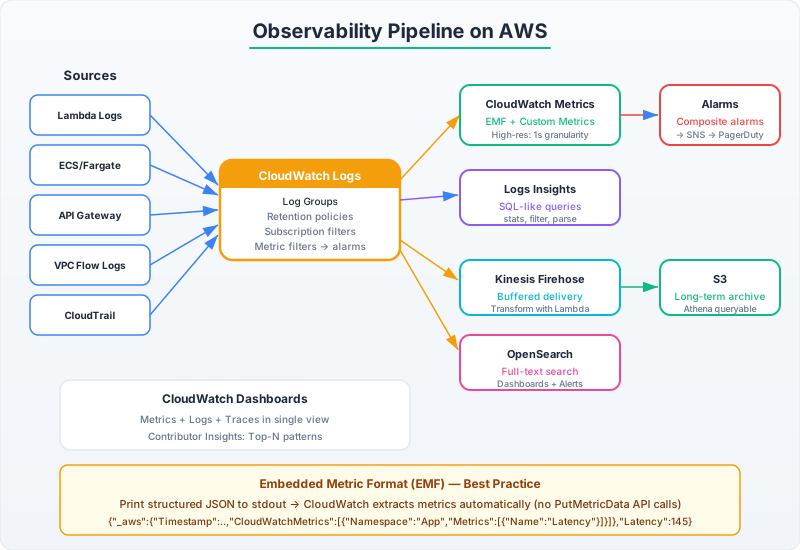
The operational model: Metrics for alerting (what’s broken), logs for debugging (why it’s broken), traces for localization (where it’s broken). If you have all three correlated by trace ID, any incident moves from “something is wrong” to “here’s the root cause” in minutes, not hours.