Event-Driven Architectures at Scale
Event-Driven Architectures at Scale
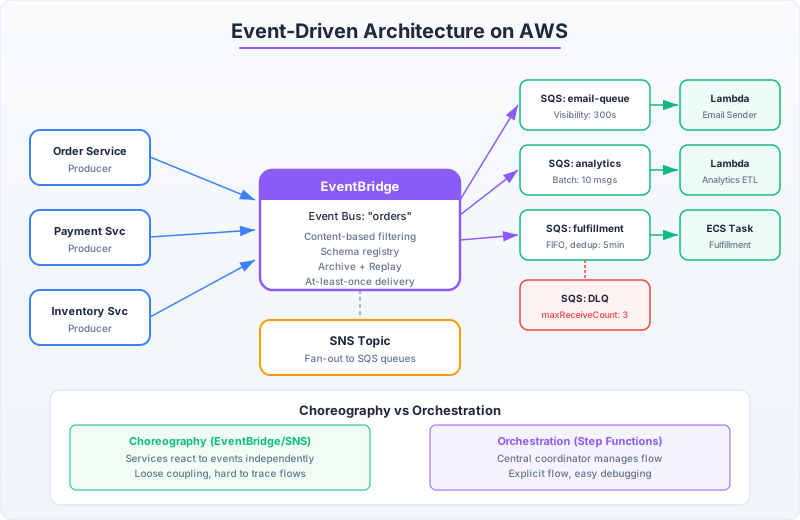
Event-driven architecture on AWS looks straightforward in diagrams: boxes connected by arrows through SQS queues and SNS topics. In production, it’s a minefield of invisible guarantees, ordering assumptions, poison pill messages, and partial failure modes that make synchronous request-response architectures seem simple by comparison.
This chapter covers the mechanics you need to build event-driven systems that survive real traffic — not the toy examples from AWS blog posts.
SQS: The Deceptively Complex Queue
SQS Standard queues provide at-least-once delivery with best-effort ordering. FIFO queues provide exactly-once processing with strict ordering within a message group. The choice between them has deep implications:
Standard Queue Mechanics
import boto3
import json
import time
from typing import Optional

sqs = boto3.client('sqs')
QUEUE_URL = 'https://sqs.us-east-1.amazonaws.com/123456789012/order-processing'

def send_with_deduplication(message: dict, dedup_id: Optional[str] = None):
    """
    Standard queues don't support native deduplication.
    You must implement it yourself at the consumer side.
    """
    params = {
        'QueueUrl': QUEUE_URL,
        'MessageBody': json.dumps(message),
        'MessageAttributes': {
            'EventType': {
                'DataType': 'String',
                'StringValue': message.get('event_type', 'unknown')
            },
            'Timestamp': {
                'DataType': 'Number',
                'StringValue': str(int(time.time() * 1000))
            }
        }
    }

    # Delay delivery (0-900 seconds) — useful for retry backoff
    if message.get('retry_count', 0) > 0:
        delay = min(900, 2 ** message['retry_count'] * 10)
        params['DelaySeconds'] = delay

    return sqs.send_message(**params)

def consume_with_visibility_management():
    """
    Critical: Visibility timeout must exceed your processing time.
    If processing takes longer than visibility timeout, the message
    becomes visible again and another consumer picks it up → duplicate processing.
    """
    while True:
        response = sqs.receive_message(
            QueueUrl=QUEUE_URL,
            MaxNumberOfMessages=10,  # Batch for efficiency (1-10)
            WaitTimeSeconds=20,       # Long polling — ALWAYS use this
            VisibilityTimeout=300,    # 5 minutes to process
            MessageAttributeNames=['All']
        )

        messages = response.get('Messages', [])
        if not messages:
            continue

        for message in messages:
            receipt_handle = message['ReceiptHandle']
            try:
                body = json.loads(message['Body'])
                process_order(body)

                # Delete ONLY after successful processing
                sqs.delete_message(
                    QueueUrl=QUEUE_URL,
                    ReceiptHandle=receipt_handle
                )
            except TransientError:
                # Let visibility timeout expire → automatic retry
                # Optionally extend visibility if we need more time:
                sqs.change_message_visibility(
                    QueueUrl=QUEUE_URL,
                    ReceiptHandle=receipt_handle,
                    VisibilityTimeout=600  # Give 10 more minutes
                )
            except PoisonPillError:
                # Move to DLQ explicitly (or let maxReceiveCount handle it)
                sqs.delete_message(QueueUrl=QUEUE_URL, ReceiptHandle=receipt_handle)
                send_to_dlq(message)
import software.amazon.awssdk.services.sqs.SqsClient;
import software.amazon.awssdk.services.sqs.model.*;
import com.fasterxml.jackson.databind.ObjectMapper;
import java.util.*;
import java.time.Duration;
public class SqsConsumer {
private final SqsClient sqs = SqsClient.create();
private final ObjectMapper mapper = new ObjectMapper();
private static final String QUEUE_URL =
"https://sqs.us-east-1.amazonaws.com/123456789012/order-processing";
public void pollAndProcess() {
while (true) {
ReceiveMessageResponse response = sqs.receiveMessage(ReceiveMessageRequest.builder()
.queueUrl(QUEUE_URL)
.maxNumberOfMessages(10)
.waitTimeSeconds(20) // Long polling
.visibilityTimeout(300) // 5 min processing window
.messageAttributeNames("All")
.build());
for (Message message : response.messages()) {
try {
Map<String, Object> body = mapper.readValue(
message.body(), Map.class);
processOrder(body);
// Delete only after successful processing
sqs.deleteMessage(DeleteMessageRequest.builder()
.queueUrl(QUEUE_URL)
.receiptHandle(message.receiptHandle())
.build());
} catch (TransientException e) {
// Extend visibility for retry
sqs.changeMessageVisibility(ChangeMessageVisibilityRequest.builder()
.queueUrl(QUEUE_URL)
.receiptHandle(message.receiptHandle())
.visibilityTimeout(600)
.build());
} catch (Exception e) {
// Let maxReceiveCount send it to DLQ
System.err.println("Unrecoverable: " + e.getMessage());
}
}
}
}
}FIFO Queues: When Order Matters
FIFO queues guarantee that messages within the same MessageGroupId are processed in exactly the order they were sent. But the throughput ceiling is real: 300 messages/sec per queue (3,000 with batching and high-throughput mode).
# FIFO queue: Processing account balance updates in order
FIFO_QUEUE_URL = 'https://sqs.us-east-1.amazonaws.com/123456789012/balance-updates.fifo'

def send_balance_update(account_id: str, amount: float, transaction_id: str):
    """
    MessageGroupId = account_id → all updates for one account are ordered.
    Different accounts can be processed in parallel.
    """
    sqs.send_message(
        QueueUrl=FIFO_QUEUE_URL,
        MessageBody=json.dumps({
            'account_id': account_id,
            'amount': amount,
            'transaction_id': transaction_id
        }),
        MessageGroupId=account_id,  # Ordering key
        MessageDeduplicationId=transaction_id  # Exactly-once within 5-min window
    )

# With 10,000 unique account IDs as MessageGroupIds,
# you get 10,000 independent ordered streams, each processing in parallel.
# Total throughput: up to 300 × number_of_message_groups (with high-throughput mode)
SNS Fan-Out with Subscription Filters
SNS topics + SQS subscriptions create the pub/sub pattern. The power feature is subscription filter policies — each subscriber only receives messages matching its filter:
sns = boto3.client('sns')

# Create subscriptions with filters — each service only gets relevant events
def setup_filtered_subscriptions(topic_arn: str):
    # Payment service: only order.created and order.cancelled
    sns.subscribe(
        TopicArn=topic_arn,
        Protocol='sqs',
        Endpoint='arn:aws:sqs:us-east-1:123456789012:payment-processing',
        Attributes={
            'FilterPolicy': json.dumps({
                'event_type': ['order.created', 'order.cancelled'],
                'amount': [{'numeric': ['>=', 0]}]
            }),
            'FilterPolicyScope': 'MessageAttributes'  # or 'MessageBody' for body-based filtering
        }
    )

    # Notification service: all order events except internal updates
    sns.subscribe(
        TopicArn=topic_arn,
        Protocol='sqs',
        Endpoint='arn:aws:sqs:us-east-1:123456789012:notification-service',
        Attributes={
            'FilterPolicy': json.dumps({
                'event_type': [{'prefix': 'order.'}],
                'internal': [{'exists': False}]  # Exclude internal events
            }),
            'FilterPolicyScope': 'MessageAttributes'
        }
    )

    # Analytics: everything (no filter)
    sns.subscribe(
        TopicArn=topic_arn,
        Protocol='sqs',
        Endpoint='arn:aws:sqs:us-east-1:123456789012:analytics-ingestion'
    )

# Publishing with attributes for filtering
def publish_order_event(topic_arn: str, event: dict):
    sns.publish(
        TopicArn=topic_arn,
        Message=json.dumps(event),
        MessageAttributes={
            'event_type': {
                'DataType': 'String',
                'StringValue': event['event_type']
            },
            'amount': {
                'DataType': 'Number',
                'StringValue': str(event.get('amount', 0))
            }
        }
    )
EventBridge: The Enterprise Event Bus
EventBridge adds content-based routing, schema registry, archive/replay, and pipe transformations on top of the basic pub/sub model. Use it when your event routing logic is complex:
events = boto3.client('events')

# Rule: Route high-value orders to a dedicated processing pipeline
events.put_rule(
    Name='high-value-order-routing',
    EventBusName='orders',
    EventPattern=json.dumps({
        'source': ['com.myapp.orders'],
        'detail-type': ['OrderCreated'],
        'detail': {
            'total': [{'numeric': ['>', 1000]}],
            'customer_tier': ['enterprise', 'premium']
        }
    }),
    State='ENABLED'
)

# Target: Step Functions for complex orchestration
events.put_targets(
    Rule='high-value-order-routing',
    EventBusName='orders',
    Targets=[{
        'Id': 'high-value-processor',
        'Arn': 'arn:aws:states:us-east-1:123456789012:stateMachine:high-value-order-flow',
        'RoleArn': 'arn:aws:iam::123456789012:role/EventBridgeToStepFunctions',
        # Transform the event before passing to Step Functions
        'InputTransformer': {
            'InputPathsMap': {
                'orderId': '$.detail.order_id',
                'customerId': '$.detail.customer_id',
                'total': '$.detail.total'
            },
            'InputTemplate': '{"order_id": <orderId>, "customer_id": <customerId>, "amount": <total>, "priority": "high"}'
        }
    }]
)

# Archive: Store all events for replay (debugging, reprocessing)
events.create_archive(
    ArchiveName='all-order-events',
    EventSourceArn='arn:aws:events:us-east-1:123456789012:event-bus/orders',
    EventPattern=json.dumps({
        'source': ['com.myapp.orders']
    }),
    RetentionDays=90
)
Choreography vs Orchestration
Choreography (events): Each service reacts independently to events. No central coordinator. Services are loosely coupled but the overall workflow is invisible — it only exists in the aggregate behavior of all services.
Orchestration (Step Functions): A central state machine defines the workflow explicitly. Each step calls a service and handles its response. The workflow is visible, debuggable, and modifiable in one place.
| Aspect | Choreography | Orchestration |
|---|---|---|
| Coupling | Services know nothing about each other | Orchestrator knows all services |
| Visibility | No single view of workflow state | Full workflow visible in one place |
| Failure handling | Each service handles its own errors | Centralized error handling and retries |
| Adding steps | Publish new event + add new subscriber | Modify the state machine definition |
| Debugging | Correlate logs across services with trace ID | Step Functions execution history shows everything |
| Scaling | Each service scales independently | Step Functions has its own throughput limits |
Rule of thumb: Use choreography for independent reactions (notifications, analytics, audit). Use orchestration for sequential workflows with branching logic (order fulfillment, onboarding flows, data pipelines).