VPC Networking Deep Dive
VPC Networking Deep Dive
A VPC is not a virtual network — it’s a software-defined overlay network running on AWS’s physical substrate. Understanding this distinction matters when you’re debugging why packets between two instances in the same VPC take 0.3ms but packets to a VPC endpoint take 3ms, or why your Lambda function connected to a VPC adds 10 seconds to cold start.
The Packet Path
When an EC2 instance sends a packet, it doesn’t hit a physical switch. The packet flows through the Nitro card (a dedicated hardware network card on the physical host), which performs:
- Security group evaluation (stateful — return traffic automatically allowed)
- Route table lookup (determines next hop)
- Encapsulation (wraps in a VPC overlay header for AWS’s physical network)
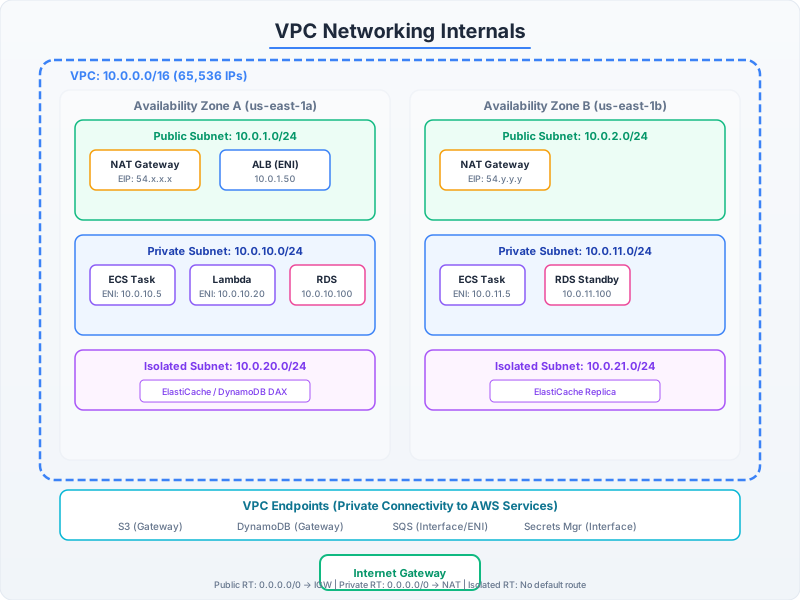
No traffic leaves the physical host unless the destination is on a different host. Two instances on the same physical host communicate at near-zero latency through the Nitro card without touching the physical network.
ENI: The Atomic Unit of VPC Networking
Every resource that participates in a VPC gets an Elastic Network Interface (ENI). An ENI has:
- One primary private IPv4 address
- Zero or more secondary private IPv4 addresses (up to instance-type limit)
- One Elastic IP per private IPv4 (optional)
- One or more security groups
- A MAC address
- Source/destination check flag
import boto3

ec2 = boto3.client('ec2')

# Create an ENI for a database instance that needs a stable IP
# even if the instance is replaced
eni_response = ec2.create_network_interface(
    SubnetId='subnet-0123456789abcdef0',
    Description='Stable ENI for primary database',
    Groups=['sg-database-internal'],
    PrivateIpAddress='10.0.1.100',  # Fixed IP for DNS/config references
    TagSpecifications=[{
        'ResourceType': 'network-interface',
        'Tags': [{'Key': 'Name', 'Value': 'db-primary-eni'}]
    }]
)

eni_id = eni_response['NetworkInterface']['NetworkInterfaceId']

# Attach to an instance (can be detached and reattached to a replacement)
ec2.attach_network_interface(
    NetworkInterfaceId=eni_id,
    InstanceId='i-0123456789abcdef0',
    DeviceIndex=1  # 0 = primary ENI (created with instance), 1+ = additional
)

# Lambda VPC: Each Lambda execution environment creates an ENI
# This is why VPC-connected Lambda has cold start overhead (~1-2s for ENI creation)
# AWS uses shared Hyperplane ENIs now (since 2019) to amortize this
import software.amazon.awssdk.services.ec2.Ec2Client;
import software.amazon.awssdk.services.ec2.model.*;
import java.util.List;
public class EniManagement {
private final Ec2Client ec2 = Ec2Client.create();
public String createStableEni(String subnetId, String securityGroup, String fixedIp) {
CreateNetworkInterfaceResponse response = ec2.createNetworkInterface(
CreateNetworkInterfaceRequest.builder()
.subnetId(subnetId)
.description("Stable ENI for failover")
.groups(securityGroup)
.privateIpAddress(fixedIp)
.tagSpecifications(TagSpecification.builder()
.resourceType(ResourceType.NETWORK_INTERFACE)
.tags(Tag.builder().key("Name").value("stable-eni").build())
.build())
.build());
return response.networkInterface().networkInterfaceId();
}
// ENI failover: detach from failed instance, attach to replacement
public void failoverEni(String eniId, String attachmentId, String newInstanceId) {
// Detach from old instance (force if instance is unresponsive)
ec2.detachNetworkInterface(DetachNetworkInterfaceRequest.builder()
.attachmentId(attachmentId)
.force(true)
.build());
// Wait for detachment
ec2.waiter().waitUntilNetworkInterfaceAvailable(
DescribeNetworkInterfacesRequest.builder()
.networkInterfaceIds(eniId)
.build());
// Attach to new instance
ec2.attachNetworkInterface(AttachNetworkInterfaceRequest.builder()
.networkInterfaceId(eniId)
.instanceId(newInstanceId)
.deviceIndex(1)
.build());
}
}Security Group Evaluation: The Full Picture
Security groups are stateful and evaluated at the ENI level. The key behaviors:
- All rules are permissive — you can only Allow, never Deny (use NACLs for Deny)
- Return traffic is automatically allowed regardless of outbound rules
- Rules referencing other security groups create dynamic membership-based access
- Evaluation is OR logic — if ANY rule matches, traffic is allowed
# Pattern: Layered security group architecture for microservices

def create_security_group_architecture(vpc_id: str):
    ec2 = boto3.resource('ec2')

    # Layer 1: ALB security group (public-facing)
    sg_alb = ec2.create_security_group(
        GroupName='alb-public',
        Description='Public ALB - accepts HTTPS from internet',
        VpcId=vpc_id
    )
    sg_alb.authorize_ingress(IpPermissions=[{
        'IpProtocol': 'tcp',
        'FromPort': 443,
        'ToPort': 443,
        'IpRanges': [{'CidrIp': '0.0.0.0/0', 'Description': 'Public HTTPS'}]
    }])

    # Layer 2: Application security group (references ALB SG)
    sg_app = ec2.create_security_group(
        GroupName='app-tier',
        Description='Application tier - only from ALB',
        VpcId=vpc_id
    )
    sg_app.authorize_ingress(IpPermissions=[{
        'IpProtocol': 'tcp',
        'FromPort': 8080,
        'ToPort': 8080,
        # Reference SG instead of CIDR — automatically includes new ALB nodes
        'UserIdGroupPairs': [{'GroupId': sg_alb.id, 'Description': 'From ALB only'}]
    }])

    # Layer 3: Database security group (references App SG)
    sg_db = ec2.create_security_group(
        GroupName='database-tier',
        Description='Database - only from application tier',
        VpcId=vpc_id
    )
    sg_db.authorize_ingress(IpPermissions=[{
        'IpProtocol': 'tcp',
        'FromPort': 5432,
        'ToPort': 5432,
        'UserIdGroupPairs': [{'GroupId': sg_app.id, 'Description': 'From app tier only'}]
    }])

    # Result: DB is reachable ONLY through app tier → app tier ONLY through ALB
    # New app instances automatically gain DB access by joining sg_app
    # No CIDR management, no IP tracking, fully dynamic

    return {'alb': sg_alb.id, 'app': sg_app.id, 'db': sg_db.id}
Subnet Design: The Production Pattern
The standard production VPC uses 3 AZs with 3 subnet tiers (public, private, isolated):
# Production VPC CIDR design for /16 (65,536 IPs)
# Each AZ gets /18 (16,384 IPs), each tier gets /20 (4,096 IPs)

vpc_design = {
    'cidr': '10.0.0.0/16',
    'azs': {
        'us-east-1a': {
            'public':   '10.0.0.0/20',    # ALBs, NAT Gateways, bastion
            'private':  '10.0.16.0/20',   # ECS tasks, Lambda, app servers
            'isolated': '10.0.32.0/20',   # RDS, ElastiCache (no internet route)
            'spare':    '10.0.48.0/20'    # Reserved for future use
        },
        'us-east-1b': {
            'public':   '10.0.64.0/20',
            'private':  '10.0.80.0/20',
            'isolated': '10.0.96.0/20',
            'spare':    '10.0.112.0/20'
        },
        'us-east-1c': {
            'public':   '10.0.128.0/20',
            'private':  '10.0.144.0/20',
            'isolated': '10.0.160.0/20',
            'spare':    '10.0.176.0/20'
        }
    },
    # Remaining: 10.0.192.0/18 — reserved for expansion
}

# Route table design:
# Public subnets:  0.0.0.0/0 → Internet Gateway
# Private subnets: 0.0.0.0/0 → NAT Gateway (one per AZ for HA)
# Isolated subnets: No 0.0.0.0/0 route at all
#                   Add VPC endpoints for AWS services (S3, DynamoDB, etc.)
VPC Endpoints: Avoiding NAT Gateway Costs
NAT Gateway charges $0.045/hour + $0.045/GB processed. For services making heavy API calls to S3 or DynamoDB, VPC endpoints eliminate this cost entirely:
# Gateway Endpoints (S3, DynamoDB): FREE, modify route table
ec2 = boto3.client('ec2')

# S3 Gateway Endpoint — routes S3 traffic directly, bypassing NAT
s3_endpoint = ec2.create_vpc_endpoint(
    VpcId='vpc-0123456789',
    ServiceName='com.amazonaws.us-east-1.s3',
    VpcEndpointType='Gateway',
    RouteTableIds=['rtb-private-a', 'rtb-private-b', 'rtb-private-c']
)
# Cost: $0. Traffic to S3 now goes through AWS backbone, not NAT.
# Savings on a data-heavy workload: $0.045/GB × 10TB/month = $450/month

# Interface Endpoints (most other services): $0.01/hour + $0.01/GB
# Creates an ENI in your VPC with a private IP for the service
secrets_endpoint = ec2.create_vpc_endpoint(
    VpcId='vpc-0123456789',
    ServiceName='com.amazonaws.us-east-1.secretsmanager',
    VpcEndpointType='Interface',
    SubnetIds=['subnet-private-a', 'subnet-private-b'],
    SecurityGroupIds=['sg-vpc-endpoints'],
    PrivateDnsEnabled=True  # Override public DNS → resolves to private IP
)
# With PrivateDnsEnabled: sdk calls to secretsmanager.us-east-1.amazonaws.com
# resolve to the endpoint's private IP (10.0.x.x) instead of public IP
# No code changes needed — DNS does the routing
Critical cost comparison for a workload doing 5TB/month of S3 API traffic:
- Through NAT Gateway: $0.045/GB × 5,000 GB = $225/month
- Through S3 Gateway Endpoint: $0/month
- S3 Gateway Endpoint is always the right choice. There’s no reason not to use it.