Transaction Boundaries and the Connection Pool Massacre
Transaction Boundaries and the Connection Pool Massacre
The Lie
@Transactional manages your transactions. Put it on a method, and Hibernate handles connection acquisition, commit, rollback, and cleanup. You write business logic. The framework handles plumbing.
The Reality
@Transactional does not just manage transactions. It manages when your code acquires a database connection and how long it holds that connection. In a connection pool with 10 connections and 100 concurrent requests, how long each request holds a connection determines whether your system serves requests or queues them.
Spring’s default behavior with @Transactional:
- The transactional proxy intercepts the method call
- It acquires a connection from the pool
- It begins a transaction on that connection
- Your method executes (including any non-database work)
- The method returns, the proxy commits
- The connection is returned to the pool
Every millisecond your method spends doing non-database work (HTTP calls to external services, file I/O, computation) is a millisecond a database connection is held but idle. With a pool of 10 connections, 10 concurrent requests each holding a connection for 500ms of non-database work means the pool is saturated for half a second doing nothing database-related.
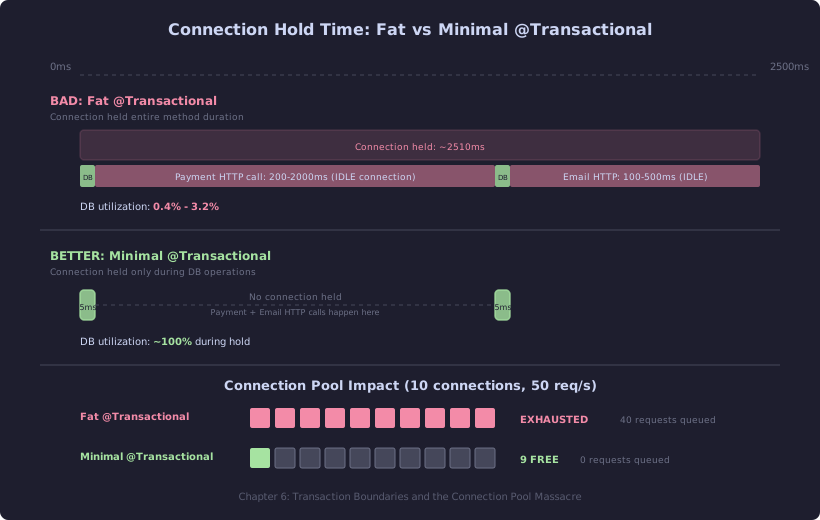
The top timeline shows a fat @Transactional method: the DB operations (green) take 10ms total, but the connection is held for up to 2510ms while HTTP calls run. The bottom timeline shows the corrected pattern: two narrow DB transactions each lasting ~5ms, with no connection held during external calls. The pool visualization below shows the practical consequence at 50 req/s — the fat pattern exhausts all 10 connections and queues 40 requests, while the minimal pattern leaves 9 connections free.
The Evidence
// BAD: Transaction holds connection during external HTTP call
@Service
public class OrderService {

    @Transactional
    public OrderConfirmation placeOrder(OrderRequest request) {
        // 1. Validate inventory (DB query: ~5ms)
        Inventory inventory = inventoryRepository.findByProductId(
            request.productId());

        // 2. Call payment gateway (HTTP: ~200-2000ms)
        PaymentResult payment = paymentGateway.charge(
            request.customerId(), request.amount());

        // 3. Create order record (DB insert: ~5ms)
        Order order = new Order(request.customerId(),
            request.productId(), payment.transactionId());
        orderRepository.save(order);

        // 4. Send confirmation email (HTTP: ~100-500ms)
        emailService.sendConfirmation(order);

        return new OrderConfirmation(order.getId(),
            payment.transactionId());
    }
}

// Connection held for: 5ms + 200-2000ms + 5ms + 100-500ms
//                    = 310ms to 2510ms
// Actual database usage: ~10ms
// Connection utilization: 0.4% to 3.2%
With HikariCP’s default pool size of 10, you can handle at most 10 concurrent placeOrder calls before connections queue. If the payment gateway is slow (2 seconds), 10 requests saturate the pool for 2 seconds. Every other endpoint that needs a database connection, including health checks, blocks.
// HikariCP will log:
// HikariPool-1 - Connection is not available, request timed out after 30000ms.
// java.sql.SQLTransientConnectionException: HikariPool-1 -
//   Connection is not available, request timed out after 30000ms.
The Fix
Split the method into database operations and non-database operations. Hold the connection only for database work.
// BETTER: Minimal transaction boundaries
@Service
public class OrderService {

    @Transactional(readOnly = true)
    public Inventory validateInventory(Long productId) {
        return inventoryRepository.findByProductId(productId);
    }

    @Transactional
    public Order createOrder(Long customerId, Long productId,
                             String transactionId) {
        Order order = new Order(customerId, productId, transactionId);
        return orderRepository.save(order);
    }

    // No @Transactional: orchestrates operations without holding a connection
    public OrderConfirmation placeOrder(OrderRequest request) {
        // 1. DB: validate inventory (~5ms connection hold)
        Inventory inventory = validateInventory(request.productId());

        // Connection is released back to pool here

        // 2. HTTP: charge payment (~200-2000ms, no connection held)
        PaymentResult payment = paymentGateway.charge(
            request.customerId(), request.amount());

        // 3. DB: create order (~5ms connection hold)
        Order order = createOrder(request.customerId(),
            request.productId(), payment.transactionId());

        // Connection is released back to pool here

        // 4. HTTP: send email (~100-500ms, no connection held)
        emailService.sendConfirmation(order);

        return new OrderConfirmation(order.getId(),
            payment.transactionId());
    }
}

// Connection utilization: nearly 100% during the ~5ms each is held
// Pool can serve 10x more concurrent requests
The trade-off: you no longer have a single atomic transaction across the inventory check, payment, and order creation. If the payment succeeds but order creation fails, you need compensation logic (refund the payment). This is the reality of any system that calls external services. The single @Transactional method gave you the illusion of atomicity, but the payment gateway call was never part of your database transaction anyway.
The Cost Model
Connection pool sizing follows Little’s Law: pool_size = throughput × hold_time.
If you need to handle 50 requests/second and each holds a connection for 500ms (the bad pattern above), you need 25 connections. If you reduce hold time to 10ms (the fixed pattern), you need 0.5 connections, so 1 in practice.
| Pattern | Connection Hold Time | Pool Size for 50 req/s | Pool Size for 200 req/s |
|---|---|---|---|
| Fat @Transactional (with HTTP calls) | 500ms - 2500ms | 25 - 125 | 100 - 500 |
| Minimal @Transactional (DB only) | 5ms - 15ms | 1 - 2 | 1 - 3 |
| Open-in-view + lazy loading | 50ms - 5000ms | 3 - 250 | 10 - 1000 |
HikariCP’s documentation recommends a pool size of (core_count * 2) + disk_spindles. For a typical 4-core server, that is 10-13 connections. The fat @Transactional pattern blows past this at modest load.