The GitLab Database Deletion: A Tired Engineer, a Wrong Terminal, and the Backup Strategy That Had Never Been Tested
The GitLab Database Deletion: A Tired Engineer, a Wrong Terminal, and the Backup Strategy That Had Never Been Tested Under Real Conditions
The System as Its Engineers Understood It
GitLab.com is a hosted Git repository service used by hundreds of thousands of developers to store, collaborate on, and deploy source code. The platform runs on a PostgreSQL database that stores metadata for repositories, issues, merge requests, user accounts, and other application data. The actual Git repository data is stored separately on disk. The PostgreSQL database is the critical metadata layer: without it, the platform cannot function even if the Git data is intact.
The database architecture uses PostgreSQL streaming replication. A primary database server receives all write operations. One or more secondary servers replicate the primary’s write-ahead log (WAL) in near-real-time, maintaining copies that can serve read queries and provide failover capability. This is standard PostgreSQL high availability.
GitLab’s backup strategy has five layers:
- Regular PostgreSQL backups (pg_dump). Automated daily database dumps.
- PostgreSQL streaming replication. Real-time data replication to secondary servers.
- LVM snapshots. Filesystem-level snapshots of the database volume.
- Azure disk snapshots. Cloud-provider-level snapshots of the virtual disk.
- S3 backup uploads. pg_dump output uploaded to Amazon S3 for off-site storage.
Five independent backup mechanisms. The engineering team has reasonable confidence that data can be recovered from any point in the recent past through at least one of these mechanisms. This confidence has never been tested through a full restore under production conditions.
On January 31, 2017, the on-call database engineer is troubleshooting a replication lag issue. The secondary database server has fallen behind the primary. WAL data is accumulating on the primary faster than the secondary can replay it. The engineer has been working on the problem for several hours. It is late evening.
The Chain
January 31, 2017, approximately 23:00 UTC. The database engineer is troubleshooting the replication lag. The secondary server’s data directory is corrupted or out of sync. The standard recovery procedure is to delete the secondary’s data directory and re-initialize it from the primary. The engineer has two terminal windows open: one connected to the secondary database server (db2), one connected to the primary database server (db1).
23:00 UTC (continued). The engineer prepares to delete the data directory on the secondary server. The command is rm -rf /var/opt/gitlab/postgresql/data/. This will remove the PostgreSQL data directory and all its contents.
23:00 UTC. The engineer executes the command. In the wrong terminal. The command runs on db1, the primary database server. The production database’s data directory begins being deleted.
The engineer realizes the mistake within seconds. The rm -rf command is already running. The engineer cancels the command with Ctrl-C, but the damage is done. A significant portion of the data directory has been deleted. PostgreSQL is no longer functioning. The primary database is destroyed.
23:00 to 23:30 UTC. The team assesses the damage and turns to the backup systems. They discover the following:
Backup 1: pg_dump. The automated pg_dump process has not been running successfully. The cron job exists, but the pg_dump command has been failing silently because the database had grown larger than the available disk space for the dump. The last successful pg_dump is approximately six hours old. Six hours of data is missing.
Backup 2: Streaming replication. The secondary server’s data is the data the engineer was trying to fix. It is corrupted and cannot be used for recovery. The replication lag that prompted the troubleshooting session means the secondary was already behind the primary.
Backup 3: LVM snapshots. LVM snapshots are not configured for the database volume. The feature is available but was never enabled for the PostgreSQL data directory.
Backup 4: Azure disk snapshots. Azure disk snapshots exist, but the snapshot process has not been running correctly. The available snapshots are older than the pg_dump backup.
Backup 5: S3 backup uploads. The S3 upload process depends on the pg_dump output. Since pg_dump has been failing, the S3 backups are also stale.
Five backup mechanisms. All five are either non-functional, stale, or corrupted. The only viable recovery path is the six-hour-old pg_dump. Six hours of GitLab.com user data, including repository metadata, issues, merge requests, comments, and account changes, will be lost.
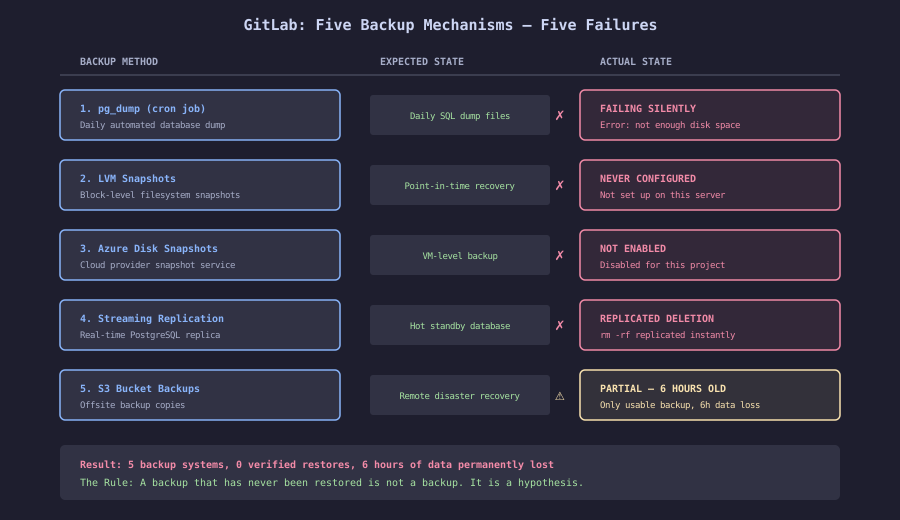
The diagram shows the intended backup architecture versus the actual state at the time of the incident. Five layers of defense, each independently designed to enable recovery. None operational when needed. The gap between the architecture diagram and reality is the core lesson.