AI Agents from Scratch Part 6: Complete Agent & Best Practices (Research Report Generator)
The Complete Series
We’ve built an AI agent from scratch across five parts:
- Understanding the ReAct Pattern — The foundation
- Building the Tool System — Giving agents capabilities
- State Management & Memory — Short-term and long-term memory
- Human-in-the-Loop Validation — Keeping humans in control
- The Agent Core & Loop — Wiring it together
- Complete Agent & Best Practices (You are here)
Now let’s run it and learn how to make it production-ready.
Complete File Structure
research-agent/
├── main.py          # Entry point
├── agent.py         # Main agent class
├── tools.py         # Tool definitions
├── state.py         # State management
├── human_loop.py    # Human interaction
├── requirements.txt # Dependencies
└── README.md
requirements.txt:
openai>=1.0.0
httpx>=0.25.0
beautifulsoup4>=4.12.0
rich>=13.0.0
The Entry Point
# main.py
from agent import ResearchAgent
from human_loop import HumanCheckpoint, console
import sys
import os

def main():
    console.print("[bold]Research Report Generator[/bold]\n")

    # Get topic from user
    topic = HumanCheckpoint.get_user_input(
        "What topic would you like to research?",
        default="The impact of AI on software development"
    )

    requirements = HumanCheckpoint.get_user_input(
        "Any specific requirements? (length, focus, audience)",
        default="2000 words, focus on practical applications, technical audience"
    )

    # Check for API key
    if not os.getenv("OPENAI_API_KEY"):
        console.print("[red]Please set OPENAI_API_KEY environment variable[/red]")
        console.print("export OPENAI_API_KEY='your-key-here'")
        sys.exit(1)

    # Create and run agent
    agent = ResearchAgent()
    agent.run(topic, requirements)

if __name__ == "__main__":
    main()
Running the Agent
# Set your API key
export OPENAI_API_KEY="sk-..."

# Run the agent
python main.py
Here’s what a session looks like:
Research Report Generator

What topic would you like to research? [default]:
quantum computing applications in finance

Any specific requirements? [default]:
focus on practical use cases, 1500 words

╭─ Welcome ─────────────────────────────────────────╮
│ 🔬 RESEARCH REPORT GENERATOR                      │
│                                                   │
│ This agent will help you create a well-researched│
│ report. You'll be asked to review and approve    │
│ each step.                                        │
╰───────────────────────────────────────────────────╯

⚙ Planning: Creating research plan...

--- Iteration 1/3 ---

╭─ Checkpoint 1: Planning ──────────────────────────╮
│ 🔬 RESEARCH PLAN                                  │
│                                                   │
│ The agent has created a research plan.            │
│ Please review:                                    │
╰───────────────────────────────────────────────────╯

Research Questions:
  1. What are the current applications of quantum computing in finance?
  2. How does quantum computing improve portfolio optimization?
  3. What are the challenges of implementing quantum solutions?
  ...

Search Queries:
  1. quantum computing finance applications 2024
  2. quantum portfolio optimization banks
  ...

What would you like to do? (approve/modify/add/reject) [approve]: approve

✓ Plan approved!

⚙ Searching: Executing search queries...
⚙ Search: Searching: quantum computing finance applications 2024
...
Best Practices
1. Always Save State
try:
    agent.run(topic, requirements)
except KeyboardInterrupt:
    console.print("\n[yellow]Interrupted. Saving state...[/yellow]")
    agent.state.save()
except Exception as e:
    agent.state.save()  # Don't lose work on crashes
    raise
Users expect to resume where they left off. Crashes shouldn’t mean starting over.
2. Limit Context Aggressively
# BAD: Send entire webpage to LLM
content = page["content"]  # Could be 50,000 tokens

# GOOD: Truncate to reasonable size
content = page["content"][:4000]  # ~1000 tokens
Web pages are huge. A single page could consume your entire context window and blow your budget.
3. Validate Tool Outputs
def web_search(query: str) -> dict:
    try:
        response = httpx.get(url, timeout=10)
        response.raise_for_status()
        # ... parse results
        return {"query": query, "results": results}
    except httpx.TimeoutException:
        return {"query": query, "results": [], "error": "Search timed out"}
    except Exception as e:
        return {"query": query, "results": [], "error": str(e)}
Never let tools crash the agent. Return error information the LLM can understand.
4. Human Checkpoints Are Not Optional
Every major decision needs oversight:
- ✅ Before expensive operations (API calls, long processing)
- ✅ When selecting from options (which sources to read)
- ✅ Before finalizing outputs (draft review)
Skip checkpoints and you’ll build something users don’t trust.
5. Fail Gracefully with Defaults
try:
    plan = json.loads(result)
    questions = plan["research_questions"]
except (json.JSONDecodeError, KeyError):
    # Sensible fallback
    questions = [f"What is {self.state.topic}?"]
    console.print("[yellow]Couldn't parse plan, using defaults[/yellow]")
LLMs are unpredictable. Parsing will fail. Have fallbacks ready.
6. Log Everything
self.state.feedback_history.append({
    "phase": "planning",
    "action": "approved",
    "timestamp": datetime.now().isoformat(),
    "modifications": questions != original_questions
})
This data is gold for:
- Debugging failed sessions
- Understanding user preferences
- Improving prompts over time
Advanced Memory Strategies
The simple sliding window from Part 3 works, but here are more sophisticated approaches:
Strategy 1: Summarization
When context fills up, ask the LLM to summarize, then continue with the summary:
def compress_context(self):
    """Replace old messages with a summary."""
    if len(self.state.messages) > 30:
        # Keep recent messages
        recent = self.state.messages[-10:]
        old = self.state.messages[:-10]

        # Summarize old messages
        summary_prompt = f"Summarize these conversation exchanges:\n{old}"
        summary = self._call_llm(summary_prompt, use_tools=False)

        # Replace old with summary
        self.state.messages = [
            {"role": "system", "content": f"Previous context: {summary.content}"},
            *recent
        ]
Pros: Preserves meaning better than truncation
Cons: Costs extra API calls
Strategy 2: Semantic Retrieval
Store all messages in a vector database. Before each call, retrieve only relevant past exchanges:
def retrieve_relevant_context(self, query: str, top_k: int = 5):
    """Find past messages relevant to current query."""
    query_embedding = self.embed(query)

    # Search vector store
    relevant = self.vector_store.search(query_embedding, top_k=top_k)

    return relevant
Pros: Scales to very long conversations
Cons: Requires embedding infrastructure
Strategy 3: Hierarchical Memory
Maintain multiple memory levels:
class HierarchicalMemory:
    working_memory: list[dict]    # Current task (small, precise)
    episodic_memory: list[str]    # Past task summaries (medium)
    semantic_memory: dict         # Learned facts & preferences (large)
Pros: Most flexible and scalable
Cons: Most complex to implement
For most projects, start with sliding window + persistent state. Add complexity only when needed.
Extending the Agent
Adding New Tools
Want to generate charts? Add a tool:
# In tools.py
def generate_chart(data: list, chart_type: str, title: str) -> dict:
    """Generate a chart from data."""
    import matplotlib.pyplot as plt

    plt.figure(figsize=(10, 6))
    if chart_type == "bar":
        plt.bar([d["label"] for d in data], [d["value"] for d in data])
    elif chart_type == "line":
        plt.plot([d["label"] for d in data], [d["value"] for d in data])

    plt.title(title)
    filename = f"{title.replace(' ', '_')}_chart.png"
    plt.savefig(filename)
    plt.close()

    return {"status": "success", "filename": filename}

# Add to registry
Tool(
    name="generate_chart",
    description="Generate a chart visualization from data. Use to illustrate findings.",
    parameters={
        "type": "object",
        "properties": {
            "data": {
                "type": "array",
                "items": {"type": "object"},
                "description": "Array of {label, value} objects"
            },
            "chart_type": {
                "type": "string",
                "enum": ["bar", "line", "pie"],
                "description": "Type of chart"
            },
            "title": {
                "type": "string",
                "description": "Chart title"
            }
        },
        "required": ["data", "chart_type", "title"]
    },
    function=generate_chart
)
Adding New Phases
Want a visualization phase? Add a handler:
def phase_visualization(self):
    """Generate charts for the report."""
    self.state.phase = AgentPhase.VISUALIZATION
    self.checkpoint.show_progress("Visualization", "Creating charts...")

    prompt = """Based on the extracted facts, identify data that could be visualized.
    For each visualization opportunity, call generate_chart with appropriate data."""

    self._agent_loop(prompt, max_iterations=5)

    # Human checkpoint for chart approval
    # ...

    return True
Supporting Multiple LLM Providers
Make the agent provider-agnostic:
def __init__(self, provider: str = "openai", model: str = "gpt-4o", **kwargs):
    if provider == "openai":
        from openai import OpenAI
        self.client = OpenAI(api_key=kwargs.get("api_key") or os.getenv("OPENAI_API_KEY"))

    elif provider == "anthropic":
        from anthropic import Anthropic
        self.client = Anthropic(api_key=kwargs.get("api_key") or os.getenv("ANTHROPIC_API_KEY"))

    elif provider == "ollama":
        from openai import OpenAI
        self.client = OpenAI(
            base_url="http://localhost:11434/v1",
            api_key="ollama"  # Required but ignored
        )

    self.model = model
Common Pitfalls
1. Infinite Loops
Problem: Agent keeps calling tools forever.
Solution: Always set max_iterations and handle the limit gracefully.
2. Context Overflow
Problem: Hit token limit, API throws error.
Solution: Trim messages proactively, truncate tool outputs.
3. Unparseable Responses
Problem: LLM returns malformed JSON.
Solution: Use regex extraction, always have fallbacks.
4. Runaway Costs
Problem: Agent makes 100 API calls for a simple task.
Solution: Log token usage, set budget limits, review iteration counts.
5. Lost Work
Problem: Crash means starting over.
Solution: Save state after every phase, support resumption.
What You’ve Built
Let’s recap the complete architecture:
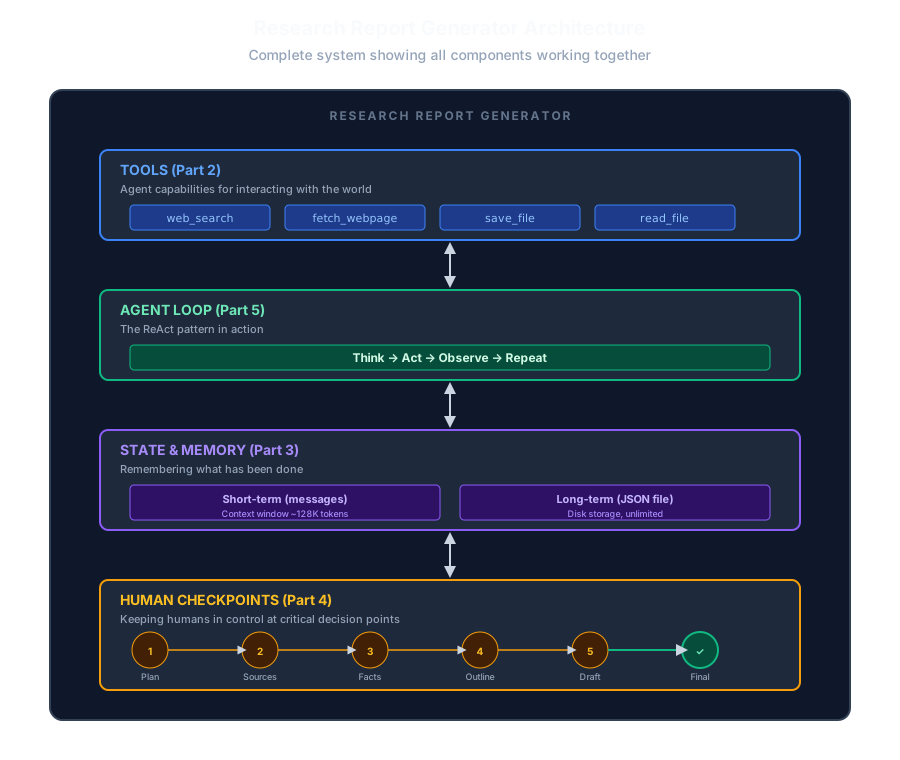
The Research Report Generator demonstrates how four fundamental components integrate to create a production-ready AI agent. At the foundation, the Tools layer (Part 2) provides concrete capabilities: web_search for finding information, fetch_webpage for extracting content, save_file for persisting reports, and read_file for accessing stored data. These tools are the agent’s hands—enabling interaction with the external world.
The Agent Loop layer (Part 5) implements the ReAct pattern, cycling through Think → Act → Observe → Repeat. This is the agent’s brain, orchestrating when to use tools and when to synthesize information. The loop calls the LLM with current context, executes requested tools, and feeds results back until the task completes.
State & Memory (Part 3) provides both short-term working memory (the messages array limited by context window) and long-term persistent storage (JSON files on disk). This dual-memory architecture allows the agent to maintain conversation flow while preserving progress across sessions, enabling crash recovery and multi-session research projects.
Finally, Human Checkpoints (Part 4) form the control layer, inserting oversight at critical decision points: plan approval, source selection, fact verification, outline approval, draft review, and final acceptance. This ensures the autonomous agent remains aligned with user intent throughout the workflow.
No magic. No frameworks hiding complexity. Just loops, function calls, JSON parsing, and user prompts working together in a transparent, debuggable architecture.
Series Summary
Part 1: The ReAct Pattern
Agents loop through Reason → Act → Observe. The LLM decides what to do; your code executes it. The LLM decides when to stop.
Part 2: Tools
Functions the LLM can request. Web search, content extraction, file I/O. The LLM can only use tools you explicitly provide.
Part 3: State & Memory
Short-term memory (conversation context) is limited by tokens. Long-term memory (disk) survives crashes. Manage both or your agent forgets everything.
Part 4: Human-in-the-Loop
Checkpoints at key decisions. Users approve plans, select sources, verify facts, review drafts. Autonomous agents are dangerous; oversight is essential.
Part 5: The Agent Core
The loop that ties it together. System prompt with state, tool execution, phase handlers. Surprisingly simple once you see it.
Part 6: Putting It Together
Best practices, memory strategies, extension patterns. The gap between “working” and “production-ready.”
What’s Next?
You now understand how agents work at the fundamental level. From here, you can:
- Extend this agent — Add more tools, new phases, better memory
- Build different agents — Code assistants, data analyzers, workflow automators
- Try frameworks — LangChain, CrewAI, AutoGen—now you’ll understand what they’re doing
- Optimize — Parallel tool calls, streaming responses, cost tracking
The sophistication doesn’t come from complex orchestration. It comes from:
- Well-designed tools that give useful capabilities
- Clear state that tracks progress and enables recovery
- Strategic checkpoints that keep humans in control
- Robust error handling that fails gracefully
Now go build something amazing! 🚀
Full Series Links
- Part 1: Understanding the ReAct Pattern
- Part 2: Building the Tool System
- Part 3: State Management & Memory Architecture
- Part 4: Human-in-the-Loop Validation
- Part 5: The Agent Core & Loop
- Part 6: Complete Agent & Best Practices (You are here)
Continue reading
Next article
How I Built an AI System That Writes Full-Length Books
Related Content
AI Agents from Scratch Part 3: State Management & Memory (Research Report Generator)
Give your AI agent a memory! Learn short-term vs long-term memory, prevent context overflow, and enable agents to resume interrupted work.
AI Agents from Scratch Part 1: Understanding the ReAct Pattern (Research Report Generator)
Start your journey building AI agents without frameworks. Learn the foundational ReAct pattern that powers modern agents—with a hands-on Research Report Generator example.
AI Agents from Scratch Part 2: Building the Tool System (Research Report Generator)
Give your AI agent superpowers! Build a clean tool system with web search, content extraction, and file operations—the foundation that lets agents interact with the real world.