AI Agents from Scratch Part 1: Understanding the ReAct Pattern (Research Report Generator)
The Series: Building a Research Report Generator
Welcome to a six-part series where we build a complete AI agent from scratch—no LangChain, no CrewAI, no AutoGen. Just Python and an LLM.
By the end of this series, you’ll have built a Research Report Generator that:
- Takes a research topic from the user
- Searches the web for relevant information
- Extracts and summarizes content from multiple sources
- Generates a structured report with citations
- Asks for user validation at key checkpoints
This isn’t a chatbot. It’s a goal-oriented agent that executes a multi-step workflow while keeping humans in control.
The Series:
- Understanding the ReAct Pattern (You are here)
- Building the Tool System
- State Management & Memory Architecture
- Human-in-the-Loop Validation
- The Agent Core & Loop
- Complete Agent & Best Practices
Why Build Agents from Scratch?
Frameworks are powerful, but they hide the mechanics. When things break (and they will), you need to understand what’s happening underneath.
Building from scratch teaches you:
- Debug effectively — Know exactly where failures occur
- Customize behavior — Go beyond framework limitations
- Optimize costs — Control precisely what gets sent to the LLM
- Build trust — Implement oversight at every step
Let’s start with the most important concept: ReAct.
What is the ReAct Pattern?
Traditional LLM usage is one-shot: send a prompt, get a response, done.
Agents work differently. They follow a loop:
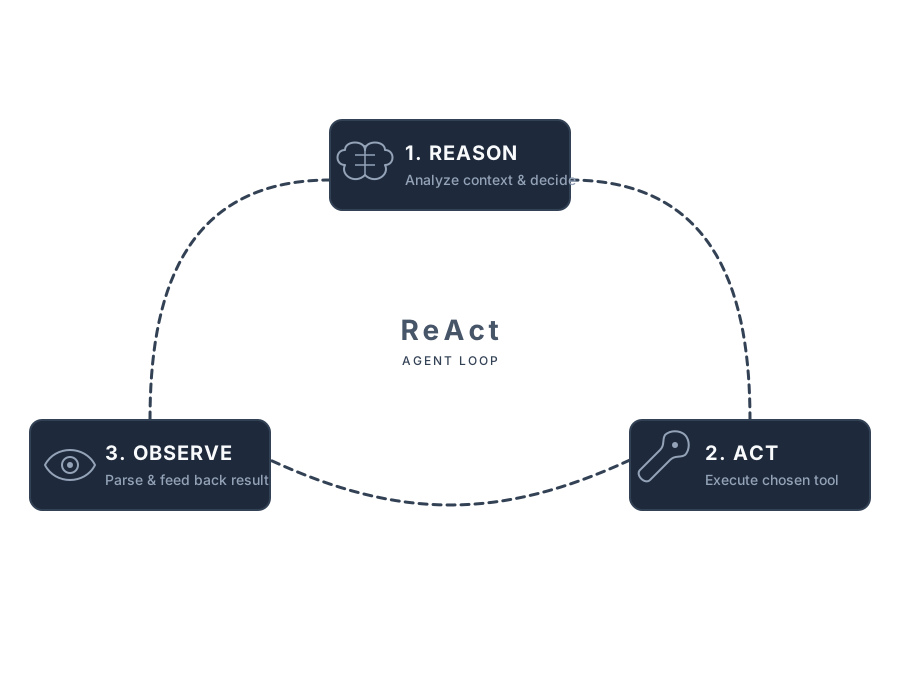
The magic? The LLM adapts based on what it learns. If a search returns nothing useful, it tries a different query. If a webpage is blocked, it moves to the next source.
ReAct in Action
Let’s trace through what happens when our Research Report Generator processes a request:

The key insight: the LLM decides when to stop. It keeps calling tools until it has enough information. This self-directed behavior is what makes agents feel “intelligent.”
The Anatomy of an AI Agent
Every agent has these core components:
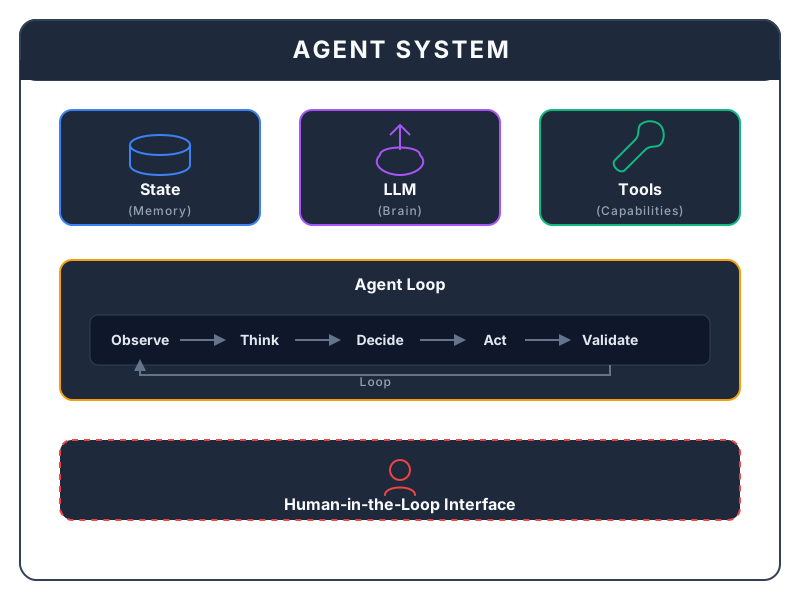
Let’s break these down:
LLM (The Brain)
The language model that reasons about what to do next. It doesn’t execute code—it requests actions and interprets results.
Tools (Capabilities)
Functions the agent can call: web search, file operations, API calls. The LLM outputs structured requests like “call web_search with query=‘AI agents’”, and your code executes them.
State (Memory)
Everything the agent knows and has done. Without state, each LLM call starts fresh with no memory.
Agent Loop
The ReAct pattern in code: think → act → observe → repeat.
Human-in-the-Loop
Checkpoints where users can approve, modify, or reject agent decisions.
Project Setup
We’ll use minimal dependencies to keep things transparent:
# Create project
mkdir research-agent && cd research-agent
python -m venv venv
source venv/bin/activate  # Windows: venv\Scripts\activate

# Install dependencies
pip install openai httpx beautifulsoup4 rich
Why these packages?
| Package | Purpose |
|---|---|
openai | LLM API client (works with any OpenAI-compatible API) |
httpx | Modern HTTP client for web requests |
beautifulsoup4 | HTML parsing for content extraction |
rich | Beautiful terminal output |
What’s Coming Next
In Part 2, we’ll build the Tool System—the functions that give our agent its capabilities:
- Web search (using DuckDuckGo, no API key needed)
- Webpage content extraction
- File operations for saving reports
- A clean interface that works with any LLM
The tool system is where your agent gains its “superpowers.” Without tools, an LLM can only think. With tools, it can act.
Key Takeaways
- ReAct = Reason + Act — Agents loop through thinking and doing
- The LLM decides when to stop — It’s self-directed, not scripted
- Tools bridge thinking and doing — LLM requests, code executes
- State enables memory — Without it, agents are stateless
- Humans stay in control — Checkpoints prevent runaway agents
Ready to give your agent superpowers? Continue to Part 2: Building the Tool System →
Continue reading
Next article
SQLAlchemy 2.0 in Production - Full Guide
Related Content
AI Agents from Scratch Part 2: Building the Tool System (Research Report Generator)
Give your AI agent superpowers! Build a clean tool system with web search, content extraction, and file operations—the foundation that lets agents interact with the real world.
AI Agents from Scratch Part 5: The Agent Core & Loop (Research Report Generator)
Build the brain of your AI agent! Implement the ReAct loop, system prompts, tool execution, and phase handlers that orchestrate the entire research workflow.
AI Agents from Scratch Part 3: State Management & Memory (Research Report Generator)
Give your AI agent a memory! Learn short-term vs long-term memory, prevent context overflow, and enable agents to resume interrupted work.