AI Agents from Scratch Part 3: State Management & Memory (Research Report Generator)
Previously in This Series
In Part 1, we learned the ReAct pattern. In Part 2, we built tools that let our agent interact with the world.
But there’s a problem: our agent has amnesia.
Every LLM call starts fresh. The agent doesn’t remember what it already searched, what facts it extracted, or what the user approved. Today, we fix that.
The Series:
- Understanding the ReAct Pattern
- Building the Tool System
- State Management & Memory Architecture (You are here)
- Human-in-the-Loop Validation
- The Agent Core & Loop
- Complete Agent & Best Practices
The Memory Problem
Without state management, here’s what happens:
Turn 1: "Research quantum computing"
Agent:  *searches, finds 5 articles*

Turn 2: "What did you find?"
Agent:  "I don't know. What would you like me to search for?"
        (╯°□°)╯︵ ┻━┻
The agent executed a search, got results, and immediately forgot everything. This isn’t just annoying—it makes multi-step tasks impossible.
Two Types of Memory
Agents need two distinct memory systems:
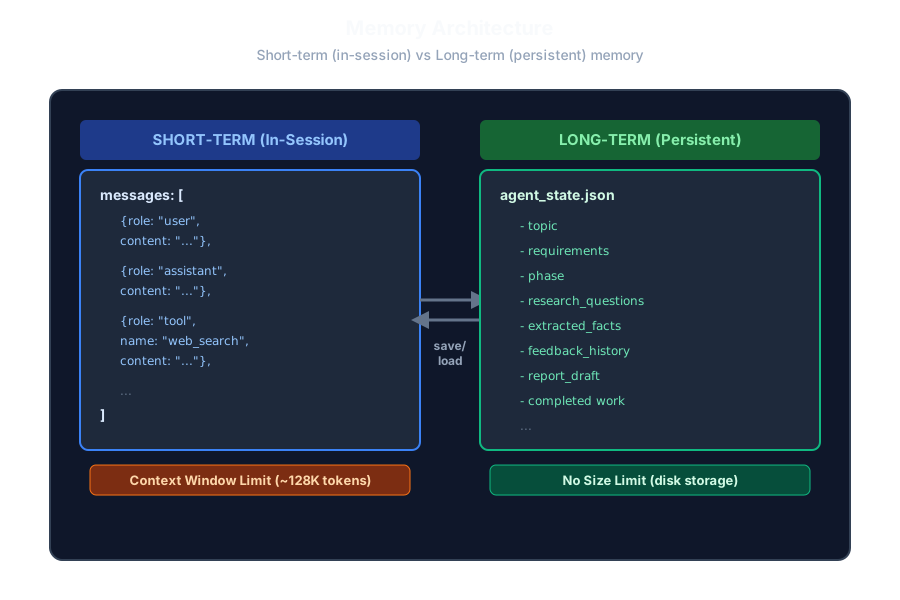
AI agents require two complementary memory systems to function effectively. Short-term memory (in-session) holds the conversation context as an array of messages containing user inputs, assistant responses, and tool results. This working memory is limited by the model’s context window, typically around 128,000 tokens for modern LLMs. Long-term memory (persistent storage) saves the agent’s state to disk as JSON files, preserving research artifacts like the topic, requirements, extracted facts, feedback history, and completed work. These two systems work together through save and load operations, allowing agents to maintain continuity across sessions while managing the finite context window during execution.
Short-Term Memory (Working Memory)
This is the conversation context—everything the LLM can “see” in a single API call:
- The current user request
- Recent tool calls and their results
- The last few exchanges
The catch: This memory is limited by the model’s context window. GPT-4 has ~128K tokens. Fill it up, and you must drop older information.
Long-Term Memory (Persistent Storage)
This survives across sessions:
- User preferences learned over time
- Previously researched topics
- Work-in-progress that can be resumed
For our research agent:
- Short-term: The
messageslist that grows during execution - Long-term: The
agent_state.jsonfile saved to disk
Designing the State Class
Let’s build a state object that tracks everything:
# state.py
from dataclasses import dataclass, field
from typing import Optional
from enum import Enum
import json

class AgentPhase(Enum):
    """Workflow phases for our research agent."""
    PLANNING = "planning"
    SEARCHING = "searching"
    READING = "reading"
    SYNTHESIZING = "synthesizing"
    WRITING = "writing"
    REVIEWING = "reviewing"
    COMPLETE = "complete"
Why phases? They make the agent predictable. Instead of one giant “do research” task, we break it into explicit stages. This helps with:
- Debugging (where exactly did it fail?)
- Resumption (pick up at the right phase)
- User communication (show progress)
Now the main state class:
@dataclass
class ResearchState:
    # === USER INPUT ===
    topic: str = ""
    requirements: str = ""
    phase: AgentPhase = AgentPhase.PLANNING

    # === RESEARCH ARTIFACTS ===
    # These accumulate as the agent works
    research_questions: list[str] = field(default_factory=list)
    search_queries: list[str] = field(default_factory=list)
    search_results: list[dict] = field(default_factory=list)
    fetched_pages: list[dict] = field(default_factory=list)
    extracted_facts: list[dict] = field(default_factory=list)

    # === OUTPUT ARTIFACTS ===
    report_outline: list[str] = field(default_factory=list)
    report_draft: str = ""
    final_report: str = ""

    # === SHORT-TERM MEMORY ===
    # Grows during session, sent to LLM
    messages: list[dict] = field(default_factory=list)

    # === LONG-TERM MEMORY ===
    # Persisted across sessions
    feedback_history: list[dict] = field(default_factory=list)
Giving the LLM Context
The LLM needs to know what’s already happened. We create a summary method:
def to_context_string(self) -> str:
    """Summarize state for the LLM's system prompt."""
    return f"""
=== CURRENT RESEARCH STATE ===
Topic: {self.topic}
Requirements: {self.requirements}
Phase: {self.phase.value}

Research Questions ({len(self.research_questions)}):
{chr(10).join(f"  - {q}" for q in self.research_questions)}

Search Queries Planned: {len(self.search_queries)}
Search Results Found: {len(self.search_results)}
Pages Fetched: {len(self.fetched_pages)}
Facts Extracted: {len(self.extracted_facts)}

Report Outline Sections: {len(self.report_outline)}
Draft Written: {"Yes" if self.report_draft else "No"}
"""
This goes into the system prompt, so the LLM always knows:
- What topic we’re researching
- What phase we’re in
- What work has been completed
Preventing Context Overflow
Here’s a critical problem: as the agent runs, messages grows. Eventually, it exceeds the context window. We need trimming:
def trim_messages(self, max_messages: int = 20):
    """
    Prevent context overflow by keeping only recent messages.
    This is SHORT-TERM MEMORY management.
    """
    if len(self.messages) > max_messages:
        # Keep recent context, drop old exchanges
        self.messages = self.messages[-max_messages:]
This is the simplest strategy: a sliding window. But it’s lossy—we might drop important early context.
A smarter approach is summarization:
def summarize_for_context(self) -> str:
    """
    When context gets too long, summarize instead of truncating.
    This preserves important information while freeing tokens.
    """
    facts_summary = f"{len(self.extracted_facts)} facts extracted"
    pages_summary = f"{len(self.fetched_pages)} sources analyzed"
    return f"Progress: {facts_summary}, {pages_summary}. Phase: {self.phase.value}"
The idea: instead of keeping all 50 messages, keep the last 10 + a summary of the first 40.
Persistence: Save and Load
For long-term memory, we serialize to JSON:
def save(self, filename: str = "agent_state.json"):
    """Persist to LONG-TERM MEMORY (disk)."""
    data = {
        "topic": self.topic,
        "requirements": self.requirements,
        "phase": self.phase.value,
        "research_questions": self.research_questions,
        "search_queries": self.search_queries,
        "search_results": self.search_results,
        "fetched_pages": self.fetched_pages,
        "extracted_facts": self.extracted_facts,
        "report_outline": self.report_outline,
        "report_draft": self.report_draft,
        "final_report": self.final_report,
        "messages": self.messages,
        "feedback_history": self.feedback_history
    }
    with open(filename, "w") as f:
        json.dump(data, f, indent=2)

@classmethod
def load(cls, filename: str = "agent_state.json") -> "ResearchState":
    """Restore from LONG-TERM MEMORY."""
    with open(filename) as f:
        data = json.load(f)
    state = cls()
    for key, value in data.items():
        if key == "phase":
            state.phase = AgentPhase(value)
        else:
            setattr(state, key, value)
    return state
Now if the agent crashes or the user closes the terminal, we can resume:
# Resume interrupted session
if os.path.exists("agent_state.json"):
    state = ResearchState.load()
    print(f"Resuming: {state.topic} at phase {state.phase.value}")
Complete state.py
Here’s the full implementation:
# state.py
from dataclasses import dataclass, field
from typing import Optional
from enum import Enum
import json

class AgentPhase(Enum):
    PLANNING = "planning"
    SEARCHING = "searching"
    READING = "reading"
    SYNTHESIZING = "synthesizing"
    WRITING = "writing"
    REVIEWING = "reviewing"
    COMPLETE = "complete"

@dataclass
class ResearchState:
    # User input
    topic: str = ""
    requirements: str = ""
    phase: AgentPhase = AgentPhase.PLANNING

    # Research artifacts
    research_questions: list[str] = field(default_factory=list)
    search_queries: list[str] = field(default_factory=list)
    search_results: list[dict] = field(default_factory=list)
    fetched_pages: list[dict] = field(default_factory=list)
    extracted_facts: list[dict] = field(default_factory=list)

    # Output artifacts
    report_outline: list[str] = field(default_factory=list)
    report_draft: str = ""
    final_report: str = ""

    # Short-term memory
    messages: list[dict] = field(default_factory=list)

    # Long-term memory
    feedback_history: list[dict] = field(default_factory=list)

    def to_context_string(self) -> str:
        return f"""
=== CURRENT RESEARCH STATE ===
Topic: {self.topic}
Requirements: {self.requirements}
Phase: {self.phase.value}

Research Questions ({len(self.research_questions)}):
{chr(10).join(f"  - {q}" for q in self.research_questions)}

Search Queries Planned: {len(self.search_queries)}
Search Results Found: {len(self.search_results)}
Pages Fetched: {len(self.fetched_pages)}
Facts Extracted: {len(self.extracted_facts)}

Report Outline Sections: {len(self.report_outline)}
Draft Written: {"Yes" if self.report_draft else "No"}
"""

    def trim_messages(self, max_messages: int = 20):
        if len(self.messages) > max_messages:
            self.messages = self.messages[-max_messages:]

    def summarize_for_context(self) -> str:
        facts_summary = f"{len(self.extracted_facts)} facts extracted"
        pages_summary = f"{len(self.fetched_pages)} sources analyzed"
        return f"Progress: {facts_summary}, {pages_summary}. Phase: {self.phase.value}"

    def save(self, filename: str = "agent_state.json"):
        data = {
            "topic": self.topic,
            "requirements": self.requirements,
            "phase": self.phase.value,
            "research_questions": self.research_questions,
            "search_queries": self.search_queries,
            "search_results": self.search_results,
            "fetched_pages": self.fetched_pages,
            "extracted_facts": self.extracted_facts,
            "report_outline": self.report_outline,
            "report_draft": self.report_draft,
            "final_report": self.final_report,
            "messages": self.messages,
            "feedback_history": self.feedback_history
        }
        with open(filename, "w") as f:
            json.dump(data, f, indent=2)

    @classmethod
    def load(cls, filename: str = "agent_state.json") -> "ResearchState":
        with open(filename) as f:
            data = json.load(f)
        state = cls()
        for key, value in data.items():
            if key == "phase":
                state.phase = AgentPhase(value)
            else:
                setattr(state, key, value)
        return state
Memory Strategies Comparison
| Strategy | Pros | Cons | Best For |
|---|---|---|---|
| Sliding Window | Simple, fast | Loses early context | Short tasks |
| Summarization | Preserves meaning | Costs extra LLM calls | Medium tasks |
| Semantic Retrieval | Most flexible | Complex to implement | Long-running agents |
| Hierarchical | Best of all worlds | Most complex | Production systems |
For our research agent, we use:
- Sliding window for message trimming
- Structured state for artifacts (facts, sources, drafts)
- Disk persistence for resumption
What’s Coming Next
We have tools. We have memory. But our agent runs autonomously—what if it goes off track?
In Part 4, we build Human-in-the-Loop Validation:
- Checkpoints where users approve or reject plans
- Source selection (which articles to read)
- Fact verification (remove incorrect information)
- Draft review with revision requests
Fully autonomous agents are dangerous. Users need to stay in control.
Key Takeaways
- Short-term memory = Conversation context (limited by tokens)
- Long-term memory = Persisted state (unlimited, survives restarts)
- Trim or summarize to prevent context overflow
- Explicit phases make agents predictable and debuggable
- Save state frequently for crash recovery
Ready to keep humans in control? Continue to Part 4: Human-in-the-Loop →
Continue reading
Next article
AI Agents from Scratch Part 2: Building the Tool System (Research Report Generator)
Related Content
AI Agents from Scratch Part 6: Complete Agent & Best Practices (Research Report Generator)
The finale! Run your complete Research Report Generator, learn best practices, explore advanced memory strategies, and discover how to extend your agent with new capabilities.
AI Agents from Scratch Part 2: Building the Tool System (Research Report Generator)
Give your AI agent superpowers! Build a clean tool system with web search, content extraction, and file operations—the foundation that lets agents interact with the real world.
AI Agents from Scratch Part 1: Understanding the ReAct Pattern (Research Report Generator)
Start your journey building AI agents without frameworks. Learn the foundational ReAct pattern that powers modern agents—with a hands-on Research Report Generator example.