Continuous Audio Playback on a Static Astro Site
Continuous Audio Playback on a Static Astro Site
Astro is an MPA framework. Every internal link is a full browser navigation — the old page unloads, the new one loads from scratch. Any in-memory state, including HTMLAudioElement, is destroyed.
This makes building a persistent audio player annoying. Options:
- SPA mode with View Transitions — possible, but you’re pulling in client-side routing, back-forward cache concerns, and a bunch of complexity just to keep music playing.
- A
localStoragebridge — the audio element does restart on each page, but it immediately seeks to the saved position. For a podcast or ambient music player, the brief gap is acceptable.
I went with option two. Here’s the full architecture.
How It Works
Three pieces cooperate:
- Audio Engine — a lazy singleton
HTMLAudioElementthat lives for the lifetime of one page - Global Player Store — a Zustand vanilla store backed by
localStoragevia thepersistmiddleware, shared across every page - GlobalMiniPlayer — a Preact component rendered in
BaseLayout.astro(so it appears on every page) that rehydrates the store on mount and auto-resumes playback if the session is still valid
The core insight is simple: localStorage is per-origin, not per-page. Data written on /blog/post-a/ is readable on /blog/post-b/.
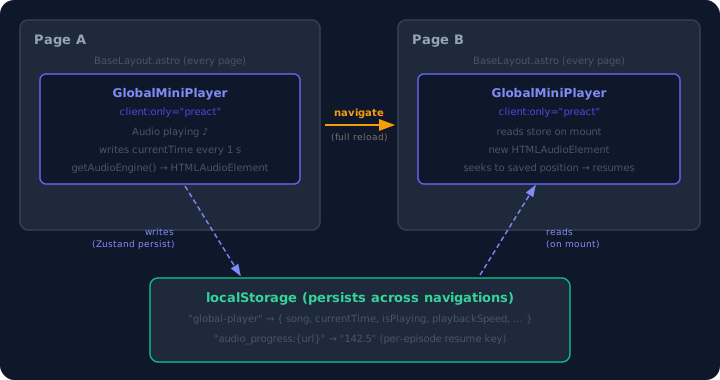
The diagram above shows the full loop. Page A’s player saves currentTime to localStorage every second via Zustand’s persist middleware. When the user navigates to Page B, the browser fully reloads. The fresh GlobalMiniPlayer instance reads the persisted state, creates a new HTMLAudioElement, seeks to the saved position, and resumes — all before the user notices the player was ever interrupted.
The Audio Engine
A thin wrapper around a plain HTMLAudioElement, lazily created on first access:
// audioEngine.ts
let instance: AudioEngineInstance | null = null;

export function getAudioEngine(): AudioEngineInstance | null {
  if (typeof window === "undefined") return null; // SSR guard
  if (!instance) {
    const el = new Audio();
    instance = {
      el,
      onLoaded: (cb) => {
        const handler = () => cb();
        el.addEventListener("canplaythrough", handler, { once: true });
        return () => el.removeEventListener("canplaythrough", handler);
      },
      onEnded: (cb) => {
        const handler = () => cb();
        el.addEventListener("ended", handler);
        return () => el.removeEventListener("ended", handler);
      },
    };
  }
  return instance;
}
The typeof window === 'undefined' guard matters — Astro SSR-renders components at build time and new Audio() would throw in Node.js.
Within a single page session this is a true singleton — the same element is reused if the song changes. Across navigations it’s re-created from scratch each time. That’s fine because the only state we care about preserving — position, playing status, speed, volume — lives in the store, not in the element.
The Store
The store uses zustand/vanilla (not the React/Preact bindings) so the same store instance can be imported from any component without coupling to a specific framework:
// globalPlayerStore.ts
import { createStore, type StoreApi } from "zustand/vanilla";
import { persist, createJSONStorage } from "zustand/middleware";

const SESSION_EXPIRY_MS = 60 * 60 * 1000; // 1 hour

const store = createStore<GlobalPlayerState>()(
  persist(
    (set, get) => ({
      isPlaying: false,
      song: null, // { url: string; title: string }
      context: null, // 'podcast' | 'ambient'
      currentTime: 0,
      volume: 0.5,
      playbackSpeed: 1,
      loop: false,
      lastActiveAt: 0,

      // Start playing a song
      play: (song, context, options) =>
        set({
          isPlaying: true,
          song,
          context,
          currentTime: options?.initialTime ?? 0,
          loop: options?.loop ?? false,
          lastActiveAt: Date.now(),
        }),

      // Load a song paused — shows the player without starting playback
      load: (song, context, options) =>
        set({
          isPlaying: false,
          song,
          context,
          currentTime: options?.initialTime ?? 0,
          loop: options?.loop ?? false,
          lastActiveAt: 0,
        }),

      pause: () => set({ isPlaying: false, lastActiveAt: Date.now() }),
      resume: () => set({ isPlaying: true, lastActiveAt: Date.now() }),
      stop: () => set({ isPlaying: false, song: null, currentTime: 0 }),

      shouldAutoResume: () => {
        const { isPlaying, song, lastActiveAt } = get();
        if (!song || !isPlaying) return false;
        return Date.now() - lastActiveAt < SESSION_EXPIRY_MS;
      },
    }),
    {
      name: "global-player",
      storage: createJSONStorage(() => localStorage),
      // Only persist what matters — exclude derived UI state
      partialize: (s) => ({
        isPlaying: s.isPlaying,
        song: s.song,
        context: s.context,
        currentTime: s.currentTime,
        volume: s.volume,
        playbackSpeed: s.playbackSpeed,
        loop: s.loop,
        lastActiveAt: s.lastActiveAt,
      }),
      // Clear stale sessions on rehydration
      onRehydrateStorage: () => (state) => {
        if (
          state?.song &&
          state.isPlaying &&
          Date.now() - state.lastActiveAt >= SESSION_EXPIRY_MS
        ) {
          store.setState({
            isPlaying: false,
            song: null,
            context: null,
            currentTime: 0,
            lastActiveAt: 0,
          });
        }
      },
    },
  ),
);
partialize decides what actually gets serialized. Derived state like duration and internal seek counters are excluded — they’re recalculated from the audio element on each mount.
onRehydrateStorage is the session expiry hook. It fires once when localStorage is parsed back into the store. If the user was “playing” but left more than an hour ago, clear the state instead of auto-resuming a ghost session.
The Mini Player
GlobalMiniPlayer.tsx is included in BaseLayout.astro so it renders on every page. The most important line is the directive:
<!-- BaseLayout.astro -->
<GlobalMiniPlayer
  client:only="preact"
  latestEpisodeUrl={latestEpisodeUrl}
  latestEpisodeTitle={latestEpisodeTitle}
/>
client:only="preact" is non-negotiable. If you use client:load instead, Astro SSR-renders the component at build time. At build time, localStorage doesn’t exist, so the store rehydrates to song: null, and Astro writes an empty player into the static HTML. When Preact then hydrates in the browser, it tries to reconcile that empty DOM with the actual populated state — and the mismatch causes subtle bugs ranging from the player not appearing to event handlers silently failing.
client:only tells Astro to skip server rendering entirely. The component renders exclusively in the browser, where localStorage is available. Problem gone.
Initializing Audio on Song Change
When the store’s song.url changes (either because the user picked a new track or because the component just mounted with a persisted song), the effect rebuilds the audio element:
useEffect(() => {
  const engine = getAudioEngine();
  if (!engine || !song) return;
  const audio = engine.el;

  audio.src = song.url;
  audio.loop = loop;
  audio.volume = volume;
  audio.playbackRate = speed;

  const capturedUrl = song.url; // captured for cleanup closure

  const unsubs = [
    engine.onLoaded(() => {
      const saved = globalPlayerStore.getState().currentTime;
      if (saved > 0 && isFinite(audio.duration) && saved < audio.duration) {
        audio.currentTime = saved; // seek to persisted position
      }
      setAudioReady(true);
    }),
    engine.onEnded(() => {
      if (!loop) globalPlayerStore.getState().pause();
    }),
  ];

  audio.load();

  return () => {
    unsubs.forEach((u) => u());
    // Save the outgoing episode's exact position before switching tracks
    if (engine.el.currentTime > 0) {
      saveProgressLocally(capturedUrl, engine.el.currentTime);
    }
    audio.pause();
  };
}, [song?.url]);
The cleanup captures capturedUrl — the URL of the song that’s about to be replaced — and writes its position to a separate localStorage key. Without this, switching from episode A to episode B would lose A’s exact timestamp.
Auto-Resume
Once the audio element fires canplaythrough, a second effect checks whether to auto-play:
useEffect(() => {
  if (!audioReady || hasAutoResumed.current) return;
  hasAutoResumed.current = true;

  if (globalPlayerStore.getState().shouldAutoResume()) {
    engine.el.play().catch(() => {
      globalPlayerStore.getState().pause();
    });
  }
}, [audioReady]);
shouldAutoResume() returns true only if the persisted state has isPlaying: true AND the session is under an hour old. The .catch() handles browsers that reject play() due to autoplay policy — we just mark it as paused rather than crashing.
The 1-Second Tick
A single setInterval at 1000 ms handles everything time-related:
tickRef.current = setInterval(() => {
  const t = engine.el.currentTime;
  setLocalTime(t); // update UI progress bar
  globalPlayerStore.getState().updateTime(t); // persist to localStorage
  saveProgressLocally(song.url, t); // per-URL resume key
}, 1000);
One interval, three jobs. The UI updates every second, which is fine for a podcast scrubber.
Per-Episode Progress Keys
The store persists a single currentTime for whatever is currently loaded. But the podcast page needs to show “resume from 4:32” badges for all episodes, not just the one playing. That’s what the per-URL keys are for:
const PROGRESS_PREFIX = "audio_progress:";

function saveProgressLocally(url: string, time: number) {
  localStorage.setItem(PROGRESS_PREFIX + url, String(time));
}
The podcast listing page reads these keys directly:
const savedTime =
  parseFloat(localStorage.getItem("audio_progress:" + episode.url) ?? "0") || 0;
When the user clicks an episode, the saved time is passed as initialTime to play(), so it resumes from where they left off even if they were listening to a different episode in between.
Preloading the Latest Episode on the Homepage
On the homepage, if the player is empty, we want to show the latest podcast episode ready to play — not auto-playing, just visible and buffered. The load() action handles this:
// On mount in GlobalMiniPlayer, when preloadIfEmpty=true:
useEffect(() => {
  if (!preloadIfEmpty || !latestEpisodeUrl) return;
  const { song } = globalPlayerStore.getState();
  if (song !== null) return; // don't override an active session

  const saved =
    parseFloat(
      localStorage.getItem(PROGRESS_PREFIX + latestEpisodeUrl) ?? "0",
    ) || 0;

  globalPlayerStore
    .getState()
    .load({ url: latestEpisodeUrl, title: latestEpisodeTitle }, "podcast", {
      loop: false,
      initialTime: saved,
    });
}, []);
load() differs from play() in two ways: it sets isPlaying: false and lastActiveAt: 0. The player appears, the browser starts buffering the file, but nothing plays until the user clicks. Because this state is persisted, navigating away without playing still shows the player on the next page.
BaseLayout.astro reads latest_broadcast.json at build time to get the URL:
---
// BaseLayout.astro (runs at build time)
import fs from 'node:fs/promises';

let latestEpisodeUrl = '';
let latestEpisodeTitle = '';
try {
  const raw = await fs.readFile(
    new URL('../../cache/morning-brief/latest_broadcast.json', import.meta.url),
    'utf-8'
  );
  const data = JSON.parse(raw);
  latestEpisodeUrl = data.url ?? '';
  latestEpisodeTitle = data.episode_name ?? '';
} catch { /* no broadcast available */ }
---
And index.astro opts in with a single prop:
<BaseLayout preloadPlayer={true}>Limitations
There is an audible gap. This is not a SPA with a persistent audio context — it’s a new audio element on every page that seeks to a saved position. On a cached page with a well-buffered file, the gap is under a second. On a slow connection it can be several seconds. Be upfront about this with your users.
Autoplay policy. Auto-resuming on page load only works if the navigation came from a user gesture (clicking a link). Programmatic navigations or prerendered pages may be blocked by the browser’s autoplay policy. The .catch() handler deals with this gracefully.
localStorage is synchronous and single-threaded per tab. Writing every second is cheap. Reading on mount is cheap. If you’re tracking dozens of per-URL keys for a large library of episodes, consider a cleanup strategy to avoid unbounded growth.
localStorage doesn’t work in private browsing on some browsers. Wrap all reads and writes in try/catch — the code above already does this.
Continue reading
Next article
TLS: How Your Browser Keeps Secrets (And Why It's Harder Than You Think)
Related Content
Why You Probably Don't Need a Backend
Before you spin up another Express app, deploy a PostgreSQL database, and configure a Redis cache, ask yourself: does this actually need a backend? For most projects, a static site coupled with a Git-based cron job is faster, cheaper, and infinitely more reliable. Here is how to build backendless apps.
Codexity Part 3: Async Web Search with DuckDuckGo
Fire multiple search queries in parallel using DuckDuckGo's Python library and asyncio. Handle rate limiting, deduplicate results, and build a resilient search layer that does not depend on paid APIs.
The SPA Obsession Has Ruined the Web
Single Page Applications (SPAs) were supposed to make the web feel like desktop apps. Instead, they gave us megabytes of JavaScript, blank pages during loading, broken back buttons, and over-engineered build steps. It's time to admit SPAs are a failure for 90% of websites.