Codexity Part 3: Async Web Search with DuckDuckGo
Codexity Part 3: Async Web Search with DuckDuckGo
The query rewriter produced three search queries. Now those queries need to hit a search engine, fetch results, and come back fast. We use DuckDuckGo because it requires no API key, no registration, and no billing setup. That simplicity comes with constraints, and this chapter covers how to work around them.
Why DuckDuckGo
Google’s Custom Search API gives you 100 free queries per day. Bing’s API requires an Azure account. SerpAPI costs money. Brave Search has a free tier but requires registration.
DuckDuckGo gives you unlimited searches through the duckduckgo-search Python library. The library makes HTTP requests to DuckDuckGo’s backend directly. There is no official API, which means the library reverse-engineers the request format. This works well but requires periodic library updates when DuckDuckGo changes their endpoints.
The trade-off is clear: free and easy to set up, but less stable than an official API. For a project like Codexity, where the goal is learning, that trade-off makes sense.
The Searcher Module
# searcher.py
import asyncio
from duckduckgo_search import DDGS

from models import SearchResult
from config import settings

async def search_single(query: str) -> list[SearchResult]:
    """Run a single search query using DuckDuckGo."""
    try:
        ddgs = DDGS()
        results = ddgs.text(
            query,
            max_results=settings.max_search_results,
            region="wt-wt",  # No region bias
        )
        return [
            SearchResult(
                title=r.get("title", ""),
                url=r.get("href", ""),
                snippet=r.get("body", ""),
            )
            for r in results
            if r.get("href")
        ]
    except Exception as e:
        print(f"Search failed for '{query}': {e}")
        return []

async def search_parallel(queries: list[str]) -> list[SearchResult]:
    """Run multiple queries in parallel and merge results."""
    tasks = [search_single(q) for q in queries]
    results_lists = await asyncio.gather(*tasks)

    all_results = []
    for results in results_lists:
        all_results.extend(results)

    return deduplicate(all_results)

def deduplicate(results: list[SearchResult]) -> list[SearchResult]:
    """Remove duplicate URLs, keeping the first occurrence."""
    seen_urls: set[str] = set()
    unique = []
    for result in results:
        normalized = normalize_url(result.url)
        if normalized not in seen_urls:
            seen_urls.add(normalized)
            unique.append(result)
    return unique

def normalize_url(url: str) -> str:
    """Strip trailing slashes, fragments, and tracking params."""
    url = url.split('#')[0]
    url = url.rstrip('/')
    # Remove common tracking parameters
    if '?' in url:
        base, params = url.split('?', 1)
        clean_params = '&'.join(
            p for p in params.split('&')
            if not p.startswith(('utm_', 'ref=', 'source='))
        )
        url = f"{base}?{clean_params}" if clean_params else base
    return url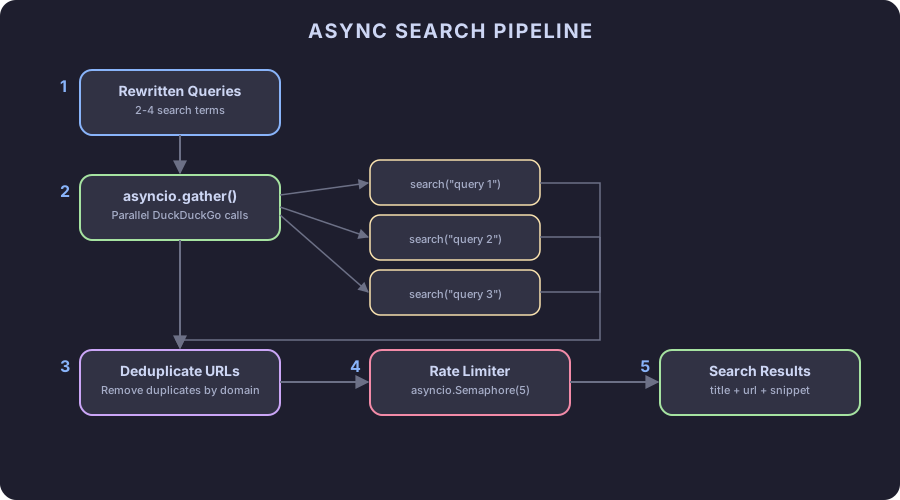
The DDGS Library Quirk
DDGS is synchronous. The library does not provide an async interface. Wrapping it in asyncio.to_thread would be the textbook approach, but there is a subtlety: the library uses httpx internally with a session that is not thread-safe by default.
The solution is simpler than it looks. Create a new DDGS instance per search call. Each instance gets its own session. Since we run at most 3-4 parallel searches, the overhead of multiple instances is negligible.
async def search_single(query: str) -> list[SearchResult]:
    loop = asyncio.get_event_loop()
    return await loop.run_in_executor(None, _search_sync, query)

def _search_sync(query: str) -> list[SearchResult]:
    ddgs = DDGS()
    results = ddgs.text(query, max_results=settings.max_search_results)
    return [
        SearchResult(
            title=r.get("title", ""),
            url=r.get("href", ""),
            snippet=r.get("body", ""),
        )
        for r in results
        if r.get("href")
    ]
Using run_in_executor delegates the synchronous call to a thread pool. The async event loop stays unblocked. Three queries run in three threads simultaneously.
Rate Limiting
DuckDuckGo does not publish rate limits. In practice, sending more than 20-30 requests per minute from the same IP triggers temporary blocks. For Codexity, each user query generates 3 searches. That gives you about 7-10 user queries per minute before hitting issues.
For development, this is fine. For production, add a delay between search batches:
_search_semaphore = asyncio.Semaphore(3)
_last_search_time = 0.0

async def search_with_rate_limit(query: str) -> list[SearchResult]:
    global _last_search_time
    async with _search_semaphore:
        now = asyncio.get_event_loop().time()
        elapsed = now - _last_search_time
        if elapsed < 1.0:
            await asyncio.sleep(1.0 - elapsed)
        _last_search_time = asyncio.get_event_loop().time()
        return await search_single(query)
The semaphore limits concurrent searches to 3. The time check adds a 1-second minimum gap between batches. This keeps you well under DuckDuckGo’s tolerance.
Handling Failures
Searches fail. The DuckDuckGo library raises DuckDuckGoSearchException when the service returns an error, and httpx.TimeoutException when the request takes too long. Both need handling:
from duckduckgo_search.exceptions import DuckDuckGoSearchException

async def search_single(query: str) -> list[SearchResult]:
    loop = asyncio.get_event_loop()
    try:
        return await asyncio.wait_for(
            loop.run_in_executor(None, _search_sync, query),
            timeout=10.0,
        )
    except asyncio.TimeoutError:
        print(f"Search timed out for: {query}")
        return []
    except DuckDuckGoSearchException as e:
        print(f"DuckDuckGo error for '{query}': {e}")
        return []
asyncio.wait_for adds a 10-second timeout. If DuckDuckGo hangs, the search returns empty and the pipeline continues with results from the other queries. One failed search should never block the entire response.
Deduplication Strategy
Three queries about PostgreSQL vs MongoDB will return overlapping URLs. The deduplicate function removes exact-URL duplicates, but some smarter deduplication helps:
from urllib.parse import urlparse

def deduplicate_smart(results: list[SearchResult], max_per_domain: int = 3) -> list[SearchResult]:
    """Deduplicate and limit results per domain."""
    seen_urls: set[str] = set()
    domain_counts: dict[str, int] = {}
    unique = []

    for result in results:
        normalized = normalize_url(result.url)
        if normalized in seen_urls:
            continue

        domain = urlparse(result.url).netloc
        count = domain_counts.get(domain, 0)
        if count >= max_per_domain:
            continue

        seen_urls.add(normalized)
        domain_counts[domain] = count + 1
        unique.append(result)

    return unique
Capping at 3 results per domain prevents a single site from dominating the source list. If Stack Overflow returns 6 results across 3 queries, we keep 3 and let other domains fill the remaining slots. This produces more diverse sources and better answers.
Plugging Into the Pipeline
from searcher import search_parallel

async def search_pipeline(query: str):
    # Phase 1: Rewrite
    yield SearchEvent(event="status", data={"step": "rewriting_query"})
    queries = rewrite_query(query)
    yield SearchEvent(event="status", data={"step": "queries_ready", "queries": queries})

    # Phase 2: Search
    yield SearchEvent(event="status", data={"step": "searching"})
    search_results = await search_parallel(queries)
    yield SearchEvent(
        event="sources",
        data={
            "urls": [r.url for r in search_results],
            "count": len(search_results),
        },
    )

    # Phase 3: Scrape (next chapter)
    # ...
The sources event sends the discovered URLs to the client before scraping starts. A frontend would display source cards at this point. For our backend-only approach, the event is visible in the SSE stream.
What the Output Looks Like
Testing with curl -N "http://localhost:8000/search?q=postgres+vs+mongo":
event: status
data: {"step": "rewriting_query"}

event: status
data: {"step": "queries_ready", "queries": ["PostgreSQL vs MongoDB 2026", "MongoDB startup advantages", "PostgreSQL JSONB document store"]}

event: status
data: {"step": "searching"}

event: sources
data: {"urls": ["https://...", "https://...", ...], "count": 14}
Fourteen unique URLs from three parallel searches, deduplicated and domain-limited. The search phase typically completes in 1-2 seconds.
Alternative Search Backends
DuckDuckGo works for development and low-traffic use. If you need higher reliability:
Brave Search API has a free tier (2000 queries/month) with proper rate limit headers. Drop-in replacement since the response format is similar.
SearXNG is a self-hosted meta-search engine. Run it in Docker, point Codexity at it, and aggregate results from multiple search engines. More setup, more results.
Google Custom Search gives 100 free queries/day. Beyond that, $5 per 1000 queries. Highest quality results but the cost adds up.
The searcher.py module isolates the search backend. Swapping DuckDuckGo for any of these requires changing one function.
What Comes Next
Part 4 is about scraping. We have 14 URLs. Now we need to fetch those pages, extract their content, and deal with everything that makes web scraping painful: JavaScript rendering, anti-bot protection, broken HTML, paywalls, and rate limiting at scale.
Continue reading
Next article
Why You Probably Don't Need a Backend
Related Content
Codexity Part 2: Query Rewriting with LLMs
A user types a vague question. The query rewriter transforms it into targeted search queries using a local LLM. We cover intent classification, query decomposition, and prompt engineering that actually works with small models.
Codexity Part 5: Content Processing and Relevance Ranking
Take raw scraped text from 12 web pages and transform it into a focused context window for an LLM. Chunk text, score relevance with BM25, select the best fragments, and format them with source citations.
Codexity Part 4: Web Scraping, Proxies, and Anti-Bot Warfare
Fetch and extract content from 15 web pages concurrently. Handle JavaScript rendering with Playwright, dodge anti-bot systems, rotate proxies, and strip HTML down to clean text using readability-lxml and BeautifulSoup.