Draft / Scheduled Content
This article is a draft or scheduled for future publication. The content is subject to change.
Codexity Part 4: Web Scraping, Proxies, and Anti-Bot Warfare
Codexity Part 4: Web Scraping, Proxies, and Anti-Bot Warfare
We have 14 URLs from the search phase. Each one points to a web page that might answer the user’s question. The job now is to fetch those pages, extract the useful text, and discard everything else.
This is where web development fights back. Pages render with JavaScript. Cloudflare challenges block automated requests. Paywalled sites return login walls. Rate limiters ban you after five requests. Every URL is a small adventure.
The Tiered Scraping Strategy
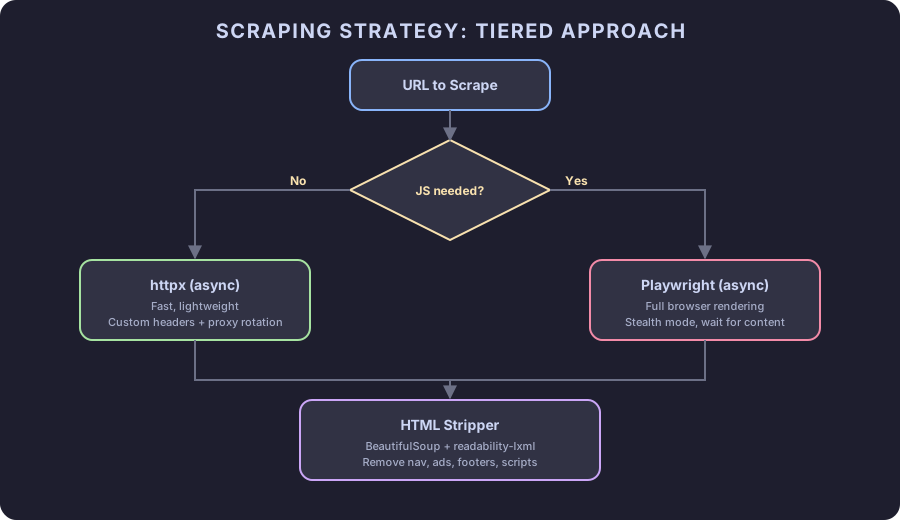
Not every page needs a full browser. Most technical blogs serve static HTML. Only JavaScript-heavy SPAs need Playwright. Running Playwright for every URL wastes 3-5 seconds per page when a simple HTTP request would complete in 200ms.
The scraper uses a tiered approach:
- Try
httpxfirst (fast, lightweight) - If the response looks like it needs JavaScript, fall back to Playwright
- If both fail, skip the page and move on
Tier 1: httpx
# scraper.py
import asyncio
import httpx
from bs4 import BeautifulSoup
from readability import Document

from models import ScrapedPage
from config import settings

HEADERS = {
    "User-Agent": "Mozilla/5.0 (Macintosh; Intel Mac OS X 10_15_7) "
                  "AppleWebKit/537.36 (KHTML, like Gecko) "
                  "Chrome/125.0.0.0 Safari/537.36",
    "Accept": "text/html,application/xhtml+xml,application/xml;q=0.9,*/*;q=0.8",
    "Accept-Language": "en-US,en;q=0.9",
    "Accept-Encoding": "gzip, deflate, br",
}

async def scrape_with_httpx(url: str, client: httpx.AsyncClient) -> ScrapedPage | None:
    try:
        response = await client.get(
            url,
            headers=HEADERS,
            follow_redirects=True,
            timeout=settings.scrape_timeout,
        )
        if response.status_code != 200:
            return None

        html = response.text
        if needs_javascript(html):
            return None  # Signal to try Playwright

        content = extract_content(html)
        title = extract_title(html)

        if len(content) < 100:
            return None  # Page yielded no useful content

        return ScrapedPage(url=url, title=title, content=content, success=True)

    except (httpx.TimeoutException, httpx.ConnectError, httpx.HTTPStatusError):
        return None
The User-Agent header is critical. Without it, many sites return 403 or a CAPTCHA page. The header mimics Chrome on macOS. Some sites check multiple headers, which is why we include Accept-Language and Accept-Encoding too.
Detecting JavaScript-Only Pages
A page that requires JavaScript usually returns minimal HTML with a script loader:
def needs_javascript(html: str) -> bool:
    """Check if a page likely needs JS rendering."""
    if len(html) < 1000:
        return True

    soup = BeautifulSoup(html, "lxml")
    text = soup.get_text(strip=True)

    # Very little visible text usually means JS renders the content
    if len(text) < 200:
        return True

    # Common SPA indicators
    indicators = [
        'id="__next"',  # Next.js
        'id="app"',     # Vue
        'id="root"',    # React
        "window.__INITIAL_STATE__",
        "noscript",
    ]
    body = soup.find("body")
    if body:
        body_html = str(body)
        # If body has very few children but script tags, it's likely an SPA
        children = [c for c in body.children if c.name and c.name != "script"]
        if len(children) <= 2 and body.find_all("script"):
            return True

    return False
This is a heuristic, not a guarantee. A page with 50 characters of visible text and three <script> tags is almost certainly an SPA. A page with 5000 characters of text is almost certainly static. The heuristic catches about 85% of cases correctly.
Tier 2: Playwright
from playwright.async_api import async_playwright

_playwright = None
_browser = None

async def get_browser():
    global _playwright, _browser
    if _browser is None:
        _playwright = await async_playwright().start()
        _browser = await _playwright.chromium.launch(
            headless=True,
            args=[
                "--disable-blink-features=AutomationControlled",
                "--disable-dev-shm-usage",
                "--no-sandbox",
            ],
        )
    return _browser

async def scrape_with_playwright(url: str) -> ScrapedPage | None:
    try:
        browser = await get_browser()
        context = await browser.new_context(
            user_agent=HEADERS["User-Agent"],
            viewport={"width": 1920, "height": 1080},
        )
        page = await context.new_page()

        # Block unnecessary resources to speed up loading
        await page.route(
            "**/*.{png,jpg,jpeg,gif,svg,woff,woff2,ttf,css}",
            lambda route: route.abort(),
        )

        await page.goto(url, wait_until="domcontentloaded", timeout=15000)
        # Wait for content to render
        await page.wait_for_timeout(2000)

        html = await page.content()
        await context.close()

        content = extract_content(html)
        title = extract_title(html)

        if len(content) < 100:
            return None

        return ScrapedPage(url=url, title=title, content=content, success=True)

    except Exception as e:
        print(f"Playwright failed for {url}: {e}")
        return None
Key decisions:
Block images, fonts, and CSS. We only need text. Blocking these resources cuts page load time in half.
--disable-blink-features=AutomationControlled removes the navigator.webdriver flag that tells sites they are talking to a bot.
wait_for_timeout(2000) gives JavaScript 2 seconds to render content. Most SPAs load within 1 second, but some lazy-load below-the-fold content.
Shared browser instance. Launching Chromium takes 2-3 seconds. We launch once and reuse the browser across all Playwright scrapes. Each scrape gets a fresh context (isolated cookies and session).
Content Extraction
Raw HTML is useless to an LLM. Navigation menus, cookie banners, ads, and footer links dilute the actual article content. Two libraries handle extraction:
def extract_content(html: str) -> str:
    """Extract main article text from HTML."""
    # readability-lxml finds the main content block
    doc = Document(html)
    article_html = doc.summary()

    # BeautifulSoup strips remaining HTML tags
    soup = BeautifulSoup(article_html, "lxml")

    # Remove remaining noise
    for element in soup.find_all(["nav", "footer", "header", "aside", "form"]):
        element.decompose()
    for element in soup.find_all(class_=lambda c: c and any(
        x in c.lower() for x in ["sidebar", "cookie", "newsletter", "popup", "modal", "ad-"]
    )):
        element.decompose()

    text = soup.get_text(separator="\n", strip=True)
    # Collapse multiple blank lines
    lines = [line for line in text.split("\n") if line.strip()]
    return "\n".join(lines)

def extract_title(html: str) -> str:
    soup = BeautifulSoup(html, "lxml")
    # Try og:title first, then <title>, then <h1>
    og = soup.find("meta", property="og:title")
    if og and og.get("content"):
        return og["content"]
    if soup.title and soup.title.string:
        return soup.title.string.strip()
    h1 = soup.find("h1")
    if h1:
        return h1.get_text(strip=True)
    return ""
readability-lxml implements Mozilla’s Readability algorithm. It identifies the main content area of a page by analyzing text density, paragraph length, and DOM structure. The library handles 80% of the extraction work. BeautifulSoup cleans up the rest.
Proxy Rotation
For development, you do not need proxies. For production with high query volume, rotating proxies prevents IP-based blocking.
import random

PROXY_LIST = [
    # Free proxies are unreliable. Use a paid service like:
    # BrightData, ScraperAPI, or Oxylabs.
    # Format: "http://user:pass@host:port"
]

def get_proxy() -> str | None:
    if not PROXY_LIST:
        return None
    return random.choice(PROXY_LIST)

async def create_client() -> httpx.AsyncClient:
    proxy = get_proxy()
    return httpx.AsyncClient(
        proxies=proxy,
        verify=True,
        http2=True,
    )
HTTP/2 support (http2=True) matters. Many modern sites serve content faster over HTTP/2, and some CDNs treat HTTP/1.1 clients with more suspicion.
If you go the proxy route, paid proxy services like BrightData or Oxylabs offer residential IPs that rarely get blocked. Free proxy lists are unreliable and slow. The cost is around $10-15/month for the volume Codexity needs.
The Orchestrator
Putting it all together. The scrape_urls function manages concurrency, applies the tiered strategy, and collects results:
async def scrape_urls(urls: list[str]) -> list[ScrapedPage]:
    """Scrape multiple URLs concurrently with tiered strategy."""
    semaphore = asyncio.Semaphore(settings.max_concurrent_scrapes)
    results: list[ScrapedPage] = []

    async with httpx.AsyncClient(http2=True) as client:
        tasks = [
            _scrape_one(url, client, semaphore) for url in urls
        ]
        pages = await asyncio.gather(*tasks)
        results = [p for p in pages if p is not None and p.success]

    return results

async def _scrape_one(
    url: str,
    client: httpx.AsyncClient,
    semaphore: asyncio.Semaphore,
) -> ScrapedPage | None:
    async with semaphore:
        # Tier 1: Try httpx
        page = await scrape_with_httpx(url, client)
        if page is not None:
            return page

        # Tier 2: Try Playwright
        page = await scrape_with_playwright(url)
        return page
The semaphore limits concurrent scrapes to 5 (configurable). Without it, firing 14 requests simultaneously would trigger rate limits on shared hosting providers and overwhelm your own bandwidth.
Common Failures and How to Handle Them
Cloudflare challenges. Cloudflare’s “Checking your browser” page blocks automated requests. Playwright with stealth flags passes about 70% of the time. For the other 30%, skip the page. You have 13 other sources.
Paywalls. Medium, NYT, WSJ return partial content or login walls. The readability algorithm extracts whatever is visible. For medium.com specifically, replacing medium.com with scribe.rip in the URL often yields the full article from a mirror.
Encoding issues. Some pages declare charset=iso-8859-1 but serve UTF-8 content. httpx handles most of this automatically, but if you see garbled text, force encoding:
if response.encoding and response.encoding.lower() != "utf-8":
    html = response.content.decode("utf-8", errors="replace")
Infinite redirects. follow_redirects=True with httpx follows up to 20 redirects by default. Some sites bounce between www and non-www forever. The timeout catches these.
Plugging Into the Pipeline
from scraper import scrape_urls

async def search_pipeline(query: str):
    # ... Phase 1 & 2 ...

    # Phase 3: Scrape
    yield SearchEvent(event="status", data={"step": "scraping"})
    urls = [r.url for r in search_results]
    pages = await scrape_urls(urls)
    yield SearchEvent(
        event="status",
        data={
            "step": "scraping_done",
            "scraped": len(pages),
            "total": len(urls),
        },
    )

    # Phase 4: Process (next chapter)
    # ...
Typical results: 14 URLs in, 9-12 successfully scraped. A 65-85% success rate is normal. The remaining pages failed due to paywalls, bot protection, or timeouts. That is fine. 9 sources provide plenty of material for a good answer.
Performance Numbers
On a decent connection:
- httpx scrape: 200ms-2s per page
- Playwright scrape: 3-8s per page
- Full batch (14 URLs, semaphore=5): 4-8 seconds total
Playwright calls dominate latency. Minimizing them through the tiered approach cuts total scraping time roughly in half compared to using Playwright for everything.
What Comes Next
Part 5 takes the 9-12 scraped pages and processes them. Raw text from web pages is noisy. We chunk it, score each chunk for relevance to the original question using BM25, select the top chunks, and format them as a prompt context with source attribution.
Related Content
Codexity Part 5: Content Processing and Relevance Ranking
Take raw scraped text from 12 web pages and transform it into a focused context window for an LLM. Chunk text, score relevance with BM25, select the best fragments, and format them with source citations.
Codexity Part 3: Async Web Search with DuckDuckGo
Fire multiple search queries in parallel using DuckDuckGo's Python library and asyncio. Handle rate limiting, deduplicate results, and build a resilient search layer that does not depend on paid APIs.
Codexity Part 6: Small Model Inference with llama-cpp-python
Run a quantized 7B model locally to generate cited answers from scraped web content. Choose between Qwen, Mistral, Phi, and Llama models. Build prompts that make small models behave like large ones.