Profiling the Query Planner: Reading executionStats and the Ratio that Matters
Profiling the Query Planner
The query planner is the first place to look when a MongoDB query is slow. Not the application logs. Not the Grafana dashboard. The query planner tells you exactly what MongoDB did to execute your query: which index it chose (or did not choose), how many documents it examined, and whether it performed an in-memory sort that consumed half your available RAM.
The tool is explain("executionStats"). The metric that matters most is a ratio: totalDocsExamined / nReturned. If you query for 50 documents and MongoDB examined 2.8 million to find them, you have a problem. The ratio is 56,000:1. The ideal ratio is 1:1.
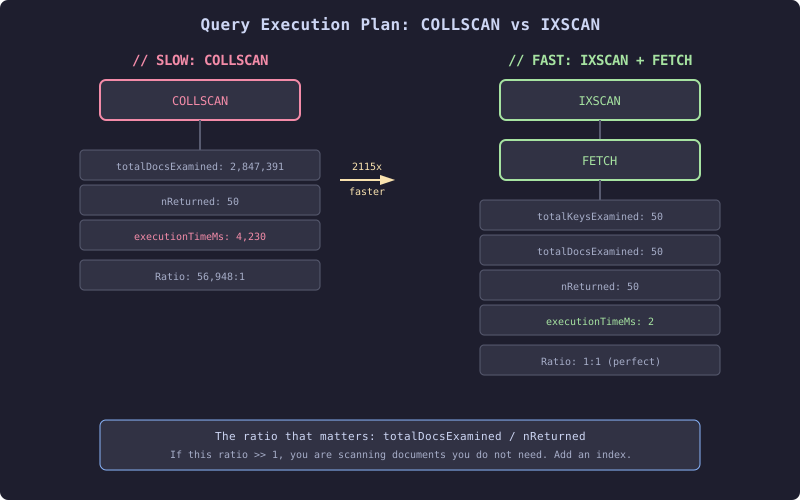
This diagram contrasts two execution plans for the same query. On the left, a COLLSCAN examines every document in the collection to return 50 results, producing a ratio of 56,948:1 and taking 4,230ms. On the right, an IXSCAN walks a B-tree index to find exactly 50 keys, then a FETCH stage loads those 50 documents, producing a perfect 1:1 ratio in 2ms. The ratio is the diagnostic. If it is significantly greater than 1, you need an index.
Running explain() from Java
// Running explain from the MongoDB Java Sync Driver
MongoCollection<Document> collection = database.getCollection("telemetry_readings");

Document explainResult = collection.find(
    Filters.and(
        Filters.eq("sensorId", "sensor-00042"),
        Filters.gte("ts", Instant.now().minus(1, ChronoUnit.HOURS))
    )
).sort(Sorts.descending("ts"))
 .limit(50)
 .explain(ExplainVerbosity.EXECUTION_STATS);

// Extract the key metrics
Document executionStats = explainResult
    .get("executionStats", Document.class);

long nReturned = executionStats.getLong("nReturned");
long totalKeysExamined = executionStats.getLong("totalKeysExamined");
long totalDocsExamined = executionStats.getLong("totalDocsExamined");
long executionTimeMs = executionStats.getLong("executionTimeMillis");

double ratio = totalDocsExamined / (double) Math.max(nReturned, 1);
System.out.printf("Ratio: %.1f:1 | Keys: %d | Docs: %d | Returned: %d | Time: %dms%n",
    ratio, totalKeysExamined, totalDocsExamined, nReturned, executionTimeMs);
When this ratio exceeds 10:1, investigate. When it exceeds 100:1, you have a missing or wrong index. When it exceeds 1,000:1, you are doing a collection scan and the query will collapse under load.
The Execution Plan Stages
Every MongoDB query execution plan is a tree of stages. The most common stages and what they mean:
COLLSCAN: Full collection scan. MongoDB reads every document in the collection. This is always slow on large collections. If you see COLLSCAN on a collection with more than 10,000 documents, you almost certainly need an index.
IXSCAN: Index scan. MongoDB walks a B-tree index to find matching keys. Fast. The number of keys examined should be close to the number of documents returned.
FETCH: Document fetch. After IXSCAN identifies matching index keys, FETCH loads the full documents from storage. This is a random I/O operation. If you can eliminate the FETCH stage with a covered query (Chapter 11), you eliminate the most expensive disk access in the read path.
SORT: In-memory sort. If no index supports the sort order, MongoDB loads all matching documents into memory and sorts them. This has a 100MB memory limit. Exceed it and the query fails with error code 292. Under that limit, it still consumes significant RAM and CPU.
LIMIT: Caps the output to N documents. When combined with SORT, the query planner can sometimes use a top-k optimization, but only if the sort is index-supported.