Writing and Debugging Auto-Configuration: Custom Starters, @ConditionalOn*, and Why Your Bean Is Not Being Registered
Writing and Debugging Auto-Configuration
Auto-configuration is not a convenience feature. It is an engineering discipline with strict rules, a well-defined evaluation order, and a debugging surface that most Spring Boot users never learn to use. The result: starters that break consuming applications, beans that silently fail to register, and hours spent adding and removing annotations until something works by accident.
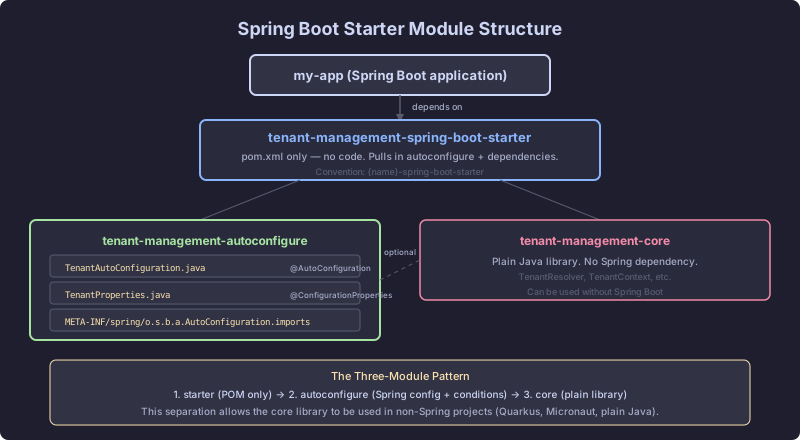
This chapter builds a production-quality custom starter for the SaaS backend: a tenant-aware audit logging library. The starter auto-configures an AuditService when a DataSource is present, respects user overrides, and provides IDE-friendly configuration properties. Along the way, every mechanism that governs auto-configuration evaluation will be made explicit.
The Auto-Configuration Contract
Spring Boot auto-configuration classes are ordinary @Configuration classes with two additional characteristics:
- They are registered through
META-INF/spring/org.springframework.boot.autoconfigure.AutoConfiguration.imports, not through component scanning. - They are guarded by
@Conditionalannotations that prevent bean registration when conditions are not met.
The internal class that drives this is AutoConfigurationImportSelector, called by @EnableAutoConfiguration (which is embedded in @SpringBootApplication). During the ConfigurationClassPostProcessor phase (CH3), this selector reads every AutoConfiguration.imports file on the classpath, collects the class names, evaluates their conditions, and passes the survivors to the ConfigurationClassParser for normal @Configuration processing.
The evaluation order matters. AutoConfigurationImportSelector delegates to ConditionEvaluator, which wraps each @Conditional annotation and calls its Condition.matches() method. If any condition returns false, the entire configuration class is skipped. No bean definitions are registered. No @Bean methods are evaluated.
The Audit Starter: Requirements
The SaaS backend needs audit logging across four microservices. Every service that includes the starter should get:
- An
AuditServicebean that writes audit events to a database table - A
TenantAwareAuditInterceptorthat captures the current tenant ID from the request context - Configuration properties under
saas.audit.*for table name, retention days, and async mode - No registration if the application has no
DataSourceon the classpath - No registration if the user has defined their own
AuditServicebean - A property toggle
saas.audit.enabled=falseto disable the starter entirely
The Auto-Configuration Class
// CORRECT: Properly guarded auto-configuration
package com.saas.audit.autoconfigure;

import org.springframework.boot.autoconfigure.AutoConfiguration;
import org.springframework.boot.autoconfigure.condition.ConditionalOnBean;
import org.springframework.boot.autoconfigure.condition.ConditionalOnClass;
import org.springframework.boot.autoconfigure.condition.ConditionalOnMissingBean;
import org.springframework.boot.autoconfigure.condition.ConditionalOnProperty;
import org.springframework.boot.autoconfigure.jdbc.DataSourceAutoConfiguration;
import org.springframework.boot.context.properties.EnableConfigurationProperties;
import org.springframework.context.annotation.Bean;

import javax.sql.DataSource;

@AutoConfiguration(after = DataSourceAutoConfiguration.class)
@ConditionalOnClass(DataSource.class)
@ConditionalOnBean(DataSource.class)
@ConditionalOnProperty(prefix = "saas.audit", name = "enabled", havingValue = "true", matchIfMissing = true)
@EnableConfigurationProperties(AuditProperties.class)
public class SaasAuditAutoConfiguration {

    @Bean
    @ConditionalOnMissingBean
    public AuditService auditService(DataSource dataSource, AuditProperties properties) {
        return new JdbcAuditService(dataSource, properties);
    }

    @Bean
    @ConditionalOnMissingBean
    public TenantAwareAuditInterceptor tenantAwareAuditInterceptor(AuditService auditService) {
        return new TenantAwareAuditInterceptor(auditService);
    }
}
Every annotation on this class has a specific purpose:
@AutoConfiguration(after = DataSourceAutoConfiguration.class). This replaces the old @Configuration + @AutoConfigureAfter combination. The after attribute ensures the DataSource bean definition is registered before this class is evaluated. Without it, @ConditionalOnBean(DataSource.class) would fail because the bean definition does not yet exist at evaluation time.
@ConditionalOnClass(DataSource.class). Checked at the class level by OnClassCondition. If javax.sql.DataSource is not on the classpath (an application using only NoSQL, for example), the entire configuration class is skipped. This is a classpath check, not a bean check. It runs before any bean definitions are evaluated.
@ConditionalOnBean(DataSource.class). Checked by OnBeanCondition. This verifies that a DataSource bean definition has actually been registered in the bean factory. A class on the classpath does not guarantee a bean. An application might have the JDBC driver but no configured data source.
@ConditionalOnProperty. Checked by OnPropertyCondition. The matchIfMissing = true attribute means the starter is enabled by default. Users opt out by setting saas.audit.enabled=false.
@ConditionalOnMissingBean on each @Bean method. This is the override mechanism. If the consuming application defines its own AuditService bean, the auto-configured one is not registered. This is non-negotiable for starters. Every auto-configured bean that a user might want to customize must have this annotation.
The Properties Class
package com.saas.audit.autoconfigure;

import org.springframework.boot.context.properties.ConfigurationProperties;

@ConfigurationProperties(prefix = "saas.audit")
public class AuditProperties {

    private boolean enabled = true;
    private String tableName = "audit_events";
    private int retentionDays = 90;
    private boolean async = false;

    // Getters and setters omitted for brevity
    public boolean isEnabled() { return enabled; }
    public void setEnabled(boolean enabled) { this.enabled = enabled; }
    public String getTableName() { return tableName; }
    public void setTableName(String tableName) { this.tableName = tableName; }
    public int getRetentionDays() { return retentionDays; }
    public void setRetentionDays(int retentionDays) { this.retentionDays = retentionDays; }
    public boolean isAsync() { return async; }
    public void setAsync(boolean async) { this.async = async; }
}
The AuditService Implementation
package com.saas.audit.autoconfigure;

import javax.sql.DataSource;
import org.springframework.jdbc.core.JdbcTemplate;

public class JdbcAuditService implements AuditService {

    private final JdbcTemplate jdbc;
    private final AuditProperties properties;

    public JdbcAuditService(DataSource dataSource, AuditProperties properties) {
        this.jdbc = new JdbcTemplate(dataSource);
        this.properties = properties;
    }

    @Override
    public void record(String tenantId, String action, String entityType, String entityId) {
        String sql = "INSERT INTO " + properties.getTableName()
                   + " (tenant_id, action, entity_type, entity_id, created_at) VALUES (?, ?, ?, ?, NOW())";
        jdbc.update(sql, tenantId, action, entityType, entityId);
    }
}
The Broken Starter
Here is what happens when conditions are missing or wrong.
// BROKEN: No conditional guards
package com.saas.audit.autoconfigure;

import org.springframework.context.annotation.Bean;
import org.springframework.context.annotation.Configuration;
import javax.sql.DataSource;

@Configuration
@EnableConfigurationProperties(AuditProperties.class)
public class SaasAuditAutoConfiguration {

    @Bean
    public AuditService auditService(DataSource dataSource, AuditProperties properties) {
        return new JdbcAuditService(dataSource, properties);
    }

    @Bean
    public TenantAwareAuditInterceptor tenantAwareAuditInterceptor(AuditService auditService) {
        return new TenantAwareAuditInterceptor(auditService);
    }
}
Three problems:
-
No
@ConditionalOnClass. If an application includes this starter but does not have JDBC on the classpath, theDataSourceparameter inauditService()causes aNoClassDefFoundErrorduring bean definition parsing. The application fails to start. -
No
@ConditionalOnMissingBean. If the consuming application defines a customAuditServicewith special encryption or remote logging, both beans are registered. The application gets aNoUniqueBeanDefinitionExceptionunless one is marked@Primary. -
@Configurationinstead of@AutoConfiguration. The class participates in component scanning if it is on the scan path. It cannot specify ordering relative to other auto-configurations. It cannot be filtered byAutoConfigurationImportFilter.
The fix is not adding one annotation. The fix is understanding that auto-configuration classes operate in a specific evaluation context with a defined order of condition checks, and every condition must be present for the starter to behave correctly in all consuming applications.
Condition Evaluation Order
ConditionEvaluator processes conditions in a defined order:
@ConditionalOnProperty(fastest: reads fromEnvironment, no classpath scanning)@ConditionalOnClass/@ConditionalOnMissingClass(classpath check, no bean factory access)@ConditionalOnBean/@ConditionalOnMissingBean(bean factory check, depends on registration order)@ConditionalOnWebApplication/@ConditionalOnNotWebApplication@ConditionalOnSingleCandidate- Custom
@Conditionalimplementations
Class-level conditions are evaluated before method-level conditions. If the class-level @ConditionalOnClass fails, no @Bean methods are evaluated. This is why expensive conditions belong at the class level: a single false skips all bean definitions in the class.
Debugging Auto-Configuration
When a bean is not being registered, the condition evaluation report tells you exactly why.
Method 1: --debug flag. Run the application with --debug or set debug=true in application.properties. Spring Boot prints the ConditionEvaluationReport at startup. It lists every auto-configuration class, whether it matched or did not match, and which specific condition caused the rejection.
SaasAuditAutoConfiguration:
   Did not match:
      - @ConditionalOnBean (types: javax.sql.DataSource; SearchStrategy: all)
        did not find any beans of type javax.sql.DataSource (OnBeanCondition)
   Matched:
      - @ConditionalOnClass found required class 'javax.sql.DataSource' (OnClassCondition)
      - @ConditionalOnProperty (saas.audit.enabled=true) matched (OnPropertyCondition)
This report is generated by ConditionEvaluationReportLogger, which reads from ConditionEvaluationReport stored as a bean in the application context. You can also inject it programmatically:
@Component
public class AutoConfigDebugger implements ApplicationRunner {

    private final ConditionEvaluationReport report;

    public AutoConfigDebugger(ConfigurableApplicationContext context) {
        this.report = ConditionEvaluationReport.get(context.getBeanFactory());
    }

    @Override
    public void run(ApplicationArguments args) {
        report.getConditionAndOutcomesBySource().forEach((source, outcomes) -> {
            System.out.println(source + ": " + (outcomes.isFullMatch() ? "MATCHED" : "NOT MATCHED"));
        });
    }
}
Method 2: Actuator /conditions endpoint. If Spring Boot Actuator is on the classpath, the /actuator/conditions endpoint returns the same report as JSON. This is the preferred method in running environments because it does not require a restart.
Method 3: Breakpoint in ConditionEvaluator.shouldSkip(). Set a breakpoint in org.springframework.context.annotation.ConditionEvaluator.shouldSkip(). Every @Conditional annotation passes through this method. You can inspect the AnnotatedTypeMetadata to see which class is being evaluated and which condition is failing.
Custom @Conditional Annotations
The built-in conditions cover most cases. When they do not, you write your own. The SaaS backend needs a condition that checks whether the current deployment is a multi-tenant configuration versus a single-tenant one:
package com.saas.audit.autoconfigure;

import org.springframework.context.annotation.Condition;
import org.springframework.context.annotation.ConditionContext;
import org.springframework.core.type.AnnotatedTypeMetadata;

public class OnMultiTenantCondition implements Condition {

    @Override
    public boolean matches(ConditionContext context, AnnotatedTypeMetadata metadata) {
        String mode = context.getEnvironment().getProperty("saas.tenant.mode", "single");
        return "multi".equalsIgnoreCase(mode);
    }
}@Target({ElementType.TYPE, ElementType.METHOD})
@Retention(RetentionPolicy.RUNTIME)
@Conditional(OnMultiTenantCondition.class)
public @interface ConditionalOnMultiTenant {
}Use it on the interceptor that only makes sense in multi-tenant mode:
@Bean
@ConditionalOnMissingBean
@ConditionalOnMultiTenant
public TenantAwareAuditInterceptor tenantAwareAuditInterceptor(AuditService auditService) {
    return new TenantAwareAuditInterceptor(auditService);
}
For conditions that need to participate in Spring Boot’s filtering and ordering system, extend SpringBootCondition instead of implementing Condition directly. SpringBootCondition provides structured logging through ConditionOutcome and integrates with the condition evaluation report:
public class OnMultiTenantCondition extends SpringBootCondition {

    @Override
    public ConditionOutcome getMatchOutcome(ConditionContext context, AnnotatedTypeMetadata metadata) {
        String mode = context.getEnvironment().getProperty("saas.tenant.mode", "single");
        if ("multi".equalsIgnoreCase(mode)) {
            return ConditionOutcome.match("Multi-tenant mode is active");
        }
        return ConditionOutcome.noMatch("Tenant mode is '" + mode + "', not 'multi'");
    }
}
This version shows up in the --debug condition evaluation report with a clear message explaining why it matched or did not.
Registration: AutoConfiguration.imports
The auto-configuration class must be registered in META-INF/spring/org.springframework.boot.autoconfigure.AutoConfiguration.imports inside the autoconfigure module’s resources directory:
com.saas.audit.autoconfigure.SaasAuditAutoConfigurationOne fully qualified class name per line. No comments. No blank lines between entries. This file replaces the older spring.factories mechanism (deprecated in Spring Boot 2.7, removed for auto-configuration in 3.0).
Spring Boot discovers this file through AutoConfigurationImportSelector, which uses ImportCandidates.load() to read all files matching that path from every JAR on the classpath. The class names are then filtered through AutoConfigurationImportFilter implementations before condition evaluation begins.
The Complete Picture
The evaluation flow for the audit starter:
AutoConfigurationImportSelectorreadsAutoConfiguration.imports, findsSaasAuditAutoConfigurationAutoConfigurationImportFilterchecks class-level@ConditionalOnClass(DataSource.class)using ASM (no class loading)- If the class passes filtering,
ConfigurationClassParserprocesses it as a@Configurationclass ConditionEvaluatorchecks@ConditionalOnPropertyagainst theEnvironmentConditionEvaluatorchecks@ConditionalOnBeanagainst theBeanDefinitionRegistry- If all class-level conditions pass, individual
@Beanmethods are processed - Each
@Beanmethod’s@ConditionalOnMissingBeanis evaluated against the registry - Surviving bean definitions are registered in
DefaultListableBeanFactory - During
finishBeanFactoryInitialization(), the beans are instantiated with their dependencies
Every step is inspectable. Every failure has a specific condition that did not match. The --debug flag shows you which one. The ApplicationContextRunner (CH6-S2) lets you test each scenario in isolation without starting a full application context.
Auto-configuration is not magic. It is a pipeline of condition checks with a strict evaluation order, a clear debugging surface, and a set of conventions that, when followed, produce starters that work correctly in any consuming application.