Volume Types and PersistentVolume Lifecycle
SummaryCovers container filesystem ephemerality with a concrete demonstration,...
Covers container filesystem ephemerality with a concrete demonstration,...
Covers container filesystem ephemerality with a concrete demonstration, volume types (emptyDir, hostPath, configMap, secret, projected), PersistentVolume as a cluster resource, the PV lifecycle (Provisioning → Binding → Using → Reclaiming), static and dynamic provisioning, reclaim policies (Retain, Delete), and a complete PV manifest example.
Volume Types and PersistentVolume Lifecycle
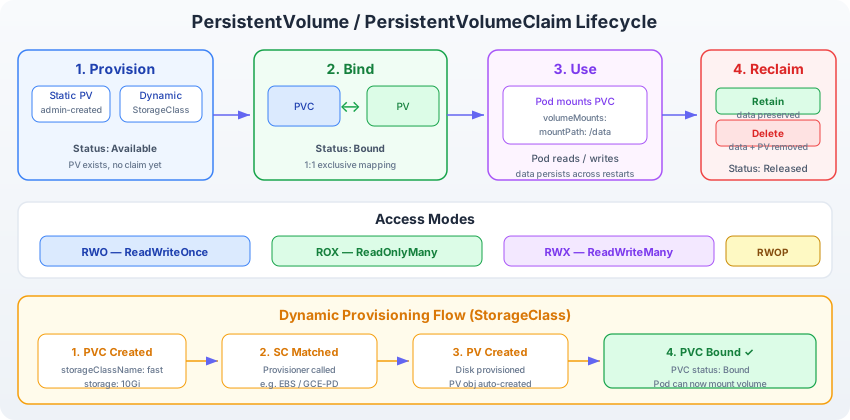
PersistentVolume lifecycle: A PersistentVolume (PV) begins in the Available phase after being provisioned — either manually by an administrator (static provisioning) or automatically by a StorageClass controller (dynamic provisioning). When a PersistentVolumeClaim (PVC) with matching capacity and access mode requirements is created, the PV transitions to the Bound phase. While bound, the PV is exclusively reserved for that PVC and can be mounted by Pods referencing the claim. When the PVC is deleted, the PV enters the Released phase. What happens next depends on the reclaim policy: a Retain policy keeps the PV and its data intact for manual cleanup, while a Delete policy instructs Kubernetes to remove both the PV object and its underlying storage.
The Ephemeral Container Filesystem
Before exploring volumes, it is worth seeing the problem firsthand. Create a Pod, write a file, delete the Pod, and observe that the file disappears:
kubectl run writer --image=busybox:1.36 --restart=Never -- sh -c "echo 'important data' > /tmp/data.txt && sleep 3600"Verify the file exists:
kubectl exec writer -- cat /tmp/data.txtOutput:
important dataNow delete and recreate the Pod:
kubectl delete pod writer
kubectl run writer --image=busybox:1.36 --restart=Never -- sh -c "cat /tmp/data.txt 2>/dev/null || echo 'file not found'; sleep 3600"
Check the output:
kubectl logs writerOutput:
file not foundThe file is gone. Each container starts from its image layers with an empty writable layer on top. Nothing written to that layer survives a container restart or Pod recreation. This behavior is intentional — it makes containers reproducible and stateless by default. But when you need persistence, you need volumes.
Clean up:
kubectl delete pod writerVolume Types Relevant to the CKAD
Kubernetes supports more than a dozen volume types, but the CKAD focuses on a handful. Each type answers a different question: where does the data come from, and how long does it live?
emptyDir
An emptyDir volume is created when a Pod is assigned to a node and exists for as long as the Pod runs on that node. It starts as an empty directory. All containers in the same Pod can read from and write to the same emptyDir volume, making it the standard mechanism for sharing files between sidecar containers.
When the Pod is removed from the node — whether by deletion, eviction, or rescheduling — the emptyDir is permanently deleted with all its contents.
apiVersion: v1
kind: Pod
metadata:
  name: shared-logs
spec:
  containers:
    - name: app
      image: busybox:1.36
      command: ["sh", "-c", "while true; do echo $(date) >> /var/log/app.log; sleep 5; done"]
      volumeMounts:
        - name: log-volume
          mountPath: /var/log
    - name: sidecar
      image: busybox:1.36
      command: ["sh", "-c", "tail -f /logs/app.log"]
      volumeMounts:
        - name: log-volume
          mountPath: /logs
  volumes:
    - name: log-volume
      emptyDir: {}
In this example, the app container writes log entries to /var/log/app.log. The sidecar container reads those same entries from /logs/app.log. Both mount paths point to the same underlying emptyDir volume — the name: log-volume connection links them.
Key properties of emptyDir:
- Lifetime: Same as the Pod. Survives container restarts within the Pod but not Pod deletion.
- Storage medium: Defaults to the node’s disk. Set
emptyDir: { medium: "Memory" }to use tmpfs (RAM-backed), which is faster but counts against the container’s memory limit. - Use cases: Scratch space, inter-container data exchange, caching.
hostPath
A hostPath volume mounts a file or directory from the host node’s filesystem into the Pod. Unlike emptyDir, the data exists independently of the Pod — it lives on the node itself.
volumes:
  - name: host-data
    hostPath:
      path: /data/app
      type: DirectoryOrCreate
The type field controls validation behavior:
DirectoryOrCreate: Create the directory if it does not exist.Directory: The directory must already exist; fail otherwise.FileOrCreate: Create the file if it does not exist.File: The file must already exist.
Warning: hostPath volumes are dangerous in production. The data is tied to a specific node — if the Pod reschedules to a different node, it gets a different (or empty) directory. Security-wise, mounting arbitrary host paths can expose sensitive system files. The CKAD exam may present hostPath in debugging scenarios or ask you to recognize it as non-portable. Do not use it for persistent data in any real workload.
configMap
A configMap volume mounts the keys of a ConfigMap as files inside the container. Each key becomes a filename, and its value becomes the file content.
volumes:
  - name: config-vol
    configMap:
      name: app-config
If the ConfigMap app-config contains a key database.properties with value host=db.local\nport=5432, the container sees a file at the mount path named database.properties containing those two lines.
ConfigMap volumes update automatically when the underlying ConfigMap changes, though the propagation delay can be up to a minute depending on the kubelet sync period. This makes them suitable for configuration files that applications reload periodically.
You covered ConfigMap creation and usage in earlier chapters. The volume mount mechanism is how ConfigMaps deliver multi-line configuration files rather than individual environment variables.
secret
A secret volume works identically to a configMap volume, but it mounts data from a Kubernetes Secret. The values are base64-decoded before being written to the filesystem.
volumes:
  - name: tls-certs
    secret:
      secretName: app-tls
The mounted files have permissions set to 0644 by default. Override this with defaultMode:
volumes:
  - name: tls-certs
    secret:
      secretName: app-tls
      defaultMode: 0400
Secret volumes are tmpfs-backed — they exist in memory on the node and are never written to disk. This provides a modest security benefit over configMap volumes, though the Secrets themselves are stored in etcd (base64-encoded, not encrypted, unless you enable encryption at rest).
projected
A projected volume combines multiple volume sources into a single mount point. Instead of mounting a ConfigMap at one path and a Secret at another, you can merge them:
volumes:
  - name: all-config
    projected:
      sources:
        - configMap:
            name: app-config
        - secret:
            name: app-credentials
        - downwardAPI:
            items:
              - path: "labels"
                fieldRef:
                  fieldPath: metadata.labels
This creates a single directory containing files from the ConfigMap, the Secret, and the downward API. The projected type is useful when an application expects all its configuration in a single directory.
It also supports serviceAccountToken as a source, which is how Kubernetes mounts short-lived, automatically rotated tokens for workload identity:
sources:
  - serviceAccountToken:
      audience: api
      expirationSeconds: 3600
      path: token
PersistentVolumes: Cluster-Level Storage Resources
The volume types described above are either Pod-scoped (emptyDir), node-scoped (hostPath), or configuration-scoped (configMap, secret). None of them model durable, portable storage that outlives a Pod and can be reattached to a new Pod on a different node.
That is what PersistentVolumes are for.
A PersistentVolume (PV) is a cluster-level resource that represents a piece of storage in the cluster. It could be backed by a local disk, an NFS share, a cloud block device (AWS EBS, GCP Persistent Disk, Azure Disk), or any storage system with a CSI driver. The PV abstracts the storage backend — Pods consume PVs through PersistentVolumeClaims without knowing or caring what stores the bytes.
PVs are not namespaced. They exist at the cluster level, visible across all namespaces. This distinguishes them from most resources you have worked with so far.
The PersistentVolume Lifecycle
A PV moves through four phases during its life, as illustrated in the diagram at the top of this section:
Phase 1: Provisioning
The PV is created. This happens either through static provisioning (an administrator writes a PV manifest and applies it) or through dynamic provisioning (a StorageClass controller creates a PV automatically in response to a PVC).
Phase 2: Binding
A PVC is created that requests storage matching the PV’s capacity, access modes, and StorageClass. Kubernetes finds a suitable PV and binds it to the PVC. The binding is exclusive — one PV binds to exactly one PVC. Once bound, the PV’s status changes from Available to Bound.
If no existing PV matches the PVC’s requirements as a static provisioning, and no StorageClass is configured for dynamic provisioning, the PVC remains in a Pending state until a matching PV becomes available.
Phase 3: Using
Pods reference the PVC in their volume specification. The kubelet mounts the PV’s underlying storage into the Pod’s containers at the specified mount path. The Pod reads and writes data. Multiple Pods can mount the same PVC simultaneously if the access mode permits it (ROX or RWX).
Phase 4: Reclaiming
The PVC is deleted. The PV enters the Released state. What happens next is controlled by the PV’s reclaim policy.
Reclaim Policies
Two reclaim policies matter for the CKAD:
Retain: The PV keeps its data and transitions to Released status. An administrator must manually clean up the PV — either deleting it or removing the claimRef to make it available for a new PVC. This policy is appropriate when data must be preserved (database volumes, user uploads).
Delete: Kubernetes deletes both the PV object and the underlying storage (the cloud disk, the NFS export, etc.). This is the default for dynamically provisioned PVs in most StorageClasses. It is appropriate when the storage is disposable (build caches, temporary computation results).
A third policy, Recycle, exists in older documentation but is deprecated. The CKAD will not test it, and you should not use it.
You can verify a PV’s reclaim policy with:
kubectl get pv <pv-name> -o jsonpath='{.spec.persistentVolumeReclaimPolicy}'Static Provisioning: Creating a PV Manually
In static provisioning, an administrator creates PVs ahead of time. When a PVC requests storage that matches a PV’s attributes, Kubernetes binds them.
Here is a complete PV manifest using hostPath as the backing storage (appropriate for local development or Kind clusters):
apiVersion: v1
kind: PersistentVolume
metadata:
  name: pv-demo
spec:
  capacity:
    storage: 5Gi
  accessModes:
    - ReadWriteOnce
  persistentVolumeReclaimPolicy: Retain
  storageClassName: manual
  hostPath:
    path: /mnt/data
Apply it:
kubectl apply -f pv-demo.yamlVerify the PV is available:
kubectl get pv pv-demoExpected output:
NAME      CAPACITY   ACCESS MODES   RECLAIM POLICY   STATUS      CLAIM   STORAGECLASS   AGE
pv-demo   5Gi        RWO            Retain           Available           manual          5s
The STATUS column shows Available — the PV is provisioned and waiting for a PVC to claim it. The CLAIM column is empty because nothing has bound to it yet.
Field-by-field breakdown:
- capacity.storage: The amount of storage this PV offers. PVCs can request up to this amount.
- accessModes: Which access patterns the PV supports. Covered in detail in the next section.
- persistentVolumeReclaimPolicy: What happens when the bound PVC is deleted (
RetainorDelete). - storageClassName: A label that PVCs use to select this PV. PVCs requesting
storageClassName: manualwill match this PV. Setting this to an empty string ("") opts out of dynamic provisioning entirely. - hostPath.path: The directory on the node where data is stored. In a Kind cluster, this is a directory inside the Kind container.
Dynamic Provisioning: Let StorageClass Do the Work
Static provisioning requires an administrator to anticipate storage needs and pre-create PVs. Dynamic provisioning inverts this: a PVC requests storage from a StorageClass, and the StorageClass’s provisioner automatically creates a PV that satisfies the request.
The flow works like this:
- A PVC is created with
storageClassName: standard(or whatever StorageClass is configured). - Kubernetes looks up the
standardStorageClass and invokes its provisioner. - The provisioner creates a real storage resource (a disk, a volume, a directory) and a corresponding PV object.
- Kubernetes binds the new PV to the PVC.
From the developer’s perspective, dynamic provisioning means you create a PVC and a matching PV appears automatically. You never write a PV manifest. This is how most production clusters operate, and it is how Kind works with its default standard StorageClass.
The details of StorageClass configuration and the PVC manifests that trigger dynamic provisioning are covered in the next section.
Summary
Container filesystems are ephemeral — data written by a container does not survive Pod recreation. Kubernetes provides volume types to inject and persist data: emptyDir for Pod-scoped temporary storage, hostPath for node-local files, configMap and secret for configuration, and projected for combining multiple sources.
For durable storage that outlives Pods, Kubernetes introduces PersistentVolumes (PVs) — cluster-level storage resources with a four-phase lifecycle: Provisioning, Binding, Using, and Reclaiming. Static provisioning requires manual PV creation; dynamic provisioning automates it through StorageClasses. Reclaim policies (Retain, Delete) control whether data survives a PVC deletion.
The next section covers the developer-facing side of this system: PersistentVolumeClaims, access modes, StorageClasses, and how to mount storage in Pods.