Java Interop Edge Cases and Platform Types
Mixed Java-Kotlin codebases are the norm, not the exception. Most Kotlin adoption starts with a few Kotlin files alongside an existing Java project. The interop boundary is where type assumptions collide, and the compiler can’t always protect you.
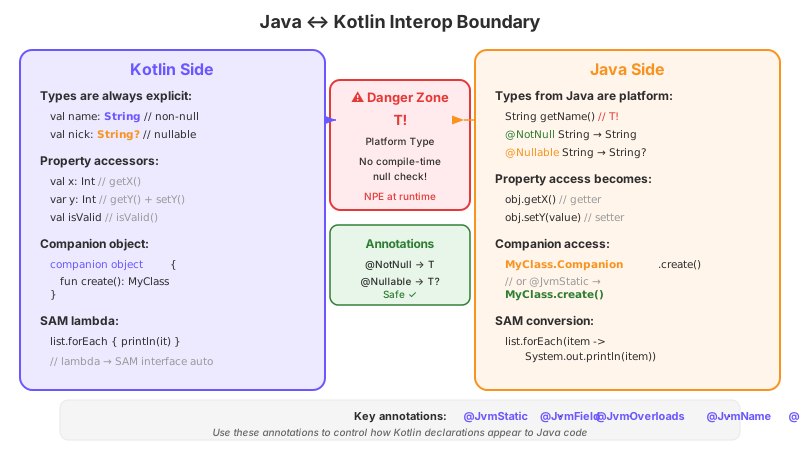
Platform Types: The T! That Bites You at Runtime
Consider this Java class:
public class UserRepository {
    public String findNameById(int id) {
        // might return null — no annotation says otherwise
        return database.query("SELECT name FROM users WHERE id = ?", id);
    }
}
No @Nullable, no @NotNull. When you call this from Kotlin, what type does findNameById() return?
Neither String nor String?. It returns String! — a platform type. The compiler suspends judgment. It doesn’t know whether the value can be null, so it lets you treat it as either nullable or non-null without complaint.
val repo = UserRepository()

// Both compile without warnings:
val name1: String = repo.findNameById(1)   // assumes non-null — crashes if null
val name2: String? = repo.findNameById(1)  // assumes nullable — safe
The danger of val name1: String is that Kotlin inserts a null-check (Intrinsics.checkNotNull) at the assignment. If the Java method returns null, you get an IllegalStateException at this line. That’s actually the good outcome — you crash immediately with a clear stack trace.
The bad outcome is letting the type propagate without an explicit annotation:
val name = repo.findNameById(1) // inferred as String! (platform type)
name.length // NPE here, far from the source
Now name is String!. The compiler doesn’t add a null-check. If it’s null, you get a raw NullPointerException when you call .length — potentially many lines away from the Java call, making the bug harder to trace.
The rule: Always assign Java return values to explicitly typed Kotlin variables. Force the crash to the boundary:
// DO THIS — crash at the assignment if null
val name: String = repo.findNameById(1)

// OR THIS — handle nullability explicitly
val name: String? = repo.findNameById(1)
name?.let { process(it) }
Detecting Platform Types in the IDE
IntelliJ shows platform types as String! in quick documentation and expression type hints (Ctrl+Shift+P / Cmd+Shift+P). When you see !, you’re at the interop boundary. Treat it as a code smell that needs an explicit type annotation.
You can also enable the compiler warning -Xjsr305=strict to treat incorrectly annotated or unannotated Java types more aggressively. This flag makes the compiler honor @Nonnull under TYPE_USE targets and report more nullability mismatches.
Nullability Annotations: Which Ones Kotlin Recognizes
Kotlin’s compiler reads nullability annotations from multiple packages:
| Package | Annotations |
|---|---|
org.jetbrains.annotations | @Nullable, @NotNull |
javax.annotation (JSR-305) | @Nullable, @Nonnull, @CheckForNull |
androidx.annotation | @Nullable, @NonNull |
org.eclipse.jdt.annotation | @Nullable, @NonNull |
io.reactivex.rxjava3.annotations | @Nullable, @NonNull |
org.checkerframework.checker.nullness.qual | @Nullable, @NonNull |
When any of these are present on a Java method, Kotlin treats the return type as String or String? instead of String!. This is why annotating your Java code with nullability annotations is the single most effective thing you can do for Kotlin interop.
For custom annotations your team uses, configure the JSR-305 support in build.gradle.kts:
tasks.withType<KotlinCompile> {
    compilerOptions {
        freeCompilerArgs.add("-Xjsr305=strict")
        // For custom annotations:
        freeCompilerArgs.add("[email protected]:warning")
    }
}
SAM Conversions: Java Functional Interfaces vs Kotlin’s fun interface
Java functional interfaces automatically convert to Kotlin lambdas:
// Java
@FunctionalInterface
public interface Predicate<T> {
    boolean test(T value);
}

public class Filters {
    public static <T> List<T> filter(List<T> items, Predicate<T> predicate) { /* ... */ }
}
// Kotlin — SAM conversion happens automatically
val adults = Filters.filter(people) { it.age >= 18 }The compiler generates an anonymous class implementing Predicate with your lambda body. On JDK 8+, it uses invokedynamic with LambdaMetafactory for the same optimization Java lambdas get.
The gotcha: Regular Kotlin interfaces do not get SAM conversion, even with a single abstract method:
// Kotlin interface — NO automatic SAM conversion
interface Validator<T> {
    fun validate(value: T): Boolean
}

fun <T> check(value: T, validator: Validator<T>) { /* ... */ }

// This does NOT compile:
// check(email) { it.contains("@") }

// You must write:
check(email, object : Validator<String> {
    override fun validate(value: String) = value.contains("@")
})
To enable SAM conversion for Kotlin interfaces, use the fun keyword:
fun interface Validator<T> {
    fun validate(value: T): Boolean
}

// Now this works:
check(email) { it.contains("@") }
The fun interface declaration tells the compiler to generate the SAM conversion bridge. Without it, Kotlin interfaces remain “just interfaces” — no special treatment.
Interop implication: If you’re writing a Kotlin library that Java code will consume, use fun interface for callback-style interfaces. Java callers get lambda syntax. Kotlin callers get lambda syntax. Everyone wins.
Calling Kotlin from Java: The Five Gotchas
1. Top-Level Functions → FileNameKt.method()
// file: StringUtils.kt
package com.example

fun String.isPalindrome(): Boolean = this == this.reversed()
From Java:
boolean result = StringUtilsKt.isPalindrome("racecar");The generated class name is FileNameKt. Control it with a file-level annotation:
@file:JvmName("Strings")
package com.example

fun String.isPalindrome(): Boolean = this == this.reversed()
Now Java calls Strings.isPalindrome("racecar").
If you have multiple files that should contribute to the same facade class, use @JvmMultifileClass:
// file: StringUtils.kt
@file:JvmName("Strings")
@file:JvmMultifileClass

// file: StringFormatters.kt
@file:JvmName("Strings")
@file:JvmMultifileClass
Both files’ top-level functions appear on a single Strings class from Java’s perspective.
2. Properties → Getters/Setters (Unless @JvmField)
class Config {
    var maxRetries: Int = 3
    val version: String = "2.0"
}
Java sees getMaxRetries(), setMaxRetries(int), and getVersion(). If you want direct field access — common for framework integration (serialization, DI injection) — use @JvmField:
class Config {
    @JvmField var maxRetries: Int = 3
    @JvmField val version: String = "2.0"
}
Now Java accesses config.maxRetries directly. The field becomes public with no accessor methods.
Restriction: @JvmField cannot be used on properties with custom getters, delegated properties, or properties that override an interface member.
3. Default Parameters → Invisible Without @JvmOverloads
fun connect(host: String, port: Int = 443, ssl: Boolean = true) { /* ... */ }Java sees only connect(String, int, boolean). There is no way to call connect("host") from Java. The synthetic connect$default method exists but it’s not meant for public consumption.
Add @JvmOverloads:
@JvmOverloads
fun connect(host: String, port: Int = 443, ssl: Boolean = true) { /* ... */ }
Java now gets three overloads: connect(String), connect(String, int), connect(String, int, boolean).
The catch with constructors: @JvmOverloads on a primary constructor generates secondary constructors that call each other in a chain. If you have non-property parameters with side effects in default expressions, the evaluation order might surprise you. Test constructor chains explicitly.
4. Companion Object → Companion.method() (Unless @JvmStatic)
Covered in CH6-S1 — from Java, you access companion members through the Companion field. Apply @JvmStatic and @JvmField to expose them as static members on the enclosing class.
5. Checked Exceptions → Silent From Java
Kotlin doesn’t have checked exceptions. Every Kotlin function’s throws clause is empty in bytecode. If a Kotlin function throws IOException, a Java caller cannot write a catch (IOException e) block — the Java compiler complains that the exception is never thrown.
@Throws(IOException::class)
fun readConfig(path: String): Config {
    // may throw IOException
}
@Throws adds the exception to the method’s bytecode signature. Now Java callers can catch it:
try {
    Config config = ConfigReaderKt.readConfig("/etc/app.conf");
} catch (IOException e) {
    // This compiles because @Throws declared it
}
For library APIs consumed by Java, audit every function that can throw and apply @Throws. Missing it won’t cause crashes — Java can still catch Exception broadly — but it breaks the Java convention of documented checked exceptions.
Calling Java from Kotlin: The Hidden Conversions
Getter/Setter → Property Syntax
Kotlin automatically converts Java getter/setter pairs into property syntax:
public class JavaUser {
    private String name;
    public String getName() { return name; }
    public void setName(String name) { this.name = name; }
}
val user = JavaUser()
user.name = "Alice" // calls setName()
println(user.name) // calls getName()Edge case: Methods named getX() that take parameters are not converted to properties. Methods like getFoo() that return void are not properties either. The heuristic is strictly: zero-arg getX() returning non-void, with an optional one-arg setX().
Boolean properties follow the is convention: isActive() → user.isActive, but hasPermission() does not become a property — it stays user.hasPermission().
void Methods → Unit
Java void methods return Unit in Kotlin. This is transparent — you don’t need to handle Unit. But if you capture the return value, you get Unit:
val result = javaObject.voidMethod() // result: UnitThis matters in lambda contexts where the last expression is the return value. If a void Java method is the last statement in a lambda expected to return Unit, everything works. If the lambda expects a different return type, you need an explicit return.
Arrays: IntArray vs Array<Int>
Kotlin maps Java int[] to IntArray, not Array<Int>. The distinction matters:
val primitiveArray: IntArray = intArrayOf(1, 2, 3)       // int[] in bytecode
val boxedArray: Array<Int> = arrayOf(1, 2, 3)            // Integer[] in bytecode
When passing to Java methods expecting int[], use IntArray. Passing Array<Int> gives Integer[], which doesn’t match.
Collections: Mutable vs Immutable Is Your Responsibility
Java’s java.util.List maps to both kotlin.collections.List (read-only) and kotlin.collections.MutableList in Kotlin. The compiler lets you assign either way:
val readOnly: List<String> = javaObject.getNames()         // compiles
val mutable: MutableList<String> = javaObject.getNames()   // also compiles
Both reference the same Java ArrayList underneath. Kotlin’s type system doesn’t enforce immutability on Java collections at runtime — it’s a compile-time contract. If you assign to List<String>, the compiler prevents you from calling .add() in Kotlin code. But the Java code still has the original mutable reference and can modify it freely.
The safe pattern: If you need immutability guarantees, defensively copy:
val names: List<String> = javaObject.getNames().toList()toList() creates a new ArrayList — mutations to the original Java list won’t affect your copy.
Checklist: Making a Kotlin Library Java-Friendly
Use this when you’re writing Kotlin code that Java code will consume:
-
@JvmStaticon companion object functions that Java should call as static methods -
@JvmFieldon companion object constants and properties that Java should access as fields -
@JvmOverloadson every public function with default parameters -
@JvmNameon files with top-level functions — give them a readable class name -
@Throwson every function that can throw checked exceptions -
fun interfaceon single-method interfaces that should accept lambdas - Avoid
internalvisibility for APIs Java needs —internalcompiles topublicwith a mangled name (method$module_name), which Java can technically call but shouldn’t - Avoid
inline class(value class) in public APIs — they have complex mangling rules that make Java interop unpredictable - Document platform type boundaries — if your Kotlin code calls unannotated Java code and returns the result, annotate the Kotlin return type explicitly
- Run
javapon your public API — verify the generated signatures are what Java callers expect
The interop between Java and Kotlin is well-designed for gradual migration. These annotations exist precisely because the Kotlin team assumed mixed codebases are the default state. Use them liberally — they add zero runtime cost and prevent hours of debugging at the language boundary.