Event Store Operations: Retention, Archiving, and Storage Growth
Event Store Operations
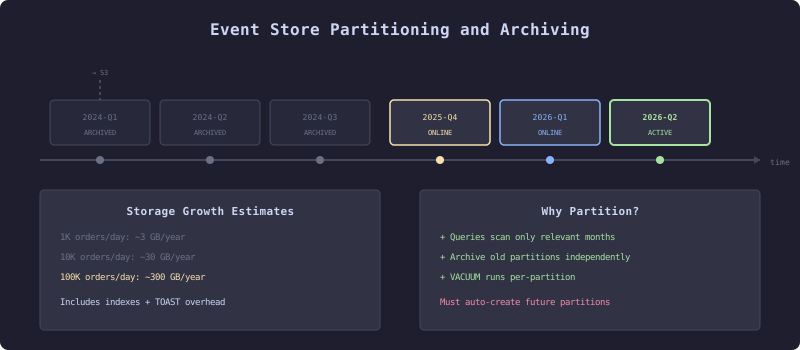
PostgreSQL range partitioning splits the event store into monthly tables. Old partitions are archived to cold storage (S3) and detached. Active partitions serve current queries. The partition manager auto-creates future partitions before they are needed. Storage growth math determines when archiving becomes necessary.
An event store only grows. Events are immutable. Deletes violate the fundamental guarantee. After six months of production traffic, the event store holds millions of rows. After two years, tens of millions. After five years, the question is no longer “how do we store events” but “how do we manage the storage.”
This chapter covers the operational decisions that determine whether an event-sourced system remains viable at scale: how much storage you actually need, when and how to archive, how to partition tables for query performance, and what monitoring to put in place before storage becomes a crisis.
Storage Growth Math
The Problem
Teams adopt event sourcing without estimating storage requirements. The event store works fine in development with thousands of events. In production, with hundreds of events per second, storage growth becomes the primary operational concern.
The Mechanism
Storage planning starts with concrete numbers. Measure the actual event payload sizes in your system, not theoretical estimates.
-- FROM SCRATCH
-- Measure average event size by type
SELECT
    event_type,
    COUNT(*) AS event_count,
    AVG(LENGTH(payload::text)) AS avg_payload_bytes,
    MAX(LENGTH(payload::text)) AS max_payload_bytes,
    SUM(LENGTH(payload::text)) AS total_payload_bytes
FROM event_store
GROUP BY event_type
ORDER BY total_payload_bytes DESC;

-- Estimate daily growth
SELECT
    DATE(stored_at) AS day,
    COUNT(*) AS events,
    SUM(LENGTH(payload::text)) AS payload_bytes,
    pg_size_pretty(SUM(LENGTH(payload::text))::bigint) AS payload_size
FROM event_store
WHERE stored_at > NOW() - INTERVAL '30 days'
GROUP BY DATE(stored_at)
ORDER BY day DESC;
For the e-commerce order management platform, typical event sizes:
| Event Type | Avg Payload Size | Events Per Order | Events Per Day (1000 orders/day) |
|---|---|---|---|
| OrderPlaced | 800 bytes | 1 | 1,000 |
| PaymentAuthorized | 200 bytes | 1 | 1,000 |
| InventoryReserved | 300 bytes | 1 | 1,000 |
| FulfilmentDispatched | 150 bytes | 1 | 1,000 |
| OrderStatusChanged | 100 bytes | 3 | 3,000 |
| Total | 7 | 7,000 |
At 7,000 events per day with an average payload of 250 bytes, the raw payload storage is 1.75 MB per day. With PostgreSQL row overhead (tuple header, alignment, TOAST for large JSONB), the actual table size is roughly 3x the payload: 5 MB per day. Indexes add another 2-3 MB per day. Total: ~8 MB per day, ~240 MB per month, ~3 GB per year.
For 10,000 orders per day, multiply by 10: 30 GB per year. For 100,000 orders per day: 300 GB per year.
These numbers are manageable for PostgreSQL. The concern is not raw storage cost (cheap) but query performance as the table grows. Sequential scans over 300 million rows for projection rebuilds become the bottleneck.
Table Partitioning
The Mechanism
PostgreSQL range partitioning splits the event store table into time-based partitions. Each partition is a separate physical table. Queries that include the partition key (the timestamp) scan only the relevant partitions.
-- FROM SCRATCH
-- Convert event_store to a partitioned table
CREATE TABLE event_store_partitioned (
    global_position BIGSERIAL,
    stream_id       VARCHAR(255) NOT NULL,
    sequence_number BIGINT NOT NULL,
    event_type      VARCHAR(255) NOT NULL,
    payload         JSONB NOT NULL,
    metadata        JSONB DEFAULT '{}',
    occurred_at     TIMESTAMPTZ NOT NULL,
    stored_at       TIMESTAMPTZ NOT NULL DEFAULT NOW(),
    PRIMARY KEY (global_position, stored_at)
) PARTITION BY RANGE (stored_at);

-- Create monthly partitions
CREATE TABLE event_store_2026_01 PARTITION OF event_store_partitioned
    FOR VALUES FROM ('2026-01-01') TO ('2026-02-01');
CREATE TABLE event_store_2026_02 PARTITION OF event_store_partitioned
    FOR VALUES FROM ('2026-02-01') TO ('2026-03-01');
-- ... create partitions for each month

-- Indexes on partitions (created per partition)
CREATE INDEX idx_es_2026_01_stream ON event_store_2026_01 (stream_id, sequence_number);
CREATE INDEX idx_es_2026_01_type ON event_store_2026_01 (event_type, stored_at);
What the Implementation Reveals
Partitioning changes the operational model. Creating new partitions must happen before the time range starts. If January’s partition does not exist when the first January event arrives, the insert fails. Partition creation must be automated.
// FROM SCRATCH
public class PartitionManager {

    private final DataSource dataSource;

    public PartitionManager(DataSource dataSource) {
        this.dataSource = dataSource;
    }

    public void ensurePartitionsExist(int monthsAhead) {
        YearMonth current = YearMonth.now();

        for (int i = 0; i <= monthsAhead; i++) {
            YearMonth target = current.plusMonths(i);
            createPartitionIfNotExists(target);
        }
    }

    private void createPartitionIfNotExists(YearMonth yearMonth) {
        String partitionName = String.format("event_store_%d_%02d",
            yearMonth.getYear(), yearMonth.getMonthValue());

        LocalDate start = yearMonth.atDay(1);
        LocalDate end = yearMonth.plusMonths(1).atDay(1);

        String sql = String.format("""
            CREATE TABLE IF NOT EXISTS %s PARTITION OF event_store_partitioned
            FOR VALUES FROM ('%s') TO ('%s')
            """, partitionName, start, end);

        try (Connection conn = dataSource.getConnection();
             Statement stmt = conn.createStatement()) {
            stmt.execute(sql);

            // Create indexes on the new partition
            stmt.execute(String.format(
                "CREATE INDEX IF NOT EXISTS idx_%s_stream ON %s (stream_id, sequence_number)",
                partitionName, partitionName));
            stmt.execute(String.format(
                "CREATE INDEX IF NOT EXISTS idx_%s_type ON %s (event_type, stored_at)",
                partitionName, partitionName));
        } catch (SQLException e) {
            throw new PartitionException("Failed to create partition " + partitionName, e);
        }
    }
}
The stream uniqueness constraint (stream_id, sequence_number) is now per-partition, not global. This means optimistic concurrency checks must include the partition key or use an alternative mechanism. In practice, for event streams (where all events for a given stream are appended with monotonically increasing sequence numbers), this is rarely a problem: concurrent writes to the same stream will still be detected within the same partition because all recent events for an active stream are in the latest partition.
Archiving
The Problem
After three years, the event store holds billions of events. Most of them belong to completed orders that will never be replayed. The events are needed for compliance (audit trail) but not for daily operations.
The Mechanism
Archiving moves old partitions to cold storage. The partition is exported, compressed, uploaded to object storage (S3, GCS), and then detached from the partitioned table.
# FROM SCRATCH
# Export a partition to compressed SQL
pg_dump -h localhost -U eventstore -d eventstore \
    --table=event_store_2024_01 \
    --format=custom \
    --compress=9 \
    -f event_store_2024_01.dump

# Upload to S3
aws s3 cp event_store_2024_01.dump \
    s3://eventstore-archive/2024/01/event_store_2024_01.dump

# Detach the partition (keeps the table but removes it from the partitioned hierarchy)
ALTER TABLE event_store_partitioned DETACH PARTITION event_store_2024_01;

# Optionally drop the detached table to reclaim space
DROP TABLE event_store_2024_01;
// FROM SCRATCH
public class ArchiveManager {
private final DataSource dataSource;
private final Duration retentionPeriod;
public ArchiveManager(DataSource dataSource, Duration retentionPeriod) {
this.dataSource = dataSource;
this.retentionPeriod = retentionPeriod;
}
public List<String> findArchivablePartitions() {
YearMonth cutoff = YearMonth.now().minusMonths(retentionPeriod.toDays() / 30);
List<String> partitions = new ArrayList<>();
String sql = """
SELECT tablename FROM pg_tables
WHERE schemaname = 'public'
AND tablename LIKE 'event_store_%'
AND tablename != 'event_store_partitioned'
ORDER BY tablename
""";
try (Connection conn = dataSource.getConnection();
PreparedStatement stmt = conn.prepareStatement(sql);
ResultSet rs = stmt.executeQuery()) {
while (rs.next()) {
String name = rs.getString("tablename");
YearMonth partitionMonth = parsePartitionMonth(name);
if (partitionMonth != null && partitionMonth.isBefore(cutoff)) {
partitions.add(name);
}
}
} catch (SQLException e) {
throw new ArchiveException("Failed to find archivable partitions", e);
}
return partitions;
}
private YearMonth parsePartitionMonth(String tableName) {
// event_store_2024_01 -> 2024-01
try {
String[] parts = tableName.replace("event_store_", "").split("_");
return YearMonth.of(Integer.parseInt(parts[0]), Integer.parseInt(parts[1]));
} catch (Exception e) {
return null;
}
}
}What the Implementation Reveals
Archiving introduces a critical constraint: projection rebuilds can only replay events that are still in the event store. If you archive January 2024 and then need to rebuild a projection from scratch, you must restore that partition first. This creates a dependency between your archiving strategy and your projection rebuild strategy.
The solution is to maintain projection snapshots (Chapter 9’s blue-green approach) so that rebuilds start from a recent checkpoint rather than from the beginning of time. If your projection checkpoint is from March 2024, and you have archived everything before March 2024, the rebuild still works because it starts from the checkpoint.
Compliance requirements often dictate retention periods. Financial systems may require seven years of event history. Healthcare systems may require longer. Know your retention requirements before designing the archiving strategy.
Monitoring and Alerting
The Mechanism
Three metrics matter for event store operations: storage growth rate, query performance, and partition health.
-- FROM SCRATCH
-- Table size per partition
SELECT
    schemaname,
    tablename,
    pg_size_pretty(pg_total_relation_size(schemaname || '.' || tablename)) AS total_size,
    pg_size_pretty(pg_relation_size(schemaname || '.' || tablename)) AS data_size,
    pg_size_pretty(pg_indexes_size(schemaname || '.' || tablename)) AS index_size
FROM pg_tables
WHERE tablename LIKE 'event_store_%'
ORDER BY pg_total_relation_size(schemaname || '.' || tablename) DESC;

-- Events per hour (for growth rate monitoring)
SELECT
    DATE_TRUNC('hour', stored_at) AS hour,
    COUNT(*) AS events,
    pg_size_pretty(SUM(LENGTH(payload::text))::bigint) AS payload_size
FROM event_store
WHERE stored_at > NOW() - INTERVAL '24 hours'
GROUP BY DATE_TRUNC('hour', stored_at)
ORDER BY hour;

-- Slow stream loads (aggregates with too many events)
SELECT
    stream_id,
    COUNT(*) AS event_count,
    MAX(sequence_number) AS latest_version
FROM event_store
WHERE stored_at > NOW() - INTERVAL '90 days'
GROUP BY stream_id
HAVING COUNT(*) > 1000
ORDER BY event_count DESC
LIMIT 20;
// FROM SCRATCH
public class EventStoreMetrics {
private final DataSource dataSource;
public EventStoreMetrics(DataSource dataSource) {
this.dataSource = dataSource;
}
public StorageStats getStorageStats() {
String sql = """
SELECT
COUNT(*) AS total_events,
pg_size_pretty(pg_total_relation_size('event_store')) AS total_size,
(SELECT COUNT(*) FROM event_store
WHERE stored_at > NOW() - INTERVAL '1 hour') AS events_last_hour
""";
try (Connection conn = dataSource.getConnection();
PreparedStatement stmt = conn.prepareStatement(sql);
ResultSet rs = stmt.executeQuery()) {
rs.next();
return new StorageStats(
rs.getLong("total_events"),
rs.getString("total_size"),
rs.getLong("events_last_hour")
);
} catch (SQLException e) {
throw new MetricsException("Failed to get storage stats", e);
}
}
public List<HotStream> findHotStreams(int minEvents) {
String sql = """
SELECT stream_id, COUNT(*) AS event_count
FROM event_store
GROUP BY stream_id
HAVING COUNT(*) > ?
ORDER BY event_count DESC
LIMIT 50
""";
List<HotStream> streams = new ArrayList<>();
try (Connection conn = dataSource.getConnection();
PreparedStatement stmt = conn.prepareStatement(sql)) {
stmt.setInt(1, minEvents);
try (ResultSet rs = stmt.executeQuery()) {
while (rs.next()) {
streams.add(new HotStream(
rs.getString("stream_id"),
rs.getLong("event_count")
));
}
}
} catch (SQLException e) {
throw new MetricsException("Failed to find hot streams", e);
}
return streams;
}
public record StorageStats(long totalEvents, String totalSize, long eventsLastHour) {}
public record HotStream(String streamId, long eventCount) {}
}The Production Path
// PRODUCTION
@Component
public class SpringEventStoreHealthIndicator implements HealthIndicator {

    private final JdbcTemplate jdbc;

    @Value("${eventstore.max-events-per-stream:10000}")
    private int maxEventsPerStream;

    @Value("${eventstore.storage-warning-gb:100}")
    private int storageWarningGb;

    public SpringEventStoreHealthIndicator(JdbcTemplate jdbc) {
        this.jdbc = jdbc;
    }

    @Override
    public Health health() {
        try {
            Long totalEvents = jdbc.queryForObject(
                "SELECT COUNT(*) FROM event_store", Long.class);

            Long hotStreams = jdbc.queryForObject(
                "SELECT COUNT(DISTINCT stream_id) FROM event_store " +
                "GROUP BY stream_id HAVING COUNT(*) > ? LIMIT 1",
                Long.class, maxEventsPerStream);

            Health.Builder builder = (hotStreams != null && hotStreams > 0)
                ? Health.down().withDetail("hotStreams", hotStreams)
                : Health.up();

            return builder
                .withDetail("totalEvents", totalEvents)
                .build();
        } catch (Exception e) {
            return Health.down(e).build();
        }
    }
}
The Test
// FROM SCRATCH
class PartitionManagerTest {

    @Test
    void createsPartitionsForFutureMonths() {
        // Verify partition names are generated correctly
        YearMonth current = YearMonth.of(2026, 6);
        List<String> expected = List.of(
            "event_store_2026_06",
            "event_store_2026_07",
            "event_store_2026_08"
        );

        List<String> generated = new ArrayList<>();
        for (int i = 0; i <= 2; i++) {
            YearMonth target = current.plusMonths(i);
            generated.add(String.format("event_store_%d_%02d",
                target.getYear(), target.getMonthValue()));
        }

        assertEquals(expected, generated);
    }
}

@Testcontainers
class ArchiveManagerTest {

    @Container
    static PostgreSQLContainer<?> postgres = new PostgreSQLContainer<>("postgres:16")
        .withDatabaseName("archive_test");

    @Test
    void identifiesOldPartitionsForArchiving() throws SQLException {
        var ds = new org.postgresql.ds.PGSimpleDataSource();
        ds.setUrl(postgres.getJdbcUrl());
        ds.setUser(postgres.getUsername());
        ds.setPassword(postgres.getPassword());

        try (Connection conn = ds.getConnection();
             Statement stmt = conn.createStatement()) {

            stmt.execute("""
                CREATE TABLE event_store_partitioned (
                    id SERIAL, stored_at TIMESTAMPTZ NOT NULL,
                    PRIMARY KEY (id, stored_at)
                ) PARTITION BY RANGE (stored_at)
                """);

            // Create partitions for testing
            stmt.execute("""
                CREATE TABLE event_store_2024_01 PARTITION OF event_store_partitioned
                FOR VALUES FROM ('2024-01-01') TO ('2024-02-01')
                """);
            stmt.execute("""
                CREATE TABLE event_store_2026_01 PARTITION OF event_store_partitioned
                FOR VALUES FROM ('2026-01-01') TO ('2026-02-01')
                """);
        }

        var manager = new ArchiveManager(ds, Duration.ofDays(365));
        List<String> archivable = manager.findArchivablePartitions();

        assertTrue(archivable.contains("event_store_2024_01"));
        assertFalse(archivable.contains("event_store_2026_01"));
    }
}
Event store operations are not glamorous work. They do not appear in architecture diagrams or conference talks. But they determine whether the event-sourced system survives its second year in production. Plan for storage growth before you launch. Partition from the start. Monitor continuously. Archive deliberately.
This chapter covered the storage side of operations. The next chapter addresses the debugging side: how to understand what happened when something goes wrong.