Event Streaming vs Message Queues
Event Streaming vs Message Queues
The logistics platform has two data movement requirements that look similar but are mechanically different.
Requirement 1: When a package is scanned, notify the tracking dashboard, the analytics pipeline, and the customer notification service. Each consumer processes the event independently. If a new consumer is added next month (a fraud detection service), it should be able to replay historical events.
Requirement 2: When a delivery route is computed, dispatch it to exactly one available driver. If the driver’s app crashes before acknowledging, the route must be re-dispatched to another driver. No two drivers should receive the same route.
Requirement 1 is event streaming. Requirement 2 is message queuing. Kafka solves the first. RabbitMQ solves the second. They are not interchangeable.
Kafka: The Append-Only Log as a Message System
Kafka’s storage is the append-only log from Chapter 1, partitioned and replicated. A Kafka topic is a logical stream. Each topic is split into partitions, and each partition is an independent append-only log.
The Producer Path
A producer sends a message to a topic. Kafka determines which partition receives the message:
- If the message has a key (e.g.,
package_id), Kafka hashes the key to select a partition. All messages with the same key go to the same partition. This guarantees ordering per key. - If the message has no key, Kafka round-robins across partitions.
// Concept: Kafka producer with key-based partitioning
// All events for the same package go to the same partition,
// guaranteeing ordering per package.

Properties props = new Properties();
props.put("bootstrap.servers", "kafka-1:9092,kafka-2:9092");
props.put("key.serializer", "org.apache.kafka.common.serialization.StringSerializer");
props.put("value.serializer", "org.apache.kafka.common.serialization.StringSerializer");
props.put("acks", "all");           // Wait for all ISR replicas
props.put("compression.type", "lz4"); // Compress batches

KafkaProducer<String, String> producer = new KafkaProducer<>(props);

// Key = packageId ensures all events for PKG-40291 land on the same partition
producer.send(new ProducerRecord<>(
    "package-events",       // topic
    "PKG-40291",           // key (determines partition)
    "{\"status\":\"SCANNED\",\"warehouse\":\"WH-042\"}"  // value
));
The Consumer Group
A consumer group is a set of consumers that collectively read from a topic. Each partition is assigned to exactly one consumer in the group. If the group has 3 consumers and the topic has 6 partitions, each consumer reads from 2 partitions.
The critical difference from a message queue: the message is not deleted after consumption. It remains in the log until the retention period expires. Multiple consumer groups can independently read the same messages.
# Concept: consumer group partition assignment
kafka-consumer-groups.sh --describe --group tracking-dashboard

# GROUP              TOPIC           PARTITION  CURRENT-OFFSET  LOG-END-OFFSET  LAG
# tracking-dashboard package-events  0          4521890         4521895         5
# tracking-dashboard package-events  1          3892100         3892100         0
# tracking-dashboard package-events  2          5102340         5102380         40

# Consumer group "tracking-dashboard" has 3 consumers, one per partition.
# Partition 0 has 5 messages of lag (consumer is 5 messages behind).
# Partition 2 has 40 messages of lag (consumer is falling behind).

# A separate consumer group "analytics-pipeline" can read the same partitions
# at its own pace without affecting "tracking-dashboard".
Consumer Lag: The Metric That Matters
Consumer lag is the difference between the log-end offset (latest message produced) and the current offset (latest message consumed). Lag is measured per partition.
When lag grows, the consumer is processing messages slower than the producer is writing them. Causes: slow deserialization, slow downstream writes, garbage collection pauses, rebalancing overhead.
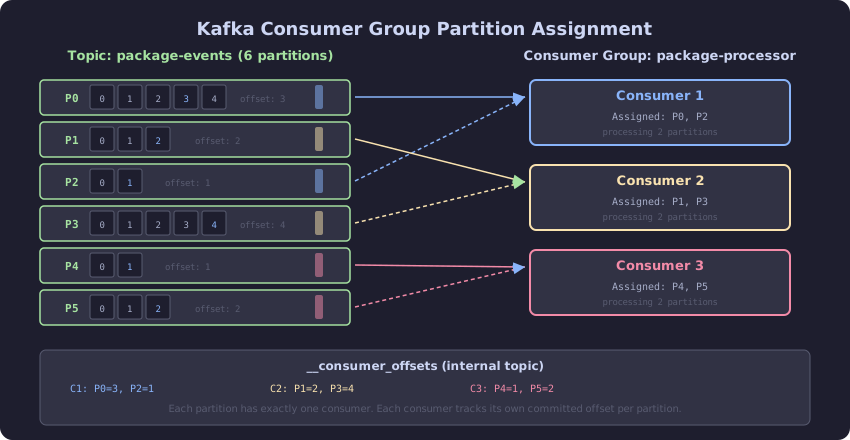
The diagram shows a Kafka topic with 6 partitions assigned across 3 consumers in a group. Each consumer reads from exactly 2 partitions. The offset pointer per partition tracks where each consumer has read up to. When consumer C2 fails, its 2 partitions are reassigned to C1 and C3 during rebalancing. During rebalancing, no consumer in the group processes messages, creating a processing gap.
RabbitMQ: The Queue That Delivers and Forgets
RabbitMQ is a message broker. A producer sends a message to an exchange. The exchange routes the message to one or more queues based on routing rules. A consumer receives the message from the queue and acknowledges it. After acknowledgment, the message is deleted from the queue.
The Dispatch Pattern
The logistics platform’s route dispatch sends a computed route to exactly one driver. RabbitMQ’s work queue pattern handles this:
// Concept: RabbitMQ work queue for single-consumer dispatch
// Multiple driver apps consume from the same queue.
// RabbitMQ delivers each message to exactly one consumer.

ConnectionFactory factory = new ConnectionFactory();
factory.setHost("rabbitmq-1");

Connection connection = factory.newConnection();
Channel channel = connection.createChannel();

// Declare a durable queue
channel.queueDeclare("route-dispatch", true, false, false, null);

// Set prefetch to 1: each consumer receives one message at a time.
// The next message is not delivered until the current one is acknowledged.
// This prevents a fast consumer from starving slow ones.
channel.basicQos(1);

// Consume with manual acknowledgment
channel.basicConsume("route-dispatch", false, (tag, delivery) -> {
    String routeJson = new String(delivery.getBody(), StandardCharsets.UTF_8);
    try {
        assignRouteToDriver(routeJson);
        channel.basicAck(delivery.getEnvelope().getDeliveryTag(), false);
    } catch (Exception e) {
        // Reject and requeue: message goes back to the queue for another consumer
        channel.basicNack(delivery.getEnvelope().getDeliveryTag(), false, true);
    }
}, tag -> {});
If the consumer crashes before acknowledging, RabbitMQ redelivers the message to another consumer. This is at-least-once delivery: the message is guaranteed to be processed, but may be processed more than once if the consumer crashes after processing but before acknowledging.
The Key Differences
| Property | Kafka | RabbitMQ |
|---|---|---|
| Storage model | Append-only log (Chapter 1) | Queue (FIFO, message deleted on ack) |
| Message retention | Retained until retention expires | Deleted after consumer ack |
| Multiple consumers | Independent consumer groups | Competing consumers on same queue |
| Ordering | Per-partition ordering | No ordering across competing consumers |
| Replay | Consumers can reset offset and replay | Not possible after ack |
| Delivery | Pull (consumer polls) | Push (broker delivers) |
| Backpressure | Consumer controls read rate | Prefetch count limits in-flight messages |
The Decision Rule
Use Kafka when multiple independent consumers need the same data, when replay is required, or when ordering per key matters. Event streaming, change data capture, audit trails. The logistics platform’s package events are published to Kafka because the tracking dashboard, the analytics pipeline, the notification service, and future consumers all need the same events independently.
Use RabbitMQ when exactly one consumer should process each message, when the message is no longer needed after processing, and when at-most-once or at-least-once delivery per consumer is the requirement. Task dispatch, route assignment, work queues. The logistics platform’s route dispatch uses RabbitMQ because each route should go to exactly one driver, and a route that fails should be requeued.
Do not use Kafka as a work queue. While Kafka can approximate competing consumers within a single consumer group, the partition-based assignment is coarser than RabbitMQ’s per-message delivery, and rebalancing during consumer failures causes processing pauses.
Do not use RabbitMQ as an event log. Messages are deleted after acknowledgment. Replay is impossible. Adding a new consumer that needs historical data requires re-publishing from the source, which defeats the purpose.